Do you find people visit your company website but don’t actually contact you about your services? Want to know why they are leaving your website and going elsewhere?
If you’re having trouble turning website visitors into customers you need to take a look at your site and see if there are areas to improve (there’s always areas to improve). From an outdated design to annoying pop up adverts the guys at HubSpot have them all covered in this article.
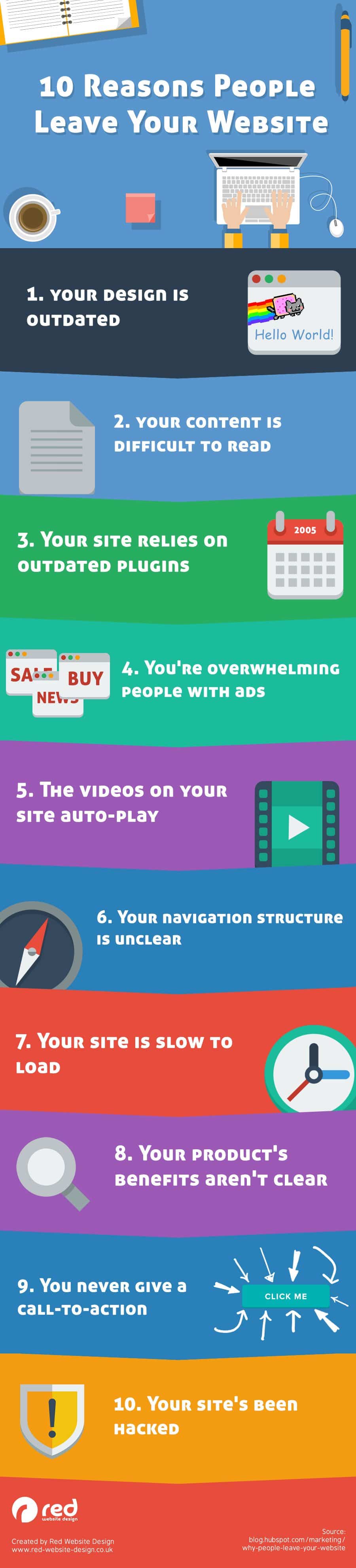
We’ve featured 10 of the best of those in the infographic below.
In today’s fast-paced digital world, your website is often the first point of contact between your business and potential customers. It’s the virtual storefront where visitors decide whether to engage with your brand or seek out your competitors. Unfortunately, many businesses struggle to retain visitors and convert them into customers. If you find that people are leaving your website and heading to your competitors instead, you’re not alone. But it’s essential to identify and address the reasons behind this exodus to improve your online presence and boost your conversion rates. In this blog post, we’ll explore the top 10 reasons why people leave your website and choose your competitors instead, along with actionable solutions to keep them engaged.
1. Slow Loading Times
In the age of instant gratification, slow-loading websites are a major turnoff for visitors. According to Google, 53% of mobile site visits are abandoned if pages take longer than three seconds to load. If your website doesn’t load quickly, users will quickly move on to a competitor’s site.
Solution: Optimize your website’s performance by compressing images, using a Content Delivery Network (CDN), and minimizing server response times. Regularly monitor your site’s speed and make improvements as necessary.
2. Poor Mobile Experience
With mobile devices becoming the primary means of accessing the internet, it’s crucial that your website provides an excellent mobile experience. If visitors struggle to navigate or read your site on their smartphones, they’ll likely seek out a competitor with a more responsive design.
Solution: Implement responsive web design to ensure your site adapts seamlessly to various screen sizes. Test your website’s mobile-friendliness and fix any issues that hinder the user experience on smaller screens.
3. Lack of Clear Navigation
Confusing or cluttered navigation menus can frustrate visitors and lead them to abandon your site. If users can’t easily find what they’re looking for, they’ll bounce to a competitor’s website that offers a more user-friendly experience.
Solution: Streamline your website’s navigation by organizing content logically and using clear, concise menu labels. Conduct user testing to ensure that your navigation is intuitive and easy to use.
4. Unappealing Website Design
First impressions matter, and your website’s design plays a significant role in shaping visitors’ perceptions of your brand. If your site looks outdated, unprofessional, or unattractive, potential customers may doubt your credibility and choose competitors with more appealing designs.
Solution: Invest in a modern, visually appealing design that reflects your brand identity. Use high-quality images, consistent color schemes, and well-chosen typography to create a polished and professional look.
5. Lack of Trust Signals
Trust is a critical factor in online decision-making. If your website lacks trust signals, such as customer reviews, security badges, or contact information, visitors may doubt the legitimacy of your business and turn to competitors they perceive as more trustworthy.
Solution: Display trust-building elements prominently on your website. Encourage satisfied customers to leave reviews, prominently display contact information, and ensure your site uses SSL encryption to protect user data.
6. Poor Content Quality
Content is king in the online world, and low-quality content can quickly drive visitors away. Whether it’s grammatical errors, outdated information, or irrelevant content, poor-quality content diminishes your credibility and authority in your industry.
Solution: Invest in creating high-quality, relevant, and up-to-date content that resonates with your target audience. Regularly audit and update existing content to maintain its relevance and accuracy.
7. Intrusive Pop-ups and Ads
While ads and pop-ups can generate revenue, they can also annoy and distract visitors. Intrusive pop-ups that appear immediately upon landing on your site or obstruct content can frustrate users and drive them to competitors’ ad-free and clutter-free websites.
Solution: If you use pop-ups and ads, ensure they are relevant, non-intrusive, and easy to dismiss. Balance your revenue goals with the user experience to avoid driving visitors away.
8. Lack of Personalization
In today’s personalized digital landscape, users expect tailored experiences. If your website doesn’t provide personalized content or recommendations, visitors may turn to competitors who offer a more customized journey.
Solution: Implement personalization strategies such as product recommendations, personalized emails, and dynamic content based on user behavior and preferences.
9. Complicated Checkout Process
A lengthy and complicated checkout process can lead to cart abandonment and lost sales. If visitors encounter too many steps, required account creation, or unexpected fees during checkout, they may switch to competitors with a smoother purchasing process.
Solution: Streamline your checkout process by minimizing the number of steps, offering guest checkout options, and providing clear pricing information, including shipping costs and taxes.
10. Slow Customer Support
When visitors have questions or encounter issues on your website, they expect quick and helpful customer support. Slow response times or unresponsive support channels can frustrate users and drive them to competitors with more efficient customer service.
Solution: Offer multiple channels for customer support, such as live chat, email, and phone support, and ensure that responses are timely, helpful, and courteous.
Conclusion
In the highly competitive online landscape, retaining visitors and keeping them engaged on your website is essential for business success. By addressing these ten common reasons why people leave your website and turn to competitors instead, you can enhance the user experience, build trust, and increase conversion rates. Regularly analyze user behavior, gather feedback, and make continuous improvements to stay ahead of the competition and create a website that not only attracts but also retains your target audience. Remember, your website is often the face of your business in the digital world, so invest the time and resources needed to make it a welcoming and engaging destination for your visitors.

Author:
Mark Ford

Mastering the Art of the Landing Page: Design, Copy, and Conversion in Harmony
Are you trying to design a landing page that not only looks great but actually converts visitors into customers? Want to learn how to balance design, copy, and strategy to create landing pages that work in perfect harmony? […]