

Are you looking for ways to increase user engagement on your small business website? Do you want to stop people leaving without getting in contact?
You’ve done the hard job in getting people to your site so don’t waste it by presenting them with an unengaging experience that drives them to your competitors. Give them an experience that keeps them onsite, makes you memorable and gives you the best chance of converting them to customers.
For some quick and simple tips take a look at the infographic below.
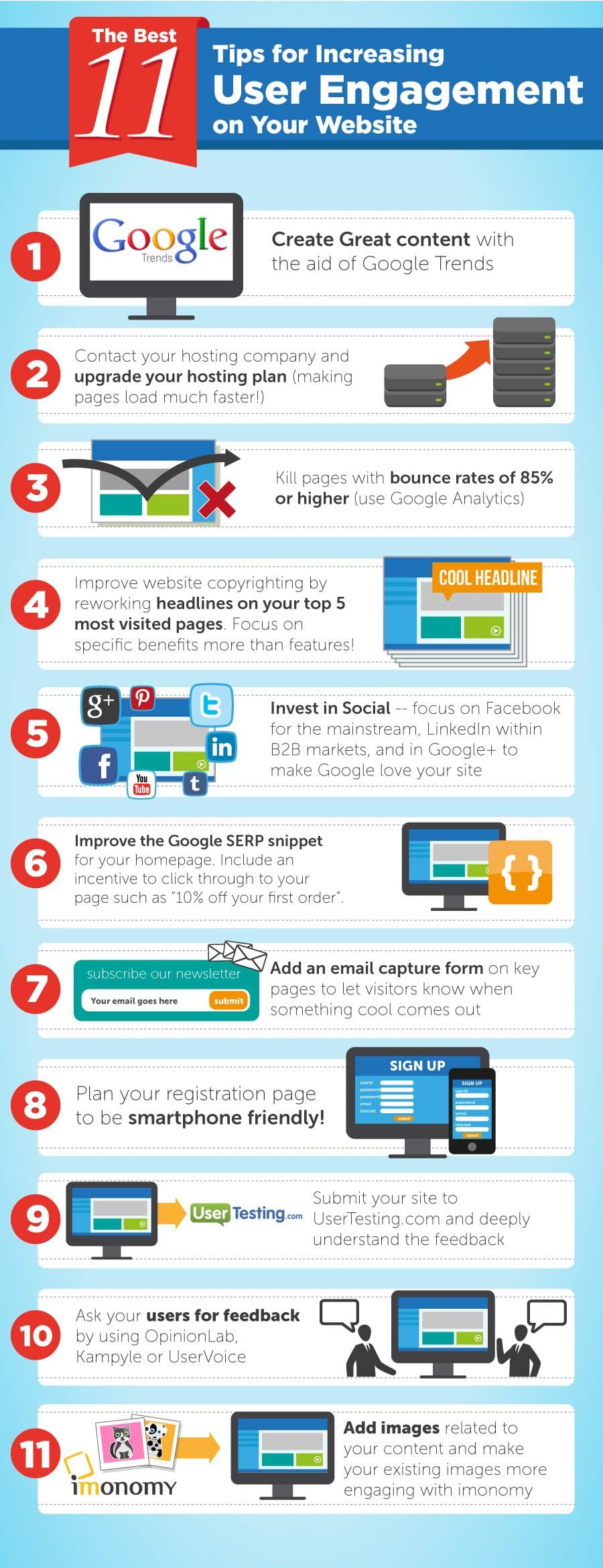
User engagement is a critical factor in the success of any website. When visitors are actively interacting with your content, staying longer on your site, and taking desired actions, it not only boosts your website’s metrics but also enhances its overall effectiveness. Whether you run a blog, an e-commerce platform, or a corporate website, increasing user engagement should be a top priority. In this blog post, we will explore 11 actionable tips that can help you boost user engagement on your website and keep your visitors coming back for more.
- Optimize Website Speed
One of the most common reasons for users to abandon a website is slow loading times. If your pages take too long to load, visitors are likely to click away before they even see your content. To address this, optimize your website’s speed by:
- Compressing images and files to reduce page size.
- Enabling browser caching to store static resources locally.
- Using a content delivery network (CDN) to distribute content geographically.
- Minimizing HTTP requests by combining CSS and JavaScript files.
- Create High-Quality Content
Content is king, and creating high-quality, relevant content is paramount for engaging your audience. Understand your target audience’s needs and interests, and tailor your content accordingly. Consistently provide valuable and well-researched information that addresses their pain points or interests. Utilize various formats such as blog posts, videos, infographics, and podcasts to cater to different preferences.
- Improve Website Navigation
A user-friendly and intuitive website navigation system can significantly enhance user engagement. Ensure that your menu structure is clear and organized, making it easy for visitors to find the information they are looking for. Implement breadcrumbs, a search bar, and a well-designed footer to assist users in navigating your website effortlessly.
- Implement Responsive Design
With the increasing use of mobile devices, having a responsive website design is essential. A responsive design adapts your website’s layout to different screen sizes, providing a seamless user experience on smartphones, tablets, and desktops. Google also prioritizes mobile-friendly websites in its search rankings, making it crucial for SEO and user engagement.
- Use Engaging Visuals
Visual elements such as images, videos, and infographics can significantly enhance user engagement. These visuals break up text, making content more digestible and appealing. Ensure that visuals are relevant to your content and of high quality. Optimize image sizes to prevent slow page loading times.
- Implement Clear Calls to Action (CTAs)
Guide your visitors on what actions to take next by using clear and compelling CTAs. Whether it’s signing up for a newsletter, making a purchase, or sharing your content on social media, your CTAs should stand out and convey a sense of urgency or value. Experiment with different CTA placements and wording to determine what works best for your audience.
- Utilize Social Proof
People tend to trust and engage with websites that demonstrate social proof. Display customer reviews, ratings, testimonials, and case studies to build trust and credibility. Highlighting the positive experiences of others can influence visitors to take similar actions, such as making a purchase or signing up for your services.
- Optimize for SEO
Search engine optimization (SEO) plays a crucial role in attracting organic traffic to your website. When your content ranks higher in search engine results pages, it’s more likely to be discovered and engaged with by users. Conduct keyword research to identify relevant keywords and phrases, optimize your content for them, and build high-quality backlinks to improve your website’s search visibility.
- Enable Comments and Interaction
Encourage user interaction by enabling comments on your blog posts or articles. Engage with your audience by responding to comments and fostering discussions. Additionally, consider incorporating interactive elements such as polls, quizzes, and surveys to make your content more engaging and informative.
- Personalize User Experiences
Personalization can significantly boost user engagement. Use data analytics and user behavior tracking to understand your visitors’ preferences and tailor content and recommendations accordingly. Personalized product recommendations, content suggestions, and email marketing campaigns can all contribute to a more engaging user experience.
- Regularly Update Your Content
Keeping your website’s content fresh and up-to-date is vital for user engagement. Outdated information can deter visitors and harm your website’s credibility. Regularly update your blog, product listings, and other content areas. You can also repurpose and refresh old content to give it new life.
Conclusion
Increasing user engagement on your website is an ongoing process that requires attention to detail and a commitment to providing value to your visitors. By optimizing website speed, creating high-quality content, improving navigation, and implementing responsive design, you can create a strong foundation for engagement. Additionally, using engaging visuals, clear CTAs, social proof, and SEO techniques can attract and retain users.
Encourage interaction through comments and personalized experiences, and don’t forget to regularly update your content to keep it relevant and valuable. By implementing these 11 tips, you can create a website that not only attracts users but also keeps them engaged and returning for more, ultimately leading to the success of your online presence.

Author:
Mark Ford

Designing for Humans: The Psychological Role of Colour in Web Design
Are you confident that the colours on your website are supporting how users feel, think and behave when they arrive? Have you ever wondered why some websites feel instantly trustworthy and intuitive, while others create friction without any obvious reason? […]



