LinkedIn is not just a platform for job seekers and recruiters anymore. It has evolved into a powerful tool for professionals and businesses to connect, network, and generate leads.
Your LinkedIn profile is your digital business card, and having a boring or incomplete profile can cost you valuable opportunities.
In this blog post, we will explore 13 tips to transform your bland LinkedIn profile into a lead generating machine.
Whether you’re a job seeker, entrepreneur, or a sales professional, these strategies will help you make the most of your LinkedIn presence.
Infographic from HubSpot.
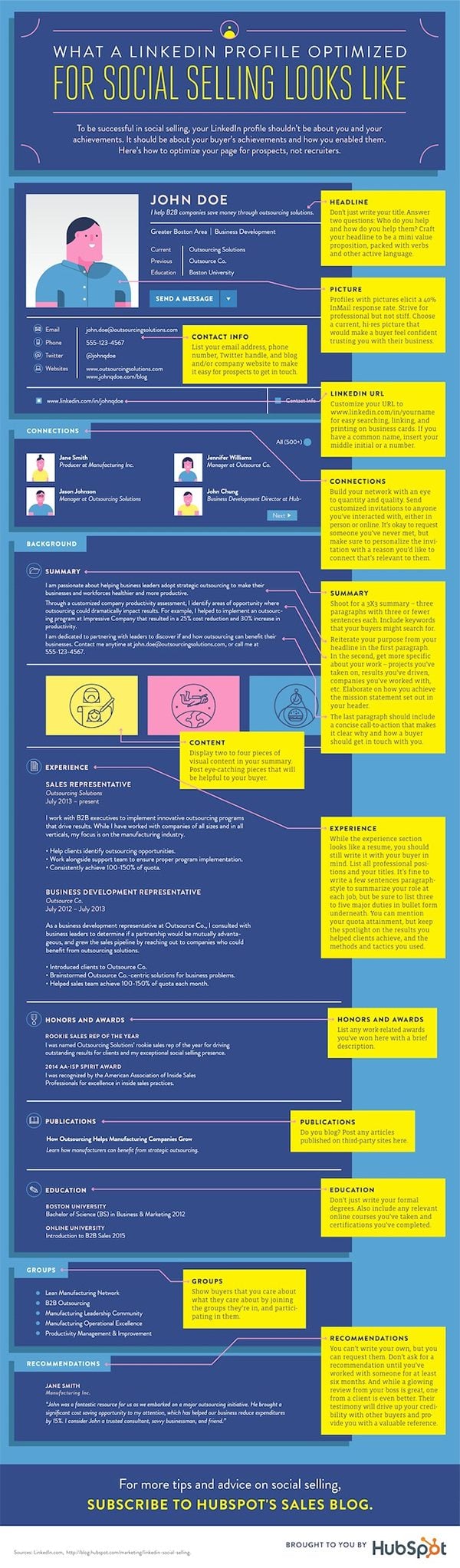
- Craft a Compelling Headline
Your LinkedIn headline is the first thing people see when they come across your profile. Instead of using a generic job title, create a headline that communicates your unique value proposition. Use keywords related to your industry and profession to increase your profile’s visibility in search results. For example, instead of “Marketing Manager,” you can use “Results-Driven Marketing Manager Specializing in Digital Strategies.”
- Choose the Right Profile Photo
Your profile picture is your first impression on LinkedIn, so it’s essential to choose the right one. Use a high-quality, professional-looking photo where you are dressed appropriately for your industry. A smiling, approachable expression can make you seem more inviting. Avoid using selfies or photos with distracting backgrounds.
- Write a Captivating Summary
Your LinkedIn summary is your opportunity to tell your professional story and showcase your expertise. Use this section to provide a brief overview of your career journey, highlight your achievements, and convey your passion for what you do. Make it engaging and relatable to your target audience. Keep it concise but informative, and use bullet points or paragraphs for better readability.
- Showcase Your Achievements with Experience
When detailing your work experience, don’t just list your job responsibilities. Highlight your achievements, quantify results, and showcase how you added value to your previous employers or clients. Use action verbs and specific metrics to demonstrate your impact. For example, instead of saying, “Managed a marketing campaign,” you could say, “Led a successful marketing campaign that increased website traffic by 30% and doubled lead generation.”
- Customize Your LinkedIn URL
LinkedIn allows you to customize your profile’s URL, making it easier for people to find you and remember your profile. Edit your URL to include your name or a variation of it. It will not only look cleaner but also appear more professional.
- Get Recommendations and Endorsements
Recommendations and endorsements add credibility to your profile. Request recommendations from colleagues, supervisors, or clients who can vouch for your skills and work ethic. Additionally, endorse the skills of your connections, and they may reciprocate. A well-rounded profile with endorsements and recommendations can build trust with potential leads.
- Use Rich Media and Visuals
LinkedIn allows you to enhance your profile by adding rich media content, such as presentations, videos, and articles. Utilize this feature to showcase your work, share case studies, or provide valuable insights into your industry. Visual content can make your profile more engaging and informative.
- Engage in Thoughtful Content Sharing
LinkedIn is a platform for professional networking and knowledge sharing. Regularly share industry-related articles, insights, and your own content to establish yourself as a thought leader. Engage with your network by commenting on and sharing relevant posts. This activity can help you stay top-of-mind with your connections and potential leads.
- Join and Participate in Groups
LinkedIn groups are excellent places to connect with like-minded professionals, share knowledge, and establish your expertise. Join relevant groups related to your industry or interests. Actively participate in discussions, share valuable insights, and connect with group members who could be potential leads or collaborators.
- Network Strategically
Building a strong network on LinkedIn is crucial for lead generation. Connect with professionals in your industry, colleagues, alumni, and individuals you meet at conferences or events. Personalize your connection requests to explain why you want to connect and how you can provide value to them. A well-curated network can lead to valuable opportunities.
- Showcase Your Skills
List your skills on your LinkedIn profile, and ask your connections to endorse them. Highlighting your skills helps potential leads understand your expertise at a glance. Make sure to update your skills regularly to reflect your current abilities and interests.
- Be Active and Consistent
Consistency is key on LinkedIn. Regularly update your profile, share content, and engage with your network. An active and up-to-date profile signals to potential leads that you are invested in your professional presence on the platform. Set aside dedicated time each week for LinkedIn activities to maintain your visibility.
- Analyze and Optimize
LinkedIn provides analytics to track the performance of your profile and posts. Monitor these metrics to gain insights into what’s working and what’s not. Adjust your strategy accordingly. Experiment with different types of content and posting times to see what resonates best with your target audience.
Conclusion
Your LinkedIn profile has the potential to be a powerful lead generation tool if you invest time and effort into optimizing it. By following these 13 tips, you can transform your profile from a bland digital resume into a compelling narrative of your professional journey. Engage with your network, share valuable content, and build meaningful connections to turn your LinkedIn presence into a lead generating machine that opens doors to exciting opportunities in your career or business.

Author:
Mark Ford