In today’s digital age, having a strong online presence is essential for any business. And one of the most effective ways to sell products or services online is through an eCommerce website.
However, creating an eCommerce website that not only looks good but also converts visitors into customers can be a challenging task.
To help you navigate this process successfully, we’ve compiled a comprehensive guide with 25 essential steps to create an eCommerce website that your customers will want to buy from.
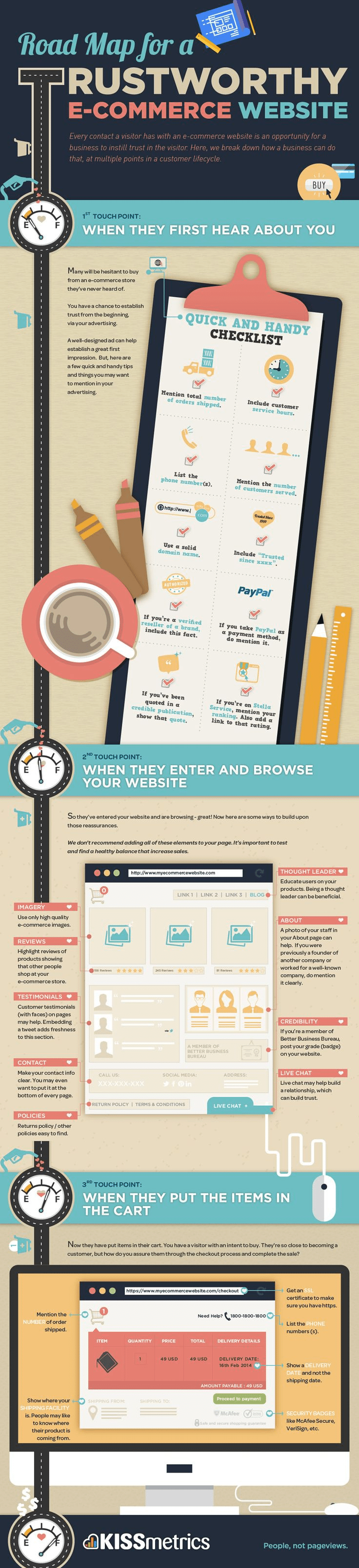
Infographic by KISSmetrics.
1. Define Your Niche and Target Audience
Before you dive into designing your eCommerce website, it’s crucial to define your niche and target audience. Understand your customers’ needs, preferences, and pain points. Knowing your niche will help you tailor your website to meet their specific requirements.
2. Conduct Market Research
Research your competitors and the market to identify trends, gaps, and opportunities. This information will inform your website’s design, product offerings, and pricing strategy.
3. Choose a Domain Name
Select a domain name that is easy to remember, relevant to your niche, and preferably includes your brand name. Ensure it’s unique and available for registration.
4. Register Your Domain
Once you’ve chosen a domain name, register it through a domain registrar like GoDaddy, Namecheap, or Google Domains.
5. Select a Reliable Hosting Provider
Choose a hosting provider that offers excellent uptime, security features, and scalability. Popular options include Bluehost, SiteGround, and HostGator.
6. Install a Content Management System (CMS)
Most eCommerce websites are built on CMS platforms like WordPress, Magento, or Shopify. Choose one that aligns with your business needs and expertise.
7. Pick an eCommerce Platform
Select an eCommerce platform that integrates seamlessly with your CMS. Shopify, WooCommerce (for WordPress), and Magento are popular choices.
8. Design Your Website
Invest in a visually appealing and user-friendly design. Ensure your website is responsive, mobile-friendly, and follows best practices for UX/UI design.
9. Create a Logo and Branding
Develop a strong brand identity with a memorable logo, color scheme, and typography that resonates with your target audience.
10. Set Up Payment Gateways
Integrate secure payment gateways like PayPal, Stripe, or Square to enable smooth transactions.
11. Implement SSL Security
Install an SSL certificate to encrypt customer data and provide a secure shopping experience.
12. Add High-Quality Product Images and Descriptions
Use professional images and write compelling product descriptions. Include details like price, specifications, and availability.
13. Implement a Search Functionality
Enable a robust search feature to help customers find products quickly. Include filters and sorting options.
14. Optimize for SEO
Optimize your website for search engines to improve visibility. Focus on on-page SEO, meta tags, alt text for images, and content optimization.
15. Set Up Google Analytics
Install Google Analytics to track website traffic, user behavior, and conversion rates. This data will help you make informed decisions.
16. Create High-Quality Content
Regularly publish blog posts, articles, or videos related to your niche. High-quality content can attract organic traffic and establish your authority.
17. Develop a Social Media Presence
Promote your eCommerce website on social media platforms relevant to your audience. Engage with followers and run targeted ads.
18. Offer Discounts and Promotions
Entice customers with special offers, discounts, and loyalty programs to boost sales.
19. Implement User Reviews and Ratings
Enable customers to leave reviews and ratings for products. Positive reviews build trust and credibility.
20. Set Up Email Marketing
Create an email marketing strategy to nurture leads and retain customers. Send newsletters, product recommendations, and abandoned cart reminders.
21. Provide Exceptional Customer Support
Offer multiple customer support channels, such as live chat, email, and phone support. Respond promptly to inquiries and resolve issues effectively.
22. Optimize Website Speed
Ensure your website loads quickly to prevent bounce rates. Compress images, use a content delivery network (CDN), and optimize code.
23. Conduct A/B Testing
Continuously test different elements of your website, such as button colors, CTAs, and product placements, to improve conversion rates.
24. Monitor and Analyze
Regularly review your website’s performance using analytics tools. Identify areas for improvement and make data-driven changes.
25. Stay Updated and Adapt
The eCommerce landscape is constantly evolving. Stay updated with industry trends, technology advancements, and customer preferences. Adapt your website and strategies accordingly.
Creating an eCommerce website that attracts and retains customers is a multifaceted process. By following these 25 steps, you can build a successful eCommerce platform that not only looks appealing but also offers a seamless shopping experience, ultimately driving sales and growth for your business. Remember that ongoing maintenance and improvement are key to long-term success in the competitive world of eCommerce.

Author:
Mark Ford

Mastering the Art of the Landing Page: Design, Copy, and Conversion in Harmony
Are you trying to design a landing page that not only looks great but actually converts visitors into customers? Want to learn how to balance design, copy, and strategy to create landing pages that work in perfect harmony? […]