In today’s digital age, having a strong online presence is essential for businesses of all sizes. Your website serves as the virtual front door to your business, and it’s often the first point of contact that potential customers have with your brand.
For local businesses, in particular, your website can be a powerful tool for attracting and retaining customers in your area. To make the most of your online presence, it’s crucial to provide local consumers with the information they need to connect with your business. In this blog post, we’ll explore four crucial pieces of information that local consumers need to see on your website.
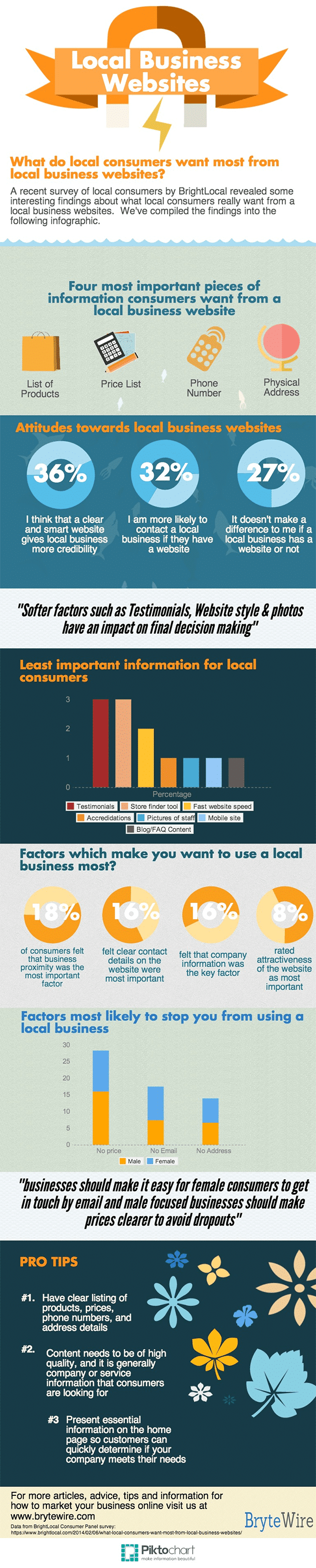
A recent survey by Brytewire asked a panel of local consumers how a website affects their attitudes and actions towards a business.
The results give business owners clear guidance on the type of information they need to be including within their website design and these findings are detailed in the infographic below.
1. Contact Information
One of the most fundamental pieces of information that local consumers need to find on your website is your contact information. This includes your business’s physical address, phone number, and email address. Local consumers often visit a website with the intention of finding out how to get in touch with a business, so it’s vital that this information is easy to locate.
Tips for displaying contact information:
- Prominently Displayed: Your contact information should be prominently displayed on your website’s homepage, preferably in the header or footer. This ensures that visitors can find it quickly without having to search extensively.
- Consistency: Make sure that your contact information is consistent across your website and all other online listings. Inaccurate or outdated information can lead to frustration and confusion among potential customers.
- Clickable Phone Number: If your website is viewed on a mobile device, ensure that your phone number is clickable, so users can easily initiate a call without having to manually enter the number.
- Map Integration: Consider integrating a map with your business location. This allows users to get directions to your physical address directly from your website, making it even more convenient for them to visit your store.
- Contact Form: In addition to displaying your contact information, provide a contact form that visitors can use to send you a message or inquiry. Make sure the form is user-friendly and includes fields for essential details like name, email, and message.
Having your contact information readily available not only helps potential customers reach out to you but also builds trust and credibility, as it shows that you are a legitimate and accessible local business.
2. Business Hours
Local consumers often visit your website to find out when your business is open. Whether they want to plan a visit to your store or schedule an appointment, having accurate business hours on your website is crucial. It can be frustrating for potential customers to arrive at your business only to find that it’s closed when they expected it to be open.
Tips for displaying business hours:
- Regular Updates: Ensure that your business hours are kept up to date, especially during holidays or special events when your hours may vary.
- Holiday Hours: If your business has different hours during holidays, prominently display this information on your website so that visitors are aware.
- Clear and Simple: Present your business hours in a clear and easy-to-read format. Consider using a table or a clear list of days and hours of operation.
- Include Special Notices: If you have any specific instructions related to your business hours, such as curbside pickup options or appointment requirements, make sure to include these details.
- Responsive Design: Ensure that your website is mobile-friendly, and that business hours are easily accessible on smaller screens.
By providing accurate and easily accessible business hours on your website, you can improve the overall customer experience and increase the likelihood of attracting local visitors during your operational hours.
3. Product or Service Information
Local consumers want to know what products or services your business offers. Providing detailed information about your offerings on your website not only helps potential customers make informed decisions but also sets the stage for search engine optimization (SEO) to attract local search traffic.
Tips for displaying product or service information:
- Dedicated Pages: Create dedicated pages for each product or service category. Include high-quality images, detailed descriptions, pricing, and any relevant specifications.
- Optimized Content: Use relevant keywords and phrases that local consumers are likely to search for when describing your products or services. This can improve your website’s visibility in local search results.
- Customer Reviews and Testimonials: If applicable, showcase customer reviews and testimonials to build trust and credibility. Positive feedback from local customers can help persuade others to choose your business.
- Service Areas: If your business serves specific neighborhoods or areas within your locality, make it clear which areas you cover. This can help users determine whether your business is convenient for them.
- Contact Information Integration: Include a clear call-to-action (CTA) on product or service pages that encourages users to contact you for more information or to make a purchase.
By providing comprehensive information about your products or services, you not only meet the needs of local consumers but also enhance your website’s SEO, making it easier for potential customers to discover your business online.
4. Customer Reviews and Testimonials
Positive reviews and testimonials from satisfied customers can have a significant impact on your business’s reputation and credibility. Local consumers often rely on the experiences of others when deciding whether to choose your business. Therefore, it’s essential to showcase customer reviews and testimonials prominently on your website.
Tips for displaying customer reviews and testimonials:
- Diverse Selection: Showcase a diverse selection of reviews that highlight different aspects of your business, such as product quality, customer service, and overall experience.
- Recent Reviews: Keep your reviews up to date. Highlight recent positive feedback to demonstrate that your business consistently provides excellent service.
- Star Ratings: If applicable, use star ratings to provide a quick visual representation of your business’s overall rating.
- Customer Stories: Consider featuring longer customer testimonials or stories that provide more in-depth insights into their experiences with your business.
- Response to Reviews: Show that you value customer feedback by responding to reviews, both positive and negative, in a professional and constructive manner.
- Third-Party Review Platforms: If your business is listed on review platforms like Google My Business or Yelp, include links or widgets that display your overall rating and reviews from these platforms.
By prominently featuring positive customer reviews and testimonials on your website, you can build trust with potential customers and increase the likelihood that they’ll choose your business over competitors.
Conclusion
Your website is a vital tool for connecting with local consumers and attracting them to your business. By ensuring that your website contains these four crucial pieces of information—contact information, business hours, product or service details, and customer reviews—you can create a positive and informative online experience that encourages local customers to engage with your business. Remember that a well-designed and user-friendly website not only serves your current customers but also helps you reach new ones in your local community. Make it a priority to regularly update and maintain these essential pieces of information to ensure that your website remains a valuable asset for your local business.

Author:
Mark Ford

Mastering the Art of the Landing Page: Design, Copy, and Conversion in Harmony
Are you trying to design a landing page that not only looks great but actually converts visitors into customers? Want to learn how to balance design, copy, and strategy to create landing pages that work in perfect harmony? […]