Twitter is a powerhouse of social media with over 330 million monthly active users. It’s a platform where individuals, businesses, and influencers vie for attention in a sea of tweets.
In this highly competitive environment, getting more retweets can significantly boost your online presence and message reach. But how can you increase your chances of getting retweeted?
The answer lies in science. In this blog post, we’ll delve into five scientifically proven ways to get more retweets on Twitter.
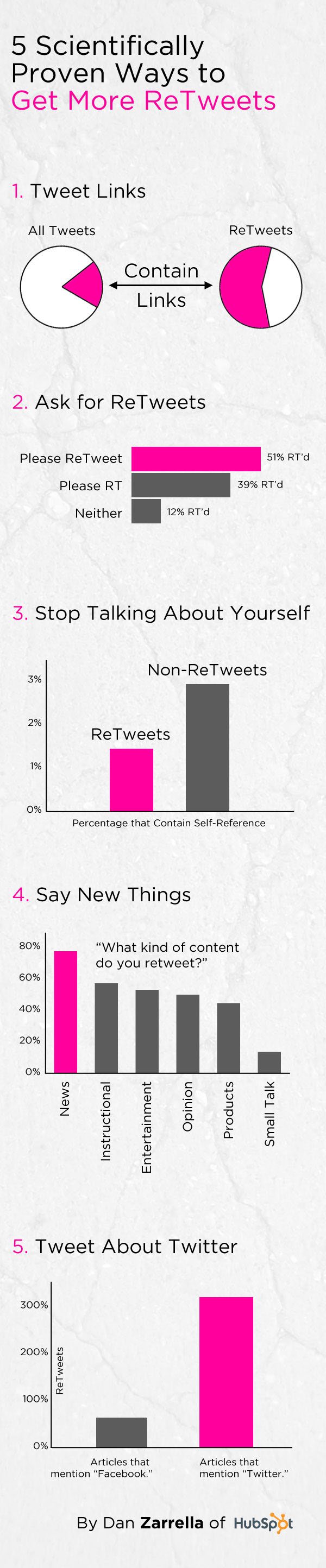
Infographic from HubSpot.
1. Harness the Power of Emotion
Emotion plays a pivotal role in the success of any social media campaign. People are more likely to engage with content that elicits an emotional response. According to a study published in the journal “Science,” content that evokes high-arousal emotions, such as awe, anger, or anxiety, is more likely to be shared.
To leverage this phenomenon, consider crafting tweets that tap into these emotions. Share awe-inspiring facts, express your passionate opinions, or highlight pressing issues that provoke anger or anxiety. Remember to be authentic and genuine in your emotions, as users can spot insincerity from a mile away.
Additionally, using emotive language and vivid imagery can help elicit these emotional responses. Pairing your tweets with relevant images or GIFs can further amplify their impact.
2. Keep It Short and Sweet
Brevity is key on Twitter. The platform’s character limit encourages concise communication, and research has shown that shorter tweets tend to get more retweets. According to a study conducted by Buddy Media, tweets with 100 characters or less receive 17% higher engagement rates.
The reason behind this phenomenon lies in the ease of consumption. Twitter users scroll through their feeds quickly, and shorter tweets are more likely to capture their attention. To make your tweets more retweetable, focus on delivering your message succinctly and to the point.
You can also consider using URL shorteners like Bitly to conserve character space when sharing links. This allows you to convey more information while staying within the character limit.
3. Use Hashtags Strategically
Hashtags are powerful tools for increasing the discoverability of your tweets. They categorize your content and make it easier for users interested in specific topics to find your tweets. However, it’s essential to use hashtags strategically.
Research from HubSpot found that tweets with one or two hashtags receive 21% higher engagement than those with three or more. Overloading your tweets with hashtags can make them appear spammy and less appealing to users.
When selecting hashtags, opt for relevant and trending ones that align with your content. Tools like Twitter’s trending topics and third-party apps can help you identify popular hashtags in real-time. Additionally, consider creating a unique branded hashtag for your campaigns to foster community engagement and make it easier for users to find and retweet your content.
4. Time Your Tweets Wisely
The timing of your tweets can significantly impact their reach and retweetability. Posting when your target audience is most active increases the likelihood of engagement. Different studies suggest various optimal times to tweet, but the key is to know your audience and their habits.
One tool that can help is Twitter Analytics, which provides insights into when your followers are most active. Additionally, several studies have examined general patterns:
- According to Buffer, the best times to tweet are between 9 AM and 3 PM.
- HubSpot suggests that engagement peaks around noon and 5 PM.
- Sprout Social found that Wednesdays and Fridays are the best days for retweets.
Remember that these are general guidelines, and your audience’s behavior may vary. It’s crucial to analyze your Twitter data to determine the optimal posting times for your specific followers.
5. Engage and Interact
Twitter is not a one-way communication channel; it’s a social platform. Building meaningful connections and engaging with your audience is crucial for increasing retweets. When you interact with others on Twitter, you not only boost your visibility but also create a sense of community around your brand or profile.
Here are some tips for effective engagement:
- Respond to Mentions: When someone mentions you or comments on your tweet, take the time to respond. Acknowledging your audience’s input shows that you value their interaction and can encourage more retweets.
- Retweet and Comment on Relevant Content: Share tweets from others that are relevant to your niche or industry. Adding your comments or insights to these retweets can spark conversations and encourage reciprocity.
- Participate in Twitter Chats: Joining Twitter chats related to your interests or industry is an excellent way to connect with like-minded individuals. These chats often lead to increased followers and retweets.
- Run Contests and Giveaways: Organize contests or giveaways that require users to retweet your content for a chance to win. This gamification encourages retweets and can help expand your reach.
- Collaborate with Influencers: Partnering with influencers in your niche can introduce your content to a broader audience. When influencers retweet your content, it gains credibility and can result in more retweets from their followers.
In conclusion, getting more retweets on Twitter is not just a matter of luck; it’s a science. By understanding and applying these scientifically proven strategies, you can boost your tweet’s retweetability and increase your visibility on this dynamic social media platform. Remember to tap into emotions, keep your tweets concise, use hashtags strategically, time your tweets wisely, and engage with your audience actively. With dedication and consistency, you can become a Twitter pro and watch your retweet count soar.

Author:
Mark Ford

How to Create Engaging Instagram Reels Without Ever Showing Your Face
Are you looking for creative ways to make engaging Instagram Reels without stepping in front of the camera? Want to discover proven content ideas that help your brand stand out on social media while keeping your privacy intact? […]