In today’s digital age, having a strong online presence is crucial for businesses and individuals alike. Whether you’re running a small blog, an e-commerce store, or a multinational corporation, getting noticed on the internet can make or break your success. And one of the most effective ways to increase your online visibility is through Search Engine Optimization (SEO).
SEO is the process of optimizing your website so that it ranks higher on search engine results pages (SERPs). When your website appears on the first page of Google or other search engines, you’re more likely to attract organic traffic, which can lead to higher conversions and revenue.
While there are plenty of paid tools and services that promise to boost your SEO, you don’t necessarily need to break the bank to improve your ranking. In this blog post, we’ll explore six effective ways to enhance your SEO and boost your Google ranking for free.
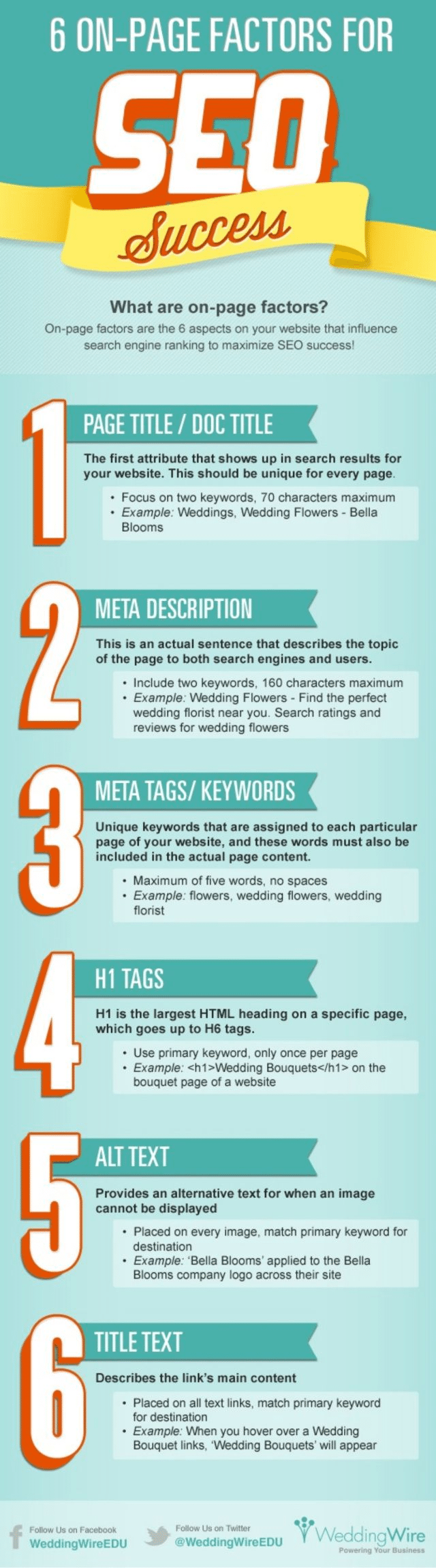
The infographic below from WeddingWire shows you the 6 on site changes you can make. It’s all about making sure Google knows what each page is about using keyword placement. Don’t overcook it and keyword stuff though, Google really hates that.
1. High-Quality Content is King
Content is the backbone of SEO. Search engines like Google prioritize websites that offer valuable, relevant, and engaging content to their users. To improve your SEO for free, focus on creating high-quality content that resonates with your target audience. Here’s how:
a. Keyword Research
Identify relevant keywords and phrases related to your niche. Tools like Google’s Keyword Planner and Ubersuggest can help you find popular keywords with low competition. Incorporate these keywords naturally into your content.
b. Create Informative and Unique Content
Your content should provide useful information, solve problems, or entertain your audience. Avoid duplicating content from other websites, as search engines penalize duplicate content. Instead, aim to produce unique, original content.
c. Optimize Headings and Structure
Use clear and concise headings to organize your content. Incorporate your primary keyword into the title and headings while maintaining a logical flow. This makes it easier for both search engines and readers to understand your content.
d. Improve Readability
Ensure your content is easy to read by using short paragraphs, bullet points, and subheadings. Use a readable font and maintain a consistent text size and color scheme. Good readability enhances the user experience, which can positively impact your SEO.
e. Regularly Update Your Content
Search engines favor fresh content. Regularly update and expand your existing articles to keep them relevant. This demonstrates to search engines that your website is active and authoritative in your niche.
2. Optimize Your Website’s Speed
Website loading speed is a critical factor in SEO. Google considers page speed when ranking websites, as faster-loading pages provide a better user experience. Slow-loading websites can lead to higher bounce rates and lower rankings. Here are some free ways to optimize your website’s speed:
a. Compress Images
Large images can slow down your website. Use image compression tools like TinyPNG or Compressor.io to reduce image file sizes without sacrificing quality.
b. Minimize HTTP Requests
Each element on a web page, such as images, scripts, and stylesheets, requires an HTTP request to load. Minimize these requests by combining files and using efficient coding practices.
c. Enable Browser Caching
Browser caching allows frequently visited elements of your website to be stored in a user’s browser. This reduces the need for repeated downloads and speeds up page loading times. Most content management systems (CMS) have plugins or settings to enable browser caching.
d. Use Content Delivery Networks (CDNs)
CDNs distribute your website’s content across multiple servers worldwide, reducing server load and improving page load times for users around the world. Cloudflare and CloudFront are popular free CDNs.
3. Optimize for Mobile Devices
With the rise of mobile internet usage, Google has shifted to mobile-first indexing. This means that Google primarily uses the mobile version of your site for ranking and indexing. Ensuring your website is mobile-friendly is crucial for SEO. Here’s how to do it for free:
a. Use a Responsive Design
Choose a responsive website design that automatically adjusts to different screen sizes and devices. Most modern website builders and CMS platforms offer responsive templates.
b. Test Mobile Compatibility
Google provides a free tool called the “Mobile-Friendly Test” that evaluates your website’s mobile compatibility. Use this tool to identify and fix mobile-related issues.
c. Optimize Images and Media
Ensure images and media elements are appropriately sized for mobile devices. Compress images and use HTML5 for videos, as it’s more mobile-friendly than Flash.
4. Build High-Quality Backlinks
Backlinks, also known as inbound links, are links from other websites to your site. They are a crucial factor in SEO, as search engines consider them as a vote of confidence in your website’s authority. Here are ways to acquire high-quality backlinks without spending money:
a. Guest Posting
Write informative and valuable guest posts for reputable websites in your niche. Include a link back to your site in your author bio. Make sure the websites you target have a good domain authority and are relevant to your content.
b. Create Shareable Content
Produce content that is highly shareable, such as infographics, in-depth guides, or case studies. When others find your content valuable, they are more likely to link to it naturally.
c. Collaborate with Others
Collaborate with bloggers, influencers, and businesses in your industry. This can lead to natural backlinks as you promote each other’s content or products.
d. Broken Link Building
Identify broken links on other websites, particularly those that relate to your content. Reach out to the website owner and suggest replacing the broken link with a link to your relevant content.
5. Optimize On-Page SEO
On-page SEO refers to the optimization of individual web pages to rank higher and earn more relevant traffic. Here are some free on-page SEO techniques to improve your Google ranking:
a. Optimize Title Tags
Create compelling and descriptive title tags for each page, incorporating relevant keywords. Title tags should be concise, typically under 60 characters, and encourage click-throughs from search results.
b. Craft Meta Descriptions
Write unique and engaging meta descriptions that provide a brief summary of the page’s content. Include keywords naturally while enticing users to click through to your site.
c. Use Descriptive URLs
Ensure your page URLs are clear, concise, and include relevant keywords. Avoid long strings of numbers or symbols.
d. Internal Linking
Link to other relevant pages within your website using descriptive anchor text. Internal linking helps search engines understand the structure of your website and improves user navigation.
e. Optimize Images
Add alt text to images, describing their content. This not only helps visually impaired users but also provides search engines with additional context about your content.
6. Monitor Your SEO Progress
To continually improve your SEO for free, you must monitor your progress and make data-driven decisions. Several free tools and techniques can help you track your SEO performance:
a. Google Analytics
Google Analytics is a powerful free tool that provides detailed insights into your website’s traffic, user behavior, and more. It allows you to track which keywords are driving traffic to your site and which pages are performing well.
b. Google Search Console
Google Search Console offers valuable information about your website’s performance in Google search results. It provides data on your site’s indexing status, mobile compatibility, and search queries.
c. SEO Audit Tools
Use free SEO audit tools like Screaming Frog SEO Spider and Google PageSpeed Insights to identify and address technical SEO issues on your website.
d. Monitor Keyword Rankings
Track your keyword rankings using tools like Google’s Search Console and free keyword tracking tools like Rank Tracker. Keep an eye on your progress and adjust your SEO strategies accordingly.
In conclusion, improving your SEO and boosting your Google ranking doesn’t have to be expensive. By focusing on high-quality content, website speed, mobile optimization, backlinks, on-page SEO, and monitoring your progress, you can make significant improvements to your online visibility without breaking the bank. Remember that SEO is an ongoing process, and consistent efforts will yield long-term results. Start implementing these free SEO techniques today and watch your website climb the ranks on Google’s SERPs.

Author:
Mark Ford