

In today’s digital age, having a strong online presence is crucial for businesses of all sizes. Your website serves as the digital storefront for your brand, and it’s often the first point of contact for potential customers.
To make the most of this online real estate, your website needs to be more than just a static page—it should be a powerful tool for generating sales and inquiries. In this blog post, we will explore seven website essentials that can significantly impact your ability to convert visitors into customers and leads.
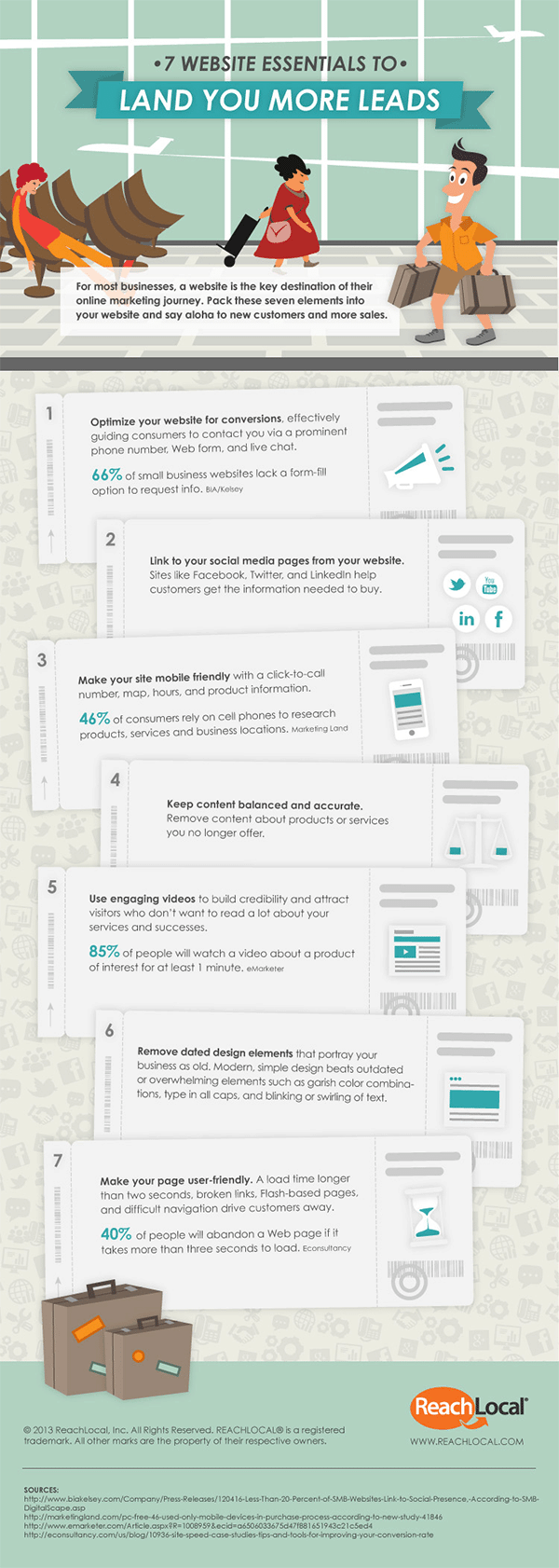
If you’re thinking of creating a new website, or your current site is under performing, the infographic below from Reach Local gives you 7 essential items you should be using to generate more sales and enquiries.
1. User-Friendly Navigation
Imagine walking into a physical store where the aisles are cluttered, and it’s nearly impossible to find what you’re looking for. You’d likely leave in frustration, right? The same principle applies to your website. If visitors can’t easily navigate your site, they’re likely to bounce, resulting in lost sales and inquiries.
Here are some tips for creating user-friendly navigation:
- Clear Menu Structure: Your website’s menu should be intuitive and organized logically. Use clear and concise labels for each menu item.
- Search Functionality: Implement a robust search feature to help visitors find specific products or information quickly.
- Breadcrumbs: Breadcrumbs provide users with a clear path back to previous pages, making it easier to explore your site.
- Mobile Responsiveness: Ensure your navigation works seamlessly on both desktop and mobile devices.
2. Compelling Visual Design
First impressions matter, and your website’s design is often the first thing visitors notice. A visually appealing website can captivate your audience and instill confidence in your brand. Here are some design elements to consider:
- Branding Consistency: Maintain a consistent color scheme and use your logo prominently to reinforce your brand identity.
- High-Quality Images: Use high-resolution images and graphics that showcase your products or services effectively.
- Whitespace: Avoid clutter and allow for ample whitespace to make your content more readable and visually pleasing.
- Typography: Choose fonts that are easy to read and complement your brand style.
3. Compelling Content
Quality content is the cornerstone of a successful website. It not only informs and engages your audience but also boosts your search engine rankings. Here are some essential content elements:
- Clear Messaging: Clearly communicate your value proposition, products, or services on your homepage.
- Engaging Copy: Write compelling and concise copy that speaks directly to your target audience’s needs and desires.
- Blog and Resources: Regularly publish valuable content, such as blog posts, articles, or downloadable resources, to establish authority in your industry.
- Testimonials and Reviews: Display customer testimonials and reviews to build trust and credibility.
4. Strong Calls to Action (CTAs)
Every page on your website should have a clear and compelling call to action. Whether it’s to make a purchase, request a quote, or sign up for a newsletter, CTAs guide visitors towards the actions you want them to take. Here are some CTA best practices:
- Clarity: Use concise and action-oriented language for your CTAs, such as “Buy Now,” “Get Started,” or “Contact Us.”
- Placement: Position CTAs prominently on your pages, such as at the top, middle, and end of content.
- Contrasting Colors: Make your CTAs stand out by using contrasting colors that draw attention.
- A/B Testing: Continuously test different CTAs to see which ones perform best and make improvements accordingly.
5. Trust-Building Elements
Establishing trust is crucial for converting website visitors into customers or leads. Trust-building elements can help reassure your audience that your business is reputable and reliable. Here are some ways to build trust:
- Contact Information: Provide clear and easily accessible contact information, including a phone number, email address, and physical address if applicable.
- SSL Certificate: Ensure your website is secure with an SSL certificate, indicated by “https://” in the URL.
- Privacy Policy: Display a privacy policy that outlines how you handle user data and adhere to privacy regulations.
- Trust Seals: Showcase trust seals, certifications, and awards that your business has received.
6. Mobile Optimization
With the increasing use of smartphones, a mobile-friendly website is no longer optional—it’s a necessity. Google also prioritizes mobile-friendly websites in search results. Here’s how to optimize for mobile:
- Responsive Design: Use responsive web design to ensure your site adapts seamlessly to various screen sizes.
- Fast Loading Times: Optimize images and minimize code to keep your website fast and responsive on mobile devices.
- Mobile-First Content: Prioritize important content and CTAs for mobile users.
- Test on Real Devices: Regularly test your website on actual mobile devices to identify and fix any issues.
7. Analytics and Conversion Tracking
To continually improve your website’s performance, you need data and insights. Implementing analytics and conversion tracking tools allows you to monitor user behavior, track conversions, and make data-driven decisions. Here’s what you should consider:
- Google Analytics: Set up Google Analytics to track visitor demographics, behavior, and traffic sources.
- Conversion Tracking: Implement conversion tracking for specific actions, such as form submissions, purchases, or downloads.
- A/B Testing: Use A/B testing tools to experiment with different website elements and analyze their impact on conversions.
- Regular Analysis: Review your analytics regularly and use the data to make informed improvements to your website.
Conclusion
Your website is a powerful tool for driving sales and inquiries, but it requires careful planning and attention to detail. By incorporating these seven website essentials—user-friendly navigation, compelling design, quality content, strong CTAs, trust-building elements, mobile optimization, and analytics—you can create a website that not only attracts visitors but also converts them into valuable customers and leads. Keep in mind that a successful website is not a one-time project; it’s an ongoing effort that requires continuous optimization and adaptation to meet the changing needs of your audience and industry.

Author:
Mark Ford

Mastering the Art of the Landing Page: Design, Copy, and Conversion in Harmony
Are you trying to design a landing page that not only looks great but actually converts visitors into customers? Want to learn how to balance design, copy, and strategy to create landing pages that work in perfect harmony? […]


