

Have you written your own website content? Did you check for errors before hitting publish?
Errors in your written content may seem like a small issue to some, but what effect does it have on your reputation, both with your website visitors and Google? If your content is sprawled with errors you may find visitors won’t trust you and Google could demote you in their rankings.
For some common errors, and how to correct them, take a look at this infographic from Constant Contact.
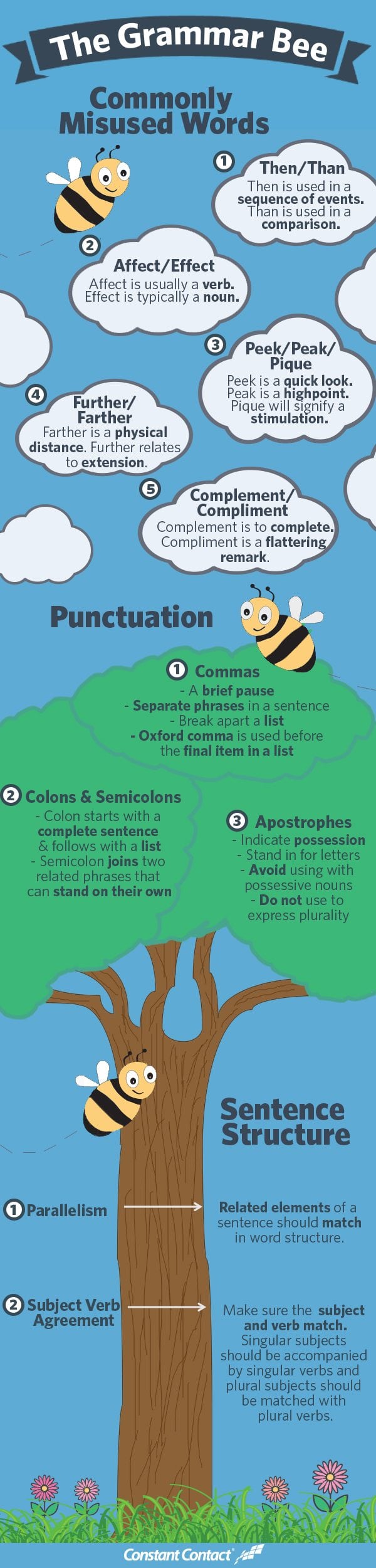
In today’s digital age, your website is often the first point of contact between you and your audience. It’s your virtual storefront, your online resume, and your platform for communication. Therefore, it’s crucial that your website communicates your message effectively and professionally. One of the key elements of effective communication is proper grammar and punctuation. If your website is riddled with grammar and punctuation mistakes, it can leave a lasting negative impression on your visitors. In this blog post, we’ll explore eight common grammar and punctuation mistakes that can ruin your website and provide tips on how to avoid them.
1. Spelling Errors
Nothing screams unprofessionalism like spelling errors on a website. Spelling mistakes can make your content difficult to read and can erode the trust of your audience. To avoid spelling errors, take the following steps:
- Proofread: Before publishing any content on your website, proofread it carefully. Use spelling and grammar checking tools, but don’t rely solely on them, as they can miss certain errors.
- Get a Second Pair of Eyes: Sometimes, we become blind to our own mistakes. Ask a colleague or friend to review your content for spelling errors.
- Take Your Time: Rushed writing is more likely to contain errors. Give yourself enough time to write, review, and edit your content thoroughly.
2. Misplaced Apostrophes
Misusing apostrophes is a common error that can make your content look sloppy. The two main uses of apostrophes are to indicate possession and to create contractions. Here are some examples:
- Possession: The cat’s collar (the collar belonging to the cat)
- Contractions: It’s (it is), can’t (cannot), don’t (do not)
To avoid misplaced apostrophes:
- Know the Rules: Familiarize yourself with the rules for using apostrophes.
- Proofread: Again, proofreading is your friend. Pay close attention to words that end in “s” to ensure you’re using apostrophes correctly.
3. Comma Splices
Comma splices occur when two independent clauses are joined by a comma without a coordinating conjunction (e.g., and, but, or). Here’s an example of a comma splice:
Incorrect: I went to the store, I bought some groceries.
To correct this, you can either separate the clauses into two sentences or use a semicolon:
Correct: I went to the store. I bought some groceries. Correct: I went to the store; I bought some groceries.
Avoiding comma splices:
- Learn Sentence Structure: Understand the difference between independent and dependent clauses.
- Use Conjunctions: If you want to connect two independent clauses, use a coordinating conjunction or a semicolon.
4. Run-on Sentences
Run-on sentences are similar to comma splices but occur when two independent clauses are joined without any punctuation or conjunction. They can make your content confusing and difficult to follow. Here’s an example:
Incorrect: I went to the store I bought some groceries.
To correct run-on sentences:
- Use Punctuation: Separate the independent clauses with a period, semicolon, or comma and conjunction.
- Shorten Sentences: If two independent clauses are closely related, consider combining them into a single sentence.
5. Inconsistent Capitalization
Inconsistent capitalization can make your website appear unprofessional and disorganized. Pay attention to the following areas:
- Headings and Titles: Ensure that your headings and titles use consistent capitalization. For example, if one heading is in sentence case (only the first word capitalized), make sure all headings follow the same style.
- Product or Service Names: If you have specific product or service names, capitalize them consistently.
- Acronyms and Initialisms: Decide whether you’ll use all caps or only capitalize the first letter of acronyms and stick to that style throughout your website.
To avoid inconsistent capitalization:
- Create a Style Guide: Develop a style guide for your website that outlines capitalization rules.
- Proofread and Edit: Carefully review your content to ensure consistent capitalization.
6. Lack of Parallel Structure
Parallel structure is essential for clear and organized writing. It involves using the same grammatical structure for items in a list or series. Inconsistent structure can make your content confusing. Here’s an example:
Incorrect: I enjoy reading, swimming, and to hike.
To correct this, ensure parallel structure:
Correct: I enjoy reading, swimming, and hiking.
Tips for maintaining parallel structure:
- Check Lists: When creating lists, ensure that each item follows the same grammatical pattern.
- Edit Carefully: Pay attention to sentence structure during the editing process.
7. Dangling Modifiers
Dangling modifiers are words or phrases that are not clearly or logically related to the word they’re intended to modify. They can lead to confusing and awkward sentences. Here’s an example:
Incorrect: After studying all night, the exam was easy.
To correct this, rephrase the sentence to make the modifier clear:
Correct: After studying all night, I found the exam easy.
To avoid dangling modifiers:
- Identify Modifiers: Be aware of words or phrases that modify other elements in the sentence.
- Restructure Sentences: If a modifier is unclear, restructure the sentence to make it explicit.
8. Excessive Exclamation Points
While the occasional exclamation point can add emphasis to your writing, excessive use can make your content appear unprofessional and overly enthusiastic. Here’s an example:
Incorrect: Buy our product today!!! It’s the best thing ever!!!
To use exclamation points effectively:
- Use Sparingly: Save exclamation points for moments of genuine excitement or urgency.
- Choose Strong Words: Instead of relying on exclamation points, choose strong and descriptive words to convey enthusiasm.
In conclusion, proper grammar and punctuation are essential for maintaining a professional and credible online presence. Spelling errors, misplaced apostrophes, comma splices, run-on sentences, inconsistent capitalization, lack of parallel structure, dangling modifiers, and excessive exclamation points can all detract from the quality of your website’s content. By taking the time to proofread, edit, and follow the rules of grammar and punctuation, you can ensure that your website effectively communicates your message and leaves a positive impression on your audience. Remember, your website is often the first impression you make online, so make it a good one by avoiding these common mistakes.

Author:
Mark Ford



