

Is your website loading slower than you’d like and costing you valuable visitors? Want to uncover the technical SEO issues that could be hurting your site’s speed and performance?
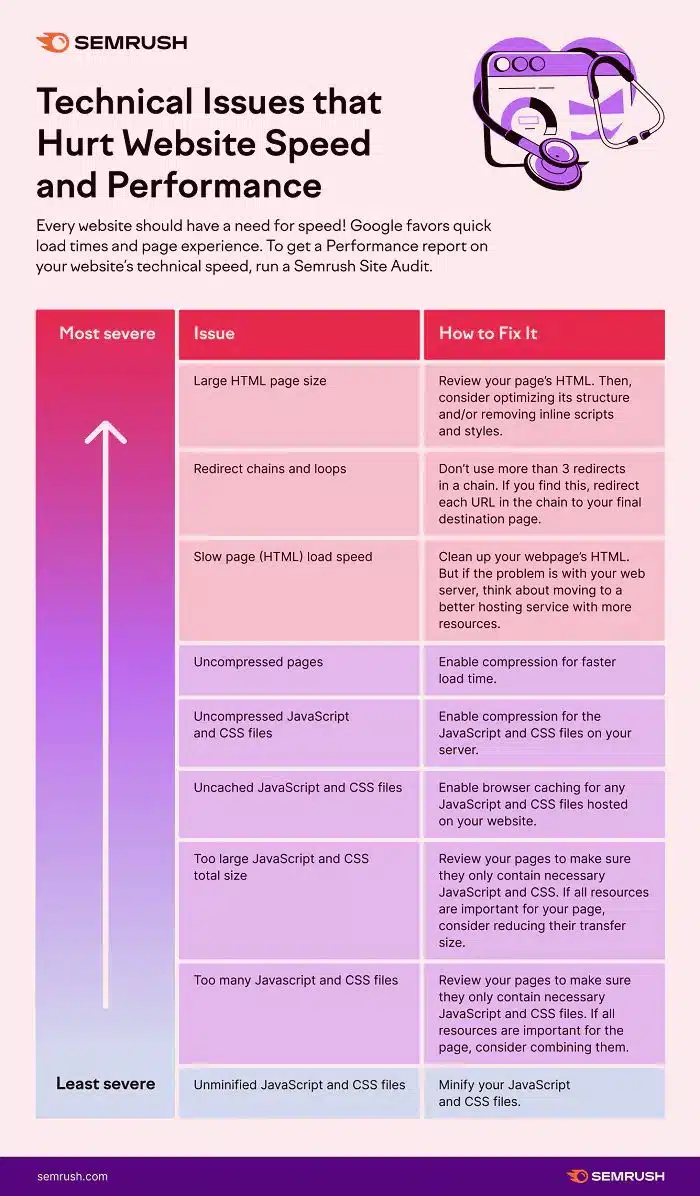
You’ll find some website basics in this infographic.
Here’s a summary of what’s covered:
- Large HTML Page Size
- Redirect Chains and Loops
- Slow Page (HTML) Load Speed
- Uncompressed Pages
- Uncompressed JavaScript and CSS Files
- Uncached JavaScript and CSS Files
- Too Large JavaScript and CSS Total Size
- Too Many JavaScript and CSS Files
- Unminified JavaScript and CSS Files
Check out the post below for more.
A fast, well-optimised website is more than just a luxury—it’s a necessity. Google’s ranking algorithms increasingly favour speed and performance, and your visitors do too. Long load times lead to higher bounce rates, lower engagement, and ultimately, fewer conversions. If your site feels sluggish, technical SEO issues may be to blame.
In this post, we’ll walk you through 9 common technical problems that could be dragging down your site’s speed and performance. We’ll explain what each one is, why it matters, and how to fix it with practical, actionable advice. Let’s uncover what’s slowing your site down—and how to speed it up.
Large HTML Page Size
When your HTML files are too large, your server takes longer to deliver them to the user’s browser. This slows down the initial loading process, even before images and scripts come into play. Oversized pages are often bloated with unnecessary inline scripts, styles, or poorly structured code. Trimming them down is a crucial first step toward a leaner, faster site.
- Review your HTML to remove redundant code and unnecessary content.
- Minimise the use of inline JavaScript and CSS styles.
- Use semantic HTML and proper structuring to reduce clutter.
- Consider using a CMS or website builder that outputs clean, optimised code.
Redirect Chains and Loops
Redirects are sometimes necessary, but when overused, they can create a chain reaction of delays. Every redirect adds extra load time, and if they loop or stack too deep, users may never reach the final page. Redirect chains are also bad for SEO, diluting link equity and confusing crawlers.
- Limit redirect chains to a maximum of three hops.
- Redirect each URL in the chain directly to the final destination.
- Audit your site regularly for outdated or unnecessary redirects.
- Use 301 redirects only when absolutely necessary for SEO continuity.
Slow Page (HTML) Load Speed
Slow-loading HTML delays everything else on the page, including scripts, images, and styles. This can lead to a frustrating user experience and negatively affect search rankings. Often the problem lies with inefficient HTML or an underpowered hosting environment. Optimising both can make a significant difference.
- Clean up your HTML to remove bloated code and reduce file size.
- Optimise server response time by upgrading your hosting plan.
- Use lazy loading techniques to defer non-critical resources.
- Monitor your site’s Time to First Byte (TTFB) with speed testing tools.
Uncompressed Pages
If your pages aren’t compressed before being served to the browser, they take longer to load. This is especially true for content-heavy pages that include lots of text and structural code. Compression helps reduce file sizes and speeds up data transfer between your server and the end user.
- Enable Gzip or Brotli compression on your web server.
- Test your site with tools like GTmetrix or PageSpeed Insights to confirm compression is active.
- Use server-side configurations or plugins to automate compression.
- Regularly audit your site’s compression settings after updates or migrations.
Uncompressed JavaScript and CSS Files
JavaScript and CSS are critical for rendering your website correctly—but they don’t need to be bulky. Uncompressed versions of these files can severely affect load times. Compressing them ensures faster delivery without altering functionality or design.
- Enable compression for JS and CSS files at the server level.
- Use tools like UglifyJS or CSSNano to automate the process.
- If you use a CMS, look for plugins that handle compression.
- Recompress files after major code changes to maintain optimisation.
Uncached JavaScript and CSS Files
When JavaScript and CSS files aren’t cached, the browser has to download them every time someone visits your site. This wastes bandwidth and increases load times, particularly for returning users. Caching allows these files to be stored locally and reused across sessions.
- Enable browser caching via your site’s .htaccess or server settings.
- Set appropriate expiry times for static assets like JS and CSS.
- Use a CDN (Content Delivery Network) to manage global caching.
- Test your site with Lighthouse or GTmetrix to confirm caching rules.
Too Large JavaScript and CSS Total Size
Even if your scripts and styles are compressed, they can still be too large overall. This is often the result of unnecessary code, unused libraries, or third-party tools. Reducing the total size of these files helps pages load faster and improves overall performance.
- Audit your code to remove unused functions, plugins, or frameworks.
- Replace large libraries with lighter alternatives where possible.
- Avoid loading multiple versions of the same script or framework.
- Bundle and minify files to reduce HTTP requests and total size.
Too Many JavaScript and CSS Files
Excessive numbers of script and style files lead to more HTTP requests, each of which takes time to complete. This is especially damaging on mobile connections and slower networks. Reducing the number of individual files will help improve load speed significantly.
- Combine multiple JS and CSS files into a single file where possible.
- Load critical scripts inline and defer non-essential ones.
- Use HTTP/2 or HTTP/3 protocols to handle multiple requests more efficiently.
- Audit third-party plugins to avoid redundant file loading.
Unminified JavaScript and CSS Files
Minification is the process of removing whitespace, comments, and unnecessary characters from code files. It reduces file size without changing how the code works. Skipping this step leaves your scripts and styles bloated and unnecessarily slow.
- Use build tools like Webpack, Gulp, or online minifiers to minify your code.
- Implement minification as part of your deployment process.
- Set up automation in your CMS or hosting environment to maintain minification.
- Test your minified files to ensure they still function as expected.
Conclusion
Your website’s speed isn’t just a technical concern—it’s a competitive advantage. Every second saved improves user experience, reduces bounce rates, and supports better rankings in search engine results. The issues we’ve covered—from bloated HTML to poorly managed scripts—are some of the most common culprits behind sluggish performance.
Addressing these technical SEO issues doesn’t require a complete site overhaul. Often, small, focused changes to how your pages are structured, delivered, and cached can lead to noticeable improvements. Use this guide as your checklist, fix the bottlenecks, and watch your site’s speed—and SEO—climb.

Author:
Mark Ford



