

Are you looking for ways to improve your website’s speed, SEO, and visual performance? Want to go beyond basic alt text and learn the most effective image optimisation tactics?
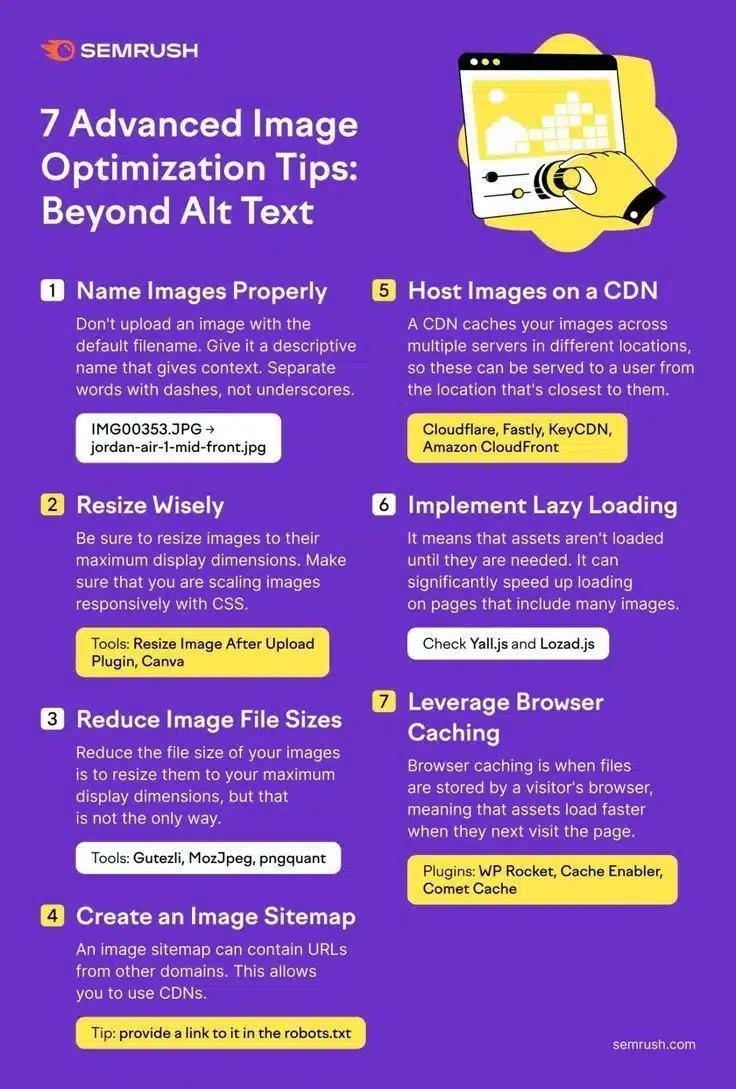
You’ll find some SEO basics in this infographic.
Here’s a summary of what’s covered:
- Name Images Properly
- Resize Wisely
- Reduce Image File Sizes
- Create an Image Sitemap
- Host Images on a CDN
- Implement Lazy Loading
- Leverage Browser Caching
Check out the post below for more.
When it comes to website optimisation, images are often overlooked. Many site owners stop at adding alt text and move on, missing out on the full potential of what image optimisation can do.
From improving SEO rankings to speeding up page load times, well-optimised images play a vital role in user experience and performance. In this guide, we’ll explore seven advanced image optimisation tactics that go beyond basic alt attributes.
Name Images Properly
Image file names aren’t just for organisation—they can influence search engine visibility. Default camera filenames like IMG001.jpg offer no value to users or search engines. Descriptive, keyword-relevant file names help Google understand what your image represents. This small step can make a big difference to SEO and image search rankings.
- Rename files to include relevant keywords that describe the image content.
- Use hyphens to separate words instead of underscores (e.g., blue-running-shoes.jpg).
- Avoid stuffing keywords—make filenames readable and natural.
- Keep file names concise but meaningful to help search engines index them properly.
Resize Wisely
Uploading images that are too large for their display size is one of the most common causes of slow websites. Always resize images to match the maximum dimensions they’ll be displayed at. Scaling images correctly ensures fast load times and improves the overall browsing experience. Use CSS and responsive design principles to maintain consistency across devices.
- Determine the largest size the image will display and resize accordingly.
- Use responsive image techniques like srcset for different screen resolutions.
- Avoid relying solely on HTML/CSS to scale large images down.
- Tools like Canva or the Resize Image After Upload Plugin can simplify the process.
Reduce Image File Sizes
Reducing the file size of your images speeds up loading without compromising too much on quality. This doesn’t just involve resizing—it also means using the right compression methods. Smaller file sizes make your site more efficient and can significantly lower bounce rates. The goal is to balance quality and performance.
- Use tools like Guetzli, MozJpeg, or pngquant for advanced compression.
- Experiment with file formats—sometimes switching from PNG to JPEG reduces size drastically.
- Remove unnecessary metadata from image files.
- Test and compare image quality after compression to avoid visual degradation.
Create an Image Sitemap
An image sitemap helps search engines discover and index your images more effectively. It’s especially useful if you’re using a CDN or serving images from multiple domains. By including image-specific URLs, you improve your chances of having visuals appear in image search results. This added visibility can drive extra traffic to your website.
- Include all image URLs in your sitemap—even those from external domains.
- Use Google’s recommended sitemap format for images.
- Provide a direct link to your image sitemap in the robots.txt file.
- Regularly update your sitemap as you add or remove images from your site.
Host Images on a CDN
A Content Delivery Network (CDN) hosts your images on servers around the world. When a visitor accesses your site, images are served from the server closest to their location. This minimises latency and speeds up image delivery, which is especially helpful for media-heavy websites. It also helps reduce server load and improves scalability.
- Use trusted CDN providers like Cloudflare, Fastly, KeyCDN, or Amazon CloudFront.
- Ensure your images are correctly cached and optimised across the network.
- Integrate CDN support into your CMS or website builder for easier setup.
- Monitor image delivery performance to assess CDN effectiveness.
Implement Lazy Loading
Lazy loading delays the loading of images until they’re needed—usually when they enter the user’s viewport. This approach can significantly reduce initial page load times, especially on long or media-rich pages. It also improves the perceived performance of your site, keeping visitors engaged while content loads progressively.
- Use JavaScript libraries like Lozad.js or Yall.js to set up lazy loading.
- Ensure fallbacks are in place for older browsers that don’t support lazy loading.
- Apply lazy loading selectively to non-critical images like banners or footers.
- Test your implementation to confirm images appear correctly as users scroll.
Leverage Browser Caching
Browser caching stores image files in a visitor’s browser, allowing faster load times on repeat visits. Instead of downloading the same images every time, the browser retrieves them from local storage. This not only reduces bandwidth use but also makes your website feel faster and more responsive. It’s a simple but powerful optimisation.
- Set long expiration dates for static assets like images using HTTP headers.
- Use plugins like WP Rocket, Cache Enabler, or Comet Cache for easy implementation.
- Combine browser caching with CDN delivery for even greater speed gains.
- Regularly clear and update your cache settings when images are replaced or updated.
Conclusion
Optimising images is about more than just ticking the alt text box—it’s about creating a faster, more accessible, and SEO-friendly website. By naming files strategically, resizing appropriately, compressing efficiently, and using advanced techniques like lazy loading and CDNs, you can significantly boost your site’s performance.
These seven tactics provide a comprehensive approach that benefits both your users and your rankings. Don’t let poorly optimised images slow you down—put these strategies to work and take your site to the next level.

Author:
Mark Ford



