

Are you looking for ways to quickly boost your rankings on Google? Want some actionable tips you can easily implement yourself?
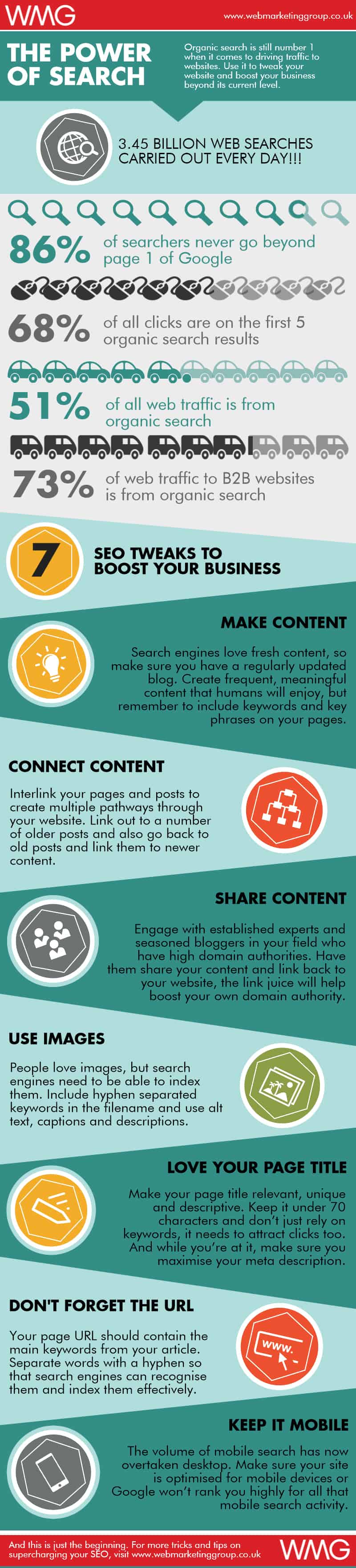
Web Marketing Group share their steps to success in this infographic.
Here’s a quick summary:
- Create content
- Connect content
- Share content
- Use images
- Optimise your page title
- Optimise your URL
- Optimise for mobile
Check out the infographic for more detail.
In the vast digital landscape, standing out on Google can seem like a monumental task. However, by implementing some straightforward and actionable SEO tips, you can significantly enhance your online visibility.
Here are seven effective strategies to boost your presence on Google.
Create Content
Creating content is the backbone of any effective SEO strategy. For small businesses, this is particularly important as it helps establish authority, attract potential customers, and engage with your target audience.
Here are some in-depth tips and guidance for small businesses to create compelling content that drives results:
Understand Your Audience
To create content that resonates with your audience, you first need to understand who they are. Here’s how to get started:
- Conduct Market Research: Use surveys, focus groups, and customer feedback to gather insights about your target audience’s preferences, challenges, and needs.
- Analyze Competitors: Look at what your competitors are doing well and identify gaps in their content that you can fill.
- Develop Buyer Personas: Create detailed profiles of your ideal customers, including demographics, interests, and pain points. This helps tailor your content to address their specific needs.
Conduct Keyword Research
Keyword research is crucial for understanding what your audience is searching for and ensuring your content is discoverable. Here’s how to approach it:
- Use Keyword Tools: Tools like Google Keyword Planner, Ahrefs, and SEMrush can help you find relevant keywords with good search volume and low competition.
- Focus on Long-Tail Keywords: These are longer, more specific phrases that users are more likely to use when they’re closer to making a purchase. For example, instead of “shoes,” use “best running shoes for flat feet.”
- Analyze Search Intent: Understand the intent behind the keywords. Are users looking for information, a product, or a solution? Tailor your content to meet that intent.
Create High-Quality Content
Quality content is informative, engaging, and valuable to your audience. Here are some tips to ensure your content stands out:
- In-Depth Research: Ensure your content is well-researched and backed by credible sources. Providing accurate and comprehensive information builds trust and authority.
- Engaging Writing: Write in a clear, conversational tone that resonates with your audience. Use storytelling techniques to make your content more relatable and engaging.
- Structure and Readability: Break your content into short paragraphs, use headings and subheadings, and include bullet points and lists. This makes your content easier to read and digest.
- Originality: Avoid duplicate content. Ensure your content is unique and offers a fresh perspective on the topic.
Diversify Your Content Formats
Different formats can appeal to different segments of your audience. Here’s how to diversify your content:
- Blog Posts: Regular blog posts can address common questions, provide how-to guides, and share industry news.
- Videos: Create tutorials, product demonstrations, or behind-the-scenes videos to engage users who prefer visual content.
- Infographics: Visual representations of data and information can be more engaging and shareable.
- Podcasts: Launch a podcast to discuss industry trends, interview experts, and provide valuable insights.
- Interactive Content: Quizzes, calculators, and polls can engage users and provide personalized experiences.
Create a Content Calendar
A content calendar helps you plan and organize your content creation efforts. Here’s how to set one up:
- Plan Ahead: Schedule your content for the upcoming months, considering seasonal trends and important dates.
- Balance Topics: Ensure a mix of topics that address different stages of the buyer’s journey—from awareness to consideration to decision.
- Set Deadlines: Assign deadlines to ensure consistent content production and publication.
Promote User-Generated Content
Encouraging your audience to create content related to your brand can boost engagement and provide fresh perspectives. Here’s how:
- Run Contests: Organize contests that encourage users to share their experiences with your products or services.
- Feature Customer Stories: Share testimonials, case studies, and user reviews on your website and social media.
- Create a Community: Build a community around your brand where users can share tips, ask questions, and provide feedback.
Update and Repurpose Existing Content
Maximize the value of your existing content by keeping it updated and repurposing it into different formats. Here’s how:
- Regular Updates: Periodically review your content and update it with the latest information and insights.
- Repurpose Content: Turn a blog post into a video, an infographic, or a podcast episode to reach a wider audience.
- Optimize Old Content: Revisit old posts and optimize them for new keywords, better readability, and improved SEO performance.
Leverage Local Content
For small businesses, local content can be particularly effective in attracting nearby customers. Here’s how to leverage it:
- Local Keywords: Use location-based keywords (e.g., “best pizza in [city]”) to attract local search traffic.
- Local Events: Create content around local events, news, and activities to engage with your community.
- Customer Spotlights: Feature stories about local customers and their experiences with your business.
Measure and Analyze Your Content Performance
To understand what’s working and what’s not, you need to measure and analyze your content performance. Here’s how:
- Use Analytics Tools: Tools like Google Analytics and Google Search Console can provide insights into your content’s performance, including traffic, engagement, and conversions.
- Monitor Key Metrics: Track metrics such as page views, bounce rate, average time on page, and social shares to gauge your content’s effectiveness.
- Adjust Your Strategy: Use the data to refine your content strategy, focusing on what resonates most with your audience and driving the best results.
By following these in-depth tips and guidelines, small businesses can create content that not only attracts and engages their target audience but also enhances their visibility and authority on Google. Content creation is an ongoing process, and continuous improvement is key to long-term success in the digital landscape.
Connect Content
Internal linking, or connecting content within your website, is a vital SEO strategy that helps search engines understand the structure of your site and the relationship between different pages.
For small businesses, effective internal linking can enhance user experience, boost SEO rankings, and guide visitors through your site’s content seamlessly.
Here’s a detailed guide on how to effectively connect your content:
Understand the Importance of Internal Linking
Internal linking offers several benefits that are crucial for SEO and user experience:
- Improves Site Navigation: Helps users find related content easily, enhancing their overall experience.
- Distributes Page Authority: Passes link equity (ranking power) from one page to another, helping important pages rank higher.
- Defines Site Architecture: Establishes a hierarchy, showing which pages are most important.
- Boosts Engagement: Encourages visitors to spend more time on your site, reducing bounce rates.
Create a Logical Site Structure
A well-organized site structure is the foundation of effective internal linking. Here’s how to create it:
- Hierarchy of Pages: Organize your content into a clear hierarchy, with main categories and subcategories. This makes it easier for search engines and users to understand the structure.
- Pillar Pages and Clusters: Use a pillar-cluster model where pillar pages cover broad topics and cluster pages delve into more specific aspects. Link cluster pages back to their corresponding pillar page.
- Breadcrumbs: Implement breadcrumb navigation to show users their location within your site and provide easy access to higher-level pages.
Identify Key Pages
Not all pages are created equal. Identify the key pages on your site that are crucial for your business objectives and focus your internal linking efforts on them:
- High-Value Pages: Pages that drive conversions, such as product or service pages.
- Content-Rich Pages: Informative articles or blog posts that provide significant value to your audience.
- Cornerstone Content: Comprehensive, authoritative content that covers important topics in-depth.
Use Contextual Links
Contextual links are links within the body of your content that direct readers to related content. Here’s how to use them effectively:
- Relevance: Ensure the linked content is relevant to the current page’s topic. This provides value to the reader and enhances SEO.
- Anchor Text: Use descriptive anchor text that includes relevant keywords. Avoid generic phrases like “click here” and opt for text that gives users an idea of what they’ll find on the linked page.
- Natural Placement: Place links naturally within the flow of your content. Forced or unnatural links can disrupt the reading experience.
Implement Deep Linking
Deep linking refers to linking to pages within your site rather than just the homepage or top-level pages. Here’s why and how to do it:
- Encourages Exploration: Guides users to more specific, valuable content, keeping them engaged longer.
- Boosts SEO for Subpages: Helps lower-level pages gain visibility and authority, improving their chances of ranking.
- Balance Link Distribution: Ensure that link equity is distributed throughout your site, not just concentrated on a few pages.
Use a Variety of Internal Link Types
Diversifying your internal links can enhance user experience and SEO. Here are some types to consider:
- Navigational Links: Include links in menus, footers, and sidebars to guide users to important sections of your site.
- Inline Links: Embed links within the content to direct readers to related articles or pages.
- Related Posts: At the end of blog posts, include a section with links to related articles to encourage further reading.
- Call-to-Actions (CTAs): Use CTAs within your content to guide users to action-oriented pages like product pages, sign-up forms, or contact pages.
Regularly Audit Your Internal Links
Conducting regular audits of your internal links helps maintain their effectiveness and uncover any issues. Here’s how:
- Check for Broken Links: Use tools like Google Search Console or Screaming Frog to identify and fix broken links that can harm user experience and SEO.
- Update Old Content: When you publish new content, update older articles with links to the new pages to keep them relevant and interconnected.
- Ensure Link Quality: Remove or replace any low-quality or irrelevant links that don’t add value.
Use Tools for Internal Linking
Several tools can help you manage and optimize your internal linking strategy:
- SEO Plugins: WordPress plugins like Yoast SEO can provide suggestions for internal links and highlight opportunities to improve your link structure.
- Link Management Tools: Tools like Link Whisper can automate the process of finding and adding internal links, saving you time and ensuring comprehensive coverage.
- Analytics Tools: Google Analytics and other analytics tools can provide insights into how users navigate your site, helping you identify areas for improvement.
Monitor and Measure Impact
It’s essential to monitor the impact of your internal linking strategy and make adjustments as needed. Here’s how:
- Track Metrics: Use analytics to track key metrics such as bounce rate, average session duration, and page views per session to assess the effectiveness of your internal links.
- User Behavior: Analyze user behavior data to understand how visitors are interacting with your internal links and identify any bottlenecks or issues.
- Adjust Strategy: Based on your findings, tweak your internal linking strategy to better meet user needs and achieve your SEO goals.
Encourage Natural Linking
Natural internal links occur when your content is genuinely interrelated, and linking between pages happens organically. Here’s how to encourage this:
- Create Comprehensive Guides: Develop in-depth guides or resource hubs that naturally link to various related articles.
- Content Series: Produce a series of related articles that build on each other, encouraging natural linking between them.
- Regular Content Reviews: Periodically review your content to identify new internal linking opportunities and ensure all related content is interconnected.
By following these in-depth tips and guidelines, small businesses can effectively connect their content, enhancing both user experience and SEO performance. Internal linking is a continuous process that, when done correctly, can significantly contribute to the overall success of your digital marketing efforts.
Share Content
Creating high-quality content is essential, but sharing it effectively is just as crucial. For small businesses, strategic content sharing can increase visibility, drive traffic, and engage your target audience.
Here’s an in-depth guide on how to share your content effectively:
Leverage Social Media
Social media platforms are powerful tools for content distribution. Here’s how to maximize their potential:
- Identify the Right Platforms: Focus on the social media channels where your target audience is most active. For example, B2B businesses might find LinkedIn more effective, while B2C businesses may benefit from platforms like Instagram, Facebook, or Pinterest.
- Create Platform-Specific Content: Tailor your content to fit the style and audience of each platform. For instance, use high-quality images and short, engaging captions on Instagram, while sharing more detailed, professional updates on LinkedIn.
- Engage with Your Audience: Don’t just post content; interact with your followers. Respond to comments, participate in conversations, and show appreciation for user-generated content. Engagement helps build a loyal community and can boost your content’s visibility.
- Use Hashtags Strategically: Research and use relevant hashtags to increase the reach of your posts. Don’t overdo it; focus on a mix of popular and niche hashtags that are relevant to your content and audience.
- Schedule Posts: Consistency is key in social media marketing. Use scheduling tools like Buffer, Hootsuite, or Sprout Social to plan and automate your posts, ensuring a steady stream of content.
Engage with Online Communities
Joining and participating in online communities can drive targeted traffic to your content. Here’s how to do it effectively:
- Identify Relevant Communities: Find forums, groups, and communities related to your industry on platforms like Reddit, Quora, Facebook Groups, and LinkedIn Groups.
- Provide Value First: Focus on providing valuable insights and answering questions rather than just promoting your content. Build trust and credibility within the community.
- Share Content Strategically: When sharing your content, ensure it’s highly relevant to the discussion and provides genuine value. Avoid spamming and follow the community rules to maintain a positive reputation.
- Be Consistent: Regular participation in these communities helps establish your presence and can lead to more opportunities for sharing your content and attracting followers.
Utilize Email Marketing
Email marketing is one of the most effective ways to share your content directly with your audience. Here’s how to make the most of it:
- Build a Quality Email List: Focus on growing an email list of engaged subscribers who are genuinely interested in your content. Use lead magnets, such as eBooks, guides, or discounts, to encourage sign-ups.
- Segment Your Audience: Divide your email list into segments based on factors like demographics, purchase history, or engagement levels. This allows you to send targeted, relevant content to each group.
- Craft Compelling Emails: Write engaging subject lines and create valuable, well-designed email content. Use a mix of text, images, and clear calls-to-action to encourage clicks and engagement.
- Regular Newsletters: Send regular newsletters featuring your latest content, industry news, and exclusive offers. Consistency helps keep your audience engaged and informed.
- Analyze Performance: Use email marketing tools like Mailchimp, Constant Contact, or Sendinblue to track open rates, click-through rates, and other metrics. Use this data to refine your email strategy.
Collaborate with Influencers
Partnering with influencers can significantly amplify your content’s reach. Here’s how to approach influencer collaboration:
- Identify Relevant Influencers: Look for influencers in your niche who have an engaged following that matches your target audience. Micro-influencers (with smaller but highly engaged audiences) can be particularly effective for small businesses.
- Build Relationships: Engage with influencers by commenting on their posts, sharing their content, and building a genuine relationship before proposing a collaboration.
- Offer Value: When reaching out to influencers, clearly outline how the collaboration will benefit them. This could be through free products, monetary compensation, or exposure to your audience.
- Create Authentic Partnerships: Ensure that any collaborations are authentic and align with your brand values. Authentic endorsements are more likely to resonate with the influencer’s audience.
- Track Results: Use unique links or discount codes to track the performance of influencer collaborations. Analyze the impact on traffic, engagement, and conversions to assess the effectiveness of the partnership.
Utilize Content Syndication
Content syndication involves republishing your content on third-party platforms to reach a wider audience. Here’s how to do it effectively:
- Identify Syndication Partners: Look for reputable platforms in your industry that accept syndicated content. Examples include Medium, LinkedIn Pulse, or industry-specific blogs and publications.
- Follow Syndication Guidelines: Each platform has its own guidelines for content syndication. Ensure you follow these rules to avoid duplicate content issues and to maximize the benefits.
- Include Canonical Links: When syndicating content, use canonical links to point back to the original post on your site. This helps search engines understand the source of the content and prevents duplicate content penalties.
- Monitor Performance: Track the performance of your syndicated content using analytics tools. Measure metrics like referral traffic, engagement, and conversions to evaluate the effectiveness of your syndication strategy.
Repurpose Content
Repurposing content allows you to reach new audiences and extend the lifespan of your existing content. Here’s how to do it:
- Transform Blog Posts into Videos: Convert popular blog posts into engaging videos. Use tools like Animoto or Lumen5 to create videos that can be shared on platforms like YouTube and social media.
- Create Infographics: Turn data-heavy articles or research into visually appealing infographics. Infographics are highly shareable and can attract backlinks.
- Develop Slide Decks: Repurpose content into slide decks that can be shared on platforms like SlideShare or used in presentations.
- Host Webinars or Live Sessions: Use your content as the basis for webinars or live Q&A sessions. This allows you to engage with your audience in real-time and gather feedback.
- Write Guest Posts: Adapt your existing content into guest posts for other blogs or publications in your industry. This can help you reach new audiences and build backlinks.
Optimize for Search Engines
SEO plays a crucial role in making your content discoverable. Here’s how to optimize your content for search engines:
- Use Relevant Keywords: Incorporate relevant keywords naturally throughout your content, including in titles, headings, and meta descriptions.
- Optimize Meta Tags: Write compelling meta titles and descriptions that include target keywords and entice users to click.
- Include Internal and External Links: Link to other relevant pages on your site as well as authoritative external sources. This improves your content’s credibility and SEO value.
- Encourage Backlinks: Reach out to industry websites and bloggers to share your content and encourage them to link back to it. High-quality backlinks can significantly boost your search rankings.
- Use Schema Markup: Implement schema markup to provide search engines with additional information about your content. This can enhance your visibility in search results with rich snippets.
Utilize Paid Promotion
While organic reach is important, paid promotion can give your content an additional boost. Here’s how to effectively use paid promotion:
- Social Media Ads: Use social media advertising on platforms like Facebook, Instagram, LinkedIn, or Twitter to promote your content to a targeted audience. Utilize detailed targeting options to reach the right people.
- Google Ads: Run Google Ads campaigns to promote your content through search ads, display ads, or YouTube ads. This can drive immediate traffic to your site.
- Sponsored Content: Partner with industry websites or influencers to create sponsored content that promotes your brand. Sponsored content can provide exposure to new audiences.
- Retargeting Campaigns: Use retargeting ads to re-engage users who have previously visited your site but didn’t convert. Retargeting can remind them of your valuable content and bring them back to your site.
By following these in-depth tips and strategies, small businesses can effectively share their content, reaching a wider audience and driving more traffic and engagement. Content sharing is a continuous process that requires regular monitoring and adjustment to achieve the best results.
Use Images
Images play a crucial role in enhancing your content’s appeal and effectiveness. They can improve user engagement, boost SEO, and convey complex information quickly. For small businesses, leveraging images effectively can make a significant impact on your digital presence.
Here’s an in-depth guide on how to use images strategically:
Optimize Image Quality and Size
High-quality images can captivate your audience, but large files can slow down your website. Here’s how to balance quality and performance:
- Compress Images: Use tools like TinyPNG, JPEG-Optimizer, or ImageOptim to reduce file sizes without compromising quality. Smaller image files load faster, improving user experience and SEO.
- Choose the Right Format: Use appropriate file formats for your images. JPEGs are suitable for photographs and complex images, while PNGs are better for images requiring transparency and simpler graphics. WebP is a newer format that provides superior compression.
- Resize Images: Scale images to the correct dimensions before uploading them to your website. Avoid relying on HTML or CSS to resize images as this can slow down page load times.
Use Descriptive File Names
Before uploading images, rename the files with descriptive, keyword-rich names. This practice helps search engines understand the content of your images and improves your chances of appearing in image search results:
- Be Specific: Instead of generic names like “IMG1234.jpg,” use descriptive names like “organic-green-tea-packaging.jpg.”
- Include Keywords: Incorporate relevant keywords that reflect the content of the image and align with your SEO strategy.
Add Alt Text
Alt text (alternative text) is a description of an image that helps search engines understand its content. It also improves accessibility for users with visual impairments who rely on screen readers:
- Be Descriptive and Concise: Write clear and concise descriptions that accurately describe the image. Include relevant keywords naturally, but avoid keyword stuffing.
- Improve Accessibility: Alt text should convey the purpose and content of the image to users who cannot see it. This enhances the user experience for visually impaired visitors.
Implement Structured Data for Images
Structured data (schema markup) provides search engines with additional information about your images, improving their visibility in search results:
- ImageObject Schema: Use the ImageObject schema to provide details about your images, such as the URL, description, and author. This can enhance your images’ appearance in search results with rich snippets.
- Sitemap Inclusion: Include images in your XML sitemap to help search engines discover and index them more efficiently.
Use High-Quality, Relevant Images
Images should complement and enhance your content. Here’s how to select and use images effectively:
- Ensure Relevance: Choose images that are directly related to your content. They should help illustrate your points, provide context, or add visual interest.
- High Resolution: Use high-resolution images that appear crisp and professional. Avoid blurry or pixelated images as they can negatively impact your credibility.
- Authentic Imagery: Use original images whenever possible. Stock photos can be useful, but unique, authentic images of your products, team, or customers can have a greater impact.
Optimize Images for SEO
Optimizing images for search engines can improve your site’s visibility and drive more traffic. Here’s how:
- Descriptive Captions: Use captions to provide additional context for your images. Captions can enhance user engagement and provide more opportunities for keyword placement.
- Structured URLs: Use a logical structure for image URLs, such as “yourwebsite.com/images/product-name.jpg.” This helps search engines understand and index your images.
- Lazy Loading: Implement lazy loading to defer loading images until they are needed. This can improve page load times, especially for content-heavy pages.
Utilize Various Types of Images
Different types of images can serve various purposes and engage users in unique ways. Here are some types to consider:
- Product Images: High-quality images of your products from multiple angles can enhance your product pages and improve conversion rates.
- Infographics: Visual representations of data and information can make complex topics more digestible and shareable.
- Charts and Graphs: Use charts and graphs to present statistical data in a visually appealing way.
- Illustrations: Custom illustrations can add a unique touch to your content and help explain concepts more effectively.
- User-Generated Content: Encourage customers to share photos of your products in use. Featuring these images can build trust and community.
Create Image Galleries and Slideshows
Image galleries and slideshows can enhance user engagement by showcasing multiple images in an interactive format:
- Product Showcases: Use galleries to display a collection of product images, highlighting different features and use cases.
- Event Highlights: Share images from company events, trade shows, or customer gatherings to build a sense of community and engagement.
- Portfolio Displays: For businesses in creative industries, use galleries to showcase your work and demonstrate your capabilities.
Leverage Social Media for Image Sharing
Social media platforms are highly visual, making them ideal for sharing images. Here’s how to maximize their impact:
- Consistent Branding: Use images that align with your brand’s visual identity. Consistency in colors, fonts, and styles can strengthen brand recognition.
- Engage with Visual Content: Share images that encourage interaction, such as behind-the-scenes photos, user-generated content, and promotional graphics.
- Use Stories and Reels: Utilize features like Instagram Stories, Facebook Stories, and TikTok Reels to share quick, engaging visual content that can drive traffic to your website.
Monitor and Analyze Image Performance
Track the performance of your images to understand what resonates with your audience and optimize accordingly:
- Analytics Tools: Use tools like Google Analytics to monitor metrics such as image views, click-through rates, and engagement levels.
- Heatmaps: Tools like Hotjar or Crazy Egg can show you where users are clicking and how they interact with your images.
- Adjust Strategy: Based on the data, refine your image strategy to focus on what works best for your audience.
Protect Your Images
Protecting your images from unauthorized use is important for maintaining your brand’s integrity:
- Watermarking: Add watermarks to your images to deter unauthorized use while still allowing them to be shared.
- Copyright Notices: Include copyright notices on your website to inform users of your image use policies.
- Image Licensing: Use licensed images and ensure you have the proper permissions to use any third-party images.
By following these in-depth tips and strategies, small businesses can effectively use images to enhance their content, improve SEO, and engage their audience. Images are a powerful tool in your digital marketing arsenal, and when used strategically, they can significantly boost your online presence.
Optimize Your Page Title
The page title, also known as the title tag, is one of the most critical on-page SEO elements. It’s the first thing users see in search engine results and can significantly influence your click-through rate (CTR). Optimizing your page title effectively can boost your search rankings and attract more visitors to your website.
Here’s an in-depth guide on how to craft compelling and SEO-friendly page titles:
Understand the Importance of Page Titles
Page titles play a crucial role in both SEO and user experience:
- SEO Value: Search engines use page titles to understand the content of your page. An optimized title helps search engines determine the relevancy of your page for specific queries.
- User Attraction: A well-crafted title can entice users to click on your link over others in the search results, increasing your CTR.
- Brand Impression: The page title is often the first impression users have of your brand. A clear, compelling title can convey professionalism and relevance.
Conduct Keyword Research
Incorporating relevant keywords into your page titles is essential for SEO. Here’s how to do it effectively:
- Identify Primary Keywords: Use tools like Google Keyword Planner, Ahrefs, or SEMrush to find keywords that are relevant to your content and have a good search volume.
- Analyze Search Intent: Understand the intent behind the keywords. Are users looking for information, making a purchase, or seeking a specific solution? Tailor your titles to match this intent.
- Use Long-Tail Keywords: Long-tail keywords are more specific and often less competitive. They can attract more targeted traffic. For example, instead of “shoes,” use “best running shoes for flat feet.”
Craft Compelling Titles
A compelling page title should be both SEO-friendly and enticing to users. Here are some tips:
- Incorporate Keywords Naturally: Place your primary keyword towards the beginning of the title, but ensure it reads naturally. Avoid keyword stuffing.
- Use Action Words: Action words like “discover,” “learn,” “buy,” or “get” can make your titles more engaging and encourage clicks.
- Highlight Benefits: Clearly state the benefit or value of clicking on your link. For example, “Learn 10 Effective SEO Strategies for Small Businesses” is more enticing than “SEO Strategies.”
- Create a Sense of Urgency: Phrases like “now,” “today,” or “limited time” can create a sense of urgency and encourage immediate action.
Keep Titles Concise and Descriptive
Search engines typically display the first 50-60 characters of a page title. Here’s how to make sure your titles fit this limit:
- Stay Within the Character Limit: Aim for 50-60 characters to ensure your entire title is visible in search results. If your title is too long, it may be truncated, which can reduce its impact.
- Be Specific: Clearly describe what the page is about. Vague or misleading titles can result in high bounce rates and lower rankings.
- Avoid Redundancy: Keep your titles concise and to the point. Avoid unnecessary words or repetition.
Include Your Brand Name
Including your brand name in your page titles can enhance brand recognition and trust. Here’s how to do it effectively:
- Brand at the End: Place your brand name at the end of the title, separated by a vertical bar or dash. For example, “10 Tips for Effective Email Marketing | YourCompanyName.”
- Use for Key Pages: Include your brand name in titles for key pages, such as your homepage, about page, and main product or service pages.
- Maintain Consistency: Ensure consistent use of your brand name across all page titles to build a cohesive brand image.
Use Numbers and Power Words
Incorporating numbers and power words in your titles can make them more appealing and clickable:
- Use Numbers: Titles with numbers often perform better because they indicate clear, actionable information. For example, “5 Easy Steps to Improve Your SEO.”
- Power Words: Words like “ultimate,” “essential,” “proven,” and “exclusive” can make your titles more persuasive and enticing.
Avoid Duplicate Titles
Each page on your site should have a unique title to prevent confusion and ensure maximum SEO value. Here’s how to manage this:
- Unique Titles: Ensure each page title is unique and accurately reflects the content of the page. Duplicate titles can confuse search engines and dilute your SEO efforts.
- Content Management Systems: Use features in your CMS (like WordPress) to help manage and automate the creation of unique titles for different pages.
Test and Refine Your Titles
Continuous testing and refinement can help you identify the most effective titles. Here’s how to do it:
- A/B Testing: Use A/B testing tools to compare different versions of your page titles and see which ones perform better in terms of CTR and engagement.
- Analyze Performance: Monitor metrics such as CTR, bounce rate, and average session duration to gauge the effectiveness of your titles.
- Iterate and Improve: Use the insights gained from testing to refine and optimize your titles continuously.
Utilize Tools for Title Optimization
Several tools can assist you in crafting and optimizing your page titles:
- Yoast SEO: A popular WordPress plugin that provides real-time feedback on your page titles and overall SEO.
- CoSchedule Headline Analyzer: Helps analyze the effectiveness of your headlines and provides suggestions for improvement.
- SERPsim: A tool that allows you to preview how your titles will appear in search results and ensure they fit within the character limit.
Consider User Experience
While optimizing for SEO is important, user experience should also be a priority:
- Avoid Clickbait: Ensure your titles accurately reflect the content of your page. Misleading titles can lead to high bounce rates and damage your credibility.
- Enhance Readability: Use clear and simple language. Avoid jargon and complex terms that might confuse users.
- Focus on Relevance: Make sure your titles are relevant to the content of your page and provide a clear expectation of what users will find.
By following these in-depth tips and strategies, small businesses can craft compelling, SEO-friendly page titles that attract clicks and improve search rankings. Optimizing your page titles is a critical step in your SEO strategy and can significantly impact your online visibility and success.
Optimize Your URL
A well-structured URL is crucial for both SEO and user experience. Optimizing your URLs helps search engines understand your content better and makes it easier for users to navigate your site. For small businesses, a clear and concise URL structure can improve search rankings and attract more visitors.
Here’s an in-depth guide on how to optimize your URLs effectively:
Understand the Importance of URL Optimization
URLs are more than just web addresses; they play a significant role in SEO and user experience:
- SEO Value: Search engines use URLs to understand the context and content of a page. An optimized URL can improve your page’s relevancy for search queries.
- User Experience: Clear and descriptive URLs help users understand what a page is about before they click on the link, increasing the likelihood of clicks and engagement.
- Trust and Credibility: Clean and readable URLs look more professional and trustworthy to users, which can enhance your brand’s credibility.
Use Keywords in URLs
Incorporating relevant keywords into your URLs can improve your SEO by signaling to search engines what your page is about:
- Primary Keywords: Include your primary keyword in the URL to enhance relevancy. For example, if your primary keyword is “organic coffee,” your URL could be “yourwebsite.com/organic-coffee.”
- Avoid Keyword Stuffing: Use keywords naturally and avoid overloading your URL with too many keywords. Keyword stuffing can look spammy and harm your SEO efforts.
Keep URLs Short and Simple
Shorter URLs are easier to read, remember, and share. Here’s how to keep your URLs concise:
- Eliminate Unnecessary Words: Remove stop words like “and,” “or,” “the,” and other filler words. For instance, use “yourwebsite.com/best-coffee-beans” instead of “yourwebsite.com/the-best-coffee-beans-you-can-buy.”
- Use Hyphens: Separate words with hyphens (-) rather than underscores (_) or spaces. Hyphens are easier to read and preferred by search engines.
- Limit Length: Aim for URLs that are around 50-60 characters long. If your URL is too long, it might get truncated in search results.
Ensure URLs Are Descriptive
A descriptive URL helps users and search engines understand the content of your page at a glance:
- Reflect the Content: Make sure your URL accurately reflects the content of your page. For example, “yourwebsite.com/coffee-brewing-tips” clearly indicates that the page contains tips on brewing coffee.
- Avoid Random Characters: Avoid using random numbers, characters, or meaningless strings in your URLs. These can confuse users and offer no SEO value.
Use a Consistent URL Structure
A consistent URL structure across your site helps with organization and navigation:
- Hierarchical Structure: Use a logical, hierarchical structure that reflects your site’s content organization. For example, “yourwebsite.com/products/coffee-makers” indicates a product category page for coffee makers.
- Subfolders Over Subdomains: When possible, use subfolders (e.g., “yourwebsite.com/blog”) instead of subdomains (e.g., “blog.yourwebsite.com”). Subfolders tend to perform better for SEO.
- Avoid Deep Nesting: Limit the number of subfolders to keep URLs simple and avoid deep nesting. For example, “yourwebsite.com/products/coffee-makers” is preferable to “yourwebsite.com/products/appliances/kitchen/coffee-makers.”
Implement URL Redirection Properly
Proper URL redirection ensures that users and search engines are directed to the correct pages, preserving your SEO efforts:
- 301 Redirects: Use 301 redirects to permanently redirect users and search engines from old URLs to new ones. This passes most of the SEO value from the old URL to the new one.
- Avoid 302 Redirects: Avoid using 302 redirects for permanent changes, as these are meant for temporary redirects and do not pass SEO value.
- Update Internal Links: Ensure all internal links point to the correct URLs after making changes. This prevents broken links and ensures a seamless user experience.
Monitor and Fix Broken Links
Broken links can harm your SEO and frustrate users. Regularly monitor and fix broken links to maintain a healthy URL structure:
- Use Tools: Tools like Google Search Console, Screaming Frog, and Ahrefs can help you identify broken links on your site.
- Regular Audits: Conduct regular audits of your site to find and fix broken links promptly.
- Custom 404 Pages: Create a custom 404 error page that provides helpful information and links to important pages on your site. This improves the user experience even when they encounter a broken link.
Use Canonical Tags
Canonical tags help prevent duplicate content issues by indicating the preferred version of a page to search engines:
- Rel=Canonical: Add a rel=canonical tag to the HTML head of your pages to specify the canonical URL. This tells search engines which version of a page should be indexed.
- Consistent Usage: Ensure that canonical tags are used consistently across your site to avoid confusion and duplication.
Optimize for Mobile
With the increasing use of mobile devices, it’s crucial to ensure your URLs are mobile-friendly:
- Responsive Design: Use responsive design to ensure your website, including URLs, functions well on all devices. Mobile-friendly websites are favored by search engines and provide a better user experience.
- Short URLs: Short URLs are easier to type and share on mobile devices, enhancing usability and user experience.
Analyze URL Performance
Regularly analyze the performance of your URLs to identify areas for improvement:
- Track Metrics: Use tools like Google Analytics to track metrics such as page views, bounce rates, and conversion rates for different URLs.
- User Behavior: Analyze user behavior to understand how visitors interact with your URLs. This can provide insights into how to optimize your URLs further.
Best Practices for Specific Types of Pages
Different types of pages may require specific URL optimization strategies. Here’s how to approach some common page types:
- Homepage: Keep your homepage URL simple and short, such as “yourwebsite.com.” Avoid unnecessary words or characters.
- Product Pages: Include the product name and relevant keywords in the URL, e.g., “yourwebsite.com/product/organic-coffee-beans.”
- Blog Posts: Use descriptive and keyword-rich URLs for blog posts, e.g., “yourwebsite.com/blog/coffee-brewing-tips.”
- Category Pages: Reflect the category in the URL, e.g., “yourwebsite.com/category/coffee-makers.”
By following these in-depth tips and strategies, small businesses can optimize their URLs effectively, enhancing both SEO and user experience. A well-structured and optimized URL can significantly impact your website’s visibility, traffic, and overall success.
Optimize for Mobile
With the growing prevalence of mobile internet usage, optimizing your website for mobile devices is no longer optional—it’s essential.
Mobile optimization ensures that your site provides a seamless and user-friendly experience on smartphones and tablets, which can significantly impact your SEO rankings, user engagement, and conversion rates.
Here’s an in-depth guide for small businesses on how to optimize your website for mobile:
Understand the Importance of Mobile Optimization
Mobile optimization offers several critical benefits:
- SEO Advantage: Google uses mobile-first indexing, meaning it predominantly uses the mobile version of a site for indexing and ranking. A mobile-optimized site is essential for good search rankings.
- Improved User Experience: Mobile users expect fast, easy-to-navigate websites. A positive mobile experience can lead to higher engagement and conversions.
- Increased Reach: With more people accessing the internet via mobile devices than desktops, optimizing for mobile can help you reach a larger audience.
Implement Responsive Design
Responsive design ensures your website adapts to various screen sizes and devices, providing a consistent user experience:
- Fluid Grids: Use fluid grids that scale based on the user’s screen size, ensuring elements adjust smoothly across different devices.
- Flexible Images: Ensure images resize within the context of their containers. Use CSS to set maximum widths for images to prevent them from overflowing.
- Media Queries: Use CSS media queries to apply different styles based on the device characteristics like width, height, and orientation. This allows you to fine-tune the layout for different devices.
Improve Page Load Speed
Page load speed is crucial for mobile users, who typically expect fast-loading pages. Here’s how to enhance your site’s speed:
- Compress Images: Use tools like TinyPNG or JPEG-Optimizer to reduce image file sizes without sacrificing quality.
- Minimize HTTP Requests: Reduce the number of elements on your page to lower the number of HTTP requests. This can be achieved by simplifying your design and combining files.
- Enable Browser Caching: Leverage browser caching to store static files on users’ devices, reducing load times for returning visitors.
- Optimize CSS and JavaScript: Minify CSS and JavaScript files to reduce their size and load time. Tools like CSSNano and UglifyJS can help with this.
- Use Content Delivery Networks (CDNs): CDNs distribute your content across multiple servers worldwide, reducing the distance data must travel and speeding up load times for global users.
Simplify Navigation
Mobile users should be able to navigate your site easily. Here are some tips to streamline navigation:
- Hamburger Menus: Use hamburger menus to save space while still providing easy access to navigation links.
- Sticky Navigation: Implement sticky navigation bars that remain at the top of the screen as users scroll, ensuring easy access to key links.
- Clear Call-to-Actions (CTAs): Make CTAs prominent and easy to tap. Use buttons with sufficient size and spacing to accommodate finger taps.
- Breadcrumbs: Use breadcrumb navigation to help users understand their location within your site and easily navigate back to previous pages.
Optimize Content Layout
Content should be easy to read and interact with on mobile devices. Here’s how to optimize your content layout:
- Short Paragraphs: Break content into short paragraphs to improve readability. Large blocks of text can be overwhelming on small screens.
- Subheadings and Bullet Points: Use subheadings and bullet points to organize content and make it easier to scan.
- Font Size and Line Spacing: Use legible font sizes and appropriate line spacing to ensure text is readable without zooming. Generally, a font size of at least 16px is recommended.
- Touch-Friendly Elements: Ensure buttons, links, and other interactive elements are large enough and spaced adequately for easy tapping.
Use Mobile-Friendly Pop-Ups
Pop-ups can be intrusive on mobile devices. Here’s how to use them without harming user experience:
- Timing and Placement: Avoid pop-ups that appear immediately when a user lands on your page. Instead, use exit-intent pop-ups or those that appear after a delay.
- Size and Functionality: Ensure pop-ups are easy to close on mobile devices. Use large, clearly visible close buttons and avoid pop-ups that cover the entire screen.
- Avoid Intrusive Interstitials: Google penalizes sites with intrusive interstitials that hinder user access to content. Ensure your pop-ups are not disruptive to the user experience.
Test for Mobile Usability
Regular testing is crucial to ensure your site performs well on mobile devices. Here’s how to do it effectively:
- Google’s Mobile-Friendly Test: Use Google’s Mobile-Friendly Test tool to check if your site meets mobile-friendly criteria and identify any issues.
- Cross-Device Testing: Test your site on various devices and screen sizes to ensure a consistent experience. Use tools like BrowserStack or Sauce Labs for comprehensive cross-device testing.
- User Feedback: Gather feedback from actual users to identify pain points and areas for improvement.
Optimize Forms for Mobile
Forms are essential for lead generation and customer interaction. Here’s how to make them mobile-friendly:
- Simplify Forms: Keep forms short and only ask for essential information. Long forms can be tedious on mobile devices.
- Use Auto-Fill and Auto-Correct: Enable auto-fill and auto-correct features to make form filling faster and more accurate.
- Responsive Form Design: Ensure forms adjust to different screen sizes and orientations. Use large input fields and buttons for easy tapping.
Leverage Accelerated Mobile Pages (AMP)
AMP is a framework designed to make web pages load faster on mobile devices. Here’s how to implement AMP:
- AMP HTML: Use the AMP HTML framework to create stripped-down versions of your web pages that load quickly on mobile devices.
- AMP Cache: Leverage the AMP Cache, a proxy-based content delivery network, to serve your AMP pages even faster.
- Structured Data: Include structured data in your AMP pages to enhance their appearance in search results and improve click-through rates.
Monitor Mobile Performance with Analytics
Regularly monitoring your mobile performance helps you identify issues and areas for improvement. Here’s how:
- Google Analytics: Use Google Analytics to track mobile traffic, user behavior, and conversion rates. Analyze metrics like bounce rate, average session duration, and pages per session for mobile users.
- Mobile-Specific Reports: Generate mobile-specific reports to gain insights into how mobile users interact with your site compared to desktop users.
- Heatmaps and Session Recordings: Use tools like Hotjar or Crazy Egg to see where mobile users are clicking and how they navigate your site. This can provide valuable insights for optimizing user experience.
By following these in-depth tips and strategies, small businesses can effectively optimize their websites for mobile devices, enhancing both user experience and SEO performance. Mobile optimization is an ongoing process, and staying up-to-date with the latest best practices is essential for maintaining a competitive edge in the digital landscape.
Conclusion
In conclusion, improving your presence on Google requires a combination of high-quality content, technical optimization, and effective sharing strategies. By implementing these seven actionable SEO tips, you can enhance your website’s visibility, attract more visitors, and achieve your digital marketing goals.
Remember, SEO is an ongoing process, and staying up-to-date with the latest best practices is essential for sustained success.

Author:
Mark Ford



