Are you considering creating your own website? Want to know what platforms are best for your budget and skill set?
We were amazed to learn that more than half of all businesses don’t have a website. There are obviously lots of business owners out there that either don’t see the value in an online presence, or feel they don’t have the budget.
Not having the budget is no longer an excuse though, there are plenty of platforms out there that enable you to get online in minutes. The guys at WebsiteToolTester.com have included 19 in the infographic below.
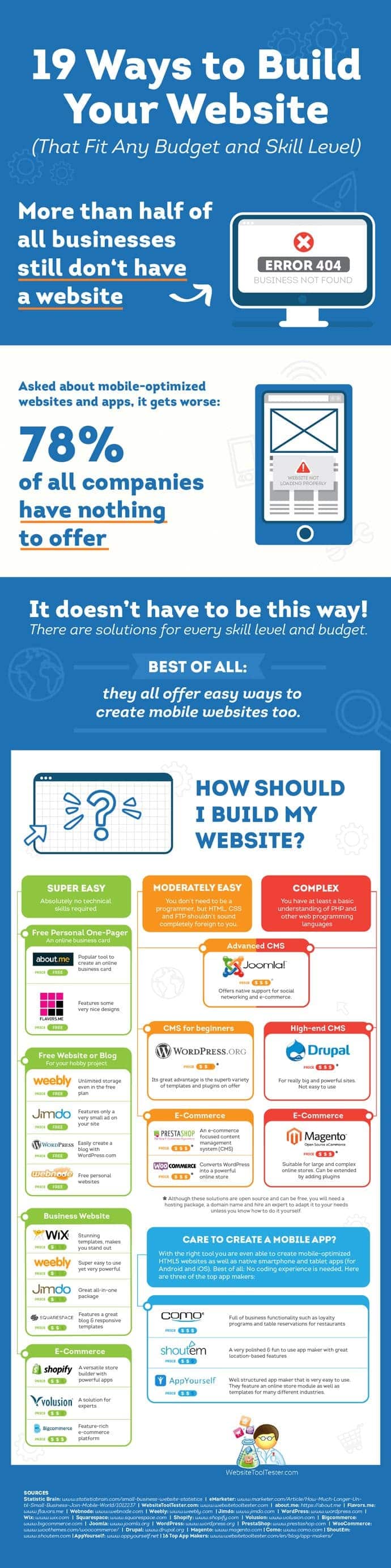
In today’s digital age, having a strong online presence is essential for individuals and businesses alike. Whether you’re a budding entrepreneur, a creative professional, or simply someone looking to showcase your passion project, having a website is a powerful way to connect with a global audience. Fortunately, you don’t need to be a tech guru or have a massive budget to get started. In this comprehensive guide, we’ll explore 19 ways to build a website with any budget or skill level. From simple drag-and-drop builders to more advanced coding options, we’ve got you covered.
1. Website Builders for Beginners
If you’re new to web design and coding, website builders are a great place to start. These platforms offer user-friendly interfaces and pre-designed templates to help you create a professional-looking website without any technical expertise.
a. Wix
Wix is a popular website builder known for its simplicity and versatility. With a wide range of templates and a drag-and-drop editor, you can customize your site to your heart’s content. Wix offers both free and premium plans, making it accessible to various budgets.
b. Weebly
Weebly is another beginner-friendly website builder that offers a straightforward interface and customizable templates. It’s a great choice for small businesses and personal portfolios. Weebly also offers a free plan, but premium features are available.
c. Squarespace
Squarespace is renowned for its stunning templates and design-focused approach. It’s an excellent option for creatives and entrepreneurs looking to showcase their work. While it’s not entirely free, the cost is reasonable for the quality you receive.
2. WordPress: The King of Content Management
WordPress is one of the most popular content management systems (CMS) in the world. It’s highly customizable and suitable for users with varying levels of technical expertise.
a. WordPress.com
WordPress.com offers a hosted version of WordPress that’s perfect for beginners. It provides a user-friendly interface and takes care of hosting and security for you. While there’s a free plan, premium options unlock more features and customization options.
b. Self-Hosted WordPress.org
For more control and flexibility, you can opt for self-hosted WordPress. This involves getting your own web hosting and domain name. While it requires a bit more technical knowledge, it’s the go-to choice for many professional websites.
3. E-commerce Platforms
If you’re looking to start an online store, there are specialized e-commerce platforms that cater to your needs.
a. Shopify
Shopify is a leading e-commerce platform known for its ease of use and extensive feature set. You can set up an online store, customize it, and manage products and payments with ease. Shopify offers various pricing plans, including a 14-day free trial.
b. WooCommerce
WooCommerce is a plugin for WordPress that turns your website into a full-fledged online store. It’s a great option if you’re already familiar with WordPress and want to add e-commerce functionality.
4. Website Templates and Themes
If you prefer not to start from scratch, website templates and themes can be a time-saving and cost-effective solution.
a. ThemeForest
ThemeForest is a marketplace where you can find thousands of website themes and templates for various platforms, including WordPress and HTML. These templates are designed by professionals and cover a wide range of industries and styles.
b. FreeHTML5.co
If you’re on a tight budget, FreeHTML5.co offers a collection of free HTML5 website templates. While they may require some coding knowledge for customization, they can be an excellent starting point.
5. Learn Basic HTML and CSS
While you don’t need to be a coding expert to build a website, having some basic knowledge of HTML and CSS can be immensely helpful. These are the building blocks of the web.
a. Codecademy
Codecademy offers interactive online courses in HTML and CSS. It’s a beginner-friendly platform that helps you grasp the fundamentals of web development.
b. W3Schools
W3Schools is a free resource that provides tutorials and reference guides for HTML, CSS, JavaScript, and more. It’s a valuable reference as you start building your site.
6. Free Website Hosting
If you’re on a tight budget, there are free hosting options available. While they may come with limitations, they can be a good starting point.
a. GitHub Pages
GitHub Pages allows you to host static websites for free. It’s an excellent option if you’re comfortable with Git and want to showcase your coding projects.
b. Netlify
Netlify offers free hosting for static websites with features like continuous integration and automatic deployments. It’s user-friendly and developer-friendly at the same time.
7. DIY Graphics and Images
Eye-catching visuals are crucial for a captivating website. You don’t need to be a graphic designer to create stunning graphics.
a. Canva
Canva is a user-friendly graphic design tool that offers a wide range of templates for social media graphics, logos, and more. It’s perfect for creating visuals for your site.
b. Unsplash and Pexels
For high-quality, free stock photos, check out Unsplash and Pexels. These platforms offer a vast library of images that you can use without worrying about licensing issues.
8. Content Management and Blogging
If you plan to publish regular content on your website, consider these blogging platforms.
a. Medium
Medium is a popular platform for publishing articles and blog posts. You can use it as a standalone blog or integrate it into your website.
b. Ghost
Ghost is a dedicated blogging platform that’s easy to use and focused on writing and publishing. It’s a great choice for bloggers and content creators.
9. Search Engine Optimization (SEO)
To ensure your website gets found on search engines like Google, you need to understand the basics of SEO.
a. Google’s SEO Starter Guide
Google offers a free SEO Starter Guide that covers essential SEO concepts and best practices. It’s a valuable resource for improving your site’s visibility.
b. Yoast SEO (WordPress Plugin)
If you’re using WordPress, the Yoast SEO plugin can help you optimize your content for search engines. It provides actionable suggestions to improve your site’s SEO.
10. Social Media Integration
To expand your online presence, make sure to integrate your website with social media platforms.
a. Social Media Sharing Buttons
Most website builders and CMS platforms offer social media sharing buttons that allow visitors to easily share your content on their social networks.
b. Embed Social Feeds
You can embed social media feeds from platforms like Instagram or Twitter on your website to keep it fresh and engaging.
11. Responsive Design
In today’s mobile-centric world, it’s crucial that your website looks and functions well on various devices and screen sizes.
a. Mobile-Friendly Themes
Choose a website theme or template that’s optimized for mobile devices. Many modern themes are designed with responsiveness in mind.
b. Test Your Site
Use tools like Google’s Mobile-Friendly Test to ensure your site works seamlessly on mobile devices.
12. Website Analytics
Understanding how visitors interact with your website is key to making improvements over time.
a. Google Analytics
Google Analytics provides in-depth data on your website’s performance, including traffic, user behavior, and more. It’s free and essential for tracking your site’s growth.
13. Security
Protecting your website and user data is paramount.
a. SSL Certificates
Install an SSL certificate to secure your site and enable HTTPS. Many hosting providers offer free SSL certificates.
b. Regular Backups
Set up regular backups of your website to safeguard against data loss. Many hosting providers offer automated backup solutions.
14. Legal Considerations
Ensure that your website complies with legal requirements.
a. Privacy Policy and Terms of Service
If you collect any user data, you should have a privacy policy in place. Consider using templates or consulting with legal professionals to create these documents.
15. Community and Support
Building a website can be a solitary endeavor, but there’s a vast online community to help you along the way.
a. Online Forums
Platforms like Stack Overflow and Reddit have active communities of web developers and designers who can answer your questions.
b. Online Courses
Consider enrolling in online courses on platforms like Udemy or Coursera to expand your skills and knowledge.
16. Monetization Options
If you’re looking to generate income from your website, explore these options.
a. Google AdSense
Google AdSense allows you to display ads on your site and earn money from clicks and impressions.
b. Affiliate Marketing
Promote products or services related to your website’s content and earn a commission for every sale made through your affiliate links.
17. Regular Updates and Maintenance
A successful website requires ongoing attention.
a. Update Content
Regularly update your content to keep it fresh and relevant. This can help with SEO and user engagement.
b. Software Updates
Keep your website’s software, plugins, and themes up to date to ensure security and performance.
18. User Feedback
Listen to your visitors and make improvements based on their feedback.
a. Contact Forms
Include contact forms on your site so visitors can easily reach out with questions or comments.
b. Surveys and Polls
Use surveys and polls to gather feedback on the user experience and content preferences.
19. Scaling Your Website
As your website grows, consider scaling up your hosting and resources.
a. VPS Hosting
Upgrade to Virtual Private Server (VPS) hosting for better performance and control over your hosting environment.
b. Content Delivery Network (CDN)
Implement a CDN to speed up the delivery of your website’s assets to visitors around the world.
In conclusion, building a website is within reach for anyone, regardless of their budget or skill level. Whether you’re a complete beginner or have some technical knowledge, there are numerous tools and resources available to help you create a stunning and functional website. Remember that building a website is an ongoing process, so stay committed to learning and improving as you go along. Your online presence will undoubtedly benefit from the effort you put into it, and who knows where your website could take you in the digital world!

Author:
Mark Ford