

Are you struggling to get your website to rank higher in search results? Want to discover the most common SEO mistakes that could be holding your site back?
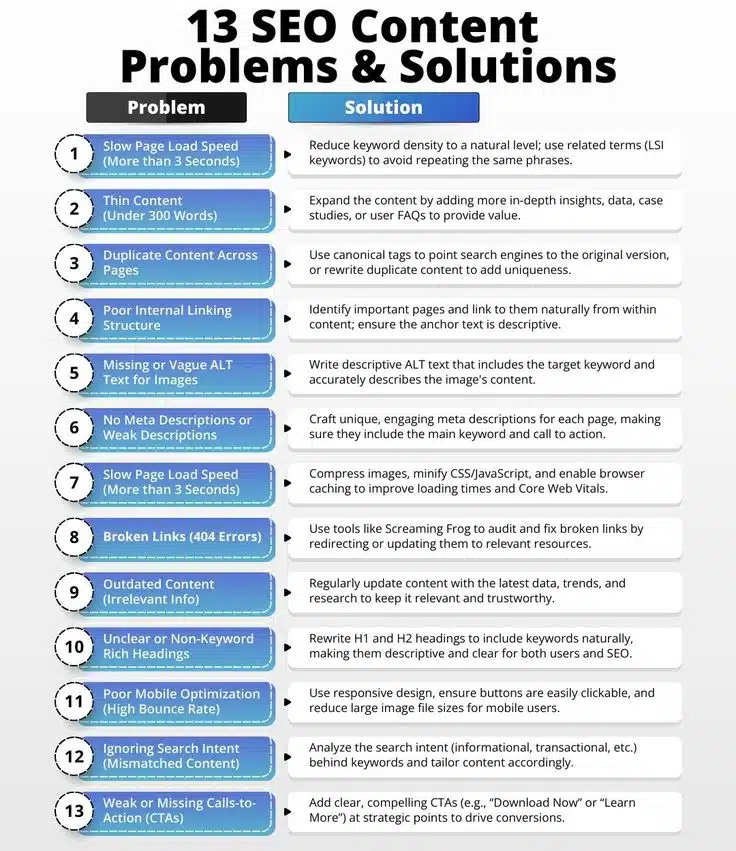
You’ll find some SEO basics in this infographic.
Here’s a summary of what’s covered:
- Slow Page Load Speed (More than 3 Seconds)
- Thin Content (Under 300 Words)
- Duplicate Content Across Pages
- Poor Internal Linking Structure
- Missing or Vague ALT Text for Images
- No Meta Descriptions or Weak Descriptions
- Broken Links (404 Errors)
- Outdated Content (Irrelevant Info)
- Unclear or Non-Keyword Rich Headings
Check out the post below for more.
Search engine optimisation (SEO) is the backbone of any successful online presence—but even well-intentioned websites can fall victim to small issues that sabotage performance. From poor page speed to missing calls-to-action, many common SEO problems go unnoticed until rankings start to slip. Fortunately, each of these issues has a practical fix.
In this guide, we’ll explore the 13 most damaging SEO content problems and how to overcome them to maximise your site’s visibility and impact.
Slow Page Load Speed (More than 3 Seconds)
If your website takes longer than three seconds to load, users—and Google—take notice. Page speed is a crucial ranking factor, and slow sites can lead to high bounce rates and lost conversions. Even minor delays can cost you both traffic and revenue. Addressing speed issues is one of the most impactful SEO fixes you can make.
- Optimise image sizes without compromising quality using compression tools.
- Minimise CSS and JavaScript files to reduce load times.
- Enable browser caching to serve repeat visitors faster.
- Use a content delivery network (CDN) to distribute your content globally.
Thin Content (Under 300 Words)
Short, surface-level content offers little value to users or search engines. Pages with less than 300 words often lack depth and authority, making them less likely to rank well. Thin content signals a lack of effort and expertise. Expanding your content helps boost relevance, user engagement, and SEO performance.
- Add statistics, research, or case studies to support your points.
- Include answers to frequently asked questions to increase length and usefulness.
- Break up content into digestible sections with subheadings and visuals.
- Provide actionable insights, examples, and expert commentary to add depth.
Duplicate Content Across Pages
Duplicate content confuses search engines and dilutes the authority of your original material. Whether it’s copied internally or externally, it can negatively affect your SEO rankings. Search engines may not know which page to prioritise, resulting in reduced visibility. Ensuring uniqueness is key to maintaining authority and relevance.
- Use canonical tags to indicate the preferred version of duplicated content.
- Rewrite similar pages with fresh wording and original perspectives.
- Consolidate overlapping content into a single, comprehensive page.
- Audit your site regularly for duplicate content using SEO tools.
Poor Internal Linking Structure
Internal links are essential for helping search engines crawl your site and guiding users to related content. Without a solid linking structure, valuable pages may go unnoticed. Weak internal linking can also reduce time on site and hinder user navigation. A well-planned link structure boosts both SEO and user experience.
- Link related pages naturally within content using descriptive anchor text.
- Ensure every new page links to at least one existing relevant page.
- Prioritise linking to high-value content, such as service or product pages.
- Avoid overloading pages with irrelevant or excessive internal links.
Missing or Vague ALT Text for Images
ALT text helps search engines understand the content of images and improves accessibility for visually impaired users. When it’s missing or vague, you miss an opportunity to boost on-page SEO. Well-written ALT attributes also increase your chances of appearing in image search results. Optimising image descriptions is a simple but powerful SEO tactic.
- Include target keywords naturally in your ALT text.
- Clearly describe the image’s content and purpose.
- Avoid keyword stuffing or using generic terms like “image” or “photo.”
- Make ALT text concise but informative—around 5–15 words is ideal.
No Meta Descriptions or Weak Descriptions
Meta descriptions play a vital role in enticing users to click through from search results. If your pages lack them—or if they’re poorly written—you’re likely missing out on valuable traffic. While meta descriptions don’t directly impact rankings, they influence click-through rates. A strong description acts like an advert for your page.
- Write a compelling summary of the page in under 160 characters.
- Include the main keyword naturally to reinforce search relevance.
- Add a clear call to action to encourage clicks.
- Make each meta description unique across your site.
Broken Links (404 Errors)
Broken links not only frustrate users but also disrupt search engine crawlers and damage your site’s credibility. They create dead ends that hurt the flow of both SEO and user journeys. Over time, these errors can accumulate and reduce trust in your content. Routine checks can prevent this problem from becoming widespread.
- Use tools like Screaming Frog or Ahrefs to detect broken links.
- Redirect broken URLs to the most relevant working page.
- Regularly audit blog posts and old pages for outdated links.
- Update internal links when moving or deleting content.
Outdated Content (Irrelevant Info)
Stale content gives users a poor impression and signals to search engines that your site isn’t actively maintained. Old statistics, trends, or products can turn visitors away. Keeping your content up to date not only improves accuracy but also strengthens your authority. Refreshing your pages keeps them competitive in search results.
- Set a regular schedule to review and update existing content.
- Replace outdated facts, figures, or examples with current ones.
- Add new sections to reflect changes in your industry or audience needs.
- Update the publish date or “last revised” tag to signal freshness to search engines.
Unclear or Non-Keyword Rich Headings
Headings help structure your content and tell search engines what each section is about. If they’re vague or missing keywords, they lose both SEO value and clarity. Strong headings improve readability, guide user flow, and boost relevance. Clear, keyword-optimised headings are a simple win for content strategy.
- Include primary or secondary keywords in your H1 and H2 tags.
- Make headings descriptive so users know what to expect.
- Avoid overly generic headings like “Introduction” or “More Info.”
- Break up long content with subheadings to improve scannability.
Poor Mobile Optimisation (High Bounce Rate)
More users now access websites via mobile than desktop, making mobile optimisation essential. A clunky mobile experience leads to high bounce rates and poor engagement. Search engines prioritise mobile-first indexing, meaning your mobile version directly affects your ranking. Optimising for mobile is no longer optional—it’s mandatory.
- Use responsive design to ensure your site adapts to all screen sizes.
- Keep buttons large and spaced well for easier tapping.
- Reduce file sizes for faster mobile loading times.
- Test your site regularly on different mobile devices and browsers.
Ignoring Search Intent (Mismatched Content)
Even if your content is keyword-optimised, it won’t perform well if it doesn’t match the user’s intent. Search intent refers to what users are really looking for—whether that’s information, a product, or a service. Misaligned content increases bounce rates and reduces conversions. Understanding search intent ensures your content meets expectations.
- Identify whether your keywords indicate informational, transactional, or navigational intent.
- Align content type (blog, product page, landing page) with the searcher’s goal.
- Use Google search results to see what types of content are ranking for your keywords.
- Adjust your tone, format, and CTA to suit the intent behind the query.
Weak or Missing Calls-to-Action (CTAs)
Even with great content, users won’t take the next step unless you tell them what to do. CTAs guide visitors toward your goals—whether that’s making a purchase, filling in a form, or reading more. Without them, your content becomes a dead end. A strong CTA can transform passive readers into active leads.
- Use clear, action-focused phrases like “Download Now” or “Book Your Free Consultation.”
- Place CTAs strategically at the end of sections and pages.
- Use buttons or bold formatting to make them stand out visually.
- Test different CTA wordings to see what performs best with your audience.
Conclusion
SEO success isn’t just about keywords—it’s about the full user experience, from the speed of your site to the clarity of your calls to action. Each of these 13 common SEO issues can weaken your online visibility and stall your growth if left unaddressed.
The good news? Every single one has a fix that can put you back on the right track. By auditing your content regularly and implementing these proven solutions, you’ll create a stronger, faster, and more search-friendly website that drives results.
Let your competitors make these mistakes. You’ve got the roadmap to avoid them. Ready to optimise? Start by fixing just one issue today and build momentum from there.

Author:
Mark Ford



