

Are you building a new website and want to make sure every section is working hard for your business? Want a clear checklist of essential features to include from top to bottom on your small business site?
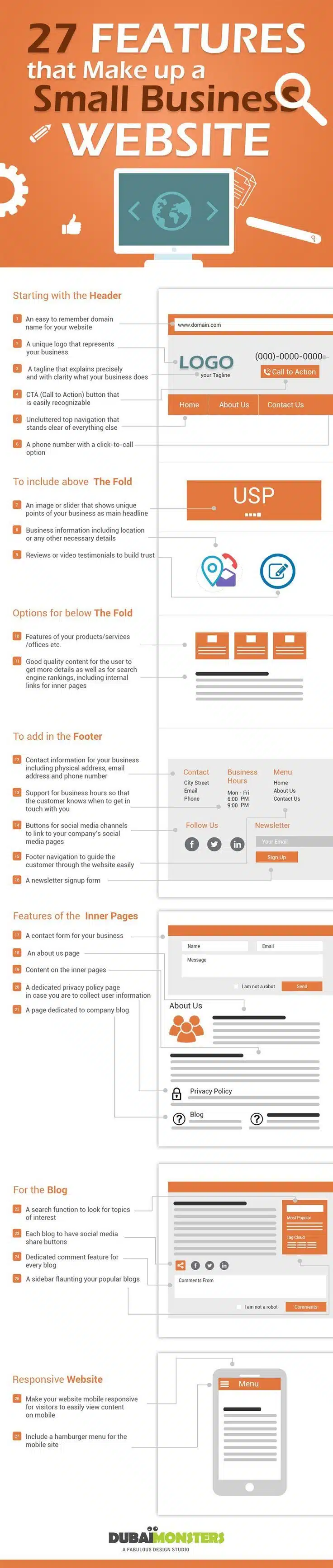
You’ll find some web design basics in this infographic.
Here’s a summary of what’s covered:
- Header Essentials
- Above the Fold Must-Haves
- Below the Fold Content
- Essential Footer Features
- Inner Page Features
- Blog Features That Boost Engagement
- Mobile-Friendly Design Elements
Check out the post below for more.
A small business website isn’t just a digital placeholder—it’s a 24/7 sales tool, trust builder, and brand ambassador rolled into one. Whether you’re a local service provider or an eCommerce store, getting your website structure right is essential.
Every section of your site—from the first thing people see to the final scroll—should serve a clear purpose. In this post, we’ll walk you through the key features every small business website should include, section by section, from header to footer.
Header Essentials
The header is the first thing most users notice when landing on your site. It sets the tone, reflects your brand, and should make it immediately clear what you do. A cluttered or confusing header can turn users away before they even scroll. The goal is to keep things clear, concise, and actionable.
- Choose a domain name that’s easy to remember and spell for your target audience.
- Use a logo that visually represents your brand and stands out at a glance.
- Include a simple, powerful tagline that explains your core offering or mission.
- Add a visible call-to-action button (like “Get a Quote” or “Book Now”) to guide user action.
Above the Fold Must-Haves
“Above the fold” refers to the section of your homepage visible without scrolling. This space should deliver your unique selling point quickly and confidently. It’s your chance to hook the visitor and show them why they should keep exploring. Strong visuals and key messages belong here.
- Use an eye-catching hero image or slider that showcases your service or product.
- Highlight your USP with a bold heading that communicates immediate value.
- Include your key business info (such as service area or key benefits).
- Feature customer reviews or video testimonials to build instant trust.
Below the Fold Content
Once users begin scrolling, the content “below the fold” should offer more detail. This is where you expand on the what, why, and how of your business. Keep it informative but accessible—users should find it easy to digest and navigate. Think of this section as your opportunity to sell through substance.
- List your products, services, or office locations clearly with links to learn more.
- Break content into sections with headers so users can scan easily.
- Include internal links to help users and improve your SEO performance.
- Use short paragraphs and bullet points to keep things readable and mobile-friendly.
Essential Footer Features
The footer is often overlooked, but it’s one of the most functional parts of your website. Visitors frequently scroll down to the footer to find contact details or business links. Done right, your footer reinforces trust and keeps people engaged. It should act as a user-friendly directory for key info.
- Include full contact info: address, email, and phone number with click-to-call.
- Display business hours clearly so users know when to reach out.
- Add social media icons to connect users with your brand across platforms.
- Create footer navigation for easy access to policies, contact forms, and services.
Inner Page Features
Your inner pages (like “About Us” or “Services”) do the heavy lifting of explaining your business. These pages offer the depth and detail that many users are seeking. They should reflect your brand personality while also being practical and informative. Good inner pages guide users further down the conversion path.
- Add a contact form to make it easy for users to reach you from any page.
- Write a compelling About page that shares your story and builds trust.
- Include engaging, well-written content that is relevant to each page’s focus.
- Provide a visible link to your privacy policy to support transparency and compliance.
Blog Features That Boost Engagement
A blog is more than just a place for news—it’s a valuable SEO and engagement tool. It allows you to showcase expertise, drive traffic, and keep your website fresh. Blog features should encourage browsing, commenting, and sharing. The goal is to turn casual readers into loyal followers.
- Add a search function to help users find topics that interest them.
- Use social sharing buttons to make it easy to spread your content.
- Enable a comment section to encourage feedback and interaction.
- Highlight your most popular posts in a sidebar to keep users exploring.
Mobile-Friendly Design Elements
More people now browse the web on mobile devices than desktops. If your website isn’t mobile responsive, you’re losing users and search engine rankings. Mobile users should be able to navigate, read, and interact with your site effortlessly. A good mobile experience is non-negotiable in modern web design.
- Ensure your site adjusts cleanly to all screen sizes, including tablets and phones.
- Simplify layout and reduce clutter for better mobile performance.
- Use large buttons and tap-friendly links to aid navigation.
- Include a hamburger menu to keep mobile navigation clean and intuitive.
Conclusion
A well-structured small business website isn’t about bells and whistles—it’s about purpose. Each element, from your header to your footer, should be designed with user experience in mind.
When done right, your site doesn’t just look good—it performs. It builds trust, guides action, and supports your business goals every step of the way. If you’re building or refreshing your site, use this list as your blueprint for success.

Author:
Mark Ford

Business-Led Web Design: Building Sites That Actually Support Your Objectives
Are you confident your website is actively supporting your business goals rather than just looking good? Do you want to understand how strategic design decisions can directly improve performance, conversions, and growth. […]


