

Are you looking for simple yet powerful tools to make your SEO work faster and more effective? Want to discover the best Chrome extensions that can help you master everything from keyword research to backlink analysis?
You’ll find some SEO basics in this infographic.
Here’s a summary of what’s covered:
- Keyword Research
- On-Page SEO
- Technical SEO
- Off-Page SEO
- Redirects and Meta Checks
- Backlink Analysis
- Content Performance
- Traffic Insights
- Crawl and Indexing Tools
- Email and Outreach Tools
- Rank Tracking
Check out the post below for more.
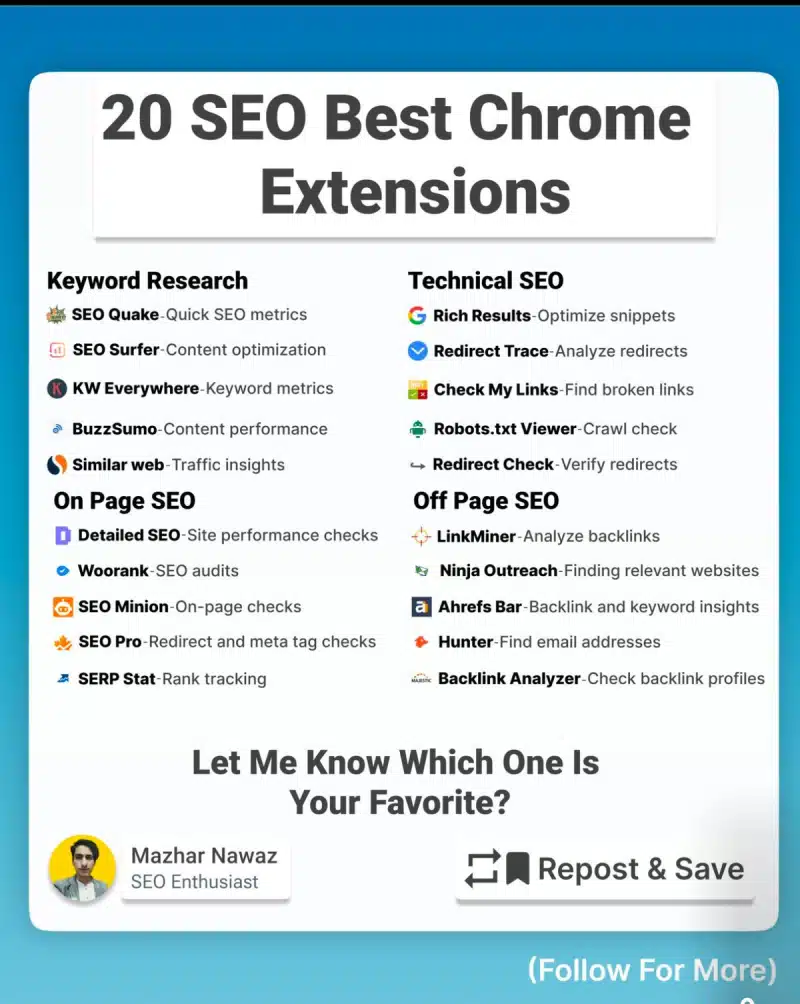
SEO professionals are always looking for ways to work smarter, faster, and with more precision. Chrome extensions have become indispensable tools in achieving that goal, giving marketers instant insights directly from their browsers.
From analysing keywords to tracking backlinks, the right set of extensions can save hours of manual work and help deliver better results. In this post, we’ll explore some of the most useful Chrome extensions that simplify every stage of the SEO process — from keyword research to technical audits and outreach.
Keyword Research
Effective keyword research is the cornerstone of every successful SEO strategy. Chrome extensions make it easier to uncover valuable search data, analyse competitors, and identify keyword opportunities without leaving your browser. These tools provide quick access to metrics like volume, competition, and related terms, helping you plan content and campaigns more efficiently.
- Use SEO Quake to view instant SEO metrics such as keyword density, backlinks, and Alexa rank directly on search results pages.
- Try SEO Surfer to optimise content by comparing on-page keyword usage with top-ranking competitors.
- Install KW Everywhere to access keyword volume, CPC, and competition data for every search you perform.
- Use BuzzSumo and SimilarWeb to analyse trending topics, traffic sources, and audience behaviour for better keyword targeting.
On-Page SEO
Once you’ve identified your keywords, optimising your pages for them is the next crucial step. On-page SEO extensions allow you to perform quick audits, identify missing tags, and evaluate your website’s structure for better search visibility. These tools provide actionable insights on everything from headings and meta descriptions to page speed and internal linking.
- Run Detailed SEO to audit your website’s on-page performance, from meta tags to internal links and image optimisation.
- Use Woorank for a comprehensive review of your site’s strengths and weaknesses, including mobile usability and security factors.
- Try SEO Minion to check broken links, analyse SERPs, and evaluate on-page elements like headings and alt text.
- Install SEO Pro to inspect meta tags, redirects, and canonical URLs quickly, ensuring your pages follow best practices.
Technical SEO
Technical SEO ensures that your site is properly structured, crawlable, and free of hidden errors that can affect ranking. Chrome extensions can help you detect redirect loops, check crawl permissions, and validate structured data without needing complex tools. They simplify tasks that used to require advanced software, making technical SEO more accessible to everyone.
- Use Rich Results to test and optimise structured data so your pages appear correctly in rich snippets.
- Install Redirect Trace to map and analyse redirect chains, helping you prevent crawl inefficiencies.
- Try Check My Links to quickly identify broken links on any webpage and fix them before they hurt your site’s SEO.
- Use Robots.txt Viewer to review and debug your robots.txt file, ensuring important pages are accessible to search engines.
Off-Page SEO
Off-page SEO focuses on improving your site’s authority and trustworthiness through external links and brand visibility. Chrome extensions can make this process more efficient by helping you find link opportunities, analyse competitors’ backlinks, and connect with site owners. With the right tools, link building becomes a strategic, data-driven activity rather than a guessing game.
- Use LinkMiner to explore backlink data and evaluate the quality of referring domains for potential outreach.
- Install Ninja Outreach to identify relevant websites and influencers for collaboration or guest posting.
- Try Ahrefs Bar to view domain authority, backlink counts, and keyword insights while browsing.
- Use Hunter to discover verified email addresses from websites, making outreach faster and more reliable.
Redirects and Meta Checks
Redirects and meta tags are often overlooked but play a vital role in maintaining SEO integrity. Chrome extensions can help you ensure that all redirects function correctly and that your meta information is properly implemented. By running quick checks on your pages, you can catch issues early and keep your site optimised for both users and search engines.
- Use SEO Pro to examine redirect behaviour and meta tags across your website to prevent lost ranking value.
- Run Redirect Check to confirm that all 301 and 302 redirects lead to the correct destination pages.
- Try Redirect Trace to visualise full redirect paths and detect any unnecessary loops or chains.
- Use Detailed SEO to review page-level metadata and ensure consistency across your entire site.
Backlink Analysis
Monitoring backlinks is essential for maintaining your site’s authority and identifying opportunities to strengthen your profile. Chrome extensions streamline backlink research by showing real-time metrics directly in your browser. You can see who’s linking to your site, evaluate link quality, and even uncover competitors’ strategies.
- Use Backlink Analyzer to inspect backlink profiles and assess the authority of linking domains.
- Install Ahrefs Bar to access link metrics, anchor text details, and domain ratings instantly.
- Try LinkMiner to view backlinks visually and mark the most valuable ones for your campaigns.
- Use Ninja Outreach to track outreach progress and manage your link-building relationships more efficiently.
Content Performance
High-performing content depends on continuous analysis and improvement. Chrome extensions designed for content performance give you real-time data on engagement, shares, and SEO metrics. They help you understand what’s working, what needs improvement, and how to create content that resonates with your target audience.
- Use BuzzSumo to identify trending topics and high-performing articles in your niche.
- Install SEO Surfer to align your content with current ranking factors and optimise keyword usage.
- Try SimilarWeb to benchmark your content’s performance against competitors.
- Use SEO Quake to analyse on-page metrics such as keyword density, headings, and readability scores.
Traffic Insights
Understanding where your visitors come from and how they interact with your site is key to ongoing SEO success. Chrome extensions focused on traffic insights help you break down audience data, referral sources, and engagement metrics at a glance. They provide a clearer picture of what drives your visibility and how to capitalise on it.
- Use SimilarWeb to monitor website traffic sources, audience demographics, and engagement trends.
- Install BuzzSumo to discover which content generates the most social engagement and referral traffic.
- Try SEO Quake to compare organic and paid traffic estimates directly in SERPs.
- Use Woorank to track traffic growth and pinpoint opportunities to attract more visitors.
Crawl and Indexing Tools
Ensuring your website is properly crawled and indexed is one of the most technical yet crucial parts of SEO. Chrome extensions make these checks more accessible, allowing you to test indexing issues and ensure your site structure supports optimal crawling. By staying proactive with these tools, you prevent hidden issues from harming your rankings.
- Use Robots.txt Viewer to confirm that search engines can crawl your key pages.
- Install Check My Links to make sure there are no dead ends preventing full site crawling.
- Try Redirect Check to validate your redirect setup and maintain link equity.
- Use Rich Results to ensure structured data elements are indexed properly for enhanced visibility.
Email and Outreach Tools
Building relationships for backlinks or partnerships often requires personalised outreach. Chrome extensions can automate and simplify this process by helping you locate contact information and track communication efforts. They enable you to spend less time searching and more time connecting with the right people.
- Use Hunter to find verified email addresses directly from any website.
- Install Ninja Outreach to manage your outreach campaigns and keep track of responses.
- Try LinkMiner to identify potential link partners and gather their contact details.
- Use Ahrefs Bar to evaluate whether a site is worth contacting based on its authority and traffic.
Rank Tracking
Tracking your search rankings helps you measure the success of your SEO efforts and identify where to focus next. Chrome extensions can monitor your keyword positions in real time and alert you to any major changes. With this data at your fingertips, you can refine your strategy and stay ahead of competitors.
- Use SERP Stat to monitor your site’s keyword rankings and track improvements over time.
- Install SEO Quake to see ranking data directly in search results without opening separate tools.
- Try SEO Minion to simulate searches and analyse SERP results for targeted keywords.
- Use Woorank to view keyword trends and assess the impact of your optimisation efforts.
Conclusion
SEO can be complex, but the right tools make it far more manageable. Chrome extensions offer a quick, accessible way to perform essential SEO tasks without needing multiple platforms or subscriptions.
Whether you’re focusing on keyword discovery, on-page optimisation, or backlink outreach, there’s an extension to streamline the process. By integrating these tools into your daily workflow, you can work more efficiently, make data-driven decisions, and keep your SEO strategy performing at its best.

Author:
Mark Ford



