Are you struggling to get your products seen by potential customers online? Want to learn proven SEO strategies to boost visibility and drive more traffic to your eCommerce store?
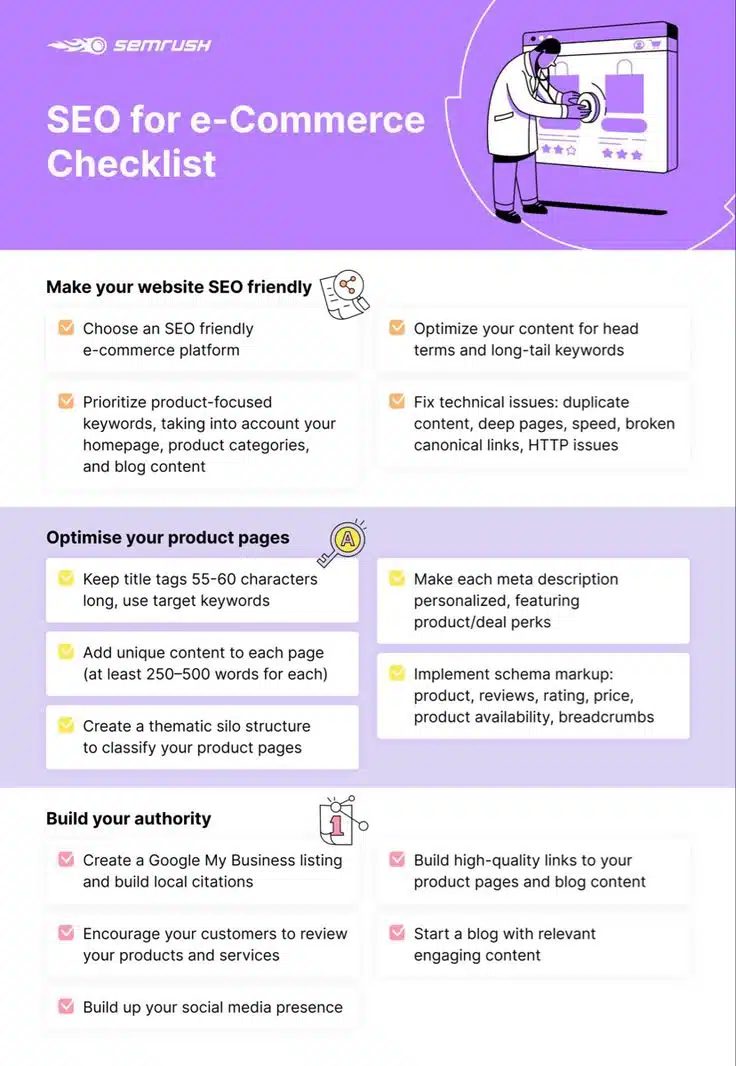
You’ll find some ecommerce SEO basics in this infographic from SEMrush.
They break things down into the following categories:
- Make Your Website SEO Friendly
- Optimise Your Product Pages
- Build Your Authority
Check out the post below for more.
In the competitive world of online retail, simply having great products isn’t enough. If shoppers can’t find you in search engines, you’re missing out on sales—plain and simple. That’s where SEO (Search Engine Optimisation) comes in.
This guide walks you through the essential tactics to help your products rank higher, attract more traffic, and convert more visitors into customers.
Make Your Website SEO Friendly
Before you can rank individual product pages, you need a strong foundation. That means building your eCommerce website on solid, search-friendly ground. From the platform you choose to the way you structure your content, every decision affects visibility. Let’s start by looking at how to make your entire website SEO friendly.
- Choose an SEO-friendly eCommerce platform
Pick a platform like Shopify, WooCommerce, or BigCommerce that’s built with SEO in mind.
Make sure it offers customisable metadata, clean URL structures, and mobile responsiveness.
Avoid platforms that rely heavily on JavaScript rendering or have poor crawlability.
Look for native support or plugins that help with SEO tasks like sitemaps and schema. - Prioritise product-focused keywords sitewide
Research high-intent keywords for your products, categories, homepage, and blog.
Use tools like SEMrush, Ahrefs, or Google Keyword Planner to find relevant terms.
Create a keyword map to avoid cannibalisation and ensure targeted optimisation.
Balance broad, competitive terms with niche, long-tail opportunities. - Optimise for both head terms and long-tail keywords
Head terms bring traffic, but long-tail keywords convert—optimise for both.
Use head terms for category pages and long-tails for specific product descriptions.
Incorporate long-tail phrases into FAQs, blog posts, and buyer guides.
Monitor what your customers are searching for and adjust accordingly. - Fix technical issues that hinder SEO
Use a tool like Screaming Frog or Sitebulb to identify technical SEO problems.
Address duplicate content, slow-loading pages, and broken links.
Ensure canonical tags are properly used to prevent indexing issues.
Regularly audit your site to catch and fix emerging technical errors.
Optimise Your Product Pages
Your product pages are where the conversions happen, so they deserve special attention. Optimising these pages not only boosts your rankings but also improves the customer experience. Every element on a product page—from title tags to schema—plays a role. Here’s how to get it right.
- Keep title tags 55–60 characters with target keywords
Include the main product keyword early in the title tag.
Add modifiers like brand, colour, or size to improve relevancy.
Avoid keyword stuffing—make it readable and appealing to searchers.
Use tools like Moz or Yoast to preview how it will look in search results. - Add 250–500+ words of unique content per page
Write product descriptions that go beyond manufacturer text.
Include product benefits, use cases, and differentiators.
Use natural language and customer-focused messaging.
Add internal links to related products or categories to aid navigation. - Create a silo structure to organise products
Group similar products under clearly defined categories and subcategories.
Use breadcrumb navigation to improve user experience and site structure.
Ensure each URL reflects the hierarchy for SEO clarity (e.g., /mens/shoes/trainers).
Link up and down the silo to strengthen topical relevance across pages. - Write personalised meta descriptions with perks
Highlight product USPs, discounts, or shipping benefits in the meta description.
Keep it under 160 characters to ensure full visibility in search results.
Use action verbs like “Shop now” or “Discover” to encourage clicks.
Make sure each meta description is unique and tailored to the product.
Implement Schema Markup
Search engines rely on structured data to better understand your content. Schema markup helps enhance your listings with rich snippets like star ratings, price, and stock status. These added features improve visibility and click-through rates. Here’s how to make the most of it.
- Add product schema to all product pages
Include fields like name, description, brand, SKU, and image.
Mark up price, currency, and availability (InStock, OutOfStock, etc.).
Validate your structured data using Google’s Rich Results Test.
Keep your markup up-to-date to reflect any changes in pricing or stock. - Use review and rating schema
Encourage verified customer reviews and display average ratings.
Mark up review content with appropriate schema tags (e.g., Rating, Review).
Display review snippets below product listings in Google Search.
Ensure reviews are genuine and in compliance with Google guidelines. - Include breadcrumb schema for navigation clarity
Mark up breadcrumbs to show your site structure in search results.
This helps both users and crawlers understand where they are on your site.
Breadcrumbs improve internal linking and reduce bounce rates.
Place the markup in the page header or use a plugin if available. - Enhance blog content with appropriate schema
Use schema types like Article, HowTo, or FAQ where relevant.
Structured blog content can win featured snippets and voice search traffic.
Embed schema manually or via a plugin to simplify implementation.
Keep all markup consistent with the visible content on the page.
Build Your Authority
Even the most optimised pages won’t rank without backlinks and social proof. Building domain authority involves earning trust from search engines and users alike. From local listings to blogging and reviews, there are many ways to establish your eCommerce brand online. Here’s how to do it effectively.
- Create a Google My Business listing
Set up and verify your business profile to appear in local search results.
Add business info, photos, categories, and products to the listing.
Use local keywords in your description for better visibility.
Encourage customers to leave reviews directly on your GMB page. - Get customers to leave reviews
Ask for reviews via email after purchase or through loyalty programs.
Showcase reviews on product pages to build credibility.
Respond to all reviews—positive and negative—to show engagement.
Use review platforms like Trustpilot or Feefo if operating at scale. - Strengthen your social media presence
Share products, reviews, and blog content across your social channels.
Engage with followers to build brand loyalty and visibility.
Use platforms like Instagram and Pinterest for visual product promotion.
Include share buttons on your site to encourage user-generated content. - Earn quality backlinks to key pages
Pitch your products to bloggers and niche publications.
Offer guest posts on industry sites with links to your product categories.
Create data-driven content or infographics worth linking to.
Use tools to monitor new backlinks and disavow harmful ones when necessary.
Start a Blog with Relevant, Engaging Content
Content marketing plays a huge role in supporting eCommerce SEO. A blog gives you a platform to target informational queries, support long-tail keyword targeting, and build topical authority. It’s also a great way to earn backlinks and keep your audience engaged. Here’s how to get the most out of your blog.
- Write posts around customer questions and problems
Use tools like AnswerThePublic to find popular search queries.
Focus on how-to guides, product comparisons, and buyer advice.
Target keywords that match early-stage search intent.
Link to relevant products within your posts to guide users toward a sale. - Incorporate internal linking to key product pages
Use contextual links to direct readers to product or category pages.
This strengthens SEO and improves user journey across the site.
Keep anchor text natural but keyword-informed.
Update old blog posts to include links to new products. - Optimise every blog post for SEO
Use keyword-rich headings, meta descriptions, and alt tags.
Structure content for readability using subheadings and bullet points.
Add images or videos to improve engagement and time on page.
Ensure fast loading and mobile-friendliness to retain traffic. - Promote blog posts across all channels
Share new posts on social media and via email newsletters.
Repurpose blog content into carousels, Reels, or short-form videos.
Encourage staff, partners, or affiliates to amplify the reach.
Use paid promotion if you want to boost traffic to high-converting content.
Conclusion
Getting your products found online takes more than luck—it takes strategy. By laying a strong technical foundation, optimising product pages, implementing schema, building authority, and investing in content, you can dramatically improve your visibility in search engines.
SEO isn’t just about rankings—it’s about getting the right people to the right products at the right time. Implement the steps above and watch your online store gain the traction it deserves.

Author:
Mark Ford