

Are you looking for ways to make your website load faster and rank higher on search engines? Want to learn how to optimise your images without sacrificing quality or accessibility?
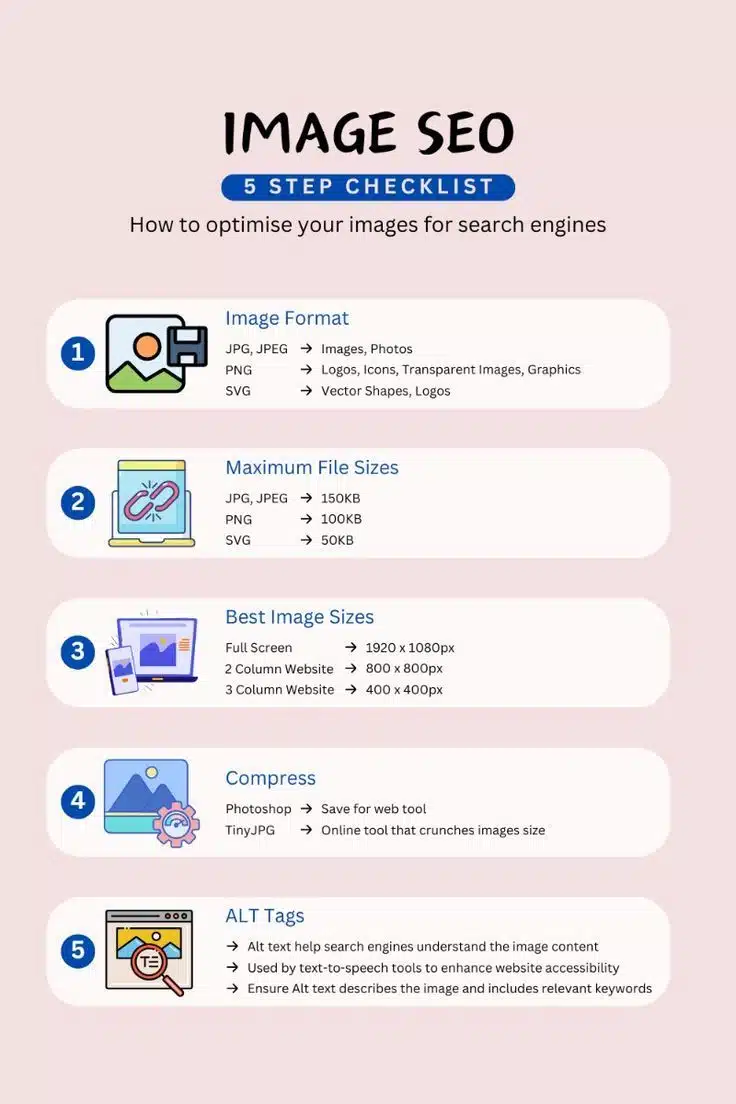
You’ll find some SEO basics in this infographic.
Here’s a summary of what’s covered:
- Image Format
- Maximum File Sizes
- Best Image Sizes
- Compress
- ALT Tags
Check out the post below for more.
Images play a crucial role in web design, helping to capture attention, convey information quickly, and enhance the overall user experience. But if not properly optimised, images can slow your site down, harm your SEO performance, and create barriers for users with visual impairments.
The good news? A few simple steps can dramatically improve how your images support performance, rankings, and accessibility. In this post, we’ll walk you through how to optimise website images for speed, search, and user inclusion.
Image Format
Choosing the correct image format is the foundation of image optimisation. Different formats are suited to different purposes—some prioritise detail, others transparency or scalability. Selecting the right one helps maintain image quality while reducing file size and load time. Use this guidance to align each image format with its ideal application.
- JPG/JPEG: Best for high-quality photographs and standard images with lots of colours.
- PNG: Ideal for logos, icons, and images needing transparent backgrounds or fine detail.
- SVG: Perfect for vector shapes, icons, and logos that need to remain crisp at any size.
- Avoid BMP/TIFF: These are outdated and heavy formats not suited for web use.
Maximum File Sizes
Large image files are one of the biggest culprits behind slow-loading web pages. To speed up your site and provide a better user experience, it’s essential to stay within recommended file size limits. Smaller file sizes also improve mobile performance and help maintain fast load speeds across devices.
- JPG/JPEG: Keep under 150KB for quicker loading without sacrificing quality.
- PNG: Aim for a maximum of 100KB, especially for icons or simple graphics.
- SVG: Limit to 50KB where possible, since these are vector-based and scalable.
- Monitor with tools: Use platforms like GTmetrix or PageSpeed Insights to check image size impact.
Best Image Sizes
Beyond file size, the pixel dimensions of your images play a big part in how quickly they load and how good they look across devices. Oversized images waste bandwidth, while undersized ones can appear blurry or stretched. Tailoring image dimensions to your layout ensures a clean, responsive design.
- Full-screen images: Use 1920 x 1080px for hero images or full-width banners.
- 2-column layouts: Resize images to 800 x 800px for balance and clarity.
- 3-column layouts: Go for 400 x 400px for compact, symmetrical layouts.
- Avoid automatic scaling: Resize images manually instead of relying on browser scaling.
Compress
Image compression reduces file size without significantly affecting visual quality. This process is key for improving site speed and user experience, especially for mobile users. Whether you use professional software or a free online tool, compressing your images before uploading is a must.
- Photoshop: Use the “Save for Web” function to reduce size while controlling quality.
- TinyJPG or TinyPNG: These free online tools compress images without visible loss.
- ImageOptim (Mac) or RIOT (Windows): Great lightweight tools for batch compression.
- Don’t over-compress: Excessive compression can cause pixelation and reduce image appeal.
ALT Tags
ALT tags serve multiple critical functions, from improving SEO to supporting users who rely on screen readers. Properly written alt text describes an image’s content and purpose, helping search engines and users alike understand its value. It’s one of the simplest but most powerful SEO and accessibility tools.
- Describe the image: Write concise, accurate descriptions that reflect what the image shows.
- Include keywords: Where relevant, use a target keyword naturally within the description.
- Avoid keyword stuffing: ALT text should read naturally and offer genuine value.
- Use for all images: Don’t skip decorative or background images—mark them as decorative or give context where helpful.
Conclusion
Optimising your website images isn’t just a technical task—it’s a strategic move that improves site speed, search engine visibility, and accessibility for all users.
By choosing the right formats, keeping file sizes in check, matching dimensions to layout, compressing efficiently, and writing meaningful ALT tags, you’ll enhance both the performance and user experience of your site.
Done right, your images won’t just look great—they’ll work harder for your business across every click and screen.

Author:
Mark Ford



