

Are your ecommerce category pages struggling to rank on Google? Want to learn how to optimise them for better visibility, user experience, and sales?
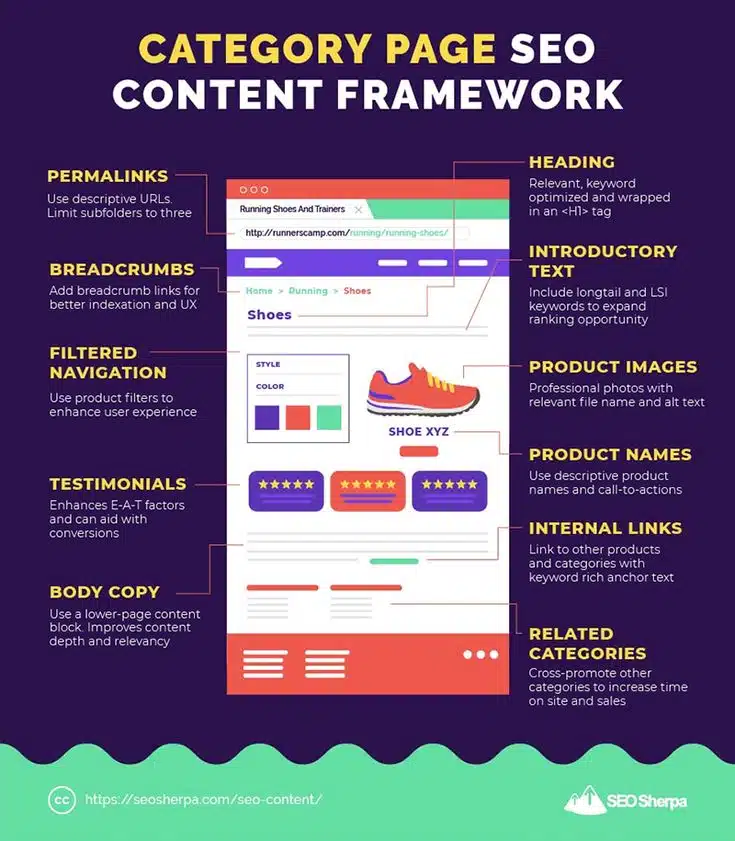
You’ll find some ecommerce basics in this infographic.
Here’s a summary of what’s covered:
- Permalinks
- Breadcrumbs
- Filtered Navigation
- Testimonials
- Body Copy
- Heading
- Introductory Text
- Product Images
- Product Names
- Internal Links
- Related Categories
Check out the post below for more.
A well-optimised category page can be the difference between your products being discovered or buried in search results. While many ecommerce sites focus heavily on product pages, category pages are powerful hubs for both SEO and user experience.
When properly structured, they can drive significant organic traffic and support conversions across your entire site. In this guide, we’ll walk you through the key elements you need to optimise for better Google rankings and improved usability.
Permalinks
Permalinks form the foundation of your category page’s URL structure. They should be clean, descriptive, and concise to make them more understandable for both users and search engines. A cluttered or overly nested URL can harm your SEO efforts by confusing crawlers and diluting link equity. The goal is to keep things simple and keyword-relevant without going overboard.
- Use short URLs that reflect the category name (e.g. /mens-running-shoes)
- Limit subfolders to no more than three levels deep
- Avoid dynamic or session-based parameters where possible
- Include your primary keyword naturally in the URL
Breadcrumbs
Breadcrumb navigation isn’t just a user-friendly feature—it’s also an important SEO tool. Breadcrumbs help search engines understand your site’s structure and improve internal linking. They also provide users with a clear path to retrace their steps, reducing bounce rates and encouraging deeper engagement. Implementing breadcrumbs is a win-win for usability and rankings.
- Place breadcrumbs near the top of the category page for easy visibility
- Use keyword-rich anchor text in breadcrumb links
- Link back to parent categories to support the site’s hierarchy
- Ensure breadcrumbs are marked up with Schema.org for enhanced indexing
Filtered Navigation
Filtered navigation lets users narrow down product listings based on features like size, colour, or price. While excellent for UX, poorly implemented filters can create SEO issues like duplicate content. Done right, they boost usability and can even increase time on site and conversions. Your task is to make them search-friendly without causing technical headaches.
- Use canonical tags to prevent duplicate content from filtered URLs
- Ensure filter combinations don’t create infinite URL variations
- Make filterable attributes indexable only if they offer unique value
- Present filters in a clear, mobile-friendly layout for better interaction
Testimonials
Trust is a huge factor in online shopping, and testimonials can enhance both credibility and SEO. Google values E-A-T (Expertise, Authoritativeness, and Trustworthiness), and user-generated reviews contribute directly to that. Including ratings and reviews on your category pages not only builds trust but can also improve click-through rates from search results if rich snippets are enabled.
- Add star ratings and review counts to product listings within the category page
- Include short, relevant customer quotes beneath or beside product summaries
- Use review Schema to boost visibility in search engine results
- Moderate and refresh testimonials regularly to maintain accuracy and relevance
Body Copy
Many ecommerce category pages lack sufficient text content, focusing solely on visuals. But a well-written, keyword-optimised body section can help Google understand what the page is about. It also adds topical relevance and can answer user questions directly on the page. Don’t overdo it—this content should be helpful, not stuffed with keywords.
- Write a 200–300 word content block at the bottom of the category page
- Incorporate primary and related keywords naturally within the text
- Answer common customer questions about the category to improve engagement
- Update the content periodically to reflect seasonal trends or product changes
Heading
Your main heading (usually wrapped in an H1 tag) sets the tone for the rest of the page. It should be clear, concise, and keyword-focused to maximise search visibility. Avoid generic headings like “Products” or “Shop All” that offer no real SEO value. Instead, craft a heading that accurately describes the page while encouraging user interest.
- Use one H1 per category page featuring your target keyword
- Avoid repeating headings from other pages to prevent cannibalisation
- Make the heading readable and relevant to what users are expecting
- Don’t over-optimise—prioritise clarity and user relevance
Introductory Text
Introductory text is a chance to provide context before users start browsing products. It can also signal topical relevance to search engines when supported by long-tail and LSI (Latent Semantic Indexing) keywords. Keep it concise and user-focused, aiming to educate or assist rather than distract. This content should invite people to explore the products below.
- Include 2–4 sentences just below the H1 to introduce the category
- Mention key features or benefits of the products listed
- Naturally include variations of your main keyword (LSI terms)
- Ensure the text is written for users first, with SEO in mind second
Product Images
Strong visuals are essential in ecommerce, and Google now places greater emphasis on image optimisation. Images not only influence conversions but also contribute to SEO through filenames and alt tags. High-quality, relevant imagery improves load speed, trust, and accessibility. Treat your images as a core part of your on-page strategy—not just decoration.
- Use professional, well-lit images with consistent formatting
- Optimise file sizes to keep page load times fast
- Include descriptive alt text with keywords where appropriate
- Rename files with relevant keywords (e.g. red-running-shoes.jpg)
Product Names
Product names are often overlooked in SEO planning, but they carry significant weight. Not only are they scanned by search engines, but they also influence click-through and conversion rates. Clear, descriptive names help users understand what’s on offer at a glance. When paired with strong calls to action, they can increase both engagement and sales.
- Use product names that include key features or specifications
- Incorporate relevant keywords where appropriate
- Keep names concise and free from unnecessary jargon
- Pair names with benefit-driven calls to action (e.g. “View Details”)
Internal Links
Internal linking is a foundational SEO technique that’s particularly powerful on category pages. By linking to related products and other relevant categories, you distribute authority and improve crawlability. This also helps users navigate your site more intuitively. Think of your category page as a strategic hub that guides both users and search bots.
- Link to subcategories using keyword-optimised anchor text
- Include featured product links within the page content or sidebar
- Use internal links to highlight bestsellers or seasonal collections
- Avoid linking to unrelated pages that dilute relevance
Related Categories
Cross-promoting other relevant categories not only boosts internal SEO but also supports upselling and product discovery. This can increase time on site and drive more pageviews per session. By showcasing related categories, you help users find alternatives or complementary products they didn’t know they needed. It’s an easy way to enrich the shopping journey.
- Display related category links near the bottom or sidebar
- Choose categories that naturally complement the current one
- Use visually distinct blocks or icons to attract attention
- Optimise anchor text with descriptive, keyword-based labels
Conclusion
Category pages are often the most underutilised SEO assets in an ecommerce site’s arsenal. While product pages fight for attention, it’s the category pages that can attract broader, more consistent search traffic when properly optimised. From smart URL structures to SEO-friendly content, filter controls to internal links, every detail counts.
If you want your ecommerce store to rank higher, perform better, and convert more users, start with your category pages. Implementing the strategies outlined in this post can put you ahead of competitors who are still treating these pages as afterthoughts. With a little attention to detail, your category pages can become true SEO workhorses.

Author:
Mark Ford



