

Are you looking for ways to make your online store load faster and perform better? Want to learn proven strategies to optimise your eCommerce website for lightning-fast speed?
You’ll find some ecommerce basics in this infographic.
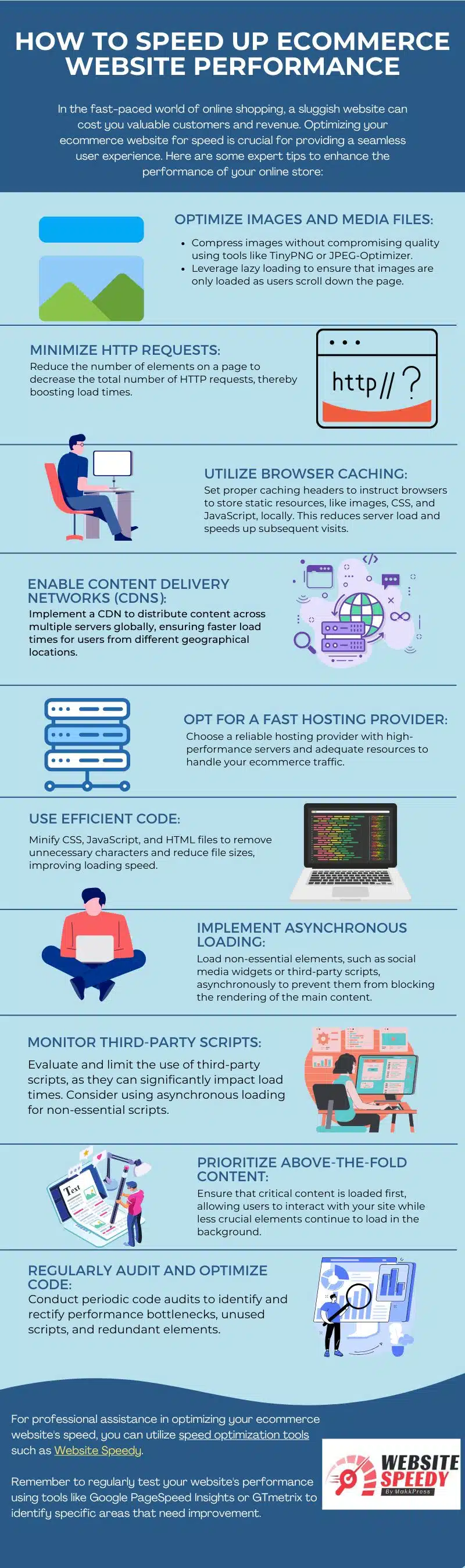
Here’s a summary of what’s covered:
- Optimise Images and Media Files
- Minimise HTTP Requests
- Utilise Browser Caching
- Enable Content Delivery Networks (CDNs)
- Opt for a Fast Hosting Provider
- Use Efficient Code
- Implement Asynchronous Loading
- Monitor Third-Party Scripts
- Prioritise Above-the-Fold Content
- Regularly Audit and Optimise Code
Check out the post below for more.
In today’s fast-paced world of online shopping, customers expect instant results. If your eCommerce website loads slowly, you risk losing valuable sales and damaging your brand’s reputation. Website performance is not just a technical concern – it’s a key factor in user experience, conversion rates, and search engine rankings.
By making smart, targeted improvements, you can give your visitors the speed they demand and keep them coming back for more.
Optimise Images and Media Files
Images and media often take up the bulk of a website’s loading time, especially for online stores with product-heavy pages. Large, uncompressed files can slow your site to a crawl, frustrating users before they even start browsing. Optimising your images without sacrificing quality is one of the quickest ways to improve performance. Combining compression with smart loading techniques can make a dramatic difference.
- Compress images using tools like TinyPNG or JPEG-Optimizer to reduce file size without noticeable quality loss.
- Use next-generation formats such as WebP to deliver high-quality visuals at smaller sizes.
- Implement responsive images so the correct size loads depending on the user’s device.
- Enable lazy loading to ensure images are only fetched as the visitor scrolls.
Minimise HTTP Requests
Every element on your web page – from images and stylesheets to scripts and fonts – requires an HTTP request to load. The more requests a page has, the longer it takes to display. Minimising these requests is a core strategy for reducing load time and improving the browsing experience. Streamlining design and combining resources can have an immediate impact.
- Reduce the number of individual files by combining CSS and JavaScript where possible.
- Limit the use of custom fonts or heavy icon libraries that add multiple requests.
- Remove unused design elements or scripts that add unnecessary load.
- Use CSS sprites to combine small images into a single file and reduce requests.
Utilise Browser Caching
When users return to your store, they shouldn’t have to download the same files again. Browser caching allows static resources to be stored locally on the visitor’s device, speeding up repeat visits and reducing strain on your server. Proper caching setup is a simple yet powerful performance boost.
- Configure caching headers for images, CSS, JavaScript, and other static files.
- Set appropriate cache expiry times to balance speed and update needs.
- Use versioning in file names to ensure updates are delivered when needed.
- Test your caching rules with tools like GTmetrix or Google PageSpeed Insights.
Enable Content Delivery Networks (CDNs)
A Content Delivery Network stores copies of your website files on multiple servers worldwide, delivering content from the server closest to the visitor’s location. This reduces latency and ensures a fast experience for users no matter where they are. For eCommerce sites targeting international customers, CDNs can be a game changer.
- Choose a reputable CDN provider with strong global coverage.
- Host static files such as images, scripts, and stylesheets on the CDN.
- Enable automatic content replication to ensure all servers stay updated.
- Monitor CDN performance to confirm consistent speed improvements.
Opt for a Fast Hosting Provider
Your hosting provider forms the foundation of your online store’s performance. Even the most optimised site can be held back by slow or overloaded servers. Choosing a host with high-performance hardware and adequate resources for your traffic levels is essential for keeping your store lightning fast.
- Select a hosting plan that offers scalable resources for peak shopping periods.
- Prioritise hosts with SSD storage for faster data access.
- Consider managed hosting for optimised server configurations.
- Check customer reviews for uptime reliability and speed feedback.
Use Efficient Code
Bloated code slows down your website and increases the amount of data that needs to be transferred to the user. Minifying and streamlining your HTML, CSS, and JavaScript reduces file size, cuts load times, and improves maintainability. This is a critical step in speeding up your store’s performance.
- Minify CSS, JavaScript, and HTML to remove unnecessary spaces and characters.
- Remove unused code left behind by plugins, themes, or previous updates.
- Consolidate multiple CSS or JS files into fewer files where possible.
- Use a build process or automated tool to maintain clean, efficient code.
Implement Asynchronous Loading
Not all website elements need to load at the same time. Asynchronous loading allows non-essential elements to load in the background while the main content appears quickly. This means users can start engaging with your store sooner, even while secondary scripts finish loading.
- Load third-party widgets, analytics, or social media scripts asynchronously.
- Prioritise core content so it appears before decorative or background elements.
- Use asynchronous attributes in script tags where supported.
- Monitor user experience to ensure key features still function correctly.
Monitor Third-Party Scripts
While third-party scripts can add valuable features, they can also be a major source of slowdowns. Every external resource must be fetched and executed, which can delay page loading. Careful monitoring and limiting of these scripts helps you maintain strong performance without losing functionality.
- Audit all third-party scripts to identify unnecessary or outdated ones.
- Remove any that do not directly contribute to user experience or conversions.
- Use asynchronous or deferred loading for remaining scripts.
- Track the performance impact of third-party services using site speed tools.
Prioritise Above-the-Fold Content
Above-the-fold content is the portion of your site visible without scrolling. Loading this first ensures visitors can interact with your store quickly, even if the rest of the page is still loading. This approach creates the impression of a faster site and keeps users engaged.
- Identify the most important visual and interactive elements for immediate loading.
- Use inline CSS for critical above-the-fold styles to speed up rendering.
- Delay non-essential images, videos, and scripts until after main content loads.
- Test how quickly above-the-fold content appears using speed testing tools.
Regularly Audit and Optimise Code
Over time, websites accumulate unused code, outdated scripts, and other performance bottlenecks. Regular audits help you identify and remove these issues before they slow your site. By making optimisation a recurring task, you keep your store running at peak performance year-round.
- Schedule regular performance reviews using tools like GTmetrix.
- Remove redundant code and scripts no longer in use.
- Update plugins, themes, and platforms to their latest versions.
- Document changes to track what improvements have been made.
Conclusion
Website speed is no longer a “nice-to-have” – it’s a critical factor in eCommerce success. Every second counts when it comes to keeping visitors engaged and converting them into paying customers.
By following these strategies – from optimising images to streamlining code and leveraging CDNs – you can create a lightning-fast online store that delights users and outperforms competitors. Regular monitoring and proactive optimisation will ensure your store stays ahead, delivering the seamless, instant experience today’s shoppers expect.

Author:
Mark Ford



