

Are you looking for simple ways to improve your website’s SEO and user experience? Want to learn how to write internal link anchor text that actually drives results?
You’ll find some SEO basics in this infographic.
Here’s a summary of what’s covered:
- Think of Scanners
- Nail the Length
- Highlight the Verb
- Aim for Quality (Over Quantity)
- Keep It Clear and Consistent
- Avoid ‘Click Here’ – at All Costs
- Match Intent with Destination
- Use Keywords Without Stuffing
- Make It Accessible
- Test and Review Regularly
Check out the post below for more.
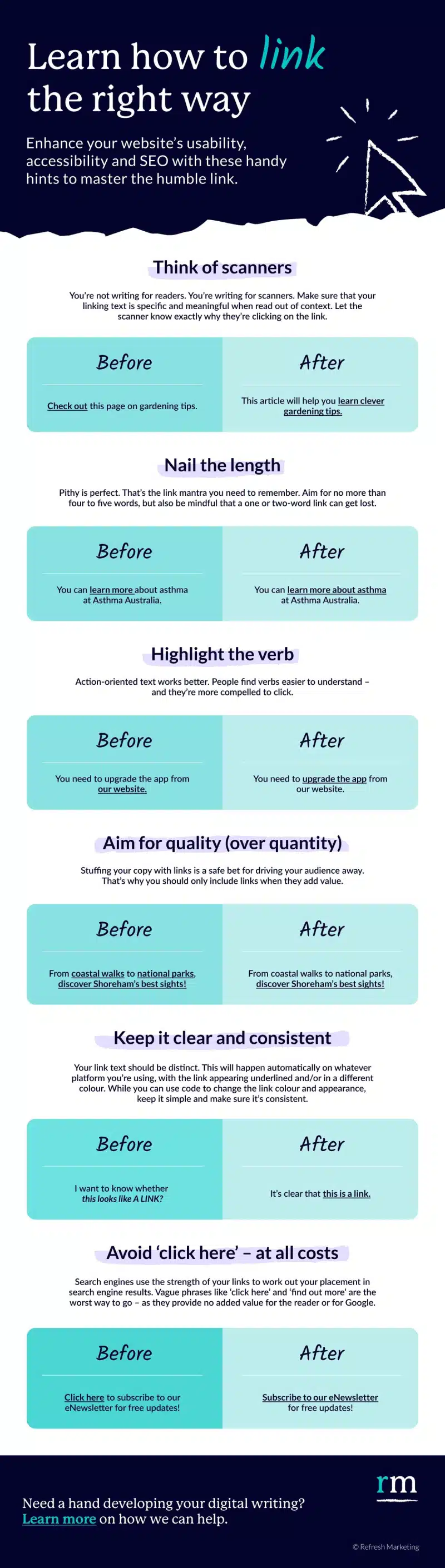
Internal linking is a cornerstone of both strong SEO and seamless user experience. Done right, it guides visitors naturally through your site, helps search engines understand your content, and boosts your rankings. But one element is often overlooked—the anchor text itself.
In this post, we’ll explore how to write better internal link anchor text that delivers clarity, value, and performance.
Think of Scanners
Website visitors tend to scan rather than read. Your anchor text should make sense even when taken out of context, providing clear intent and destination. This not only improves usability but also supports accessibility tools like screen readers. Think of your link as a mini signpost—be clear and informative.
- Use descriptive text that clearly indicates the link’s destination.
- Avoid vague phrases like “click here” or “read more.”
- Make sure your links make sense when read alone.
- Tailor the anchor to the user’s intent or what they’re looking for.
Nail the Length
Anchor text should be short enough to scan quickly but long enough to give meaningful context. One or two-word links often lack clarity, while overly long anchors can feel clunky and unfocused. Aim for that sweet spot—typically four to five words—that communicates purpose without fluff.
- Keep anchor text to 4–5 words where possible.
- Avoid single-word links unless context is very clear.
- Don’t turn whole sentences into links—prioritise scannability.
- Let the link sit naturally within the sentence for better flow.
Highlight the Verb
Action-oriented language makes anchor text more engaging and easier to understand. Verbs tell users what to expect, whether it’s learning, downloading, signing up, or exploring. This not only enhances UX but increases the likelihood of clicks and conversions.
- Start or include a verb like “learn,” “download,” or “explore.”
- Avoid static nouns or passive phrases where possible.
- Make it clear what the user is doing by clicking.
- Align the verb with the actual content they’ll see on the next page.
Aim for Quality (Over Quantity)
Stuffing your content with internal links might seem helpful, but it usually does more harm than good. Excessive linking distracts users and dilutes the authority of your content. Only include links that provide real value and guide users to relevant, helpful pages.
- Link only when the target page adds context or detail.
- Don’t repeat the same internal link multiple times unnecessarily.
- Prioritise high-value content that supports the topic.
- Ensure the link flows naturally within the paragraph.
Keep It Clear and Consistent
Consistency in link formatting helps users instantly recognise clickable elements. Whether it’s underlining, colour coding, or hover effects, stick to one style site-wide. This builds trust and reduces friction as users navigate your content.
- Use a consistent colour and style for all links.
- Underline links or make sure they stand out from body text.
- Avoid styling links too similarly to non-link text.
- Test your links across devices and browsers for clarity.
Avoid ‘Click Here’ – at All Costs
Phrases like “click here” add no value to SEO or the user experience. They’re vague, outdated, and don’t help search engines understand the content of the target page. Instead, use descriptive phrases that incorporate your target keywords and explain what the user will find.
- Replace “click here” with meaningful text that includes keywords.
- Make the link text part of a sentence, not a call to action on its own.
- Reflect the content of the target page accurately in the anchor.
- Remember that anchor text is a ranking factor—use it wisely.
Match Intent with Destination
Anchor text should align with the purpose of the target page. If someone clicks on a link expecting product information but lands on a generic homepage, that’s a mismatch. Meeting expectations enhances trust, lowers bounce rates, and increases time spent on site.
- Ensure the linked text reflects the actual topic of the destination.
- Avoid misleading links, even unintentionally.
- Ask yourself: “If I read this link alone, would I know what’s coming?”
- Use search intent as your guide—informational, navigational, or transactional.
Use Keywords Without Stuffing
Including keywords in your internal link anchor text can help with SEO, but overdoing it looks spammy and unnatural. The goal is balance: write naturally while incorporating terms that help Google understand your site structure.
- Incorporate primary keywords when relevant and natural.
- Avoid repeating the exact keyword-rich phrase multiple times.
- Use variations and synonyms to keep content fresh.
- Prioritise readability and flow over keyword density.
Make It Accessible
Anchor text should work for everyone—including people using screen readers. Accessibility isn’t just about compliance; it’s about creating a better experience for all users. Well-crafted links help everyone understand where they’re going and why.
- Avoid using the same anchor text for different destinations.
- Provide context around the link, not just within it.
- Don’t rely on colour alone to indicate a link—use underlines or bold text.
- Test your site with screen readers to check link clarity.
Test and Review Regularly
Just because a link looks fine today doesn’t mean it’ll still be effective next month. Anchor text should evolve with your content strategy, user needs, and SEO goals. Periodic review ensures your internal links remain valuable and functional.
- Audit internal links quarterly for performance and relevance.
- Use analytics to track click-through rates from internal links.
- Update anchor text when page content changes or focus shifts.
- Fix broken links or outdated phrasing to maintain trust and usability.
Conclusion
Great internal link anchor text is more than a string of clickable words—it’s a strategic tool that supports SEO, accessibility, and user experience. By writing with clarity, purpose, and intent, you can guide visitors through your website more effectively and help search engines understand the relationships between your content.
Think of your anchor text as both a signpost and a promise. Make it informative. Make it relevant. And above all, make it helpful. With these best practices, your internal linking strategy will be stronger, smarter, and more effective—one link at a time.

Author:
Mark Ford



