

With technology advancing at an alarming rate us human beings are becoming more and more impatient. We expect things to just work, and quickly. This applies to your business website too. If your web pages don’t load immediately you could be losing business!
In today’s digital age, your website is often the first impression potential customers have of your business. Whether you’re an e-commerce site, a content publisher, or a service provider, the speed at which your website loads is critical to its success.
Slow loading times can have a devastating impact on user experience, SEO rankings, and ultimately, your bottom line. In this blog post, we’ll explore the many ways in which slow loading times can destroy your website and offer practical solutions to address this issue.
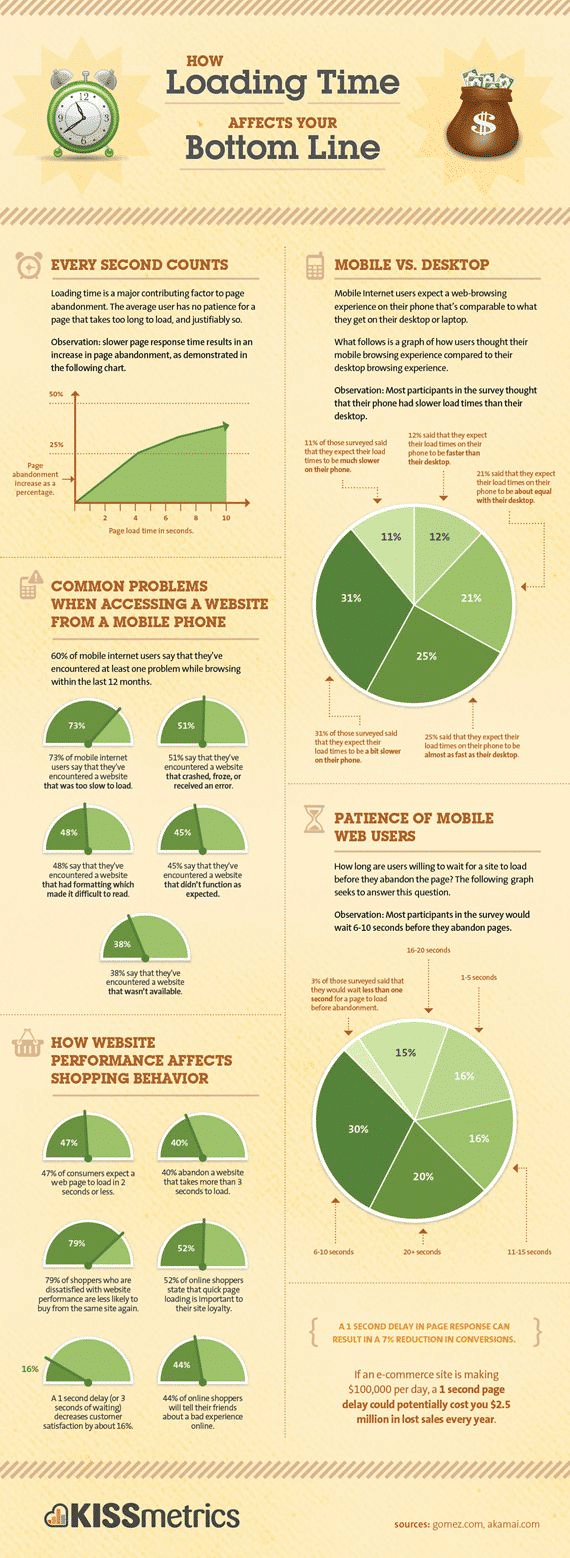
Take a look at the infographic below from Kissmetrics. It gives you a load of stats about how your website loading time affects your bottom line.
Chapter 1: The Importance of Website Speed
Before we delve into the ways slow loading times can harm your website, let’s first understand why website speed is so crucial.
1.1. User Experience
When users visit your website, they expect a seamless and speedy browsing experience. Slow loading times frustrate visitors and can lead to high bounce rates. According to a study by Google, the probability of bounce increases by 32% as page load time goes from 1 second to 3 seconds. A slow website can drive potential customers away and damage your brand’s reputation.
1.2. Search Engine Rankings
Search engines, like Google, consider page speed as a ranking factor. Slow-loading websites are penalized in search engine rankings, making it difficult for your site to appear on the first page of search results. This can significantly reduce organic traffic to your website, impacting your visibility and profitability.
1.3. Conversion Rates
Website speed is directly linked to conversion rates. Online shoppers expect quick load times, and any delay can lead to cart abandonment. Studies have shown that even a one-second delay in page load time can result in a 7% reduction in conversions. Slow websites cost businesses money by hindering sales and lead generation.
1.4. Mobile Friendliness
As more users access websites from mobile devices, it’s essential to optimize your site for mobile speed. Slow-loading pages on mobile devices can be particularly frustrating and deter users from engaging with your content or making purchases.
Chapter 2: The Consequences of Slow Loading Times
Now that we understand the significance of website speed, let’s explore the various consequences of having a slow-loading website.
2.1. High Bounce Rates
Slow-loading websites are likely to experience high bounce rates. Bounce rate refers to the percentage of visitors who leave your site after viewing only one page. When users encounter sluggish load times, they are more inclined to abandon your website, leading to missed opportunities for engagement and conversion.
2.2. Poor User Engagement
A slow website negatively affects user engagement. Visitors are less likely to explore multiple pages, read your content, or interact with your site’s features when pages take too long to load. This lack of engagement can result in missed opportunities to build a loyal audience.
2.3. Decreased Page Views
Slow-loading websites often suffer from decreased page views per session. Visitors may give up on waiting for pages to load and exit the site prematurely. This results in lower page view metrics, which can impact ad revenue and overall website performance.
2.4. Negative Impact on SEO
Search engines prioritize user experience, and slow websites do not align with this goal. Google, for instance, considers page speed when ranking websites. A slow website is less likely to rank well in search engine results, reducing organic traffic and visibility.
2.5. Frustrated Users
Users expect instant gratification on the internet, and a slow website can lead to frustration and dissatisfaction. Frustrated visitors are less likely to return to your site in the future, damaging your brand’s reputation and credibility.
Chapter 3: Identifying the Causes of Slow Loading Times
Now that we’ve discussed the consequences of slow loading times let’s explore the common culprits behind sluggish website performance.
3.1. Large Media Files
One of the primary causes of slow-loading websites is large media files, such as images and videos. High-resolution images and uncompressed videos can significantly increase page load times. Optimizing and compressing these files can help mitigate the issue.
3.2. Excessive HTTP Requests
Each element on a web page, such as images, scripts, and stylesheets, requires an HTTP request to load. Websites with numerous HTTP requests can experience delays as the server processes each one. Reducing the number of HTTP requests through techniques like combining CSS and JavaScript files can improve speed.
3.3. Inadequate Hosting
Choosing the right hosting provider and plan is crucial for website speed. Shared hosting can lead to slow loading times, especially during traffic spikes. Upgrading to a dedicated server or a faster hosting plan can alleviate this issue.
3.4. Unoptimized Code
Inefficient and unoptimized code can slow down your website. This includes HTML, CSS, and JavaScript code. Regularly reviewing and optimizing your codebase can lead to significant improvements in load times.
3.5. Lack of Content Caching
Caching involves storing website content temporarily on a user’s device, reducing the need to re-download resources on subsequent visits. Not implementing caching mechanisms can result in slower load times for returning visitors.
Chapter 4: Solutions for Faster Loading Times
Now that we’ve identified the causes of slow loading times let’s explore practical solutions to address this issue and prevent your website from destruction.
4.1. Image Optimization
Compress and resize images to reduce their file size without sacrificing quality. Use modern image formats like WebP, and implement lazy loading to ensure that images load only when they come into the viewport.
4.2. Content Delivery Networks (CDNs)
CDNs distribute website content across multiple servers located in various geographical regions. This reduces the distance between users and the server, improving load times. Implementing a CDN is particularly beneficial for websites with a global audience.
4.3. Minification and Compression
Minify your CSS, JavaScript, and HTML files to remove unnecessary characters and spaces. Additionally, enable GZIP compression on your server to reduce the size of transferred data, further enhancing website speed.
4.4. Browser Caching
Leverage browser caching to store static resources on users’ devices. This allows returning visitors to load your site faster as their browsers retrieve assets from their local cache rather than downloading them again from the server.
4.5. Upgrade Hosting
Evaluate your hosting provider and plan to ensure they meet your website’s needs. Consider upgrading to a faster hosting plan or exploring options like virtual private servers (VPS) or dedicated servers for improved performance.
4.6. Content Delivery Optimization
Use asynchronous loading for non-essential scripts and defer JavaScript execution until after the page has loaded. This prevents scripts from blocking the rendering of the page, resulting in faster perceived load times.
Chapter 5: Monitoring and Testing Website Speed
Optimizing website speed is an ongoing process. Regular monitoring and testing are essential to ensure your site maintains its fast loading times and doesn’t fall victim to performance issues.
5.1. Page Speed Insights
Google’s PageSpeed Insights is a valuable tool for assessing your website’s performance. It provides recommendations for improving speed and scores your site on both mobile and desktop devices.
5.2. GTmetrix
GTmetrix is another popular tool for analyzing website performance. It provides detailed reports on page load times, as well as actionable suggestions for optimization.
5.3. Pingdom
Pingdom offers website monitoring services that track your site’s uptime and performance. It alerts you to any issues that may arise, allowing you to address them promptly.
5.4. A/B Testing
A/B testing involves comparing two versions of a web page to determine which one performs better in terms of speed and other metrics. This can help you make data-driven decisions to improve your site’s performance continually.
Chapter 6: Conclusion
In today’s fast-paced digital landscape, the speed at which your website loads can make or break your online presence. Slow loading times can have a detrimental impact on user experience, SEO rankings, and conversion rates. To prevent your website from suffering these consequences, it’s essential to prioritize website speed optimization.
By identifying the causes of slow loading times and implementing practical solutions such as image optimization, CDNs, and browser caching, you can ensure that your website remains fast and responsive. Regular monitoring and testing will help you stay on top of performance issues and make necessary improvements.
Remember, a fast-loading website not only enhances user satisfaction but also contributes to higher search engine rankings and improved business outcomes. Don’t let slow loading times destroy your website’s potential—take action to optimize your site’s speed and reap the benefits of a better-performing online presence.

Author:
Mark Ford

Business-Led Web Design: Building Sites That Actually Support Your Objectives
Are you confident your website is actively supporting your business goals rather than just looking good? Do you want to understand how strategic design decisions can directly improve performance, conversions, and growth. […]


