
Are you about to launch a new website for your small business? Want to double and triple check you’re ready to go live?
We share 57 things to check before launching a new website in this infographic.
We break things down as follows:
- Page content
- Design
- Functionality
- SEO
- Analytics
- Security and backups
- Compliance
Check out the infographic for more detail.
![Web Design Checklist: 57 Things to Check Before Launching Your New Site [Infographic]](https://red-website-design.co.uk/wp-content/uploads/2021/04/Web-Design-Checklist-57-Things-to-Check-Before-Launching-Your-New-Site.jpg)
Launching a new website is an exciting milestone—but before you go live, it’s important to make sure everything is polished, functional, and optimised for success. A thorough pre-launch web design checklist can help you catch errors, improve user experience, and increase your chances of a strong start.
This guide breaks down 57 key checks across seven core areas to ensure your site is ready for the world. Let’s dive in and make sure nothing slips through the cracks.
Page Content
Your site content sets the tone, tells your story, and guides users toward taking action. Ensuring your content is clear, accurate, and engaging is one of the most important steps before launching. From headlines to body copy, each element must serve a purpose and work together seamlessly. Use this checklist to make sure your content hits the mark.
- Proofread all written content for spelling, grammar, and punctuation issues.
- Confirm that all content is up to date and relevant to your audience.
- Maintain a consistent tone of voice and writing style across pages.
- Include clear, action-driven calls to action that guide the user journey.
Design
Your website’s design creates the first impression and supports usability. It needs to reflect your brand identity while also being easy to navigate and visually appealing. A strong design helps build trust and keeps visitors engaged longer. Use these checks to ensure your design delivers on every front.
- Ensure consistent branding with your logo, colours, fonts, and style.
- Make sure your website is fully responsive on mobiles, tablets, and desktops.
- Check browser compatibility to guarantee consistent experience across platforms.
- Use a clear visual hierarchy to guide users through your content.
Functionality
All the design in the world won’t help if your site doesn’t work as expected. Every link, button, and form must function correctly to avoid frustrating users. Functional glitches can hurt your credibility and drive visitors away. Here are four critical functionality checks to carry out before launch.
- Test all contact, subscription, and enquiry forms for proper delivery.
- Check that all clickable buttons and CTAs lead to the correct destination.
- If you have an online shop, test shopping carts and payment gateways.
- Ensure search bars return relevant results and error pages are in place.
SEO
You don’t just want your website to look good—you want it to be found. Search engine optimisation (SEO) makes your site more visible in Google and other search engines. From metadata to image tags, every detail plays a role in helping your site rank. Follow these SEO essentials before your big launch.
- Write unique, keyword-optimised title tags and meta descriptions for each page.
- Add alt text to every image to improve accessibility and image search visibility.
- Use clean, SEO-friendly URLs that are descriptive and easy to read.
- Optimise page speed to reduce bounce rates and improve user experience.
Advanced SEO
Beyond the basics, there are advanced SEO measures that give your website a competitive edge. These techniques help search engines better understand your content and index your site more efficiently. They also support local SEO, structured data, and site performance. Take these steps to go deeper with your SEO strategy.
- Submit an XML sitemap to search engines to improve indexing.
- Set up and verify Google Search Console for performance monitoring.
- Use schema markup to provide search engines with detailed content information.
- Ensure your website is mobile-friendly and passes Google’s mobile usability tests.
Analytics
Once your site is live, you’ll want to track how users are interacting with it. Analytics tools like Google Analytics help you understand visitor behaviour and make informed improvements. It’s important to install and test tracking tools ahead of time so you don’t miss a thing. Get your analytics in place with these steps.
- Install Google Analytics and confirm it’s tracking all key pages.
- Set up goal tracking for conversions like sign-ups, sales, or downloads.
- Test event tracking for important interactions such as button clicks or video views.
- Use Google Tag Manager if you need to manage multiple tracking scripts.
Security & Backups
Website security is crucial—not just to protect your data, but to safeguard your users and maintain trust. Along with security, regular backups ensure that if anything goes wrong, you won’t lose everything. Protect your site with these essential pre-launch checks.
- Install an SSL certificate to ensure your site loads over HTTPS.
- Set up regular automated backups so you can restore your site if needed.
- Secure your admin area with strong passwords and limited access.
- Keep all CMS core files, plugins, and themes up to date to patch vulnerabilities.
Compliance
Compliance isn’t just a legal box-tick—it helps build credibility and trust with your users. Whether it’s data protection, accessibility, or clear policies, covering these bases ensures your website is responsible and inclusive. Before launch, check these vital compliance points.
- Add a cookie consent banner that complies with GDPR or relevant laws.
- Include a privacy policy, terms of use, and cookie policy in your footer.
- Make sure all data collection practices comply with GDPR or similar regulations.
- Include accessibility features like alt text, proper heading structure, and screen reader compatibility.
Final Thoughts
Launching a website can be a stressful process—but with a comprehensive checklist like this, you can be confident you’re putting your best foot forward. Each of these 57 checks plays a part in creating a secure, functional, search-optimised, and user-friendly website.
By taking the time to review each area carefully, you’ll be setting your new site up for long-term success.
![Web Design Tips: 10 Steps to Building a More Effective Website [Infographic]](https://red-website-design.co.uk/wp-content/uploads/2020/09/Web-Design-Tips-10-Steps-to-Building-a-More-Effective-Website.jpg)



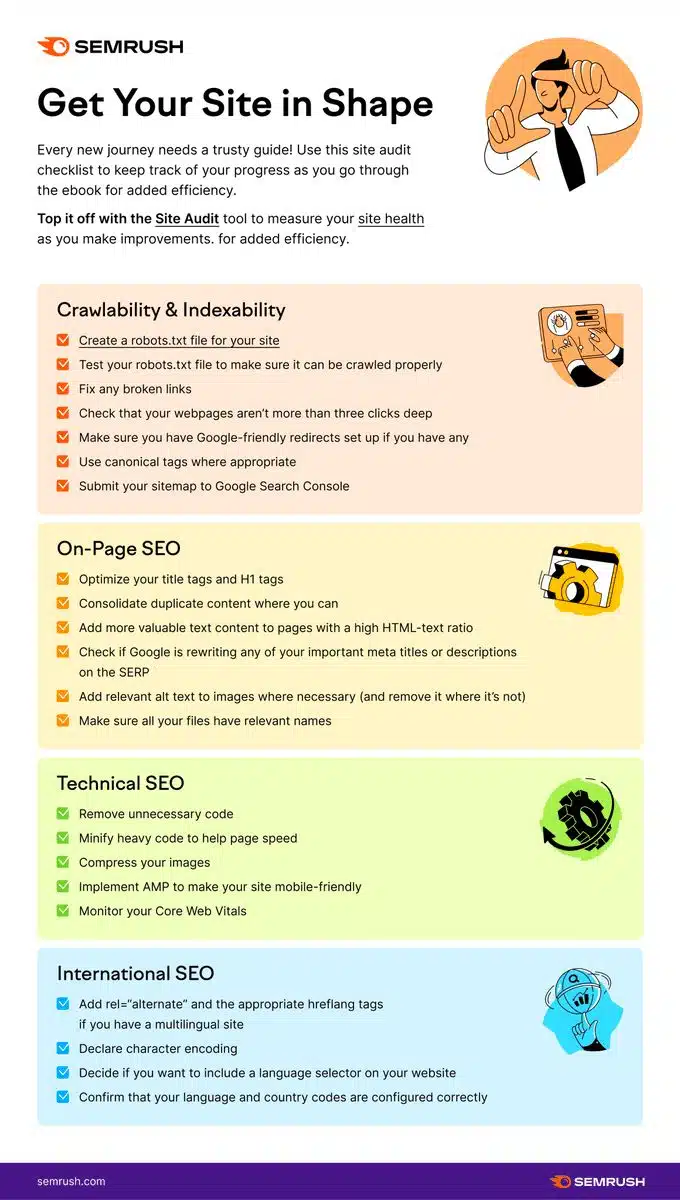
![Web Design & SEO Checklist: 56 Critical Areas to Improve [Infographic]](https://red-website-design.co.uk/wp-content/uploads/Web-Design-SEO-Checklist-56-Critical-Areas-to-Improve-1.webp)
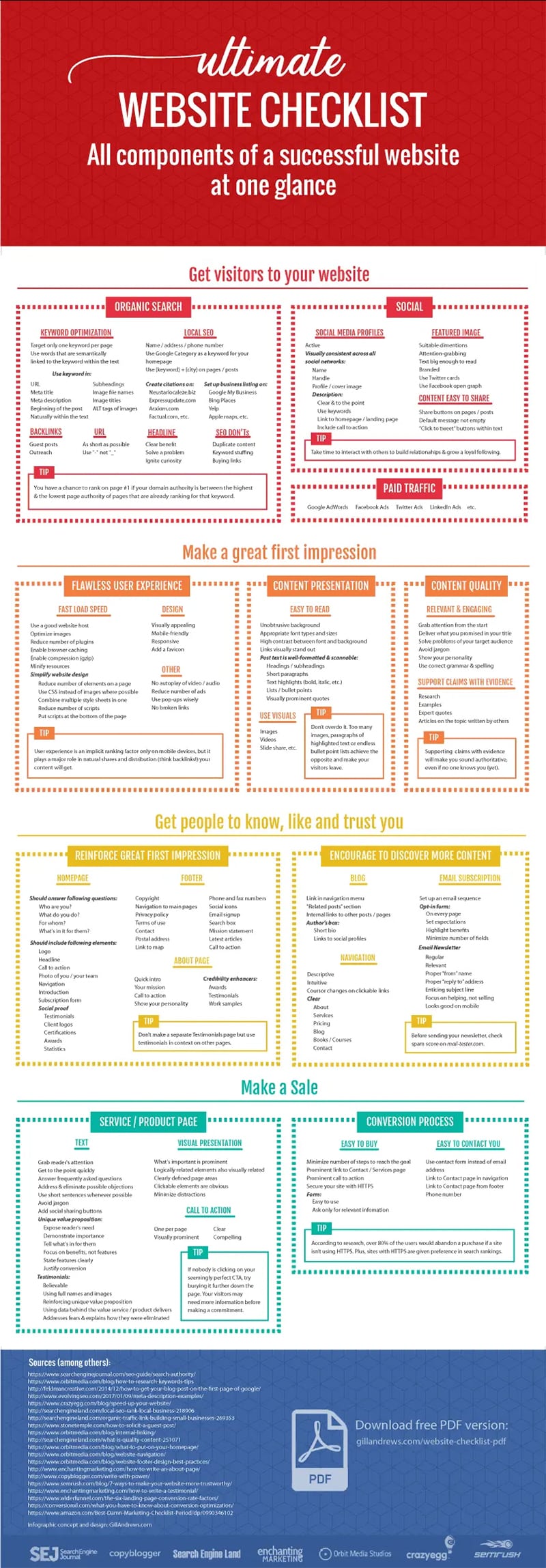
![Website Checklist: 18 Design, Usability & Optimisation Questions to Answer [Infographic]](https://red-website-design.co.uk/wp-content/uploads/Website-Checklist-18-Design-Usability-Optimisation-Questions-to-Answer-1.webp)


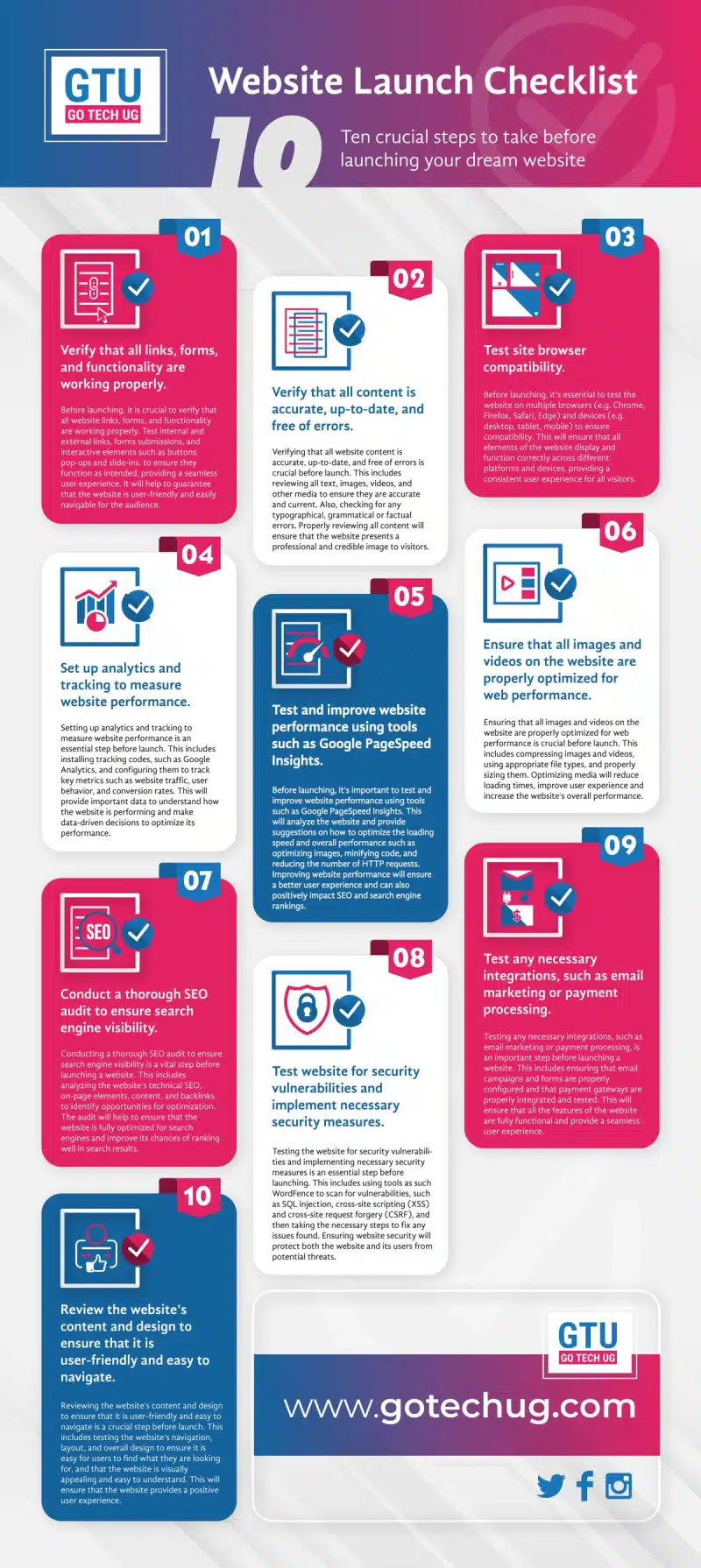
![Website Launch Checklist: Tips & Tools for Success [Infographic]](https://red-website-design.co.uk/wp-content/uploads/Website-Launch-Checklist-Tips-Tools-for-Success-1-jpg.webp)

Author:
Mark Ford

Designing for Humans: The Psychological Role of Colour in Web Design
Are you confident that the colours on your website are supporting how users feel, think and behave when they arrive? Have you ever wondered why some websites feel instantly trustworthy and intuitive, while others create friction without any obvious reason? […]



