

Are you struggling to get your website found on Google? Want to know where your SEO efforts are going wrong?
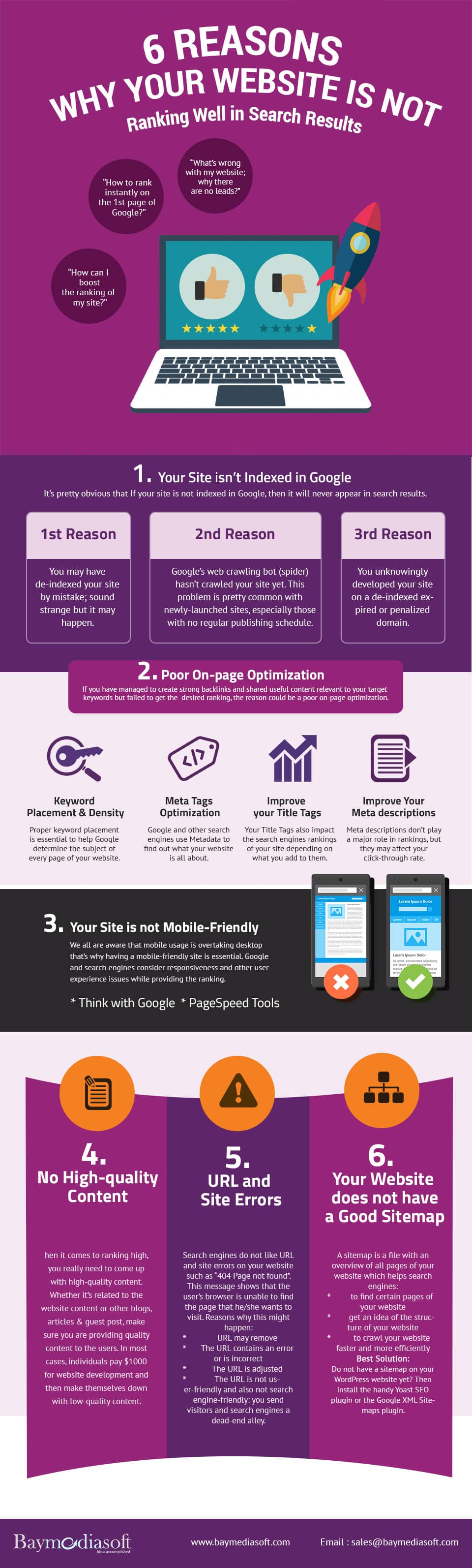
Baymediasoft share the common mistakes that prevent websites from ranking on Google in this infographic.
Here’s a quick summary:
- Your site isn’t indexed
- Poor on page optimisation
- Your site isn’t mobile friendly
- Poor quality content
- URL and site errors
- No sitemap
Check out the infographic for more detail.
In the digital age, visibility is key. If your website can’t be found on Google, you’re missing out on vast potential traffic and engagement. The ability to rank well on search engines like Google is crucial for any online business or entity.
If your site is struggling to appear in search results, there could be several underlying reasons. This blog post will explore six common issues that might be keeping your website from achieving a higher ranking.
Your Site Isn’t Indexed
For small businesses, ensuring your website is indexed by Google is crucial. If Google hasn’t indexed your site, it simply won’t appear in search results, making it invisible to potential customers searching online. Here’s a detailed guide on how to ensure your site is indexed and how to troubleshoot common issues that might prevent indexing.
Understanding Why Your Site Might Not Be Indexed
Before diving into solutions, it’s important to understand the common reasons why your site might not be indexed:
- Technical Issues: Problems in your site’s code, excessive downtime, or server errors can prevent indexing.
- New Website: If your site is new, it may not have been crawled yet. Indexing can take time.
- Poor Site Structure: If Google’s bots can’t navigate your site due to poor design or complex navigation, they may miss content.
- Policy Violations: If your site violates Google’s guidelines (like having spammy content), it may be deliberately excluded from the index.
Step-by-Step Guide to Ensuring Your Site is Indexed
- Verify Your Site with Google Search Console:
- Sign up for Google Search Console (GSC). This tool is indispensable for anyone managing a site.
- Add your website to GSC and verify ownership through the instructions provided. This step often involves adding a small piece of code to your site or updating DNS settings.
- Submit Your Site to Google:
- Once verified, use the URL Inspection tool in GSC to check if your site’s pages are indexed.
- If they aren’t, you can submit individual URLs to Google for indexing. This doesn’t guarantee indexing but alerts Google to your content.
- Check Your robots.txt File:
- This file resides in the root directory of your site and tells search engines which pages they can or cannot index.
- Ensure that it’s not disallowing search engines from crawling important parts of your site. You can test your robots.txt file directly in GSC.
- Remove Noindex Tags:
- Review your site’s HTML source code for any <meta name=”robots” content=”noindex”> tags. Remove these from pages you want to be indexed.
- Improve Site Structure and Navigation:
- Ensure your website is easy to navigate. A clear, logical structure helps search engines understand and index your site.
- Use breadcrumb lists and a consistent menu structure. Both users and search engines benefit from easy navigation.
- Ensure Quality Hosting:
- Server reliability is crucial. If your site is often down when search engines try to crawl, it won’t be indexed.
- Choose a reputable hosting provider known for good uptime and customer support.
- Create a Sitemap and Submit It to Google:
- A sitemap is a file that lists all the important pages on your site, helping Google find and crawl them all.
- You can create a sitemap using various tools online or a plugin if you use a CMS like WordPress. Once created, submit it through GSC.
Monitoring and Maintaining Index Status
After taking these steps, keep monitoring your site’s index status:
- Regularly Check Index Coverage: GSC offers an “Index Coverage” report that shows which pages are indexed and highlights any issues.
- Keep Content Fresh: Updating your site regularly with new and relevant content can encourage Google to re-crawl and re-index your site.
- Stay Informed on Google’s Guidelines: Google frequently updates its guidelines and algorithms. Staying informed helps you adapt and maintain your site’s compliance and visibility.
For small businesses, the visibility that comes from being indexed on Google can be transformative. By ensuring your site is accessible, navigable, and free of technical barriers, you can increase your chances of being indexed and found by potential customers.
Implement these strategies to build a stronger online presence and grow your business.
Poor On-Page Optimisation
On-page SEO is fundamental for improving your website’s visibility in search results. It involves optimizing elements on your website itself, like content, HTML tags, and structure, to rank higher and attract more relevant traffic.
For small businesses, mastering on-page SEO is crucial because it helps level the playing field against larger competitors. Here’s a detailed guide on how to enhance your on-page SEO.
Understanding On-Page SEO Elements
On-page SEO involves several key elements that need to be optimized correctly for better search engine rankings:
- Title Tags: These are the clickable headlines displayed on search engine results pages (SERPs) and are highly critical for SEO, usability, and social sharing.
- Meta Descriptions: This HTML attribute provides a brief summary of a page and is utilized on SERPs to display preview snippets for a given page.
- Header Tags (H1, H2, H3, etc.): These HTML elements denote headings and subheadings within content from other types of text (like paragraph text).
- Keywords: These are the terms people use in searches, and they should be strategically placed throughout your content.
- Alt Text for Images: This text serves as descriptions of images to search engines and assists in the accessibility of your site.
- URL Structure: Descriptive URLs enhance user experience and SEO performance.
Step-by-Step Guide to Enhancing On-Page SEO
- Optimize Title Tags:
- Ensure each page on your website has a unique title that includes main keywords at the beginning.
- Keep your titles under 60 characters to ensure they display properly on SERPs.
- Craft Compelling Meta Descriptions:
- Although not a direct ranking factor, meta descriptions can influence click-through rates.
- Include relevant keywords and create a description that accurately summarizes the page content in under 160 characters.
- Use Header Tags Effectively:
- Organize content clearly using header tags. Start with an H1 tag for the main title and use H2s and H3s for subsections.
- Include relevant keywords in at least one or two header tags.
- Strategically Place Keywords:
- Include your primary keywords in the first 100 words of your content.
- Use variations and long-tail keywords naturally throughout the text to avoid stuffing.
- Optimize Images:
- Use relevant images that support your content.
- Include descriptive, keyword-rich alt text for each image.
- Compress images to improve page load speed, which is a ranking factor.
- Improve URL Structure:
- Keep URLs short, descriptive, and relevant to the page topic.
- Use hyphens to separate words in a URL instead of underscores or spaces.
- Include one or two keywords in the URL if possible.
- Internal Linking:
- Use internal links to guide users and search engines to other pages of your website.
- Use descriptive anchor text for all links, which should naturally relate to the target page’s content.
- Enhance User Experience:
- Ensure your website is easy to navigate.
- Keep the user interface simple and the user experience (UX) intuitive.
- Ensure your pages load quickly by optimizing file sizes, leveraging browser caching, and reducing unnecessary plugins.
Monitoring and Improving
After implementing these strategies, monitoring their performance is crucial:
- Use Tools: Leverage tools like Google Search Console and various SEO platforms like Ahrefs or SEMrush to track how well your pages perform in terms of ranking and user engagement.
- A/B Testing: Periodically test different titles, descriptions, and content formats to see what works best for your audience and leads to better engagement and higher rankings.
- Update Regularly: SEO isn’t a one-time task. Update your content regularly to keep it fresh and relevant, which is favored by search engines.
For small businesses, effective on-page SEO is an accessible and critical strategy for digital success. By focusing on the optimization of your website, you can improve your search engine visibility, attract more traffic, and ultimately convert more customers.
Your Site Isn’t Mobile Friendly
In today’s digital landscape, mobile-friendliness is a critical factor for online success. With a majority of users accessing the web via mobile devices, having a mobile-friendly website is essential not only for user experience but also for SEO, as Google uses mobile-friendliness as a ranking factor in its search algorithms.
For small businesses, this means ensuring your website performs well on smartphones and tablets is crucial. Here’s a detailed guide on how to optimize your website for mobile users.
Understanding the Importance of Mobile Optimization
Mobile optimization involves designing and formatting your website so that it’s easy to read and navigate on a mobile device. This includes making sure the website loads quickly, the text is readable without zooming, and the interface is easy to interact with on a smaller screen. Below are key aspects to consider:
- Responsive Design: This approach uses flexible layouts that adapt to the size of the device’s screen. Essentially, your website will look great and function well whether someone is viewing it on a phone, tablet, or desktop.
- Touchscreen Readability: Ensuring buttons and links are easy to tap with a finger without zooming.
- Speed Optimization: Mobile users often have slower internet speeds, so it’s important to ensure your site loads quickly.
Step-by-Step Guide to Making Your Site Mobile Friendly
- Implement Responsive Design:
- Utilize a responsive theme or template. Most modern website platforms like WordPress offer responsive themes.
- Use CSS media queries to make style changes based on the device’s screen size and orientation.
- Test responsiveness using tools like Google’s Mobile-Friendly Test or BrowserStack.
- Optimize Images and Media:
- Compress images and videos to reduce their file size without significantly affecting quality, speeding up page load times.
- Use modern formats like JPEG 2000, JPEG XR, or WebP for images.
- Simplify Design and Content:
- Avoid using large blocks of text and opt for shorter paragraphs and bullet points to improve readability on small screens.
- Reduce the use of unnecessary or overly complex graphics that can distract or slow down loading times.
- Improve Navigation:
- Design an easy-to-use navigation menu. Consider a hamburger menu (three horizontal lines) which is popular on mobile sites.
- Ensure all clickable elements are spaced out enough to prevent the frustration of mis-taps.
- Enhance Touchscreen Interactivity:
- Make sure buttons and links are of a sufficient size and easy to tap.
- Increase padding around elements to provide a larger clickable area, which enhances the user experience.
- Speed Optimization:
- Minimize code: streamline HTML, CSS, and JavaScript. Use minification tools to remove unnecessary characters.
- Leverage browser caching to store elements of your site on users’ devices after the first visit, reducing loading times on subsequent visits.
- Choose a reliable web host that offers excellent uptime and fast servers.
- Use Mobile-Friendly Forms:
- When creating forms (like contact forms or sign-up forms), keep them short and straightforward.
- Use appropriate input types for mobile, such as ‘date’ pickers for dates and ‘number’ inputs for numbers.
- Regular Testing and Updates:
- Regularly test your mobile site with real devices and through simulated tools to ensure it continues to display and function correctly across all devices and updates.
- Stay informed about new mobile usability practices and incorporate them into your web design.
Monitoring and Adjusting
To ensure ongoing mobile-friendliness:
- Regularly Monitor Performance: Use Google Analytics to track mobile traffic and Google Search Console for insights on mobile usability issues.
- Gather User Feedback: Encourage feedback from mobile users and use this data to continuously improve the mobile experience.
- Stay Updated on Google’s Mobile Standards: Google frequently updates its standards and recommendations for mobile web design. Staying updated can help you maintain a competitive edge.
For small businesses, focusing on mobile optimization is not just about improving search rankings—it’s also about providing a better user experience that can lead to increased engagement and conversions.
By following these steps, you can ensure that your site is well-prepared to meet the needs of the modern mobile user.
Poor Quality Content
Quality content is the cornerstone of a successful online presence. It not only engages and retains customers but also significantly impacts SEO. Search engines prioritize high-quality, relevant content in their rankings. For small businesses, producing exceptional content is vital for standing out in a crowded marketplace.
Here’s how you can elevate the quality of your content and ensure it drives traffic, engages visitors, and converts leads.
Understanding the Attributes of High-Quality Content
High-quality content is more than just well-written text. It should be:
- Relevant: Directly addressing the interests and needs of your target audience.
- Informative: Providing valuable information that enhances the knowledge of the reader.
- Engaging: Capturing and maintaining the reader’s attention.
- Authoritative: Demonstrating expertise and credibility in your subject matter.
- Well-Structured: Organized logically with clear headings, subheadings, and a coherent flow.
Step-by-Step Guide to Creating Quality Content
- Know Your Audience:
- Conduct audience research to understand the needs, preferences, and pain points of your target customers.
- Create buyer personas to represent your typical customers and tailor your content to speak directly to their interests.
- Define Content Goals:
- Determine what each piece of content aims to achieve, whether it’s educating about a product, solving a common problem, or providing industry insights.
- Align content goals with your overall business objectives, ensuring each piece has a clear purpose.
- Conduct Thorough Research:
- Invest time in researching topics to find relevant statistics, studies, and data that back up your points and add depth to your content.
- Stay updated with the latest trends and developments in your industry to keep your content timely and relevant.
- Focus on Content Depth and Originality:
- Explore topics comprehensively to provide readers with all the information they need in one place.
- Offer unique perspectives or new insights on common topics to set your content apart from that of competitors.
- Optimize for Readability:
- Use clear, concise language that your audience can easily understand.
- Break text into manageable sections with headers and subheaders and use bullet points or lists to make information easier to digest.
- Incorporate Visuals:
- Use relevant images, videos, infographics, and charts to complement and enhance the textual content.
- Visuals not only break up text but can also help illustrate complex ideas more clearly and engagingly.
- Ensure Accuracy and Credibility:
- Fact-check all information and cite reliable sources to build trust with your audience.
- Display certifications, awards, or endorsements to enhance credibility.
- Optimize for SEO:
- Include relevant keywords naturally in your content to help improve its visibility in search engine results.
- Use meta tags, alt tags, and structured data to help search engines understand and index your content more effectively.
- Encourage Engagement:
- End posts with a call to action, inviting readers to comment, share, or read related content.
- Engage with readers who comment on your posts to foster a community and encourage repeat visits.
- Regularly Update Content:
- Regularly review and update your content to keep it current and relevant. This not only helps with SEO but also shows your commitment to providing valuable information.
- Refresh old posts with new information and visuals to revive interest and improve their ranking in search results.
Monitoring Content Performance
- Use Analytics: Utilize tools like Google Analytics to monitor how your content is performing in terms of traffic, engagement, and conversion rates.
- Gather Feedback: Solicit feedback from your audience through surveys or direct communications to understand how your content is perceived and how it can be improved.
- A/B Testing: Experiment with different styles, formats, and strategies to see what resonates best with your audience and leads to the desired outcomes.
For small businesses, high-quality content can be a game-changer, helping to establish a brand, build authority, and attract and retain customers. By investing in your content strategy and continuously striving to improve, you can significantly enhance your online presence and business success.
URL and Site Errors
Errors in your website’s URLs and general site structure can severely impact user experience and your site’s ability to rank well in search engines. For small businesses, minimizing these errors is crucial to maintaining a professional online presence and ensuring that visitors can access and interact with your site smoothly.
Here’s a comprehensive guide on identifying and fixing common URL and site errors that might be holding you back.
Understanding Common URL and Site Errors
Common issues that can arise with URLs and site structure include:
- 404 Errors (Page Not Found): These occur when a user attempts to access a page that doesn’t exist on the server, often due to a broken link or a mistyped URL.
- Redirect Issues: Improperly configured redirects (301 or 302 redirects) can lead to loops or excessively long chains that degrade user experience and SEO.
- Broken Links: Links that lead nowhere not only frustrate users but also waste crawl budget, meaning search engines allocate less resource to scanning your site.
- Duplicate Content: Similar or identical content appearing under different URLs can dilute SEO efforts and confuse search engines on which version to rank.
Step-by-Step Guide to Fixing URL and Site Errors
- Regularly Audit Your Website:
- Use tools like Google Search Console, Screaming Frog SEO Spider, or Ahrefs to conduct regular audits that help identify broken links, 404 errors, and redirect issues.
- Schedule these audits quarterly or biannually, depending on the size of your site and how frequently content is updated.
- Fix 404 Errors:
- Create a custom 404 page that helps users navigate back to useful content or the home page. This can mitigate the negative impact of hitting a dead end.
- Regularly review the Crawl Errors report in Google Search Console to identify and fix any links leading to 404 pages.
- Manage Redirects Properly:
- Use 301 redirects for permanent URL changes to transfer SEO value from the original URL to the new URL.
- Avoid redirect chains where possible. If a redirect chain occurs, try to shorten it to a single step.
- Check for redirect loops regularly and resolve them by ensuring that redirected URLs don’t circle back to themselves or to each other in a loop.
- Repair Broken Links:
- Implement a routine check for both internal and external broken links. Fixing these promptly ensures a smooth user experience and helps search engines crawl your site effectively.
- Use a broken link checker tool or plugins (if you’re using a CMS like WordPress) to automate some of this process.
- Address Duplicate Content:
- Use canonical tags to point search engines to the primary version of content if duplicate content cannot be avoided.
- Ensure dynamic URL parameters (often used in e-commerce for filtering products) don’t create multiple URLs with identical content. Configure URL parameters in Google Search Console.
- Optimize URL Structure:
- Keep URLs concise, readable, and descriptive. Avoid lengthy URLs filled with numbers and characters that don’t communicate content to users or search engines.
- Use hyphens to separate words in URLs, as they are recognized as space by search engines.
- Enhance Site Navigation and Architecture:
- Ensure that your website’s architecture is logical and straightforward. A well-organized site is easier for search engines to crawl and for users to navigate.
- Use a consistent, simple navigation menu that allows users to find what they need with minimal clicks.
Monitoring and Maintaining Site Health
- Continuously Monitor Site Performance: Use tools like Google Analytics and Google Search Console to keep an eye on how your site performs in terms of user engagement and search rankings.
- Stay Updated on SEO Best Practices: SEO is an ever-evolving field. Staying informed about the latest best practices and Google algorithm updates can help you preemptively address issues that could lead to errors.
For small businesses, keeping a clean, well-structured website with minimal URL and site errors is crucial for both search engine visibility and user satisfaction. By regularly auditing and correcting these issues, you can ensure that your website remains efficient, effective, and engaging for all users.
No Sitemap
A sitemap is a crucial component of your website’s SEO strategy. It acts as a roadmap of your website which guides search engines to all your important pages. Especially for new websites or those with numerous pages and content, a sitemap is essential for ensuring search engines can discover and index your content efficiently.
Here’s a detailed guide on creating and managing sitemaps for small businesses.
Understanding the Importance of a Sitemap
A sitemap can be particularly beneficial in several scenarios:
- Large Websites: For websites with many pages, a sitemap helps search engines locate all the pages on your site.
- New Websites: New businesses might struggle with search engine visibility as their links are less established.
- Websites with Rich Media Content: If your site contains lots of multimedia content, a sitemap can help ensure that this content is indexed alongside your text-based pages.
- Websites with Deep or Complex Structures: Sites with pages that aren’t well-linked through site navigation could be overlooked by search engines without a sitemap.
Types of Sitemaps
There are mainly two types of sitemaps:
- XML Sitemaps: Used by search engines to crawl a website intelligibly. This sitemap lists the website’s URLs along with metadata about each URL (when it was last updated, how often it changes, and how important it is relative to other URLs on the site) to prioritize the site’s content.
- HTML Sitemaps: Aimed at helping users navigate the website. This is a single HTML page that contains links to every page on the site.
Creating and Submitting an XML Sitemap
- Generate Your Sitemap:
- Use a sitemap generator tool appropriate for your website’s platform. WordPress users, for example, can use plugins like Yoast SEO or Google XML Sitemaps to automatically generate a sitemap.
- For websites without a CMS, online sitemap generators can crawl your website and create a sitemap. Examples include Screaming Frog (for smaller sites) or XML-Sitemaps.com.
- Include Essential URLs: Ensure your sitemap includes all pages that you want indexed by search engines. Exclude any pages that are duplicates, irrelevant, or those marked with a ‘noindex’ meta tag.
- Submit Your Sitemap to Search Engines:
- Submit your XML sitemap to Google via Google Search Console. Simply go to the ‘Sitemaps’ section and add the link to your sitemap file.
- You can also submit your sitemap to other search engines like Bing through their Bing Webmaster Tools.
- Update Your Sitemap Regularly:
- Regularly update your sitemap to reflect new content and remove obsolete pages. If you’re using a CMS with a sitemap plugin, this might be updated automatically.
- Resubmit your sitemap if significant changes have been made, like adding a large number of pages or restructuring your website.
Best Practices for Managing Sitemaps
- Keep Your Sitemap Clean: Only include pages that you want search engines to crawl and index. Exclude utility pages like terms of service or internal search result pages.
- Prioritize Important Pages: Use the <priority> tag in your sitemap to indicate the importance of pages relative to each other.
- Use Sitemap Index Files: If your website is very large (over 50,000 URLs), use sitemap index files, which are a collection of separate sitemap files, each containing a portion of your website’s URLs.
- Monitor Sitemap Statistics: Regularly check the sitemap report in Google Search Console to see how many pages are indexed and identify any issues with the sitemap or the pages listed in it.
For small businesses, creating and maintaining a sitemap is a fundamental SEO task that can significantly improve a site’s visibility and indexing by search engines. By ensuring all valuable content is easy for search engines to find and crawl, a sitemap can enhance your digital presence and support the growth of your business online.
Conclusion
In conclusion, if your website isn’t ranking well, it’s essential to investigate these areas systematically. Each element plays a significant role in how effectively your site communicates with search engines.
By addressing these issues, you can improve your visibility on Google and drive more traffic to your site.

Author:
Mark Ford



