

Are you just getting started with a LinkedIn marketing plan for your business? Want to know how to create the perfect LinkedIn profile optimised for social selling?
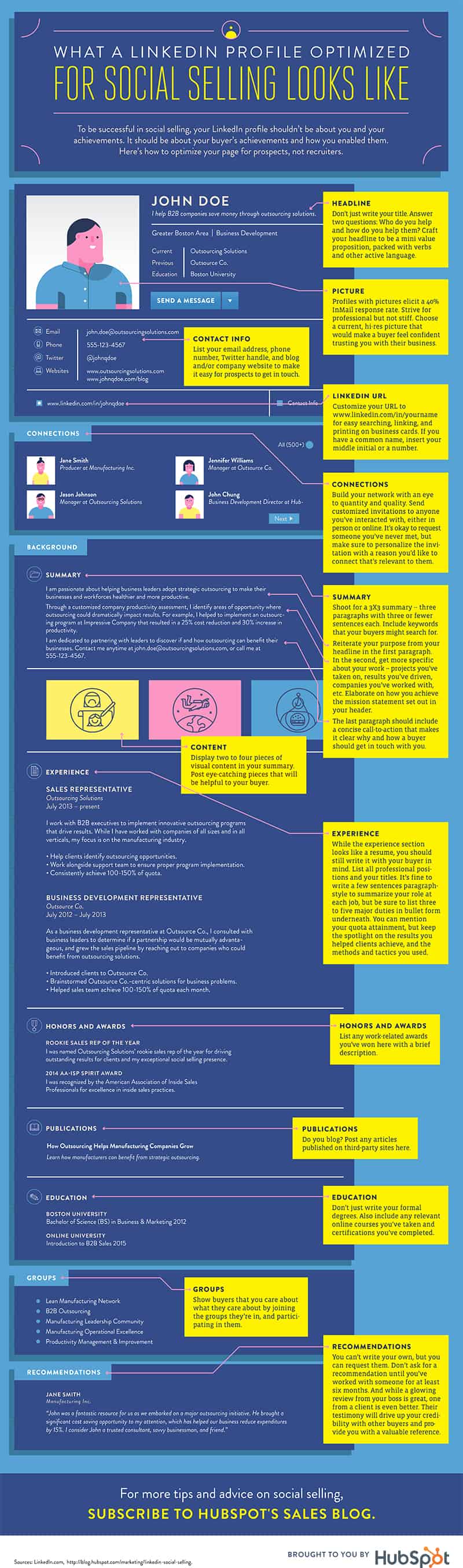
HubSpot share their guide to a sales focused LinkedIn profile in this infographic.
Here’s a quick summary:
- Add a value proposition to your headline.
- Use a professional profile photo.
- Include your contact information.
- Add keywords to your summary.
- Display visual content in your summary.
- Provide detail in your experience section.
- List honours and awards you’ve received.
- Share articles and blog posts you’ve written.
- Add your degrees, online courses, and certifications.
Check out the infographic for more detail.
In the realm of professional networking, LinkedIn stands out as a vital platform for individuals and businesses looking to connect, collaborate, and cultivate relationships. With over 900 million users globally, it serves as an unparalleled opportunity for marketers to reach their target audience and generate quality sales leads. However, the key to leveraging LinkedIn effectively lies in having a well-crafted profile that reflects your expertise and establishes your value. In this blog post, we’ll explore essential tips for perfecting your LinkedIn profile and optimizing it for lead generation.
Add a Value Proposition to Your Headline
Your LinkedIn headline is more than just a job title; it’s a powerful marketing tool that can significantly influence your ability to attract leads and connect with potential clients. By incorporating a value proposition into your headline, you can effectively communicate the unique benefits you offer to your target audience. Here’s how to craft a compelling value proposition for your LinkedIn headline that resonates with potential leads.
- Understand Your Audience
Before you can effectively communicate your value proposition, you need to know who your audience is. Understanding your target market will help you tailor your message to address their specific needs and pain points.
Tips for Understanding Your Audience:
- Identify Your Ideal Client: Create a detailed persona of your ideal client, including their demographics, job titles, industry, and challenges.
- Conduct Market Research: Use surveys, interviews, or social media polls to gather insights about your audience’s preferences and pain points.
- Analyze Competitors: Look at the headlines of competitors who are successfully attracting your target audience. What language do they use? What value propositions do they highlight?
- Define Your Unique Selling Proposition (USP)
Your unique selling proposition (USP) is what sets you apart from others in your field. It’s essential to articulate this clearly in your headline. Your USP should convey the unique value you provide and why clients should choose you over competitors.
Steps to Define Your USP:
- List Your Strengths: Identify the skills, experiences, and knowledge that make you unique in your industry.
- Highlight Your Results: Consider your past achievements and how they can translate into value for potential clients.
- Combine Your Skills and Audience Needs: Reflect on how your skills meet the needs of your target audience, forming a clear connection between what you offer and what they seek.
- Use Action-Oriented Language
When crafting your headline, choose action-oriented language that conveys confidence and decisiveness. This helps create an immediate sense of purpose and engagement with your profile.
Examples of Action-Oriented Language:
- Instead of saying “Marketing Specialist,” try “Driving Growth for Small Businesses Through Innovative Marketing Strategies.”
- Replace “Sales Manager” with “Empowering Tech Startups to Scale Revenue and Build Lasting Partnerships.”
- Include Relevant Keywords
Incorporating relevant keywords into your headline not only helps you rank better in LinkedIn searches but also makes it easier for potential clients to find you. Keywords should reflect your industry, skills, and the specific services you offer.
Tips for Using Keywords:
- Research Keywords: Use LinkedIn’s search feature to identify popular keywords related to your field. Note what terms your ideal clients are using.
- Focus on Specificity: Be as specific as possible with your keywords to target your ideal audience effectively. Instead of “consultant,” specify “digital marketing consultant for e-commerce businesses.”
- Prioritize the Most Important Keywords: Place your most critical keywords at the beginning of your headline for better visibility.
- Make It Personal and Authentic
While it’s important to highlight your professional accomplishments and skills, it’s equally essential to make your headline feel personal and authentic. A headline that reflects your personality can help establish a connection with potential leads.
Ways to Add a Personal Touch:
- Use First-Person Language: Phrases like “I help,” “I empower,” or “I specialize in” can create a more personal connection.
- Show Your Passion: Include words that convey your enthusiasm for your work, such as “passionate,” “dedicated,” or “committed.”
- Incorporate Your Brand Voice: Ensure your headline aligns with your overall brand voice, whether it’s formal, friendly, or creative.
- Test and Refine Your Headline
Once you’ve crafted a headline that you believe reflects your value proposition, it’s important to test its effectiveness. LinkedIn allows you to change your headline easily, so don’t hesitate to make adjustments based on feedback or performance.
Strategies for Testing Your Headline:
- Seek Feedback: Ask colleagues, mentors, or trusted clients for their opinions on your headline. Do they understand your value proposition?
- Monitor Engagement: Keep an eye on profile views and connection requests after updating your headline. An increase may indicate that your new headline is resonating with your audience.
- Refine Over Time: As you gain more insights about your audience and evolve in your career, revisit your headline periodically to ensure it still aligns with your goals and audience needs.
Conclusion
Your LinkedIn headline is a critical component of your online professional presence. By adding a clear value proposition, you can attract the right audience, establish credibility, and generate more sales leads. Understanding your audience, defining your unique selling proposition, using action-oriented language, incorporating relevant keywords, and personalizing your message are all key strategies for crafting a compelling headline.
By investing time into perfecting your LinkedIn headline, you set the stage for meaningful connections and business opportunities, transforming your LinkedIn profile into a powerful marketing asset.
Use a Professional Profile Photo
Your profile photo on LinkedIn is more than just a visual representation; it’s your digital handshake. A professional profile photo can significantly impact how others perceive you and your business. A well-chosen photo can establish trust, enhance credibility, and increase the chances of generating leads. Here are in-depth tips and guidance for small businesses on how to choose and optimize your LinkedIn profile photo effectively.
- The Importance of a Professional Profile Photo
First impressions matter, especially in a professional networking environment like LinkedIn. Here are a few reasons why having a professional profile photo is crucial:
- Establishes Trust: Profiles with photos receive far more connection requests and engagement than those without. A professional photo helps create a sense of trustworthiness.
- Enhances Credibility: A well-composed and high-quality image communicates that you take your professional image seriously, thereby enhancing your credibility.
- Increases Visibility: LinkedIn’s algorithm favors profiles with photos, meaning you’re more likely to appear in searches and recommendations when you have a professional image.
- Choosing the Right Photographer
If possible, consider hiring a professional photographer who specializes in headshots. They will understand how to capture you in the best light and can provide guidance on poses and expressions.
Tips for Selecting a Photographer:
- Check Their Portfolio: Review the photographer’s previous work to ensure their style aligns with your professional brand.
- Seek Recommendations: Ask colleagues or other professionals for referrals to photographers they trust.
- Discuss Your Vision: Communicate your expectations and the image you want to convey during the shoot.
- Composition and Background
The composition of your profile photo plays a crucial role in its effectiveness. Here are some essential elements to consider:
Framing:
- Head and Shoulders: Your profile photo should ideally capture your head and shoulders. This allows viewers to see your face clearly while providing context about your professional persona.
- Eye Level: Position the camera at eye level for a more engaging and approachable look.
Background:
- Keep It Simple: Choose a background that is neutral and doesn’t distract from your face. A plain white or light-colored background often works well.
- Consider Your Environment: If you want to incorporate some context related to your industry, ensure the background reflects professionalism (e.g., a well-organized office).
- Attire and Grooming
What you wear in your profile photo speaks volumes about your professional image. Choose attire that aligns with your industry standards and your brand.
Dress Appropriately:
- Business Professional: If your industry is formal (e.g., finance or law), wear business attire such as a suit or blazer.
- Business Casual: For more casual industries (e.g., creative fields), a smart casual outfit can work well. Think button-down shirts or blouses without a tie.
Grooming:
- Look Neat and Tidy: Pay attention to grooming—hair should be neat, and makeup should be applied conservatively if you choose to wear it.
- Avoid Over-Editing: While you may want to enhance your photo, avoid heavy filters or excessive editing that may misrepresent how you look in person.
- Expression and Body Language
Your expression and body language can convey a lot about your personality. Here’s how to ensure your profile photo reflects the right vibe:
Smile Naturally:
- Authenticity Matters: A genuine smile makes you appear approachable and friendly. Practice smiling naturally before the shoot to capture the best expression.
- Consider Your Audience: Think about the type of clientele you want to attract and adjust your expression accordingly. For example, a warm smile might work well for client-facing roles, while a more serious expression could be appropriate for leadership positions.
Posture:
- Stand Tall: Good posture not only looks professional but also conveys confidence.
- Angle Your Body: Instead of facing the camera directly, turn your body slightly to the side while keeping your face forward. This can create a more dynamic composition.
- Quality and Resolution
Ensure your photo is of high quality and resolution. A pixelated or blurry image can detract from your professionalism.
Photo Quality Tips:
- Use a High-Resolution Camera: If hiring a professional, they will likely use high-quality equipment. If you are taking the photo yourself, consider using a DSLR or a high-quality smartphone camera.
- Proper Lighting: Good lighting is crucial. Natural light is often the best option—consider shooting near a window or outdoors. Avoid harsh shadows or overly bright spots.
- Consistency Across Platforms
Consistency in your professional image across all platforms reinforces your brand identity. Ensure that your LinkedIn profile photo aligns with your other social media profiles, website, and any promotional materials.
Tips for Consistency:
- Use the Same Photo: If your LinkedIn profile photo is effective, consider using the same image on other professional platforms like your company website or Twitter.
- Keep Your Branding in Mind: If your business has specific branding guidelines (colors, styles), consider incorporating those elements subtly into your photo.
- Regular Updates
As you evolve in your career, your profile photo should reflect that. Regularly updating your photo helps maintain a current and relevant professional image.
When to Update:
- Career Changes: If you change jobs, roles, or industries, consider updating your profile photo to reflect your new position.
- Significant Changes in Appearance: If your appearance changes significantly (e.g., hairstyle, major weight loss), it’s a good idea to refresh your photo.
Conclusion
A professional profile photo is a crucial aspect of your LinkedIn presence and can significantly influence how you are perceived by potential clients and connections. By investing time and effort into choosing the right photographer, composing your shot thoughtfully, dressing appropriately, and maintaining a polished appearance, you can create a powerful image that conveys trust and professionalism.
Remember, your LinkedIn profile is often the first impression you make in the professional world. A high-quality, well-thought-out profile photo can help establish credibility, enhance your professional brand, and ultimately contribute to generating valuable leads for your small business.
Include Your Contact Information
Including your contact information on your LinkedIn profile is essential for small businesses looking to generate sales leads and foster connections. By providing clear and accessible contact details, you make it easy for potential clients, partners, and collaborators to reach out to you. Here’s a comprehensive guide on how to effectively include your contact information on LinkedIn to maximize engagement and lead generation.
- Understand the Importance of Contact Information
Having your contact information readily available on your LinkedIn profile serves several critical purposes:
- Facilitates Communication: It allows interested parties to contact you directly without navigating through multiple steps.
- Enhances Professionalism: A complete profile, including contact details, demonstrates professionalism and transparency, making you more approachable.
- Increases Lead Generation: When potential clients can easily reach you, they are more likely to initiate conversations that can lead to business opportunities.
- What Contact Information to Include
When filling out your LinkedIn profile, you have various options for contact information. Consider including the following:
Email Address
- Use a Professional Email: Opt for an email that aligns with your business domain (e.g., yourname@yourbusiness.com). This adds credibility compared to using a personal email address (e.g., yourname@gmail.com).
- Keep It Updated: Regularly check and update your email address to ensure potential clients can always reach you.
Phone Number
- Consider the Relevance: If you want potential clients to contact you via phone, include your business phone number. However, if you prefer to communicate primarily through email or LinkedIn messages, you may skip this.
- Choose the Right Format: Ensure your phone number is formatted correctly for easy dialing (e.g., +1 (555) 123-4567).
Website URL
- Link to Your Business Website: Include the URL to your business website, as this serves as a gateway for potential clients to learn more about your products or services.
- Use URL Shorteners: If your website URL is lengthy, consider using a URL shortener for a cleaner look.
Social Media Links
- Include Relevant Social Media Profiles: If your business actively uses social media platforms (such as Twitter, Facebook, or Instagram), provide links to those profiles. This can encourage potential leads to connect with you across multiple channels.
- Limit to Professional Platforms: Focus on professional networks relevant to your business. Avoid personal social media profiles that might detract from your professional image.
- Where to Add Your Contact Information
LinkedIn offers several sections where you can add your contact information. Here’s how to effectively utilize them:
Contact Info Section
- Add Details Directly: Use the “Contact Info” section on your profile to input your email address, phone number, website, and other relevant links. This section is easily accessible to anyone viewing your profile.
- Privacy Settings: Adjust your privacy settings to control who can see your contact information. Ensure that it’s visible to your connections, and consider making it available to everyone if you’re looking to expand your network.
About Section
- Reinforce Availability: You can also mention your preferred contact methods in your “About” section. For instance, state, “Feel free to reach out via email for inquiries or to schedule a consultation.”
- Personalize the Message: Including a brief message about your willingness to connect can make your profile more inviting.
Featured Section
- Highlight Contact-Related Content: If you have specific content related to your services (like brochures or flyers), you can feature these in your profile. Ensure they contain your contact details for easy reference.
- Optimize Contact Information for Mobile Users
With an increasing number of users accessing LinkedIn via mobile devices, ensure that your contact information is easily readable and accessible on smaller screens.
Tips for Mobile Optimization:
- Test on Multiple Devices: Regularly check your profile on different devices to ensure your contact information appears correctly.
- Keep It Concise: Use clear and concise wording to convey your contact details, making them easy to read on mobile screens.
- Create a Call to Action (CTA)
Encouraging potential leads to reach out can significantly enhance engagement. Including a call to action in your profile can guide users on what to do next.
Effective CTAs:
- Invite Conversations: Phrases like “Let’s connect!” or “Contact me for a free consultation!” can prompt potential leads to take action.
- Be Specific: If there are specific inquiries you want to encourage (e.g., “Email me for marketing strategies” or “Call for partnership opportunities”), make it clear in your CTA.
- Maintain Professionalism and Privacy
While it’s important to include your contact information, maintaining a balance between professionalism and privacy is crucial.
Tips for Maintaining Professionalism:
- Avoid Over-sharing: Only provide contact methods that you are comfortable with and that are necessary for your professional networking.
- Be Responsive: If you choose to provide your contact information, ensure you respond promptly to inquiries to maintain your professional image.
- Regularly Review and Update Your Information
As your business evolves, so might your contact information. Regularly reviewing and updating your profile ensures potential leads always have access to your latest details.
Tips for Regular Updates:
- Set Reminders: Create reminders to review your LinkedIn profile every few months or whenever you change your contact details.
- Respond to Engagement: After any significant interactions or leads generated, take a moment to assess whether your contact details still serve your needs.
Conclusion
Including your contact information on your LinkedIn profile is a critical step for small businesses aiming to generate leads and foster meaningful connections. By providing clear, professional contact details—such as an email address, phone number, website URL, and social media links—you enhance your accessibility and establish credibility with potential clients.
Using the right sections, optimizing for mobile users, creating effective calls to action, and maintaining professionalism will help you maximize the benefits of including your contact information. Regularly reviewing and updating this information will ensure you remain approachable and open to new opportunities, ultimately leading to greater success for your small business.
Add Keywords to Your Summary
In the digital age, where online visibility can make or break a small business, strategically incorporating keywords into your LinkedIn summary is essential for enhancing discoverability and attracting potential clients. Keywords help improve your profile’s searchability, ensuring that the right audience can find you when looking for specific services or expertise. Here’s an in-depth guide on how to effectively add keywords to your LinkedIn summary to maximize your visibility and lead generation potential.
- Understand the Importance of Keywords
Keywords are the terms and phrases that people use when searching for information online. In the context of LinkedIn, these are the words that potential clients, employers, and partners may use to find professionals with specific skills or services.
Benefits of Using Keywords in Your Summary:
- Improved Search Visibility: Including relevant keywords increases the chances that your profile will appear in search results when users are looking for specific skills or expertise.
- Targeted Audience Engagement: By using industry-specific keywords, you attract the right audience who are genuinely interested in your services, enhancing the quality of your leads.
- Enhanced Professional Branding: Thoughtfully chosen keywords help to reinforce your professional identity, aligning your profile with your business goals and positioning.
- Identify Relevant Keywords
Before you start writing or updating your LinkedIn summary, take the time to research and identify relevant keywords related to your industry, services, and expertise.
How to Find Keywords:
- Analyze Job Descriptions: Review job postings within your industry. Pay attention to the skills, qualifications, and terminology frequently mentioned; these often indicate popular keywords.
- Research Competitors: Look at the profiles of competitors or industry leaders to identify keywords they use effectively. This can provide insight into trending terms and phrases within your niche.
- Use Keyword Research Tools: Tools like Google Keyword Planner, SEMrush, or Ubersuggest can help you find keywords that are relevant to your business and have good search volumes.
- Leverage LinkedIn Search: Type relevant terms in the LinkedIn search bar and note the suggested keywords that appear. This reflects what users are actively searching for on the platform.
- Incorporate Keywords Naturally
Once you have a list of relevant keywords, it’s crucial to incorporate them into your summary naturally. Stuffing keywords unnaturally can make your profile appear forced and may turn off potential clients.
Tips for Natural Integration:
- Write for Your Audience: Focus on creating a summary that speaks directly to your target audience while seamlessly integrating keywords. Avoid compromising the readability of your content.
- Use Variations: Utilize different variations of keywords. For instance, if you offer “digital marketing,” you could also use “online marketing” or “internet marketing” to capture a broader audience.
- Focus on Context: Ensure that keywords fit the context of your writing. For example, if you’re discussing your experience in a specific project, incorporate related keywords that describe the project and its outcomes.
- Crafting a Compelling Summary
Your LinkedIn summary should not only include keywords but also be engaging and informative. Here’s how to craft a summary that incorporates keywords effectively:
Structure Your Summary:
- Start with a Strong Opening: Capture attention with a compelling opening sentence that includes a primary keyword. For example, “As a passionate digital marketing strategist, I specialize in creating innovative online campaigns that drive engagement and sales.”
- Highlight Your Skills: Use keywords to emphasize your core skills and competencies. Create bullet points or short phrases to make these stand out.
- Include Accomplishments: Share notable achievements and projects where you utilized specific skills. Integrate relevant keywords naturally within these descriptions.
- Close with a Call to Action: Conclude your summary with an invitation for readers to connect, visit your website, or inquire about your services. You might say, “Let’s connect to discuss how I can help your business thrive in today’s digital landscape.”
- Maintain a Balance
While it’s important to use keywords, maintaining a balance is crucial. Overloading your summary with keywords can negatively impact readability and make it feel like a marketing pitch.
Tips for Balance:
- Quality Over Quantity: Aim to integrate 5 to 10 relevant keywords within your summary rather than trying to fit in as many as possible.
- Prioritize Clarity: Ensure that your summary remains clear and concise. If a keyword feels forced, it’s better to rephrase your sentence than to include it.
- Regularly Update Your Keywords
As industries evolve and trends shift, so too do the keywords relevant to your business. Regularly updating your LinkedIn summary ensures that it reflects current terminology and practices.
When to Update:
- New Skills or Services: If you acquire new skills or introduce new services, update your summary to reflect these changes and include associated keywords.
- Shifts in Industry Trends: Stay abreast of changes within your industry and update your keywords accordingly to maintain relevance.
- Feedback and Engagement: Pay attention to how your audience engages with your profile. If certain keywords seem to resonate well, consider emphasizing them further.
- Analyze Your Summary’s Performance
After optimizing your summary with keywords, monitor how well your profile performs over time. LinkedIn provides insights that can help you understand your profile’s visibility and engagement.
Tips for Performance Analysis:
- Use LinkedIn Analytics: Check LinkedIn’s analytics for your profile to see how many views you are receiving and who is engaging with your content.
- Solicit Feedback: Ask trusted colleagues or connections to review your profile and provide feedback on the clarity and effectiveness of your summary.
Conclusion
Adding keywords to your LinkedIn summary is a vital strategy for small businesses seeking to enhance their online visibility and generate sales leads. By identifying relevant keywords, integrating them naturally, and crafting a compelling narrative, you can optimize your profile to attract the right audience and establish yourself as an industry leader.
Remember, your LinkedIn summary is not just a collection of keywords; it’s an opportunity to communicate your value proposition and engage potential clients. Regularly update your keywords, analyze your performance, and adjust your strategy as needed to ensure your LinkedIn presence effectively supports your business goals. By following these guidelines, you’ll create a powerful LinkedIn summary that resonates with your target audience and drives valuable connections.
Display Visual Content in Your Summary
In today’s digital landscape, visual content has become a vital component of effective communication, especially on platforms like LinkedIn. Incorporating visual elements into your LinkedIn summary not only enhances engagement but also helps convey your message more effectively. For small businesses, leveraging visual content can set your profile apart from the competition and attract potential clients. Here’s how to effectively display visual content in your LinkedIn summary and maximize its impact.
- Understand the Power of Visual Content
Visual content encompasses images, videos, infographics, presentations, and any other graphical representations that can communicate information quickly and effectively. Research shows that visual content can improve understanding, retention, and engagement rates.
Benefits of Using Visual Content:
- Increased Engagement: Visuals capture attention and can lead to higher engagement rates. Profiles with visual content are more likely to be viewed, shared, and interacted with.
- Improved Information Retention: People are more likely to remember information presented visually. By using graphics, you can help ensure your key messages stick in the minds of your audience.
- Professional Appeal: High-quality visuals can enhance your professional image and reinforce your brand, making your profile more appealing to potential clients or employers.
- Identify the Types of Visual Content to Include
When considering visual content for your LinkedIn summary, think about the types that best showcase your skills, achievements, and brand. Here are some effective options:
- Professional Headshot
- Importance: Your profile photo is the first visual element people notice. A professional headshot establishes trust and credibility.
- Tips: Use a high-quality image that clearly shows your face, dress professionally, and choose a neutral background to keep the focus on you.
- Portfolio Images
- Importance: If you offer services that result in tangible products (like design work, photography, or marketing campaigns), including portfolio images can provide proof of your expertise.
- Tips: Choose high-resolution images that showcase your best work. Consider creating a slideshow or a collage to display multiple projects in a visually appealing way.
- Infographics
- Importance: Infographics effectively summarize complex information and can illustrate your skills, achievements, or industry insights in a visually engaging manner.
- Tips: Use tools like Canva or Piktochart to create infographics that convey key statistics or processes relevant to your business. Ensure they align with your branding in terms of colors and fonts.
- Slide Decks or Presentations
- Importance: If you’ve delivered presentations or webinars, sharing slides can highlight your expertise and thought leadership in your field.
- Tips: Use platforms like SlideShare to host your presentations. You can then embed a link to these presentations in your summary or include a snapshot of your slides in your profile.
- Videos
- Importance: Video content can enhance engagement by providing a more personal touch. They allow you to explain your services or share client testimonials.
- Tips: Create a brief introduction video where you explain who you are and what you do, or use video testimonials from satisfied clients. Keep it concise and ensure good production quality.
- Strategically Position Visual Content
Once you’ve identified the types of visual content to include, it’s important to consider how and where to position them within your LinkedIn summary.
Tips for Effective Placement:
- Lead with Strong Visuals: Start your summary with a compelling visual element that captures attention, such as a video introduction or an infographic summarizing your expertise.
- Complement Text with Visuals: Use visuals to break up long blocks of text. For example, if you describe a complex project, you can include an infographic illustrating the project timeline or key results.
- Embed Links Strategically: If using external platforms (like SlideShare or your business website) to host visuals, ensure links are integrated naturally within your summary text, guiding readers to explore more.
- Ensure Visual Content is High Quality
The quality of your visual content reflects your professionalism. Low-quality images or poorly produced videos can diminish your credibility.
Tips for Quality Assurance:
- Invest in Good Design: If designing visuals yourself, use professional design tools and templates to ensure a polished appearance. Alternatively, consider hiring a graphic designer for high-stakes projects.
- Optimize for LinkedIn: Ensure all visual content is properly formatted for LinkedIn. Check that images are the correct size and that videos are of high quality to avoid pixelation.
- Maintain Consistent Branding: Use consistent colors, fonts, and styles across all visual content to reinforce your brand identity. This helps create a cohesive look for your profile.
- Monitor Engagement and Adjust Accordingly
After you’ve added visual content to your LinkedIn summary, it’s essential to monitor engagement to assess its effectiveness.
How to Track Performance:
- LinkedIn Analytics: Use LinkedIn’s built-in analytics tools to monitor the views and interactions on your profile. Pay attention to metrics related to visual content, such as how often videos are watched or how many people engage with infographics.
- Feedback from Connections: Encourage feedback from colleagues and connections regarding your visual content. This can provide insight into what resonates with your audience and what might need improvement.
- Regularly Update Visual Content
As your business evolves and your skills expand, keeping your visual content fresh and relevant is crucial.
When to Update:
- New Achievements: When you complete a significant project or receive an award, update your visuals to reflect these accomplishments.
- Shifts in Services: If you introduce new services or pivot your business model, ensure your visual content aligns with your current offerings.
- Trends in Design: Stay abreast of design trends and consider refreshing your visuals periodically to maintain a modern look.
Conclusion
Incorporating visual content into your LinkedIn summary is a powerful strategy for small businesses looking to enhance their online presence and attract sales leads. By understanding the types of visuals to include, strategically positioning them, ensuring high quality, and regularly updating your content, you can create a dynamic and engaging LinkedIn profile that stands out.
Visual content not only helps communicate your value proposition more effectively but also fosters a stronger connection with your audience. As you enhance your profile with visual elements, remember that clarity and professionalism should always be your guiding principles. By following these guidelines, you’ll transform your LinkedIn summary into a compelling showcase of your brand and expertise, driving greater engagement and generating valuable leads for your business.
Provide Detail in Your Experience Section
The experience section of your LinkedIn profile is one of the most critical components when it comes to attracting potential clients and generating sales leads. This section not only outlines your professional history but also showcases your skills, achievements, and the value you can bring to a business. For small businesses, providing detailed, relevant information in this section can significantly enhance credibility and influence prospective customers. Here are in-depth tips and guidance on how to effectively detail your experience section on LinkedIn.
- Use a Clear and Structured Format
The way you present your experience is crucial for readability and impact. A clear, structured format will help potential clients quickly understand your background and qualifications.
Tips for Formatting:
- Job Title and Company: Start with your job title followed by the company name. Ensure that your title reflects your role accurately and includes keywords relevant to your industry.
- Location and Dates: Include the location of the company and the dates of your employment. Use the month and year format to show the duration clearly.
- Bullet Points for Achievements: Use bullet points to break down your responsibilities and accomplishments. This format is easier to scan and allows you to highlight key achievements effectively.
- Focus on Relevant Experience
When detailing your experience, focus on positions and roles that are relevant to your current business or career goals. This relevance helps create a cohesive narrative and positions you as an expert in your field.
Tips for Relevance:
- Target Your Audience: Consider who your potential clients are and what they care about. Tailor your experience section to highlight roles that showcase the skills and knowledge that will resonate with them.
- Highlight Industry-Specific Roles: If you have worked in various industries, prioritize experiences that are most relevant to your current market or niche.
- Quantify Achievements
Quantifying your achievements gives concrete evidence of your capabilities and successes, making your profile more persuasive.
Tips for Quantification:
- Use Numbers and Metrics: Whenever possible, include metrics that demonstrate your contributions. For example, instead of saying “increased sales,” say “increased sales by 30% in six months.”
- Describe Impact: Explain how your actions led to measurable outcomes. For instance, if you led a marketing campaign, describe how it increased lead generation or engagement rates.
- Incorporate Action Verbs
Using strong action verbs can make your experience section more dynamic and impactful. This approach emphasizes your proactive contributions and accomplishments.
Tips for Using Action Verbs:
- Choose Strong Verbs: Start each bullet point with a powerful action verb like “developed,” “launched,” “implemented,” or “managed.” This choice makes your responsibilities and achievements sound more compelling.
- Vary Your Language: To keep your description engaging, vary the verbs you use throughout your experience section. Avoid repetitive phrases to maintain reader interest.
- Highlight Skills and Technologies
Detailing specific skills and technologies you used in each role not only demonstrates your expertise but also makes your profile more discoverable through LinkedIn searches.
Tips for Highlighting Skills:
- List Relevant Skills: Include skills that are pertinent to the role you are describing. For example, if you managed social media accounts, mention specific platforms and tools you used (like Hootsuite, Buffer, or Google Analytics).
- Integrate Keywords: Use keywords from job descriptions or industry standards that potential clients might search for. This strategy enhances your visibility in LinkedIn searches.
- Include Notable Projects
If you’ve worked on significant projects that highlight your capabilities, be sure to include them in your experience section. This addition can provide deeper insights into your expertise and successes.
Tips for Including Projects:
- Brief Project Descriptions: For each project, provide a brief description outlining your role and the outcomes. Use bullet points to summarize key achievements or results from the project.
- Link to Work Samples: If applicable, link to samples of your work, such as a website, presentation, or case study. This can provide tangible evidence of your skills and contributions.
- Provide Context with Company Information
Including a brief description of the companies you worked for can help provide context for your experience. This approach is particularly useful if the company is not well-known.
Tips for Company Descriptions:
- Overview of the Company: Add a sentence or two about the company, including its industry, size, and key offerings. This information can help potential clients understand the environment in which you operated.
- Your Role in Context: Explain how your role fit into the larger organization. For example, mention if you were part of a small team or a large department to give insight into the scale of your responsibilities.
- Reflect Professional Growth
Your experience section should reflect your career trajectory and professional growth over time. Showcasing how you’ve evolved in your career can make you a more appealing candidate for potential clients.
Tips for Reflecting Growth:
- Chronological Order: List your experiences in reverse chronological order to highlight your most recent roles first. This format allows clients to see your latest skills and experiences.
- Show Progression: If you’ve held various roles at the same company, show how you progressed over time. Include promotions or new responsibilities to illustrate your professional development.
- Use Consistent Language and Tone
Maintaining a consistent tone and language throughout your experience section can enhance professionalism and readability.
Tips for Consistency:
- Maintain Professionalism: Use formal language appropriate for your industry. Avoid slang or overly casual language that may detract from your professionalism.
- Consistent Formatting: Ensure consistent formatting regarding bullet points, spacing, and punctuation. This consistency helps create a polished appearance.
- Review and Edit for Clarity
Before finalizing your experience section, review and edit for clarity and conciseness. A well-edited profile can significantly enhance the overall impression of professionalism.
Tips for Review:
- Check for Typos and Grammar: Proofread your experience section for spelling and grammatical errors. Consider using tools like Grammarly or asking a colleague to review it.
- Seek Feedback: If possible, ask peers or mentors to review your profile and provide feedback. They may offer insights on how to enhance your descriptions or highlight additional skills.
Conclusion
Providing detail in your LinkedIn experience section is essential for small businesses aiming to generate sales leads and establish a professional presence online. By focusing on relevant experiences, quantifying achievements, using strong action verbs, and incorporating notable projects, you can create a compelling narrative that showcases your expertise and credibility.
Remember that your LinkedIn profile serves as a digital resume and a marketing tool for your business. By effectively detailing your experience, you’ll not only attract potential clients but also enhance your networking opportunities within your industry. Regularly update this section to reflect your evolving skills and accomplishments, ensuring your LinkedIn profile remains a powerful asset in your business growth strategy.
List Honours and Awards You’ve Received
In the competitive landscape of small business marketing, showcasing your achievements can significantly enhance your credibility and attract potential clients. Including honours and awards in your LinkedIn profile not only highlights your skills and accomplishments but also sets you apart from the competition. Here’s a detailed guide on how to effectively list your honours and awards on your LinkedIn profile to maximize their impact.
- Choose Relevant Awards
When selecting which awards to list, focus on those that are most relevant to your business or industry. Highlighting relevant accolades will demonstrate your expertise and enhance your appeal to potential clients.
Tips for Choosing Relevant Awards:
- Industry-Specific Awards: Prioritize awards from reputable organizations within your industry. These accolades can serve as a powerful endorsement of your expertise.
- Client-Focused Awards: Include awards that reflect your success in delivering value to clients. For example, if you received recognition for exceptional customer service, this can help build trust with potential clients.
- Recent Achievements: Focus on more recent awards to demonstrate your current relevance in your field. Highlighting recent successes can show that you are active and engaged in your industry.
- Provide Detailed Descriptions
When listing your honours and awards, provide a brief description of each one to offer context and significance. This additional information helps potential clients understand why the award matters.
Tips for Detailed Descriptions:
- Award Name and Issuing Organization: Clearly state the name of the award and the organization that issued it. For instance, “Best Small Business Award by the Local Chamber of Commerce.”
- Date of Award: Include the date you received the award. This helps establish a timeline and context for your accomplishments.
- Criteria for Selection: If applicable, briefly describe the criteria or process for receiving the award. This information can add credibility and demonstrate the rigor involved in the selection process.
- Use Engaging Language
Crafting your descriptions with engaging and impactful language can enhance the appeal of your honours and awards section.
Tips for Engaging Language:
- Positive Adjectives: Use descriptive adjectives to convey the significance of the award. Phrases like “prestigious,” “highly competitive,” or “noteworthy” can amplify the perceived value.
- Action-Oriented Phrases: Start your descriptions with action-oriented phrases. For example, “Recognized for excellence in customer service” instead of simply stating the award title.
- Highlight Impact and Relevance
When listing your honours and awards, consider emphasizing the impact they had on your business or career. Highlighting how these accolades have influenced your professional journey can resonate with potential clients.
Tips for Highlighting Impact:
- Business Growth: Mention if the recognition led to any specific outcomes, such as increased sales, new clients, or expanded partnerships. For example, “This award contributed to a 20% increase in client referrals.”
- Enhanced Reputation: Discuss how receiving the award has enhanced your business’s reputation or positioned you as a thought leader in your industry.
- Incorporate Visual Elements
If possible, include visual elements that enhance your awards section. This can make your profile more engaging and visually appealing.
Tips for Visual Elements:
- Images of Awards: Upload images of your awards, certificates, or recognition plaques. Visuals can capture attention and add a personal touch to your profile.
- Event Photos: If applicable, include photos from the award ceremony or event. This helps create a narrative around your achievements and connects with your audience.
- Arrange Awards in a Logical Order
The way you organize your honours and awards can impact how they are perceived. Arrange them in a logical order to maximize their effectiveness.
Tips for Logical Arrangement:
- Chronological Order: List your awards in reverse chronological order to highlight your most recent accomplishments first. This approach shows that you are actively engaged in your field.
- Category Grouping: If you have multiple awards from different categories, consider grouping them accordingly. For example, you might have sections for “Industry Awards” and “Community Recognition.”
- Update Regularly
As your business grows and evolves, so should your honours and awards section. Regularly updating this part of your profile keeps it relevant and showcases your ongoing achievements.
Tips for Regular Updates:
- Set Reminders: Schedule regular check-ins (e.g., quarterly) to review and update your profile with new awards or recognitions.
- Reflect on New Accomplishments: After completing significant projects or achieving new milestones, consider whether any resulting accolades should be added to your profile.
- Seek Recommendations for Awards
If you have received notable awards, consider asking colleagues, clients, or industry leaders for recommendations or endorsements related to those achievements. Recommendations can add another layer of credibility to your profile.
Tips for Seeking Recommendations:
- Request Testimonials: When asking for recommendations, specifically mention the awards you’d like them to reference. For example, “Could you speak to my leadership during our project that won the XYZ award?”
- Make it Easy: Provide a draft or outline of what you’d like them to say, focusing on how the award reflects your skills or contributions.
- Promote on Other Platforms
To maximize the visibility of your awards, consider promoting them on other platforms beyond LinkedIn. Sharing your achievements across various channels can further enhance your credibility and reach.
Tips for Cross-Promotion:
- Social Media Posts: Share your awards on your business’s social media profiles. Consider creating a dedicated post with visuals and a brief story about the achievement.
- Website Integration: If you have a company website, create a dedicated “Awards” section where you can showcase all recognitions prominently. This integration can drive traffic to your LinkedIn profile.
- Celebrate Your Achievements
Don’t underestimate the power of celebrating your achievements. Recognizing your hard work and accomplishments can help motivate you and your team.
Tips for Celebration:
- Share with Your Network: Use your profile to share your achievements and express gratitude to those who contributed to your success.
- Team Recognition: If applicable, acknowledge your team’s role in achieving the honour or award. This recognition can strengthen team morale and foster a positive work environment.
Conclusion
Listing honours and awards on your LinkedIn profile is a powerful strategy for small businesses seeking to generate sales leads and build credibility. By choosing relevant awards, providing detailed descriptions, and highlighting the impact of your accomplishments, you can create a compelling narrative that attracts potential clients and positions you as an industry leader.
Incorporating visual elements and regularly updating your profile further enhances its effectiveness, ensuring that it remains a dynamic representation of your achievements. Ultimately, a well-crafted honours and awards section can differentiate your small business in a competitive landscape and help foster connections that lead to valuable opportunities.
Share Articles and Blog Posts You’ve Written
Sharing articles and blog posts on your LinkedIn profile is a powerful strategy for small businesses to establish authority, engage with their audience, and generate sales leads. By showcasing your knowledge and expertise, you not only provide value to your network but also position yourself as a thought leader in your industry. Here’s a comprehensive guide on how to effectively share your written content on LinkedIn.
- Choose the Right Content to Share
Before sharing articles and blog posts, it’s crucial to curate content that aligns with your audience’s interests and needs. Selecting the right topics can enhance engagement and foster connections with potential clients.
Tips for Choosing Content:
- Relevance to Your Audience: Ensure that your articles address challenges or questions your target audience frequently encounters. For example, if you run a marketing agency, consider sharing insights on the latest social media trends or content marketing strategies.
- Industry Trends: Keep an eye on current trends and hot topics within your industry. Sharing articles that resonate with ongoing conversations can help you stay relevant and capture attention.
- Showcase Your Expertise: Choose topics that highlight your skills and knowledge. Articles that showcase your unique insights or case studies from your business can demonstrate your expertise effectively.
- Craft Engaging Headlines
The headline of your shared articles is often the first impression potential readers will have, so make it count. An engaging headline can significantly increase the likelihood of clicks and shares.
Tips for Crafting Engaging Headlines:
- Use Strong Keywords: Incorporate keywords relevant to your audience and industry. This not only helps with SEO but also makes your articles easier to discover.
- Create Curiosity: Use questions or intriguing statements to spark curiosity. For example, “Is Your Content Marketing Strategy Missing This Crucial Element?”
- Be Specific: Clearly communicate what readers can expect. Instead of vague titles, opt for something like, “5 Proven Strategies to Boost Your Email Open Rates” to attract specific interest.
- Add a Compelling Introduction
When sharing your articles on LinkedIn, accompany them with a compelling introduction that summarizes the content and encourages engagement. This can entice readers to click through and explore further.
Tips for a Compelling Introduction:
- Summarize Key Points: Provide a brief overview of the article’s main points. Highlight the benefits readers will gain by reading the full post.
- Pose a Question: Start with a question that resonates with your audience’s pain points or interests. This can encourage interaction in the comments section.
- Include Personal Insights: Share your thoughts on the topic or a brief anecdote related to the article. This personal touch can foster connections and humanize your brand.
- Use Visuals
Incorporating visuals when sharing your articles can enhance their appeal and effectiveness. Visual content attracts attention and can help convey your message more effectively.
Tips for Using Visuals:
- Eye-Catching Images: Include high-quality images that relate to your article’s content. A compelling image can make your post stand out in the LinkedIn feed.
- Infographics and Charts: If your article includes data or statistics, consider creating an infographic or chart to visualize this information. Visuals can simplify complex information and make it more digestible.
- Video Teasers: Create short video teasers or summaries of your articles. Video content often performs well on social media platforms, increasing engagement and reach.
- Utilize Hashtags
Using relevant hashtags in your posts can increase their visibility on LinkedIn and help reach a broader audience. Hashtags can categorize your content and make it easier for interested users to find.
Tips for Utilizing Hashtags:
- Research Popular Hashtags: Look for trending hashtags within your industry. Tools like LinkedIn’s search feature can help identify popular tags relevant to your content.
- Limit the Number of Hashtags: While hashtags can be beneficial, avoid overloading your posts with them. A few targeted hashtags (3 to 5) can be more effective than a long list.
- Create a Unique Hashtag: Consider creating a unique hashtag for your brand or specific campaigns. This can help build brand recognition and encourage community engagement.
- Engage with Your Audience
After sharing your articles, actively engage with your audience. Responding to comments and fostering discussions can deepen connections and encourage further engagement with your content.
Tips for Engaging with Your Audience:
- Respond Promptly: Make it a priority to reply to comments on your posts. Acknowledging feedback and questions shows that you value your audience’s input.
- Ask for Opinions: Encourage discussions by asking your audience for their thoughts on the article. Questions like, “What strategies have you found effective in your own content marketing?” can stimulate conversation.
- Share Further Insights: If readers comment with their experiences or additional questions, take the opportunity to share more insights or resources. This can further position you as a knowledgeable authority in your field.
- Share Testimonials and Case Studies
Incorporating testimonials or case studies into your articles can enhance their credibility and showcase your expertise. Sharing real-life examples of your work can resonate with potential clients and build trust.
Tips for Incorporating Testimonials:
- Highlight Success Stories: Share specific examples of how your services have benefited clients. This could include metrics or outcomes that demonstrate the impact of your work.
- Include Client Quotes: If you have received positive feedback from clients, consider incorporating quotes into your articles. This can add authenticity and bolster your credibility.
- Create Dedicated Case Studies: If you have in-depth success stories, consider writing dedicated articles focusing on these case studies. Highlight the challenges faced, your approach, and the results achieved.
- Leverage LinkedIn Articles
In addition to sharing blog posts, consider writing original articles directly on LinkedIn. This feature allows you to reach your network and beyond while establishing yourself as a thought leader.
Tips for Writing LinkedIn Articles:
- Choose Relevant Topics: Select topics that resonate with your audience and showcase your expertise. Original insights can help you stand out from shared content.
- Format for Readability: Use subheadings, bullet points, and images to make your articles easy to read. Well-structured content encourages readers to stay engaged.
- Promote Your Articles: After publishing, share the article on your other social media platforms and encourage your network to read and engage with it.
- Analyze Engagement Metrics
Regularly review the engagement metrics of your shared articles to assess their performance. Understanding which content resonates with your audience can help you refine your content strategy.
Tips for Analyzing Engagement:
- Monitor Views and Clicks: Keep track of how many views and clicks your articles receive. This data can indicate which topics or formats are most appealing to your audience.
- Evaluate Comments and Shares: Pay attention to the number and quality of comments and shares. High engagement levels may suggest that your content is resonating well.
- Adjust Your Strategy: Based on your analysis, adjust your content strategy to focus on topics and formats that yield the best results. Experiment with different styles and subjects to find what resonates with your audience.
- Promote Consistently
Consistency is key in content marketing. Regularly sharing your articles and blog posts can keep you top of mind within your network and help establish a routine for engagement.
Tips for Consistent Promotion:
- Create a Content Calendar: Plan your content sharing in advance to maintain a consistent posting schedule. A calendar can help you organize topics and track when to share.
- Engage at Optimal Times: Research the best times to post on LinkedIn for maximum visibility and engagement. Adjust your posting schedule accordingly.
- Cross-Promote on Other Platforms: Share your LinkedIn articles on other social media channels, such as Twitter, Facebook, or Instagram, to broaden your reach and attract new readers.
Conclusion
Sharing articles and blog posts on LinkedIn is a strategic way for small businesses to showcase their expertise, engage with their audience, and generate sales leads. By carefully selecting content, crafting engaging headlines and introductions, utilizing visuals, and actively engaging with your audience, you can maximize the impact of your shared articles.
Leveraging testimonials and case studies further enhances your credibility, while consistent promotion and analysis of engagement metrics will help you refine your strategy over time. By effectively sharing your written content on LinkedIn, you can position yourself as a thought leader and attract valuable connections that contribute to your business’s growth.
Add Your Degrees, Online Courses, and Certifications
In the digital landscape of LinkedIn, showcasing your educational background and certifications is a vital aspect of building a credible and professional profile. For small businesses, highlighting your degrees, online courses, and certifications not only establishes your expertise but also fosters trust among potential clients and partners. This section provides detailed guidance on how to effectively present your educational achievements on LinkedIn to maximize your profile’s impact.
- Importance of Listing Educational Credentials
Your educational credentials reflect your commitment to professional development and your expertise in your field. They can significantly influence how others perceive your authority and competence.
Why Listing Degrees and Certifications Matters:
- Builds Credibility: Potential clients and partners are more likely to trust you if they see formal education and relevant certifications listed on your profile.
- Demonstrates Commitment: Listing ongoing education shows that you are committed to staying updated with industry standards and practices.
- Enhances Visibility: Including relevant keywords associated with your degrees and certifications can improve your profile’s searchability on LinkedIn.
- Include Relevant Degrees
Start by listing your formal degrees, such as bachelor’s, master’s, or doctoral degrees, especially if they are relevant to your current business or field of expertise. Ensure you include key details that provide context and showcase the value of your education.
Tips for Including Degrees:
- Specify the Degree Type: Clearly state the type of degree (e.g., B.A., M.S., Ph.D.) and your major or field of study. For instance, “Bachelor of Science in Marketing” clearly communicates your educational background.
- Include the Institution Name: Mention the name of the university or college where you obtained your degree. This adds credibility to your profile.
- Add Dates of Attendance: Including the years you attended can provide context to your educational journey. For example, “2010-2014” gives a clear timeline.
- Mention Honors or Distinctions: If you graduated with honors or received any distinctions, be sure to highlight these achievements. For instance, “Graduated Cum Laude” or “Dean’s List” can add to your credibility.
- Highlight Online Courses
Online courses have become a popular way to gain new skills and knowledge in a flexible format. If you’ve completed relevant online courses, showcasing them can enhance your profile and demonstrate your willingness to learn and adapt.
Tips for Highlighting Online Courses:
- Choose Relevant Courses: List courses that are pertinent to your business or industry. For example, if you run a digital marketing agency, courses on SEO, content marketing, or social media strategy can be particularly relevant.
- Include Course Provider Information: Mention the name of the platform or institution offering the course (e.g., Coursera, Udemy, LinkedIn Learning). This provides recognition and credibility to your course completion.
- Add Certificates of Completion: If you received a certificate upon completion, mention it in your profile. You can include a link to your certificate if applicable, allowing potential clients to verify your achievements.
- Showcase Skills Acquired: Highlight specific skills or knowledge gained from the courses. For instance, if you completed a course on Google Ads, you might note that you gained expertise in managing PPC campaigns.
- List Certifications
Certifications are a strong testament to your specialized skills and knowledge in specific areas. Including relevant certifications can set you apart from competitors and demonstrate your expertise.
Tips for Listing Certifications:
- Focus on Industry-Recognized Certifications: Prioritize certifications that are well-known and respected in your industry. For example, certifications from recognized bodies like Google, HubSpot, or the Project Management Institute (PMI) carry weight and credibility.
- Include Expiration Dates: If applicable, note the expiration dates for your certifications. This is particularly important for certifications that require renewal, as it shows your commitment to maintaining your qualifications.
- Describe the Certification’s Relevance: Briefly explain why the certification is relevant to your business or industry. For example, you might note that a Certified Digital Marketing Professional (CDMP) certification enhances your ability to create effective marketing strategies for clients.
- Add Links for Verification: If the certification body offers a way to verify your certification online, include that link in your profile. This transparency builds trust with potential clients.
- Format for Clarity
When listing your degrees, online courses, and certifications on LinkedIn, clarity and organization are key. A well-structured format makes it easier for viewers to scan your profile and find relevant information quickly.
Tips for Formatting:
- Use Bullet Points: Present your degrees, courses, and certifications in a bullet-point format. This enhances readability and makes the information more digestible.
- Consistent Structure: Maintain a consistent structure across all entries. For example, each entry could follow this format: Degree/Certification Name, Institution/Provider, Year of Completion.
- Limit Textual Clutter: Avoid long paragraphs or excessive details. Keep your descriptions concise and focused on the most important aspects of each credential.
- Connect to Your Business Goals
As a small business owner, linking your educational achievements to your business goals can enhance your profile’s effectiveness. This connection can clarify your value proposition to potential clients and partners.
Tips for Connecting Education to Business Goals:
- Tailor Content to Your Audience: Consider the needs and interests of your target audience. Highlight courses and certifications that directly address the challenges your potential clients may face.
- Showcase Unique Qualifications: If your education or certifications give you a unique perspective or approach to your business, be sure to articulate that. For instance, if you have a background in psychology and run a marketing agency, explain how this influences your understanding of consumer behavior.
- Use Your Education in Your Marketing Materials: Mention your degrees and certifications in your marketing collateral, such as your website, brochures, or social media posts. This can reinforce your credibility and attract potential clients.
- Keep Your Profile Updated
Your LinkedIn profile should be a living document that reflects your current qualifications and accomplishments. Regularly updating your educational credentials ensures that your profile remains relevant and accurate.
Tips for Keeping Your Profile Updated:
- Review Regularly: Set a reminder to review your LinkedIn profile at least once a year. Update any new degrees, certifications, or courses you’ve completed since your last review.
- Add New Achievements Promptly: Whenever you complete a new course or obtain a certification, add it to your profile right away. This keeps your credentials current and enhances your professional image.
- Remove Outdated Information: If you have credentials that are no longer relevant or have expired, consider removing them from your profile. This keeps your profile focused on your most pertinent qualifications.
Conclusion
Adding your degrees, online courses, and certifications to your LinkedIn profile is an essential step for small businesses looking to establish credibility and showcase expertise. By effectively presenting your educational credentials, you can build trust with potential clients and partners while enhancing your professional image.
Focus on relevance, clarity, and connection to your business goals when listing your educational achievements. Keep your profile updated and engage with your audience to leverage your qualifications for lead generation and business growth. By making these elements a priority, you can effectively use LinkedIn as a powerful tool for showcasing your expertise and driving sales leads.
Conclusion
Optimizing your LinkedIn profile is essential for effective marketing and lead generation. By incorporating these tips—adding a compelling value proposition, using a professional photo, including contact information, integrating keywords, displaying visual content, detailing your experience, highlighting awards, sharing articles, and listing your education—you can create a powerful profile that stands out to potential leads.
Remember, LinkedIn is not just a job search platform; it’s a powerful tool for building professional relationships and generating sales leads. By investing time and effort into perfecting your profile, you position yourself for success in today’s competitive marketplace. Embrace these strategies, and watch as your LinkedIn presence transforms into a lead-generating powerhouse.

Author:
Mark Ford



