Are you looking for ways to create more engaging content for your blog? Want to repurpose your existing blog content into something new?
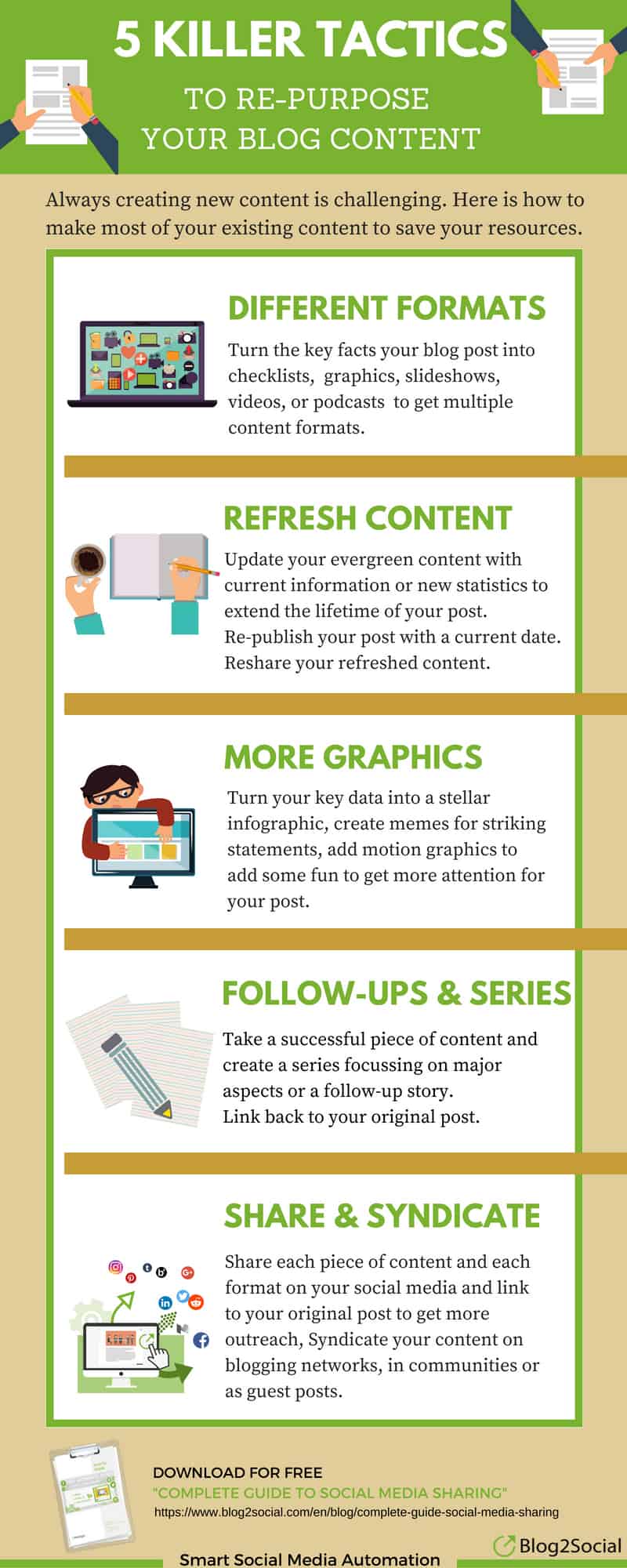
Blog2Social share their guide to repurposing blog content in this infographic.
Here’s a quick summary:
- Create a Multimedia Portfolio
- Refresh Old Content
- Use Visuals
- Write Follow-ups and Series
- Share and Syndicate Your Content
Check out the infographic for more detail.
If you’re a blogger or a business owner maintaining a blog, you already know the hard work that goes into producing high-quality content. Crafting a well-researched blog post can take hours of brainstorming, writing, editing, and polishing. But what if I told you that you could maximize your return on that time and effort by repurposing your blog content into different formats that reach new audiences and breathe new life into your original ideas?
Repurposing content isn’t just about recycling old material; it’s about transforming that content into something fresh, engaging, and shareable in new ways. Here are five killer tactics to repurpose your blog content into something amazing, helping you extend its reach and impact.
Create a Multimedia Portfolio
Building a multimedia portfolio is one of the most effective ways to repurpose your blog content into something fresh and engaging. It helps extend your reach to different audience segments, maximizes the value of your existing content, and can significantly improve your content marketing strategy. Here’s an in-depth guide for small businesses on how to create a dynamic multimedia portfolio.
- Turn Blog Posts into Videos
Video content is one of the most powerful tools in modern marketing. Platforms like YouTube, Instagram, and TikTok thrive on video, making it crucial for small businesses to tap into this medium.
How to get started:
- Identify the right format: Not every blog post lends itself easily to video content, so start with blogs that explain concepts, offer tutorials, or present valuable data. For example, a blog post that outlines “10 Steps to Optimize Your Website for SEO” can become an engaging step-by-step video tutorial.
- Choose your video style: Your video doesn’t need to be elaborate or high-budget to be effective. Here are a few styles you can experiment with:
- Talking Head Videos: These feature you (or a team member) speaking directly to the camera, explaining the content of your blog. These are great for adding a personal touch to your content.
- Tutorial or Screencast Videos: For how-to content, record your screen while walking viewers through a process (e.g., setting up a website, navigating software).
- Animations or Explainer Videos: Use platforms like Powtoon or Animaker to create animated videos that summarize your blog post. These are especially useful for explaining complex concepts or presenting statistics.
- Repurpose in segments: You don’t have to turn an entire blog post into one long video. Break it up into bite-sized segments that are more digestible for your audience. For example, if you have a post with multiple tips or steps, create a short video for each tip. This also gives you more content to share over time.
- Distribute strategically: Once you’ve created your videos, post them on YouTube (which boosts your SEO) and share snippets across social media platforms like Instagram Reels, TikTok, or LinkedIn. You can even embed videos into your original blog post, giving it added value for your readers.
- Convert Blog Content into Podcasts
Podcasts have surged in popularity over the past few years. Many people enjoy consuming content passively while driving, working out, or cooking. If your audience is busy or prefers audio content, turning your blog posts into podcasts can be a highly effective way to engage them.
How to get started:
- Determine your podcast format: Like video, there are multiple formats you can explore:
- Solo Shows: You can read or discuss the key points of your blog posts.
- Interviews or Conversations: If your blog post touches on industry trends or expert advice, invite guests to your podcast to discuss the topic in more depth.
- Narrative Podcasts: If your blog tells a story or case study, you can turn it into an audio narrative, adding sound effects, background music, and interviews to enhance the storytelling.
- Invest in quality audio equipment: High-quality audio is essential for maintaining listener engagement. A simple podcasting setup includes a USB microphone, pop filter, and audio editing software (like Audacity or GarageBand).
- Create show notes and promote: When you publish your podcast, include detailed show notes summarizing the episode (which can be directly repurposed from your blog). These notes are helpful for SEO and can drive traffic to both your podcast and your blog.
- Cross-promote with your blog: Embed your podcast episode directly into the original blog post, allowing your audience to choose whether they want to read or listen. You can also include additional resources, links, or further reading materials mentioned in your blog.
- Design Infographics to Visualize Data
Infographics are highly shareable and visually engaging. They allow you to condense a lot of information into an easy-to-read format, making them perfect for data-heavy blog posts or posts with step-by-step guides.
How to get started:
- Select the right blog post: Look for posts that feature lists, statistics, or comparisons. Posts that lend themselves well to an infographic might be “5 Tips for Social Media Success” or “10 Statistics that Show Why SEO Matters for Small Businesses.”
- Use design tools: If you’re not a graphic designer, tools like Canva, Piktochart, or Venngage offer pre-designed templates that make it easy to create professional-looking infographics without needing specialized design skills.
- Focus on simplicity and clarity: The power of infographics lies in their simplicity. When repurposing a blog into an infographic, avoid overloading it with text. Focus on the key points, stats, and takeaways, and use icons, graphs, and visuals to communicate the message.
- Embed in the blog and share widely: After creating an infographic, you can embed it into the original blog post as a visual summary. Infographics also perform exceptionally well on platforms like Pinterest and LinkedIn. Share them on social media to attract new audiences and drive traffic back to your blog.
- Transform Blogs into Slide Decks
Turning your blog post into a slide presentation allows you to showcase your content in a professional, easy-to-consume format, perfect for both online and in-person presentations.
How to get started:
- Outline your slides: Break your blog content down into key bullet points or takeaways. A blog with 5-10 key points can easily be translated into individual slides, each with its own headline and concise points underneath.
- Visualize the content: Use engaging visuals, diagrams, and minimal text to communicate each point effectively. Platforms like Canva or Google Slides can help you design stunning, branded presentations that align with your blog content.
- Upload to SlideShare or other platforms: SlideShare (now part of LinkedIn) is a fantastic platform for distributing your slides to a broader audience. Presentations on SlideShare can get thousands of views, making it an ideal platform to build brand awareness.
- Embed and repurpose: Like with video or infographics, embed your slide deck back into the original blog post, making the content more dynamic. You can also present these slides at webinars or in professional settings, adding even more value to your blog content.
- Host Webinars or Live Sessions
If your blog covers complex topics or actionable strategies, you can take it a step further by hosting a live webinar or pre-recorded session. Webinars are highly interactive, allowing you to engage directly with your audience, answer questions, and dive deeper into your subject matter.
How to get started:
- Select a high-value blog post: Choose a blog post that already has a lot of engagement or that covers a topic your audience is highly interested in. For example, a post about “Building an Effective Content Marketing Strategy” could be repurposed into a detailed webinar that offers additional insights.
- Plan the format: Webinars can be solo presentations, interviews, or panel discussions. Use your blog post as the foundation for the structure but expand on it with visuals, examples, or case studies.
- Use webinar tools: Platforms like Zoom, GoToWebinar, and Crowdcast make it easy to host webinars, invite guests, and record sessions for future repurposing.
- Promote and engage: Promote your webinar across your blog, email list, and social media platforms. After the live event, you can record and repurpose the webinar by uploading it to YouTube, offering it as a downloadable resource, or embedding it in the original blog post.
Benefits of Creating a Multimedia Portfolio
For small businesses, creating a multimedia portfolio provides several distinct benefits:
- Diversify Your Content: You can reach different audience segments that prefer varying formats—video, audio, visuals, or interactive content.
- Boost Engagement: Multimedia formats, especially videos and infographics, tend to capture and retain audience attention better than text-based content alone.
- Increase Shareability: Visual content, podcasts, and presentations are more likely to be shared across social media platforms, extending the reach of your blog content.
- Improve SEO: Multimedia content, especially videos and infographics, can help boost your SEO rankings. For instance, adding a YouTube video to your blog post increases your chances of appearing in search engine results, as search engines favor pages with mixed media.
- Leverage Cross-Platform Promotion: By repurposing your content into different formats, you can promote it on multiple platforms, each catering to different types of users, increasing the chances of your content being discovered.
Conclusion
Creating a multimedia portfolio is a powerful tactic that allows small businesses to maximize the value of their blog content, reach wider audiences, and engage readers on various levels. By transforming blog posts into videos, podcasts, infographics, presentations, and webinars, you can build a comprehensive content library that appeals to diverse audiences and enhances your brand’s visibility.
Repurposing content into multimedia not only boosts engagement but also strengthens your content marketing strategy by helping you reach new platforms and audience segments. It’s a smart way for small businesses to stretch the value of their content without creating everything from scratch.
Refresh Old Content
Refreshing old content is one of the most effective ways to breathe new life into your existing blog posts without having to start from scratch. As a small business, your time and resources are limited, so leveraging the content you’ve already created makes sense. By updating and optimizing older blog posts, you can improve their relevance, enhance SEO, and maintain audience engagement. Here’s how small businesses can refresh their old blog content for maximum impact:
- Identify High-Performing and Outdated Content
Before diving into a content refresh, you need to identify which blog posts are worth updating. The best candidates for a content refresh fall into two categories: high-performing posts and outdated posts.
- High-Performing Posts: These are the blog posts that have historically driven significant traffic or engagement but may have stagnated over time. Updating these posts can reignite their success and keep them relevant.
- Outdated Posts: Posts that contain outdated information, statistics, or trends can harm your credibility if left unchanged. By refreshing these, you can ensure they remain accurate and useful for your audience.
How to get started:
- Use tools like Google Analytics to identify high-performing posts that still drive traffic but may need updates.
- Review your industry for any changes that may have occurred since the post was written. For example, if your blog post discussed marketing trends in 2020, update it for 2024 trends.
- Pay attention to search rankings. If a post once ranked highly but has dropped over time, it may need a refresh to compete with newer content.
- Update with Current Data and Trends
One of the most important steps in refreshing old content is updating it with the latest information. Industries and consumer behavior evolve, and what was once cutting-edge information may now be outdated.
How to get started:
- Update statistics and data: Any statistics or data points mentioned in your original blog post should be checked for relevance. For instance, if you originally cited a study from 2018, find a more recent study to replace it. This signals to readers and search engines that your content is up-to-date and reliable.
- Add new insights and trends: If your blog post covered general industry advice, consider whether there have been any new trends, technologies, or tools since the article was written. For example, if your blog post discussed “Top Social Media Marketing Tools for Small Businesses,” update it with new tools that have gained popularity since then.
- Check for broken links: Outdated blog posts often contain broken links, which can hurt user experience and SEO. Use tools like Broken Link Checker to find and fix any dead links by updating them with relevant, active sources.
- Enhance SEO by Targeting New Keywords
When you first published your blog post, you likely optimized it for specific keywords. However, as SEO practices evolve, new keywords may emerge that are better suited to the post. Updating your post with these new keywords can boost its visibility in search engine results.
How to get started:
- Conduct keyword research: Use SEO tools like Ahrefs, SEMrush, or Google Keyword Planner to identify new keywords that align with your blog post’s topic. Look for opportunities to rank for long-tail keywords, questions, or phrases that weren’t as relevant when the original post was written.
- Refresh title tags and meta descriptions: Updating your blog post’s title tag and meta description with new keywords can help it perform better in search results. Ensure the title is compelling and reflective of the updated content, while the meta description should clearly communicate what’s new or improved about the post.
- Add LSI keywords (latent semantic indexing): Incorporate related terms and phrases that naturally appear in conversations around your main topic. This helps search engines understand the context of your content, improving its ranking potential.
- Optimize images: Ensure that any images in your blog post have alt text that’s keyword-rich. You can also compress image sizes for faster loading times, which improves both SEO and user experience.
- Add New Visuals and Media
Visual content is key to audience engagement and can dramatically improve the performance of your refreshed blog post. When refreshing old content, look for opportunities to update or add new visuals, such as infographics, charts, or videos, to make your post more interactive and visually appealing.
How to get started:
- Update existing images: If your old blog posts contain outdated stock images or visuals that are no longer relevant, replace them with fresh images that reflect current trends and your brand identity. For example, if you originally included images of desktop devices in a tech blog, consider adding images that reflect the current mobile-first trend.
- Create new visuals: Enhance your refreshed content with new visual elements. For example, add an infographic summarizing key points, or embed a video that demonstrates a concept discussed in the post. These additions can make your content more engaging and shareable.
- Embed multimedia content: If your blog covers complex topics, adding multimedia elements like explainer videos, podcasts, or GIFs can make the content more dynamic. For example, if you’re refreshing a blog post about “How to Use Instagram for Business,” consider embedding a short tutorial video that walks readers through setting up an Instagram business profile.
- Expand and Deepen the Content
When you revisit old blog posts, you might find that the original content was too brief or that certain sections could benefit from more depth and detail. Expanding your content not only adds value for readers but can also improve its search engine ranking.
How to get started:
- Answer new questions: Look for opportunities to address new questions or concerns that your audience may have about the topic. Use tools like AnswerThePublic or Google’s “People also ask” feature to identify questions related to your blog post’s subject and incorporate answers into your refreshed content.
- Add new sections: If your original post was short or only covered the basics, consider adding new sections that dive deeper into specific aspects of the topic. For instance, if your original post was a simple “Beginner’s Guide to Email Marketing,” you could add a section on advanced email marketing strategies or provide updated examples of successful campaigns.
- Include case studies or examples: Real-world examples and case studies make your content more credible and actionable. If you’ve since worked with clients or seen industry case studies that relate to your original blog topic, add them to the refreshed post.
- Optimize for readability: As you expand your content, ensure it remains easy to read and scannable. Break up long paragraphs, use bullet points and headers, and add visuals to maintain reader engagement.
- Update the Call-to-Action (CTA)
Your blog’s call-to-action (CTA) is a crucial element that drives conversions, whether that means signing up for a newsletter, downloading an eBook, or contacting your business. As your business evolves, your goals may change, and your CTA should reflect that.
How to get started:
- Align with current goals: If your business has changed its focus or launched new products or services, ensure your refreshed blog post’s CTA reflects those updates. For example, if your original CTA promoted a free consultation, but you’ve since launched a downloadable resource or online course, update the CTA accordingly.
- Experiment with new CTA formats: Don’t be afraid to test different CTA formats in your updated blog post. Instead of a basic text CTA, consider adding buttons, banners, or pop-up forms to encourage more engagement.
- Add interactive CTAs: If your refreshed blog post includes new visual or multimedia elements, consider adding interactive CTAs such as polls, quizzes, or clickable infographics that guide users toward your conversion goal.
- Promote Your Refreshed Content
Once you’ve successfully updated your old content, it’s time to promote it as if it were brand new. Many businesses overlook this step, but promotion is critical for driving traffic to your newly refreshed content.
How to get started:
- Reshare on social media: Treat your refreshed post as a new piece of content by sharing it across all your social media platforms. Highlight the new updates, such as fresh statistics, added sections, or enhanced visuals. Use eye-catching graphics or videos to accompany your social media posts.
- Update internal links: If you’ve written newer blog posts or created additional content since the original post was published, update the internal links within the refreshed content to direct readers to related resources on your website.
- Leverage your email list: Send out an email blast to your subscribers, letting them know that you’ve updated an old post with new insights or fresh data. Emphasize the value of revisiting the post and how the updated information can benefit them.
- Repurpose for different formats: Consider repurposing your newly refreshed blog post into other content formats such as podcasts, infographics, or videos (as discussed in the multimedia portfolio section). Each new format offers an opportunity to reach a broader audience.
Why Refreshing Old Content is Essential for Small Businesses
For small businesses, refreshing old content can have significant long-term benefits:
- Boosts SEO: Search engines favor fresh and updated content. By refreshing old blog posts, you can increase your chances of ranking higher in search results, especially if you update with new keywords and enhanced content.
- Saves time and resources: Instead of constantly creating new content from scratch, refreshing old posts is a more efficient way to provide value to your audience and maintain a consistent content publishing schedule.
- Increases content longevity: By keeping your posts updated and relevant, you extend the lifespan of your content, ensuring it remains a valuable resource for your audience over time.
- Improves credibility: Updating outdated information or statistics builds trust with your audience, as they know they can rely on you for accurate, up-to-date information.
Refreshing old content is an essential strategy for small businesses aiming to stay competitive in an ever-changing digital landscape. By following these tips, you can ensure your blog posts remain relevant, useful, and engaging for both new and returning readers.
Use Visuals
Incorporating visuals into your blog content is a powerful way to capture attention, improve engagement, and enhance user experience. For small businesses, using visuals strategically can elevate the quality of your content and increase its shareability, driving more traffic and engagement. Visuals can range from simple images and infographics to videos and interactive elements. Here’s a detailed guide on how small businesses can leverage visuals effectively in blog content:
- Choose the Right Type of Visuals for Your Audience and Content
The first step in using visuals effectively is understanding what types of visuals resonate with your audience and enhance your blog content. Different types of visuals serve different purposes, so it’s important to choose the right one based on the message you want to convey.
Here are some popular types of visuals to consider:
- Images and Photographs: High-quality images, whether original photos or carefully selected stock images, can break up text-heavy content and provide context to your message. They are especially effective in blog posts about products, events, or storytelling.
- Infographics: Infographics are ideal for presenting complex data or information in an easily digestible format. They combine visuals with concise text to explain processes, statistics, or trends in a visually engaging way. For example, a small business could create an infographic outlining the steps of their service process or showcase key industry statistics relevant to their audience.
- Videos: Videos are highly engaging and are increasingly preferred by audiences over text. You can use videos to provide demonstrations, tutorials, or customer testimonials. For example, if your business is in retail or eCommerce, you could create product videos that highlight key features or demonstrate how to use the product.
- Charts and Graphs: If your blog post involves data, adding charts and graphs can help visualize the information and make it more accessible to your readers. Use bar charts, line graphs, or pie charts to illustrate statistics, trends, or comparisons that would otherwise be difficult to grasp through text alone.
- GIFs and Memes: For a more lighthearted or relatable touch, consider adding GIFs or memes that align with your content’s tone. These can be particularly effective in social media-focused blog posts or content aimed at a younger, more casual audience.
How to get started:
- Identify the visual elements that complement your content. For example, if you’re writing a blog post on “Top Marketing Trends for 2024,” an infographic summarizing the trends or a video explaining each trend could work well.
- Research your audience’s preferences to understand which types of visuals they are most likely to engage with. Younger audiences may prefer video or GIFs, while a B2B audience may prefer infographics and charts.
- Enhance User Engagement with Visuals
Visuals are essential for capturing and holding your audience’s attention. Studies show that people retain more information from content when it’s paired with visuals. For small businesses, using visuals effectively can lead to higher engagement rates, more shares, and better overall user experience.
Here are some strategies to increase user engagement using visuals:
- Break up long paragraphs with images: Large blocks of text can overwhelm readers and discourage them from engaging with your content. Breaking up text with relevant images helps create a more visually appealing and easy-to-read format. For instance, in a blog post about “How to Improve Customer Service,” you can include images showing real-life customer interactions to illustrate your points.
- Add interactive elements: Visual content doesn’t have to be static. Add interactive visuals like clickable infographics, polls, or quizzes that encourage readers to actively engage with the content. For example, a blog post about choosing the right product could include an interactive flowchart that helps customers find the perfect product for their needs.
- Use visuals that evoke emotion: Emotionally driven visuals, such as powerful images or compelling video testimonials, can create a deeper connection with your audience. For example, if you run a nonprofit, adding photos and videos of the people you help or the communities you serve can make your content more emotionally resonant and increase the likelihood of donations or support.
How to get started:
- Create a visual plan for each blog post, mapping out where and what type of visuals will best serve your content. Ensure that each visual aligns with your blog’s key message and adds value rather than distracting from the text.
- Pay attention to image placement within your content. Place visuals strategically to complement the flow of your article, ensuring they break up the text without disrupting the reading experience.
- Optimize Visuals for SEO and Load Time
Visual content can have a significant impact on your SEO performance, as search engines like Google take visuals into account when ranking web pages. However, it’s crucial to ensure your images and other media are optimized for both SEO and site speed to avoid negatively impacting your blog’s performance.
Here’s how to optimize your visuals effectively:
- Use descriptive alt text: Alt text (alternative text) is essential for SEO and accessibility. It describes what an image is about, which helps search engines index your content and ensures that visually impaired users can understand what’s being shown. Always write keyword-rich but natural-sounding alt text for each image you use.
- Compress images for faster loading times: Large, high-resolution images can slow down your website, leading to poor user experience and higher bounce rates. Compress your images to reduce file size without compromising quality. Use tools like TinyPNG, Compressor.io, or plugins like Smush (for WordPress) to optimize image sizes for faster load times.
- Optimize video files: If you’re embedding videos in your blog post, ensure they are optimized for web performance. Host videos on platforms like YouTube or Vimeo and embed them in your blog rather than uploading the video file directly to your website. This reduces load times and ensures a better user experience.
- Use image formats wisely: Choose the right image format for your visuals. JPEGs are great for photographs and images with lots of color, while PNGs are better for images with text, logos, or transparent backgrounds. WebP is another format that provides superior compression and faster load times.
How to get started:
- Run a page speed test on your blog using tools like Google PageSpeed Insights to identify any slow-loading elements. If your visuals are causing delays, use image compression tools to reduce file sizes and speed up load times.
- Make sure every visual on your blog post has alt text and is optimized for SEO by using relevant keywords without keyword stuffing.
- Create Custom Visuals to Stand Out
While stock images can be useful, custom visuals often have a more significant impact. Unique, brand-specific visuals help differentiate your content from competitors and make your blog posts more memorable. For small businesses, investing in custom visuals can enhance brand recognition and credibility.
Here are ways to create custom visuals for your blog:
- Design branded infographics: Use tools like Canva, Piktochart, or Venngage to design infographics that match your brand’s style and color palette. Custom infographics not only provide valuable information but also reinforce your brand identity. For example, if you’re writing a blog post about “Top Productivity Tools for Small Businesses,” create an infographic that visually summarizes the tools you recommend, using your brand colors and fonts.
- Use original photography: If possible, avoid relying too much on stock images and instead use original photos. Original photos of your team, products, workspace, or customers can make your blog content more authentic and relatable. For example, a local bakery could use original photos of their baked goods, staff, and behind-the-scenes processes in their blog posts.
- Create custom illustrations or icons: Custom illustrations or icons can add a unique and polished look to your blog. If you have a graphic designer on your team, consider creating custom icons or visuals for your blog post headers, bulleted lists, or key points. These small details can significantly enhance the overall design and user experience.
- Incorporate branding into visuals: Always incorporate your business’s logo, colors, and fonts into your visuals to ensure consistency. Even if you’re using stock images or free design templates, add your branding elements to make them feel unique to your business.
How to get started:
- Use free or low-cost design tools like Canva to create branded, custom visuals that align with your blog’s theme and messaging. If design isn’t your strong suit, consider hiring a freelance designer to help create consistent and professional-looking visuals.
- Incorporate custom graphics into blog post headers, infographics, or CTA buttons to make your content stand out.
- Repurpose Visuals for Multiple Platforms
One of the great advantages of creating high-quality visuals is their versatility. You can repurpose the visuals from your blog posts to share across multiple platforms, increasing your content’s reach and impact. This is particularly valuable for small businesses with limited resources, as it allows you to maximize the utility of each visual asset.
Here are a few ideas for repurposing visuals:
- Share infographics on social media: Infographics are highly shareable and perform well on social platforms like Pinterest, Instagram, and LinkedIn. After creating an infographic for your blog post, share it as a standalone post on your social media channels to drive traffic back to the full article.
- Create video snippets: If your blog post includes a video, repurpose short clips from that video to post on platforms like Instagram, TikTok, or Twitter. This not only increases exposure but also encourages social media followers to visit your blog for more in-depth information.
- Turn charts and graphs into social media posts: If your blog post includes data or statistics, convert your charts and graphs into separate visuals to share on social media. Highlight key insights from your blog, and use these visuals to generate interest in the full post.
- Use visuals in email newsletters: Repurpose blog visuals for your email marketing campaigns. Include snippets of your infographic or images from your blog to entice readers to click through to your website for the full content.
How to get started:
- Plan to repurpose at least one visual from each blog post you create for social media, email marketing, or other platforms. This will help amplify the reach of your blog content without the need to create new assets from scratch.
- Use social media scheduling tools like Buffer or Hootsuite to automate the sharing of visuals across different platforms, ensuring consistent promotion of your blog content.
By incorporating visuals into your blog content, you can significantly enhance its appeal, engagement, and shareability. Small businesses that strategically use visuals stand out in a crowded digital landscape, build stronger connections with their audience, and increase the overall effectiveness of their content marketing efforts.
Write Follow-ups and Series
Creating follow-up blog posts and series can transform your one-off articles into a comprehensive content experience for your audience. By turning your blog into an ongoing narrative or resource hub, small businesses can build deeper connections with readers, encourage repeat visits, and establish authority in their industry. Follow-ups and series provide a structured way to explore complex topics, build momentum around your brand, and nurture customer loyalty.
Here’s an in-depth guide on how to write follow-ups and series effectively, with actionable tips for small businesses:
- Identify Topics That Deserve Expansion
Not all blog topics are suited for a follow-up or series. The key is to identify subjects that can be expanded or revisited based on ongoing trends, emerging data, or evolving customer needs. Look for blog posts that:
- Have generated high engagement: Review your blog analytics to identify posts that have performed well in terms of traffic, comments, or shares. If a post resonates with your audience, chances are they would appreciate a deeper dive into the topic.
- Cover broad or complex subjects: Some topics are too extensive to cover thoroughly in a single blog post. For example, if you’ve written a post on “The Ultimate Guide to Digital Marketing,” each subsection—like SEO, social media, or email marketing—could warrant its own detailed follow-up or even a multi-part series.
- Evolve over time: Certain industries or topics are dynamic and constantly changing. For example, if your blog post is about “The Latest E-commerce Trends,” you could plan follow-ups that revisit the trends periodically or explore new trends as they emerge.
- Provide actionable tips or guides: If your initial blog offers actionable advice, consider writing follow-ups that dive deeper into each action step. For example, if you’ve written a blog on “5 Ways to Boost Website Traffic,” you could create a follow-up for each tactic, offering more detailed strategies and case studies.
How to get started:
- Look at your existing blog content and pinpoint high-performing posts. Ask yourself whether the topic can be expanded or if a related topic is gaining traction in your industry.
- Pay attention to reader feedback and questions in the comments or on social media. If readers express interest in learning more about a particular aspect of a blog post, use that as inspiration for a follow-up or series.
- Plan and Structure Your Series
Planning is essential when creating a blog series. A well-structured series keeps your audience engaged over time and ensures that each post builds on the previous one while maintaining clarity and cohesion. Whether you’re planning a three-part series or a more extensive multi-article collection, follow these steps to create a well-organized content plan:
- Outline your series: Start by creating an outline of the main topic and breaking it into smaller, more manageable subtopics. Each subtopic should be able to stand alone as its own blog post while contributing to the overall narrative. For example, if you’re writing a series on “How to Build a Successful E-commerce Business,” your series could include posts on choosing a platform, product sourcing, marketing strategies, and optimizing customer service.
- Ensure logical flow: Arrange your posts in a logical sequence that guides your readers through the topic. Consider starting with introductory or foundational posts and gradually moving toward more advanced or nuanced content. This way, readers can follow along regardless of their knowledge level.
- Cross-reference your posts: A major benefit of writing follow-ups or series is the opportunity to drive internal traffic between blog posts. Use internal linking to connect your posts, encouraging readers to navigate through the series in its entirety. For example, include a “Next Post in the Series” link at the bottom of each blog or reference key points from previous posts with hyperlinks.
- Maintain consistency: Consistency is key to keeping your audience engaged throughout the series. Use consistent branding, voice, and formatting across the entire series to create a cohesive experience. This helps readers identify that they are still within the same series and builds familiarity.
How to get started:
- Create an editorial calendar that maps out your series and follow-up posts over time. This will help you stay organized and ensure you consistently release content at appropriate intervals.
- Start your series with a clear introduction in the first post, explaining the purpose of the series and what readers can expect in the upcoming posts.
- Expand on Popular Content Themes
One of the easiest ways to create follow-up posts or series is by expanding on your most popular themes or core content pillars. These themes often represent the core areas of interest for your target audience, so continuing to produce content around these topics will likely keep readers coming back for more.
Here’s how you can expand on existing content themes:
- Dive deeper into subtopics: Take a broad topic you’ve already covered and zoom in on specific subtopics for each follow-up. For example, if your blog post is about “Marketing Automation for Small Businesses,” you could write a follow-up series that explores automation tools for email marketing, social media, and customer relationship management (CRM) individually.
- Use audience insights: Utilize data from blog comments, social media discussions, or customer inquiries to find areas within your content themes that readers want to learn more about. You can also use keyword research tools like SEMrush or Google Keyword Planner to identify related topics that are trending in your industry.
- Address FAQs: A follow-up post addressing frequently asked questions is an excellent way to expand on a popular blog topic. For example, if your original post was “How to Optimize Your Website for SEO,” a follow-up post could address FAQs like “How long does SEO take to show results?” or “What’s the difference between on-page and off-page SEO?”
How to get started:
- Review your blog’s Google Analytics or other traffic insights tools to identify the most popular posts on your site. Use these top-performing articles as a foundation for follow-ups and related series.
- Pay attention to user behavior, such as time spent on the page, bounce rates, and engagement metrics, to determine which content themes are resonating most with your audience.
- Use Data and Case Studies to Enrich Follow-ups
Follow-up posts are an excellent opportunity to add depth to your original content by incorporating updated data, case studies, and real-world examples. Enriching your follow-up content with fresh insights not only adds value for your readers but also positions your blog as a reliable resource for up-to-date industry information.
Here’s how to use data and case studies in follow-up blog posts:
- Update old statistics with new data: If your original post contains outdated statistics or information, write a follow-up that revisits the topic with updated figures. For example, if you wrote a blog on “Social Media Trends for 2022,” write a follow-up post in 2024 that revisits those trends with updated statistics and examples of how they’ve evolved.
- Incorporate customer success stories: Case studies are a powerful way to illustrate how your business or services have helped real clients solve problems or achieve goals. In your follow-ups, include customer success stories that demonstrate how the strategies or advice you’ve given in previous posts have worked in practice.
- Include expert opinions: Adding expert interviews or quotes from industry leaders can lend authority to your follow-up content. Reach out to industry professionals for their insights or include quotes from thought leaders to support your points and offer readers additional perspectives.
How to get started:
- Use data from reliable sources like Statista, HubSpot, or industry-specific reports to update your follow-up posts with the most recent trends and insights.
- If possible, gather testimonials, reviews, or feedback from customers who have successfully implemented the advice from your original blog post to create compelling case studies for your follow-up content.
- Build Anticipation and Promote Your Series
A successful blog series requires more than just good content—it also needs effective promotion to maximize reach and engagement. Build anticipation for your series and ensure each post is properly marketed to keep your readers excited and engaged throughout the series.
Here’s how to promote your blog series effectively:
- Tease upcoming posts: At the end of each post in your series, tease the next post by briefly explaining what’s coming next. This creates a sense of anticipation and encourages readers to come back for the follow-up. For example, end a blog post with, “In our next post, we’ll be diving deeper into [specific topic]. Stay tuned!”
- Email marketing: Promote your blog series through your email newsletter by sending out reminders and updates with each new installment. If your blog series covers a significant topic, consider creating a dedicated email campaign to build excitement around the series.
- Social media countdowns and sneak peeks: Use social media platforms like Instagram, LinkedIn, or Twitter to tease your series with countdowns, sneak peeks, or behind-the-scenes content. Share snippets or quotes from upcoming blog posts to create buzz.
- Create a dedicated landing page for the series: If you’re planning an extensive series, consider creating a dedicated landing page on your website that houses all the posts in one place. This makes it easy for readers to navigate the entire series and return to any posts they’ve missed.
How to get started:
- Schedule social media posts that promote each installment of your series, using visuals or quotes to grab attention.
- Use email automation tools like Mailchimp or Constant Contact to send out notifications and updates each time a new post in your series goes live.
By writing follow-ups and series, small businesses can create a lasting impact on their audience and foster greater engagement. This strategy allows you to delve deeper into important topics, provide ongoing value, and keep readers coming back for more. When executed well, a blog series can establish your brand as a thought leader and go-to resource for industry insights, while also driving traffic, engagement, and conversions over time.
Share and Syndicate Your Content
Sharing and syndicating your blog content is essential for maximizing reach and driving traffic back to your website. For small businesses, effective content sharing can not only increase visibility but also build authority and foster relationships with potential customers. Here’s a detailed guide on how to effectively share and syndicate your content:
- Leverage Social Media Platforms
Social media is a powerful tool for distributing content. By sharing your blog posts across various platforms, you can engage with your audience and attract new followers.
- Choose the Right Platforms: Identify where your target audience spends their time. Whether it’s Facebook, Instagram, LinkedIn, or Twitter, focus on those platforms. For B2B businesses, LinkedIn might be more effective, while B2C brands could find more success on Instagram.
- Create Engaging Visuals: Posts with visuals receive significantly higher engagement. Use tools like Canva or Adobe Spark to create eye-catching images or infographics that complement your blog content.
- Use Stories and Reels: Platforms like Instagram and Facebook allow you to use Stories and Reels for quick snippets or teasers of your blog posts. This format can capture attention and direct followers to your blog.
- Post at Optimal Times: Research shows that posting at specific times can enhance engagement. Use analytics tools to determine when your audience is most active and schedule your posts accordingly.
How to Get Started:
- Develop a social media calendar to plan and organize your content distribution.
- Use scheduling tools like Buffer or Hootsuite to automate posts.
- Email Newsletters
Email marketing remains one of the most effective channels for driving traffic to your blog. By incorporating your blog content into your newsletters, you can keep your audience informed and engaged.
- Highlight Key Articles: In each newsletter, feature a few of your latest or most relevant blog posts. Include a brief summary and a strong call-to-action (CTA) encouraging readers to click through to the full article.
- Segment Your Audience: Use segmentation to tailor your emails based on subscriber preferences or behavior. This ensures that your content is relevant to each group, increasing the chances of engagement.
- Include Exclusive Content: Encourage newsletter sign-ups by offering exclusive content or insights that complement your blog. This can include downloadable resources or special promotions.
How to Get Started:
- Utilize email marketing platforms like Mailchimp or Constant Contact to design visually appealing newsletters and manage your subscriber lists.
- A/B test your email subject lines and content to see what resonates best with your audience.
- Utilize Content Syndication Networks
Syndicating your content involves republishing your blog posts on third-party sites to reach a broader audience. This strategy can significantly boost your visibility and drive new traffic.
- Choose Relevant Syndication Platforms: Identify websites and platforms relevant to your industry that allow content syndication. Examples include Medium, LinkedIn Pulse, and industry-specific forums.
- Republish with a Link Back: When syndicating, always include a link back to the original blog post. This not only directs traffic to your site but also helps maintain SEO value.
- Monitor Syndication Performance: Track how syndicated posts perform in terms of engagement and traffic. Use analytics tools to assess which platforms yield the best results.
How to Get Started:
- Research and compile a list of platforms that accept guest posts or syndicated content.
- Create a simple submission process to republish your blog posts on these sites.
- Collaborate with Influencers and Industry Leaders
Partnering with influencers or industry experts can amplify your content’s reach. Their established audiences can help expose your brand to new potential customers.
- Guest Blogging: Reach out to influencers to co-author blog posts or contribute guest posts on their sites. This allows you to tap into their audience and vice versa.
- Interviews and Webinars: Hosting interviews or webinars with industry leaders can provide valuable content while attracting their followers to your blog. Promote these events on social media and email newsletters.
- Social Media Takeovers: Consider a social media takeover where an influencer posts content on your channels for a day. They can share insights related to your blog topics, driving traffic to your site.
How to Get Started:
- Identify key influencers in your niche and reach out with collaboration proposals.
- Plan a content calendar for guest posts, webinars, and social media takeovers.
- Use Paid Advertising
If you want to boost your content’s reach quickly, consider using paid advertising. This can help you target specific demographics and drive more traffic to your blog.
- Google Ads: Create campaigns that target keywords related to your blog content. Use both search and display ads to attract traffic from various sources.
- Social Media Ads: Platforms like Facebook and LinkedIn offer robust advertising options. Use these to promote specific blog posts or highlight your best content.
- Retargeting Campaigns: Implement retargeting ads to reach users who have previously visited your blog but did not take action. This can help bring them back for a second look.
How to Get Started:
- Set up a Google Ads account and familiarize yourself with keyword targeting.
- Use the ad creation tools within social media platforms to design visually appealing ads promoting your blog content.
- Track and Measure Performance
To understand the effectiveness of your sharing and syndication efforts, it’s crucial to track performance metrics.
- Use UTM Parameters: Add UTM codes to your links to monitor traffic sources in Google Analytics. This will help you determine which channels are driving the most traffic.
- Analyze Engagement Metrics: Keep an eye on likes, shares, comments, and click-through rates across social media and email campaigns. This data will guide your future content sharing strategies.
- Refine Your Approach: Based on performance metrics, adjust your content and sharing strategies. Identify which types of content and channels yield the best results and double down on those.
How to Get Started:
- Set up Google Analytics to track traffic from various sources.
- Regularly review your performance metrics and adjust your strategy based on what works best.
Conclusion
Effectively sharing and syndicating your blog content is crucial for small businesses looking to maximize reach and engagement. By leveraging social media, email marketing, content syndication platforms, collaborations, paid advertising, and performance tracking, you can create a comprehensive strategy that amplifies your content’s impact. Remember, the goal is to drive traffic back to your website while building relationships with your audience, ultimately leading to increased conversions and brand loyalty.
Conclusion
Repurposing blog content is a smart, efficient way to maximize the value of your hard work. By transforming your blog posts into multimedia assets, refreshing old content, incorporating visuals, writing follow-ups, and sharing widely, you can create a vast range of content that appeals to different audiences and platforms. Not only does this extend the life of your blog content, but it also ensures that your message resonates across various channels. By adopting these five killer tactics, you’ll unlock the full potential of your blog and significantly boost your content marketing strategy.

Author:
Mark Ford

The Complete Content Mix: What Every Business Should Be Publishing
Are you struggling to decide what types of content your business should be publishing to attract more traffic and engagement? Want to learn how to build the perfect content mix that keeps your audience interested and your brand growing? […]