
Are you looking for smart ways to boost your website’s search rankings and attract more visitors? Want to learn the SEO upgrades that can transform your site’s performance and deliver lasting results?
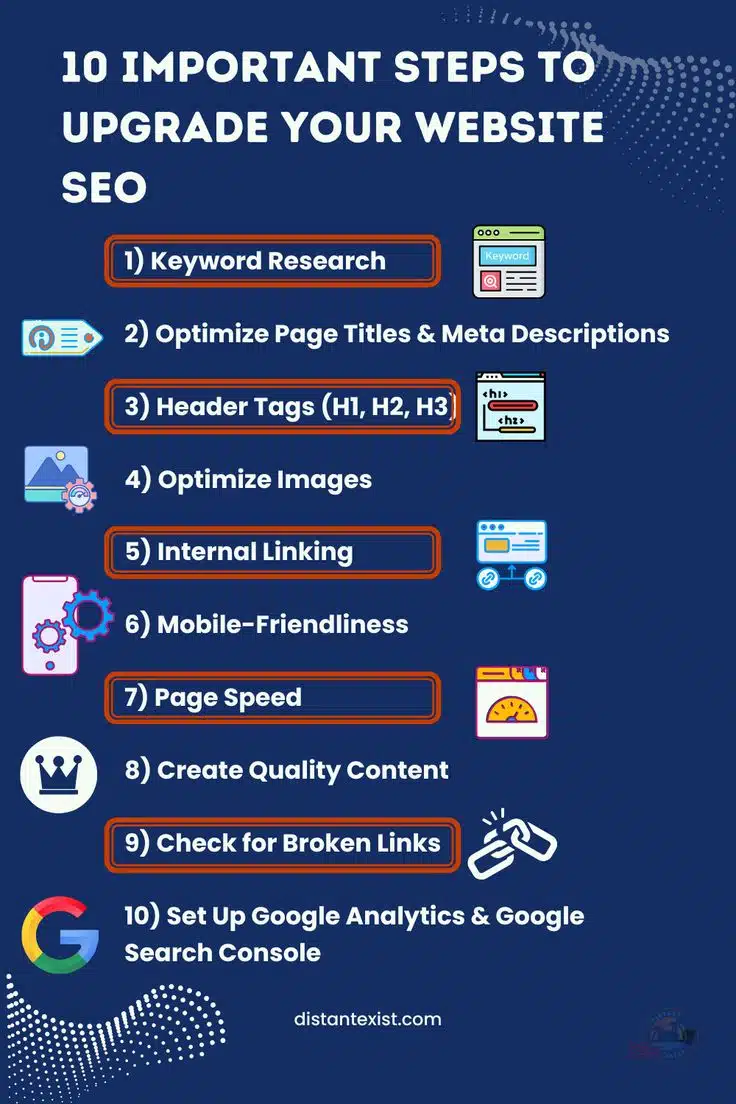
You’ll find some SEO basics in this infographic.
Here’s a summary of what’s covered:
- Keyword Research
- Optimise Page Titles & Meta Descriptions
- Header Tags (H1, H2, H3)
- Optimise Images
- Internal Linking
- Mobile-Friendliness
- Page Speed
- Create Quality Content
- Check for Broken Links
- Set Up Google Analytics & Google Search Console
Check out the post below for more.
Search engine optimisation (SEO) is no longer optional if you want your website to succeed. With millions of sites competing for visibility, making smart upgrades is the key to standing out.
By focusing on structured improvements, you can boost traffic, enhance user experience, and climb search rankings. In this guide, we’ll explore the most impactful SEO steps to transform your website performance.
Keyword Research
Keyword research is the foundation of any successful SEO strategy. It helps you understand the exact terms your audience is searching for, ensuring your content meets their needs. Without it, even the best-written content may fail to appear in relevant search results. Smart keyword planning gives your site a competitive edge.
- Use tools like Google Keyword Planner or SEMrush to find high-value search terms.
- Focus on long-tail keywords that reflect user intent and reduce competition.
- Analyse your competitors’ keywords to spot opportunities you may be missing.
- Regularly update your keyword strategy as trends and user behaviour change.
Optimise Page Titles & Meta Descriptions
Page titles and meta descriptions are the first elements users see in search results. They directly influence whether someone clicks through to your website or chooses a competitor instead. Optimising them with clarity and keywords can significantly improve your click-through rate. These small details pack a big punch for SEO.
- Keep titles under 60 characters and include your target keyword.
- Write meta descriptions that are engaging and stay within 155–160 characters.
- Use action-oriented language to encourage clicks.
- Ensure each page has a unique title and description to avoid duplication.
Header Tags (H1, H2, H3)
Header tags organise your content and make it easier for both users and search engines to understand. Proper use of H1, H2, and H3 tags improves readability and highlights important topics. When structured well, they act as a roadmap for your content. This clarity helps boost relevance and rankings.
- Use a single H1 tag for the main topic of the page.
- Break content into sections with H2 and H3 tags for easy navigation.
- Include relevant keywords naturally within headers.
- Keep headers concise and descriptive to guide readers effectively.
Optimise Images
Images play an important role in engaging visitors, but they can also impact SEO. Large or unoptimised files can slow down your site, harming both rankings and user experience. By properly formatting and tagging images, you enhance accessibility and discoverability. This ensures your visuals work for, not against, your website.
- Compress image files to reduce loading times without losing quality.
- Use descriptive file names that reflect the image content.
- Add alt text with keywords to improve accessibility and SEO.
- Choose the right format (JPEG, PNG, WebP) for speed and clarity.
Internal Linking
Internal linking strengthens your website structure and helps search engines crawl your content effectively. By guiding users to related pages, you keep them engaged longer and reduce bounce rates. Smart linking also spreads authority across your site, improving the visibility of key pages. It’s a simple but powerful upgrade.
- Link to relevant pages naturally within your content.
- Use descriptive anchor text that reflects the linked page’s topic.
- Ensure important pages have multiple internal links pointing to them.
- Review and update links regularly to avoid broken paths.
Mobile-Friendliness
More than half of all web traffic comes from mobile devices, making mobile optimisation critical. If your site isn’t mobile-friendly, you risk losing visitors and ranking lower in search results. Responsive design ensures your website works seamlessly across all devices. Prioritising mobile usability boosts both user experience and SEO.
- Use responsive design to adapt layouts to different screen sizes.
- Test your website on multiple devices for smooth navigation.
- Optimise font sizes and button placement for easy use on small screens.
- Run Google’s Mobile-Friendly Test to identify and fix issues.
Page Speed
Page speed is a crucial ranking factor and directly impacts user satisfaction. Slow-loading websites frustrate visitors and increase bounce rates, reducing your chances of conversions. Search engines reward fast websites with better visibility. Improving speed ensures your site delivers a smooth, reliable experience for every visitor.
- Compress images and use modern formats to reduce file sizes.
- Minimise code by cleaning up CSS, JavaScript, and HTML.
- Use a content delivery network (CDN) to improve global load times.
- Enable browser caching to speed up repeat visits.
Create Quality Content
High-quality content is the backbone of effective SEO. It attracts visitors, builds trust, and keeps people returning to your site. Search engines prioritise content that is relevant, original, and valuable to users. By consistently publishing quality material, you establish authority in your niche and improve rankings.
- Focus on solving your audience’s problems with useful information.
- Write in-depth, well-structured content that covers topics thoroughly.
- Keep your content fresh by updating older posts with new insights.
- Incorporate multimedia like videos or infographics to boost engagement.
Check for Broken Links
Broken links can harm both user experience and search engine performance. Visitors who encounter dead ends may leave your site, increasing bounce rates. Search engines also view broken links as a sign of poor maintenance. Regularly auditing your site for link health keeps your content trustworthy and user-friendly.
- Use tools like Screaming Frog or Ahrefs to identify broken links.
- Replace outdated links with updated or alternative resources.
- Redirect broken internal links to relevant live pages.
- Schedule regular link audits to maintain site quality.
Set Up Google Analytics & Google Search Console
Analytics tools are essential for tracking and improving SEO performance. Google Analytics and Search Console provide insights into traffic, user behaviour, and search visibility. These platforms allow you to measure what’s working and identify opportunities for growth. Setting them up ensures your SEO strategy is data-driven.
- Connect your website to Google Analytics to monitor visitor behaviour.
- Use Google Search Console to track keyword rankings and indexing status.
- Review reports regularly to understand traffic sources and trends.
- Set measurable goals to align SEO performance with business objectives.
Conclusion
SEO success is built on consistent improvements across multiple areas of your website. From keyword research to technical tweaks like page speed and broken link checks, each step contributes to better performance.
By implementing these smart upgrades, you create a site that attracts visitors, keeps them engaged, and ranks well in search results. Take the time to refine your strategy now, and you’ll enjoy long-term benefits for your website and business.

Author:
Mark Ford



