
Are you looking for simple, powerful tools that can help your small business run more efficiently without increasing costs? Want to discover the free tech and AI platforms that can boost productivity, improve communication, and support faster growth?
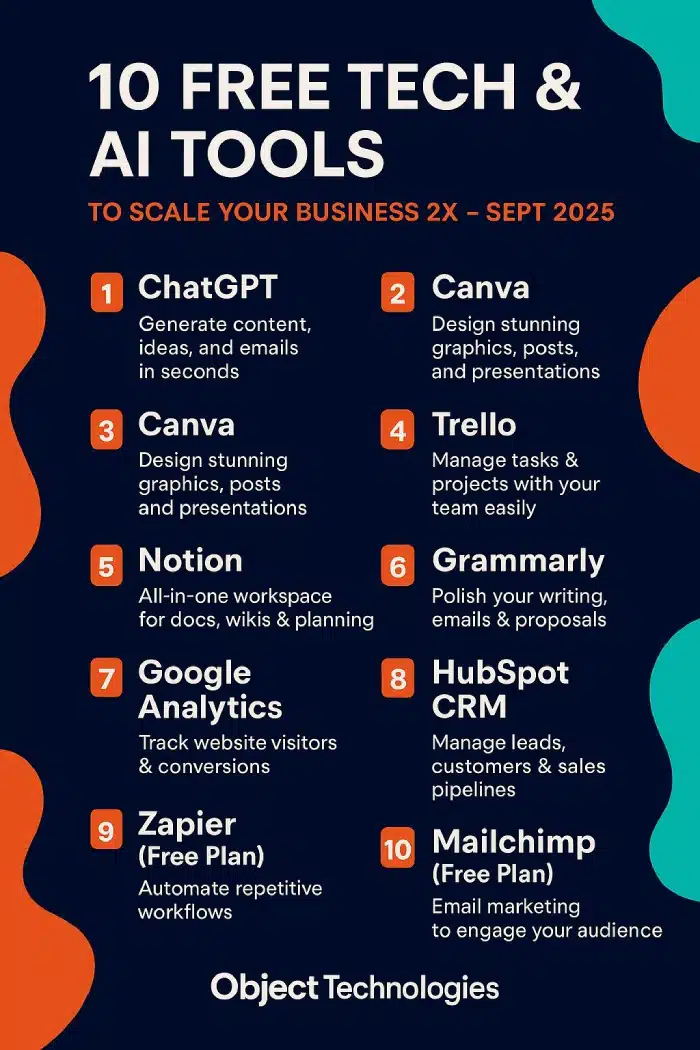
You’ll find the essential tools every small business should be using in this infographic.
Here’s a summary of what’s covered:
- ChatGPT
- Canva
- Canva
- Trello
- Notion
- Grammarly
- Google Analytics
- HubSpot CRM
- Zapier (Free Plan)
- Mailchimp (Free Plan)
Check out the post below for more.
Every small business today is expected to work faster, deliver more, and stay visible across multiple platforms without dramatically increasing costs. The good news is that a powerful set of free tech and AI tools now gives businesses the chance to compete at a level that once required huge budgets. These tools remove friction, automate repetitive work, and give even the smallest teams the ability to operate with the speed and polish of much larger operations.
This guide explores the best free tools available right now, breaking down how each one can support smarter workflows, better communication, and sustainable growth. Whether you are launching a new venture or improving an established business, these platforms offer essential building blocks for modern success.
The following sections walk through each tool individually, using the extracted headings from the infographic to structure the content clearly and practically. After reading, you will have a full set of free resources you can implement immediately to improve productivity and scale with confidence.
ChatGPT
AI-driven content generation has become a core part of how businesses communicate, plan, and innovate. ChatGPT gives small businesses instant access to ideas, written content, brainstorming, and problem solving without needing specialist skills. It acts as a writing assistant, a strategist, a researcher, and a productivity tool all in one.
For businesses that need to move quickly, ChatGPT reduces the time spent writing emails, drafting materials, or thinking through solutions. It is particularly valuable for teams without dedicated marketing or content staff.
Whether you are producing social posts, emails, proposals, or new product ideas, the tool helps maintain consistency and quality. It is one of the simplest ways for a business to achieve more in less time without increasing overheads.
- Generate content drafts for blogs, emails, website pages, and social media in seconds.
- Produce ideas and outlines to speed up planning, strategy, and creative thinking.
- Use it to refine tone, structure, and clarity in client-facing communication.
- Apply it to repetitive writing tasks to free up time for higher-value work.
Canva
Visual content has become an essential part of modern marketing, and Canva makes it accessible to any business regardless of design experience. Its drag-and-drop system makes creating graphics fast and manageable. With its extensive range of templates, even a complete beginner can create professional-quality visuals that strengthen branding and increase engagement.
Canva’s free version includes everything needed to produce graphics for social media, print, presentations, and online advertising. For small businesses that can’t justify hiring a designer for every task, Canva acts as a reliable in-house design solution.
The tool dramatically improves the consistency of visual branding, helping customers recognise and trust your business across multiple platforms.
- Use ready-made templates to design social media posts, banners, and marketing graphics.
- Create branded presentations and reports to support pitches and internal communication.
- Build consistent visual identity with reusable styles, colours, and layouts.
- Export graphics quickly for all major platforms and print formats.
Canva
The infographic lists Canva twice, so we treat this as a separate section while keeping the content relevant. This second reference reinforces Canva’s versatility as a multi-purpose design tool. It highlights how many small businesses rely on it for more than just graphics, using it for presentations, promotional materials, and even full marketing kits.
Because Canva is cloud-based, teams can collaborate easily on projects, making it useful for remote businesses or those that work with freelancers. It reduces dependency on complex design software and ensures creative work can be produced quickly.
For small teams, consistency and speed are essential. Canva supports both, helping businesses maintain a polished professional look even with limited resources.
- Produce slide decks for meetings, webinars, and pitching opportunities.
- Design promotional materials like flyers, posters, and brochures.
- Collaborate with teammates using shared folders and real-time editing.
- Create branded templates that speed up future design work.
Trello
Task management is vital when trying to keep projects on track, especially when teams juggle multiple responsibilities. Trello offers a simple board-based system that makes planning, tracking, and organising work incredibly easy. It helps businesses visualise progress and ensures no important task gets lost.
The platform works particularly well for small teams that need transparency and structure but do not want overly complex software. Its flexibility makes it suitable for everything from content planning to operational workflows.
Using Trello helps reduce confusion, improve communication, and streamline collaboration. It ensures that deadlines are clear and responsibilities are well defined.
- Create boards to track workflows, tasks, deadlines, and approvals.
- Assign responsibilities to team members and monitor progress visually.
- Integrate with other tools like Slack, Google Drive, and calendar apps.
- Keep all project notes, files, and discussions in one organised place.
Notion
Notion is an all-in-one workspace that brings documents, tasks, wikis, and planning into a single ecosystem. It is particularly helpful for small businesses that want to centralise knowledge, reduce scattered notes, and maintain a clear system for organising projects.
The platform allows users to build customised document structures that act like mini internal websites. This makes it ideal for teams that need structured information, plan repeatedly, or manage large content libraries.
Notion reduces dependency on multiple apps by offering a flexible and highly adaptable workspace. Its free version is more than powerful enough for most small operations.
- Create shared workspaces for planning, documentation, and knowledge storage.
- Build internal wikis that hold processes, policies, and reference material.
- Organise projects with databases, task lists, and customised dashboards.
- Collaborate easily with team members through shared pages and comments.
Grammarly
Clear communication is a crucial part of building trust with clients and maintaining professionalism. Grammarly helps polish writing, ensuring emails, proposals, and marketing materials are accurate and easy to read. It acts as a safety net that improves clarity, tone, and correctness.
For businesses without a dedicated editor or copywriter, Grammarly reduces mistakes and helps maintain a consistent level of quality in written interactions. It is especially useful for high-volume email communication and client-facing content.
By improving writing quality, businesses present a more credible and polished image. This can make a significant difference when dealing with new enquiries or competitive pitches.
- Check spelling, grammar, and punctuation in real time while writing.
- Improve tone and clarity to ensure messages sound professional and confident.
- Use browser extensions to apply checks across email platforms and website editors.
- Reduce errors in proposals, reports, and marketing materials.
Google Analytics
To grow effectively, a business must understand how customers behave online. Google Analytics provides the insights needed to make informed decisions about marketing, website performance, and customer engagement.
The tool tracks where visitors come from, what they do on your website, and which pages convert best. With this data, small businesses can improve their content, refine their customer journey, and focus on the traffic sources that bring the best results.
It helps businesses move away from guesswork and base decisions on real measurable behaviour. The free version offers all the core insights needed for most small businesses.
- Monitor website traffic, behaviours, and trends in real time.
- Identify top-performing pages and optimise weaker ones for better results.
- Track conversions to understand which marketing channels drive value.
- Use insights to make smarter decisions about content and advertising.
HubSpot CRM
Managing customer relationships is essential for growth, and HubSpot’s free CRM provides a powerful set of tools for tracking interactions and managing pipelines. It helps businesses stay organised while dealing with enquiries, existing customers, and follow-up tasks.
The CRM stores all communication history in one place, reducing mistakes and ensuring no lead gets forgotten. It also provides a clear visual pipeline that supports better forecasting and sales planning.
HubSpot gives small businesses access to systems normally used by much larger sales teams. This enables efficient organisation and stronger customer relationships without adding cost.
- Track leads, customers, and interactions across the entire sales cycle.
- Use pipelines to manage deals from enquiry to close with full visibility.
- Store contact details, notes, and communication history in one system.
- Automate reminders for follow-ups to avoid missed opportunities.
Zapier (Free Plan)
Repetitive tasks consume time and slow down productivity. Zapier automates these tasks by connecting different apps and triggering actions automatically. This makes it a powerful time-saving tool for small businesses that rely on multiple systems.
Automation removes unnecessary manual steps, reducing the likelihood of errors and freeing staff to focus on more valuable work. Even the free plan allows businesses to streamline essential workflows.
With Zapier, tasks like data transfer, lead management, and content scheduling become effortless. It helps businesses build a smoother, more modern operational system.
- Automate data transfers between tools such as CRM, email, and spreadsheets.
- Trigger follow-up emails or notifications based on predefined actions.
- Sync information across platforms without manual copying and pasting.
- Build simple workflows that save hours each week.
Mailchimp (Free Plan)
Email remains one of the most effective ways to reach and nurture customers. Mailchimp’s free plan provides essential email marketing tools that help businesses maintain regular communication without added cost.
It allows businesses to build email lists, send campaigns, and track performance. This is particularly useful for small businesses working on customer retention and lead nurturing.
Creating professional campaigns is easy with Mailchimp’s templates, which support consistent branding. The platform also offers useful analytics that show what resonates with your audience.
Email marketing helps maintain visibility and trust, making it a core part of long-term business growth.
- Build and manage email lists with simple signup and segmentation tools.
- Send newsletters, promotions, and updates using easy-to-edit templates.
- Track open rates, clicks, and engagement to refine future campaigns.
- Use automation to onboard new subscribers or send follow-up messages.
Conclusion
Small businesses today have access to an ecosystem of powerful tools that would have been expensive or inaccessible just a few years ago. From AI-driven content generation to CRM systems, design platforms, analytics, organisation tools, and workflow automation, these free resources give every business the ability to operate with greater efficiency and professionalism.
By adopting the tools covered in this guide, businesses can reduce time spent on routine tasks, improve communication, streamline operations, and create a more consistent and engaging presence for customers. Each tool enhances a different part of the business, but together they form a complete digital toolkit for growth.
Implementing even a few of these platforms can make an immediate difference in how smoothly your business runs. Implementing all of them can transform the way you work, freeing time, improving results, and increasing your ability to scale without unnecessary cost.

Author:
Mark Ford

The Smart Entrepreneur’s Guide to Multitasking Without Burning Out
Are you struggling to juggle endless tasks without feeling like you’re constantly on the edge of burnout? Want to discover how successful entrepreneurs multitask strategically so they stay productive without sacrificing focus or wellbeing? […]