

Are you trying to find the best platform to build and grow your business website? Want to know why WordPress is the go-to CMS for companies around the world?
You’ll find some WordPress basics in this infographic.
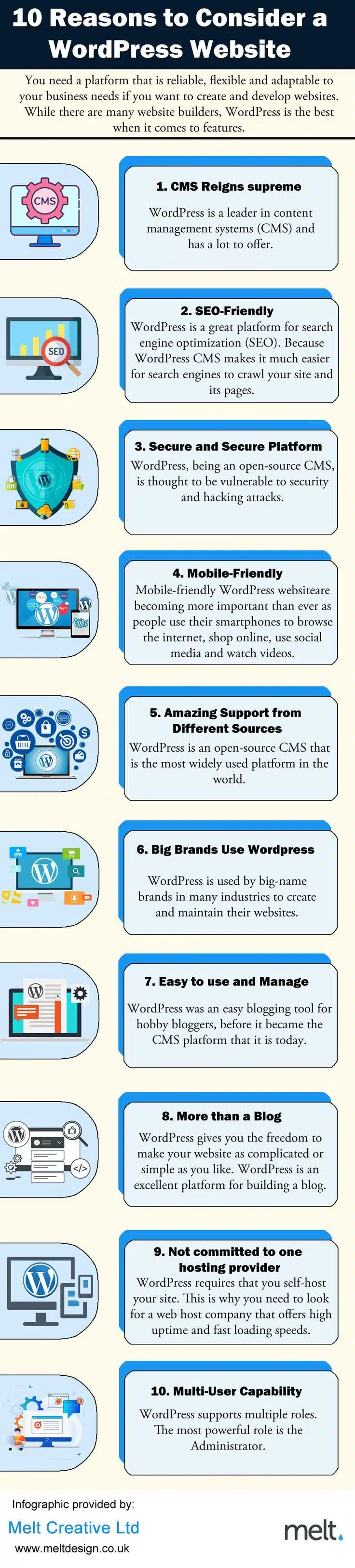
Here’s a summary of what’s covered:
- Industry-Leading CMS
- Optimised for SEO
- Secure and Reliable
- Mobile Responsive
- Broad Support Network
- Trusted by Major Brands
- Simple to Use
- Versatile Beyond Blogging
- Flexible Hosting Options
- Multi-User Access
Check out the post below for more.
Choosing the right content management system (CMS) is one of the most important decisions you’ll make when building a website. For businesses of all sizes, WordPress offers a flexible, scalable, and reliable platform that adapts to changing needs.
Whether you’re launching your first site or looking to improve your digital presence, WordPress provides the tools to succeed. In this blog post, we’ll explore the key benefits of choosing WordPress and why it continues to be the preferred CMS for millions of websites worldwide.
Industry-Leading CMS
WordPress stands as a dominant force in the CMS world, powering over 40% of all websites online today. This popularity isn’t just a matter of trend—it’s the result of a robust, user-friendly system backed by continuous development. For businesses, choosing a widely supported CMS ensures longevity, flexibility, and a wealth of available resources. Whether you’re running a small startup or a growing enterprise, WordPress gives you a solid foundation.
- Choose a CMS that’s trusted by millions of users and businesses worldwide
- Benefit from a continuously updated platform with new features and fixes
- Access a wide range of plugins and themes developed for WordPress
- Join a vast ecosystem with strong community support and documentation
Optimised for SEO
Search engine visibility is essential for any business looking to grow online. WordPress is built with SEO in mind, making it easier for you to structure content, use metadata, and integrate with SEO tools. Whether you’re working with an agency or going DIY, WordPress gives you a solid head start in ranking well on Google and other search engines. Good SEO means more traffic—and more opportunities to convert.
- Use plugins like Yoast or Rank Math for easy on-page SEO management
- Create clean, readable URLs that search engines favour
- Structure your site with categories, tags, and internal links
- Optimise your images with alt text and compression for faster load times
Secure and Reliable
Security is a top concern for any business with an online presence. As an open-source platform, WordPress is constantly monitored and updated by developers around the world. With the right setup, it offers a highly secure environment to protect both your content and your customers. Regular updates and trusted plugins ensure your site remains safe from threats.
- Keep your site secure with regular core, plugin, and theme updates
- Choose reputable security plugins like Wordfence or Sucuri
- Implement SSL certificates and secure login practices
- Use reliable web hosting providers with built-in security features
Mobile Responsive
With more people accessing the web on smartphones and tablets, mobile responsiveness is no longer optional. WordPress themes are built to be mobile-friendly right out of the box, ensuring your site looks great on all devices. A responsive design not only improves user experience but also boosts your SEO performance. It’s about reaching your audience wherever they are.
- Choose themes that are designed to be mobile-responsive
- Test your website across various devices and screen sizes
- Optimise image sizes to ensure faster load times on mobile
- Make use of responsive plugins that adapt content automatically
Broad Support Network
One of the standout features of WordPress is the extensive support it offers. As the world’s most widely used CMS, there’s a massive community of developers, designers, and users ready to help. Whether you’re troubleshooting a plugin or planning a redesign, you’ll find forums, tutorials, and expert advice in abundance. This level of support is invaluable for businesses that want to stay agile.
- Access thousands of free tutorials, forums, and YouTube videos
- Join WordPress communities on Reddit, Facebook, and dedicated sites
- Hire experienced WordPress professionals with ease
- Stay ahead with regular webinars, blogs, and online courses
Trusted by Major Brands
WordPress isn’t just for bloggers and small businesses—it’s trusted by some of the world’s biggest brands. Companies like BBC, Sony Music, and The Walt Disney Company all use WordPress to power their websites. This level of trust speaks volumes about the platform’s capability and reliability. If it’s good enough for them, it’s more than capable of supporting your business too.
- Reassure clients and stakeholders with a proven, enterprise-grade CMS
- Learn from the way top brands customise and scale WordPress
- Build confidence knowing the platform is suitable for high-traffic sites
- Take advantage of features big brands use—like multilingual support and eCommerce
Simple to Use
One of the reasons WordPress became so popular is its ease of use. You don’t need to be a developer to create, update, or manage your content. The dashboard is intuitive, and the learning curve is gentle, especially compared to other platforms. This allows business owners to stay in control without relying heavily on outside help.
- Use a simple visual editor to create and update pages
- Add or update content without needing to touch code
- Quickly install plugins and themes via the dashboard
- Assign different user roles for team collaboration and management
Versatile Beyond Blogging
Although WordPress began as a blogging platform, it has evolved into something much more powerful. Today, it supports everything from eCommerce stores and portfolios to booking systems and forums. This versatility allows your website to grow with your business, adapting as your goals and services change. You’re never boxed into one format or function.
- Build an online shop with WooCommerce or other plugins
- Launch booking systems, membership areas, or event calendars
- Create dynamic content using page builders like Elementor or WPBakery
- Integrate with third-party tools like CRMs, email marketing platforms, and analytics
Flexible Hosting Options
Unlike many website builders, WordPress gives you full control over your hosting. This means you can shop around for the best combination of price, performance, and customer service. You’re not tied into one vendor, and you can scale or move your site at any time. That freedom ensures your site can evolve as your needs change.
- Choose from a wide range of hosting providers that support WordPress
- Look for managed WordPress hosting for better performance and support
- Easily migrate your site if your current provider isn’t meeting expectations
- Scale your hosting package as your traffic or business grows
Multi-User Access
Managing a business website often requires input from several people. WordPress supports multiple user roles, allowing you to delegate tasks without compromising security. Whether it’s a content writer, SEO specialist, or developer, you can give each person the exact access they need. It’s ideal for teams, agencies, and growing organisations.
- Assign roles such as Administrator, Editor, Author, and Contributor
- Control who can add, edit, or publish content
- Limit plugin or theme access to technical users only
- Improve workflow efficiency with clear access permissions
Conclusion
When it comes to building and managing a business website, WordPress delivers an unmatched combination of flexibility, power, and ease of use. From SEO and mobile optimisation to robust security and extensive community support, it ticks all the right boxes for modern business needs.
Whether you’re launching a small brochure site or a high-traffic eCommerce store, WordPress has the tools to help you succeed. By choosing WordPress as your CMS, you’re not just picking a platform—you’re investing in the long-term growth and success of your business.

Author:
Mark Ford

Designing for Humans: The Psychological Role of Colour in Web Design
Are you confident that the colours on your website are supporting how users feel, think and behave when they arrive? Have you ever wondered why some websites feel instantly trustworthy and intuitive, while others create friction without any obvious reason? […]



