Are you using Twitter’s analytics platform to monitor and measure your strategy? Want to know the metrics you can track that will show how effective you are?
The most obvious metric to track via your analytics account is engagement, so that’s how many retweets and favourites you are receiving. But Twitter analytics goes a lot further than that and can provide some real eye opening stats that could change the way you use it completely.
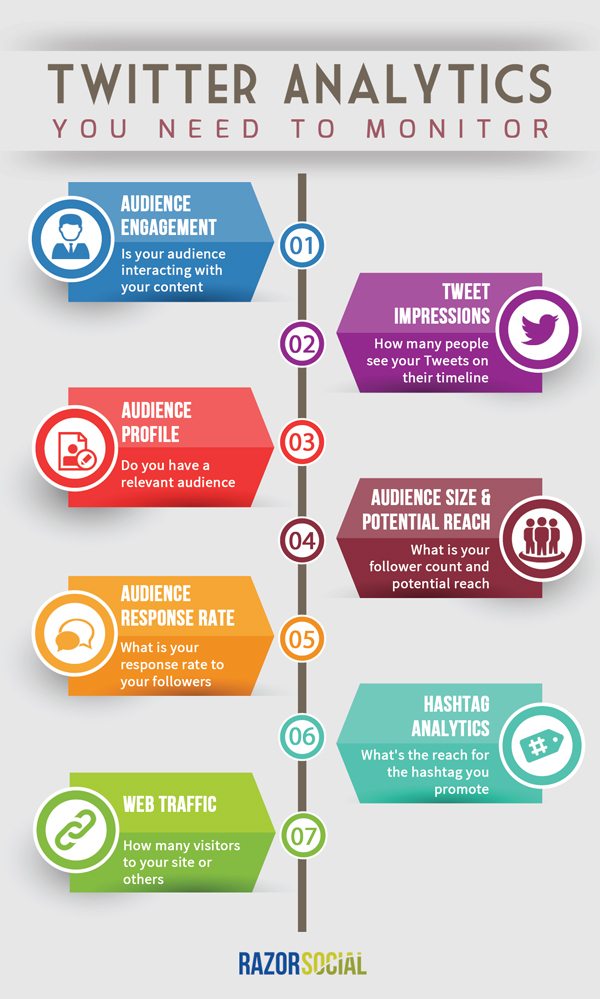
Razor Social have include 7 metrics to track in the infographic below.
Social media has become an integral part of our lives, and Twitter stands as one of the most influential platforms for individuals, businesses, and organizations to connect with their audience. Whether you’re using Twitter for personal branding, marketing, or activism, understanding your performance is crucial for success. This is where Twitter analytics comes into play. In this blog post, we’ll dive deep into seven essential metrics that will help you gauge the effectiveness of your Twitter efforts.
1. Follower Growth
Follower growth is one of the fundamental metrics to track on Twitter. It represents the number of new followers you gain over a specific period, typically a month. A steady and consistent increase in your followers indicates that your content and engagement strategies are working effectively.
However, it’s essential to note that follower growth isn’t just about quantity. The quality of your followers matters too. Are your new followers genuinely interested in your content and likely to engage with your tweets? To ensure you’re attracting the right audience, analyze the demographics and interests of your followers using Twitter analytics tools.
2. Engagement Rate
Engagement rate is a key indicator of how well your tweets resonate with your audience. It measures the level of interaction your tweets receive, including likes, retweets, replies, and clicks. To calculate your engagement rate, use the following formula:
��������������(%)=(�����+��������+�������+������)����������������×100
A higher engagement rate suggests that your content is engaging and valuable to your audience. Analyze which types of tweets, topics, or media formats (such as images, videos, or polls) receive the most engagement. This insight will help you tailor your content strategy for better results.
3. Impressions and Reach
Impressions and reach are closely related but slightly different metrics. Impressions represent the total number of times your tweets were displayed on Twitter feeds, whether or not they were clicked or engaged with. Reach, on the other hand, measures the number of unique Twitter users who saw your tweets.
Monitoring impressions and reach is crucial for understanding the visibility of your tweets. A high number of impressions with a low engagement rate may indicate that your content needs improvement, while a high reach with a low impression count suggests that your content is compelling but not reaching a broad enough audience. Use these metrics to refine your content strategy and increase your Twitter presence.
4. Click-Through Rate (CTR)
Click-through rate (CTR) measures how effective your tweets are at driving traffic to external links, such as your website or blog. To calculate CTR, use the following formula:
���(%)=���������������������������×100
A high CTR indicates that your tweets are successfully encouraging your audience to take action and visit your website or explore the links you share. Experiment with different call-to-action (CTA) techniques and track the impact on your CTR to optimize your tweet performance.
5. Hashtag Performance
Hashtags play a significant role in Twitter’s content discovery system. Monitoring the performance of hashtags in your tweets can provide valuable insights into your Twitter strategy. Track the following hashtag metrics:
- Hashtag Impressions: Measure how many times your tweets with specific hashtags were displayed in users’ feeds.
- Hashtag Engagement: Analyze the likes, retweets, and replies on tweets containing specific hashtags.
- Top Performing Hashtags: Identify which hashtags are driving the most engagement and incorporate them strategically into your content.
Using relevant and trending hashtags can help your tweets reach a broader and more targeted audience. Be mindful of using too many hashtags in a single tweet, as it can make your content appear spammy. Aim for a balance between popular and niche hashtags.
6. Audience Demographics
Understanding your Twitter audience is crucial for tailoring your content to their preferences and needs. Twitter analytics provides valuable demographic data about your followers, including:
- Age: The age groups most represented in your follower base.
- Gender: The gender distribution of your followers.
- Location: The geographic locations of your followers.
- Interests: The topics and interests your followers engage with on Twitter.
By analyzing these demographics, you can create content that resonates with your specific audience. For example, if you have a predominantly young audience, you might use trending memes and pop culture references in your tweets.
7. Tweet Timing
The timing of your tweets can significantly impact their visibility and engagement. Twitter analytics tools can help you identify the best times to tweet based on when your audience is most active. This data allows you to schedule your tweets strategically to maximize their reach and impact.
Additionally, analyze the performance of your tweets by the day of the week and the time of day. Do your tweets perform better on weekends or weekdays? Is there a specific time window when your tweets receive the most engagement? Use this information to refine your posting schedule.
Conclusion
Twitter analytics is a powerful tool for assessing the effectiveness of your Twitter strategy. By regularly monitoring these seven key metrics – follower growth, engagement rate, impressions and reach, click-through rate, hashtag performance, audience demographics, and tweet timing – you can gain valuable insights and make data-driven decisions to improve your Twitter presence.
Remember that Twitter is a dynamic platform, and trends and audience preferences can change over time. Continuously analyze your metrics, experiment with different content approaches, and adapt your strategy to stay relevant and effective on Twitter. With a strategic approach and a keen eye on analytics, you can make the most of this influential social media platform to achieve your personal or business goals.

Author:
Mark Ford