How do people feel when they land on your website? Are you making them feel like they want to do business with you?
The psychology of web design is ignored by most but when use correctly it can be your greatest weapon. Designing a site that resonates with your visitors can help create a feeling of confidence will go a long way towards convincing them you are the right choice.
For some web design psychology guidance take a look at this infographic from KISSmetrics.
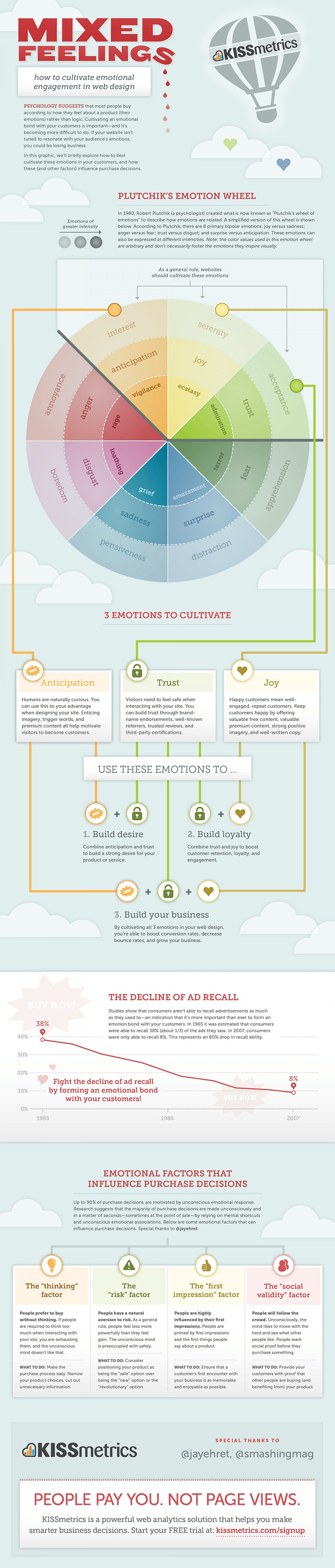
In the vast and competitive landscape of the internet, where countless websites vie for users’ attention, a well-designed website can be the difference between success and obscurity. But it’s not just about aesthetics and functionality; web design goes deeper. It’s about psychology – understanding how users think and feel when they visit your site. When done right, web design can evoke emotions and create a lasting impression.
In this blog post, we will delve into the world of web design psychology and discuss three essential emotions your site must make visitors feel: Trust, Engagement, and Comfort. By understanding and incorporating these psychological principles into your web design, you can enhance user experience, increase conversions, and build a loyal online audience.
- Trust: The Foundation of User Confidence
Trust is a fundamental emotion that your website should evoke in visitors. Without trust, users are unlikely to engage with your content, make purchases, or provide personal information. So, how can your web design instill trust in your audience?
1.1. Professional Design
The first step to building trust is to ensure your website looks professional. A polished design with a clean layout, high-quality images, and consistent typography creates an immediate impression of credibility. Visitors are more likely to trust a site that looks like it’s been well-maintained.
Consider the websites of established brands like Apple or Amazon. They invest heavily in their web design, and it shows. Their sites are sleek, modern, and exude professionalism. This level of design sophistication can help reassure users that they are dealing with a reputable entity.
1.2. Clear Navigation
Confusion breeds distrust. If users find it difficult to navigate your website, they are more likely to leave in frustration. Clear and intuitive navigation menus help users find the information they seek effortlessly.
Consider using familiar navigation patterns, such as a horizontal menu at the top or a vertical menu on the side. Ensure that your menu labels are concise and descriptive, so users know exactly what to expect when they click on them. Additionally, including a search bar can further enhance the user’s ability to find what they’re looking for.
1.3. Testimonials and Social Proof
One of the most effective ways to build trust is through social proof. Displaying testimonials, reviews, and endorsements from satisfied customers or industry experts can go a long way in convincing visitors of your credibility. Human beings tend to trust the opinions and experiences of others.
When incorporating testimonials into your web design, consider using real photos of the individuals along with their names and affiliations, if applicable. This adds a personal touch and authenticity to the testimonials. Be transparent about the source of the reviews to ensure trustworthiness.
1.4. Security Symbols
Online security is a significant concern for users, especially when making purchases or sharing personal information. To instill confidence, prominently display trust symbols like SSL certificates, payment logos (e.g., Visa, MasterCard), and security badges. These symbols indicate that your website takes security seriously and can protect users’ sensitive data.
- Engagement: Captivating Your Audience
Once you’ve established trust, it’s essential to engage your visitors and keep them interested. An engaged audience is more likely to explore your content, spend more time on your site, and return in the future. Here’s how to create an engaging web design:
2.1. Compelling Visuals
Visual elements play a significant role in capturing users’ attention and keeping them engaged. Use high-quality images, videos, and graphics that are relevant to your content and visually appealing. These visuals should complement your message and create an emotional connection with your audience.
Consider incorporating eye-catching hero images or banners that communicate your brand’s story or value proposition. Use images of real people when possible, as human faces can convey emotion and establish a connection with users.
2.2. Scannable Content
In today’s fast-paced digital world, users often skim through content rather than reading it in-depth. To cater to this behavior, design your content to be scannable. Use short paragraphs, bullet points, and subheadings to break up text and make it easier for users to find the information they need quickly.
Additionally, emphasize key points with bold text, italics, or color variations. This not only aids in comprehension but also adds visual interest to your content.
2.3. Interactive Elements
Interactive elements can greatly enhance user engagement. Consider incorporating features like polls, quizzes, or interactive infographics that encourage users to participate actively. These elements not only make the user experience more enjoyable but also provide valuable insights into user preferences and behavior.
For example, news websites often use interactive maps to allow users to explore data visually. E-commerce sites may employ product configurators that enable users to customize their purchases.
2.4. Storytelling
Storytelling is a powerful tool for engaging your audience emotionally. People connect with stories, and they can help convey your brand’s values and mission effectively. Incorporate storytelling elements into your web design through compelling narratives, user testimonials, or case studies.
Create a dedicated “About Us” page that tells the story of your brand’s journey, highlighting its successes and challenges. Consider incorporating videos or animations that bring these stories to life.
- Comfort: Ensuring a Seamless User Experience
Comfort is the emotion that ensures users have a seamless and enjoyable experience on your website. When users feel comfortable, they are more likely to stay longer, explore more content, and return in the future. Here’s how to create a comfortable web design:
3.1. Mobile Responsiveness
In an era where mobile devices are ubiquitous, ensuring that your website is mobile-responsive is paramount. A responsive design adapts to various screen sizes and devices, providing a consistent and comfortable experience for all users, whether they’re on a desktop computer, tablet, or smartphone.
Google also prioritizes mobile-friendly websites in its search rankings, making mobile responsiveness essential for SEO and discoverability.
3.2. Fast Loading Speed
Slow-loading websites can be frustrating and drive users away. A fast-loading website is not only comfortable to use but also improves your search engine rankings. Compress images, minify code, and utilize content delivery networks (CDNs) to optimize your site’s loading speed.
Use tools like Google PageSpeed Insights to identify and address performance issues. Aim for a loading time of three seconds or less, as research shows that users expect websites to load quickly.
3.3. Consistency in Design
Consistency in design elements such as color schemes, fonts, and button styles creates a comfortable and familiar user experience. When users navigate your website and encounter consistent design choices, they can easily predict how different elements will behave.
Maintain a style guide that outlines your design choices and ensure that all pages of your website adhere to these guidelines. Consistency extends to the placement of navigation menus, search bars, and calls-to-action (CTAs) to avoid confusing users.
3.4. Clear Calls-to-Action (CTAs)
To guide users through their journey on your website, use clear and compelling CTAs. These buttons or links should be prominently placed and use persuasive language that encourages action. For instance, instead of a generic “Click Here,” use a CTA like “Get Started” or “Claim Your Free Trial.”
Ensure that CTAs stand out visually through color contrast and size. A comfortable user experience involves guiding users effortlessly toward their goals, whether it’s signing up for a newsletter, making a purchase, or contacting your support team.
Conclusion
Web design psychology is a powerful tool for creating websites that resonate with users on a deep emotional level. By focusing on trust, engagement, and comfort, you can enhance the overall user experience and achieve your website’s goals, whether that’s driving sales, increasing brand awareness, or fostering a loyal online community.
Remember that web design is an ongoing process. Regularly gather user feedback, analyze website analytics, and stay updated on design trends to continually improve your site’s effectiveness. With a user-centric approach to web design psychology, you can create a website that not only looks good but also makes visitors feel the right emotions, turning them into loyal customers and advocates for your brand.

Author:
Mark Ford