Are embarking on your first web design project? Want some quick tips to ensure you actually convert some of your website visitors into clients?
One of the biggest challenges you’ll face as a website owner is keeping your visitors on your site. For success you’ll need to make navigating your site easy and you’ll need to keep distractions to a minimum.
For some guidance take a look at these simple steps from Infinista Concepts.
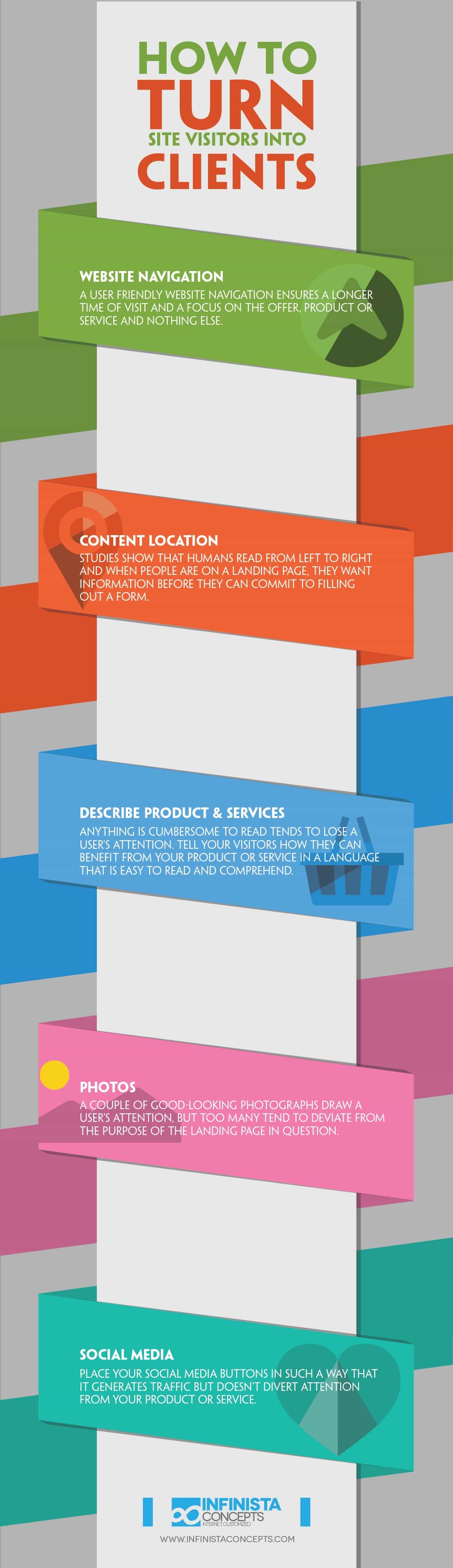
In today’s digital age, having a website is crucial for businesses of all sizes and industries. Your website is often the first point of contact between potential clients and your business. It’s not just a virtual business card; it’s a powerful marketing tool that can help you turn visitors into paying clients. However, simply having a website is not enough. To achieve this goal, you need a well-designed website that effectively engages visitors and encourages them to take action. In this blog post, we will explore the basics of website design and outline five essential steps to transform your website visitors into loyal clients.
Step 1: Know Your Audience
Before you dive into the world of web design, it’s crucial to have a deep understanding of your target audience. Who are your ideal clients? What are their needs, preferences, and pain points? Conduct thorough market research to gather insights into your audience’s demographics, behaviors, and motivations.
Once you’ve gathered this information, create detailed buyer personas that represent different segments of your target audience. These personas will serve as a reference point throughout the website design process, helping you tailor your content and design to meet the specific needs and preferences of your potential clients.
Step 2: Create a User-Friendly Navigation
One of the most frustrating experiences for website visitors is not being able to find what they’re looking for. To keep visitors engaged and interested, your website must have an intuitive and user-friendly navigation system.
Start by designing a clear and organized menu structure. Use descriptive labels for menu items that make it easy for visitors to understand what each section or page is about. Avoid clutter and excessive menu items; simplicity is key.
Additionally, consider implementing a search feature that allows users to quickly find specific content or products. Make sure that the search bar is prominently placed and easy to locate.
Step 3: Craft Compelling Content
Content is the heart of your website. It’s what informs, educates, and persuades visitors. To turn visitors into clients, your content must be compelling, informative, and relevant to their needs. Here are some key considerations for creating effective website content:
1. Homepage Messaging: Your homepage should have a clear and concise message that communicates what your business offers and how it can solve your audience’s problems. Use a compelling headline and a brief, impactful description.
2. About Page: The “About Us” page is an opportunity to build trust and credibility. Share your brand’s story, values, and mission. Highlight the expertise and experience of your team.
3. Product/Service Pages: Provide detailed information about your products or services. Use high-quality images and videos to showcase what you offer. Include benefits, features, pricing, and any relevant customer testimonials or case studies.
4. Blog and Resources: Regularly publish blog posts and resources that address the pain points and interests of your target audience. Position yourself as an authority in your industry by sharing valuable insights and tips.
5. Contact Information: Make it easy for visitors to get in touch with you. Include a contact form, phone number, email address, and even a physical location if applicable.
Remember to maintain a consistent brand voice and tone throughout your content. This consistency helps build a strong and memorable brand identity.
Step 4: Prioritize Mobile Responsiveness
With the increasing use of smartphones and tablets, it’s essential to ensure that your website is mobile responsive. A mobile-responsive design means that your website adapts and looks great on various screen sizes and devices, from desktop computers to smartphones.
Google also considers mobile-friendliness as a ranking factor, so having a mobile-responsive website can improve your search engine visibility. Here are some best practices for mobile-responsive design:
1. Use a Responsive Design Framework: Choose a website builder or theme that is designed to be responsive. Many popular content management systems (CMS) like WordPress offer responsive themes.
2. Test on Multiple Devices: Before launching your website, thoroughly test it on different devices and browsers to ensure that it functions and appears as intended.
3. Optimize Images: Compress images to reduce loading times on mobile devices without compromising quality.
4. Simplify Navigation: On smaller screens, consider using a hamburger menu (three horizontal lines) to hide the navigation menu and make it accessible with a tap.
5. Focus on Speed: Mobile users have little patience for slow-loading websites. Optimize your website’s performance to ensure fast loading times.
A mobile-responsive design not only enhances the user experience but also demonstrates that your business is up-to-date with current technology trends.
Step 5: Implement Calls to Action (CTAs)
A call to action (CTA) is a critical element of any website designed to convert visitors into clients. CTAs are prompts that encourage visitors to take a specific action, such as contacting you, making a purchase, signing up for a newsletter, or requesting a quote. Here are some tips for effective CTAs:
1. Be Clear and Specific: Use concise and action-oriented language in your CTAs. Instead of “Click here,” use phrases like “Get started now” or “Request a free consultation.”
2. Use Contrasting Colors: Make your CTAs visually stand out by using contrasting colors that draw attention to them.
3. Place CTAs Strategically: Position CTAs where they make the most sense in the user journey. For example, place a “Buy Now” button near product descriptions or a “Contact Us” button at the end of service pages.
4. Offer Value: Explain the benefits or value that visitors will receive when they click on a CTA. For example, “Subscribe to our newsletter for exclusive tips and offers.”
5. Test and Iterate: Use A/B testing to experiment with different CTAs and placements to determine what works best for your audience. Continuously optimize your CTAs based on data and user feedback.
Conclusion
Creating a website that effectively turns visitors into clients requires careful planning and attention to detail. By understanding your audience, providing user-friendly navigation, crafting compelling content, prioritizing mobile responsiveness, and implementing effective calls to action, you can design a website that not only attracts visitors but also converts them into loyal clients.
Remember that website design is an ongoing process. Regularly analyze user behavior, gather feedback, and make improvements to enhance the user experience and drive conversions. With a well-designed website, you can establish a strong online presence and grow your client base, ultimately leading to the success of your business.

Author:
Mark Ford