

Is your business website struggling to generate the results you hoped for? Want to check if you’ve made mistakes that are costing your business money?
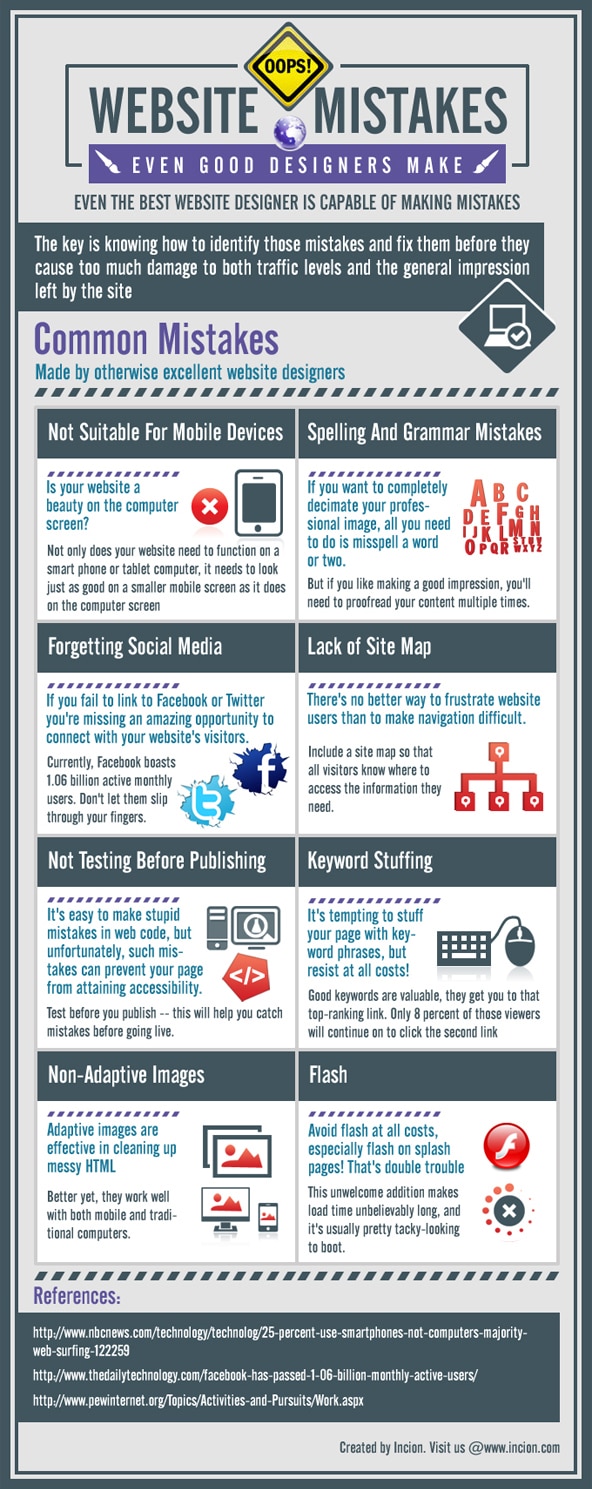
Incion share 8 website mistakes to avoid in this infographic.
Here’s a quick summary:
- Not suitable for mobile devices
- Spelling and grammar mistakes
- Forgetting social media
- Lack of site map
- Not testing before publishing
- Keyword stuffing
- Non-adaptive images
- Flash
Check out the infographic for more detail.
Your website is your digital storefront, and just like a physical store, it needs to be inviting, functional, and easy to navigate.
A poorly designed or mismanaged website can drive visitors away, damage your search rankings, and reduce conversions. Many business owners and even web designers make crucial mistakes that negatively impact performance.
Here are eight common website mistakes that can cost you dearly in terms of rankings, visitors, and conversions.
Poor Mobile Experience
With mobile devices accounting for over half of global website traffic, ensuring a seamless mobile experience is non-negotiable. A website that is not mobile-friendly leads to higher bounce rates, lower engagement, and ultimately, lost sales.
Common Mobile Issues:
- Text too small to read
- Buttons too close together
- Content wider than the screen
- Slow loading times
Google prioritizes mobile-first indexing, meaning if your site isn’t optimized for mobile, your rankings will suffer. Use responsive design to ensure your site adapts to different screen sizes, providing an optimal experience for all users.
Slow Page Load Speed
Website speed is one of the most critical ranking factors in Google’s algorithm. A slow-loading site frustrates users and significantly increases bounce rates. Research shows that a one-second delay in page load time can reduce conversions by 7%.
Ways to Improve Page Speed:
- Compress images and videos
- Minimize HTTP requests
- Use a content delivery network (CDN)
- Enable browser caching
- Optimize code and reduce unnecessary scripts
Test your website speed using tools like Google PageSpeed Insights or GTmetrix to identify areas for improvement.
Poor Website Navigation & Structure
A confusing or cluttered website structure makes it difficult for visitors to find what they’re looking for. This can lead to frustration, higher bounce rates, and lost conversions. Additionally, search engines rely on clear site structures to understand content hierarchy and improve indexing.
Best Practices for Website Navigation:
- Keep menus simple and intuitive
- Use clear, descriptive labels
- Ensure key pages are accessible within three clicks
- Implement breadcrumb navigation
- Avoid excessive dropdown menus
By creating a logical, user-friendly structure, you make it easier for visitors and search engines to navigate your website.
Neglecting SEO Best Practices
Search engine optimization (SEO) is essential for driving organic traffic to your website. However, many businesses make fundamental SEO mistakes that hinder their rankings.
Common SEO Mistakes:
- Missing or duplicate title tags and meta descriptions
- Keyword stuffing
- Ignoring internal linking
- Not optimizing images with alt text
- Poor URL structure (e.g., long, unclear URLs)
SEO is an ongoing process, and staying updated with best practices ensures your site remains competitive in search rankings.
Weak or Irrelevant Content
Content is the backbone of your website. Low-quality or irrelevant content reduces user engagement and credibility. Google prioritizes websites that provide value to users, so if your content is weak, your rankings will suffer.
Tips for High-Quality Content:
- Write informative, well-researched articles
- Use clear headings and subheadings
- Address user intent and answer common questions
- Regularly update outdated content
- Include visuals to enhance readability
Engaging, useful content keeps visitors on your site longer, improves rankings, and increases conversions.
No Clear Call-to-Action (CTA)
A website without clear CTAs fails to guide visitors toward conversions. Whether you want users to make a purchase, sign up for a newsletter, or request a quote, your CTA must be visible and compelling.
Effective CTA Strategies:
- Use action-oriented language (e.g., “Get Started Now,” “Claim Your Free Trial”)
- Place CTAs prominently on the page
- Make buttons stand out with contrasting colors
- Reduce friction by simplifying forms
Without a strong CTA strategy, visitors may leave without taking the desired action, leading to lost opportunities.
Ignoring Technical SEO Issues
Technical SEO ensures search engines can crawl and index your website efficiently. If your site has technical issues, it can negatively impact your rankings and visibility.
Common Technical SEO Issues:
- Broken links and 404 errors
- Improper use of canonical tags
- Duplicate content
- Poor XML sitemap structure
- Missing or incorrect schema markup
Using tools like Google Search Console can help you identify and fix technical issues to improve site performance.
Poor Website Security
A lack of security measures can lead to data breaches, malware infections, and a loss of trust from visitors. Google also considers security in its ranking algorithm, prioritizing HTTPS-enabled websites.
Essential Website Security Measures:
- Install an SSL certificate (HTTPS)
- Regularly update plugins and software
- Use strong passwords and enable two-factor authentication
- Monitor site activity for suspicious behavior
- Backup your website regularly
A secure website protects user data, improves trust, and maintains credibility in the eyes of search engines and visitors.
Final Thoughts
Your website plays a crucial role in attracting, engaging, and converting visitors. Avoiding these eight common mistakes will help improve search rankings, enhance user experience, and increase conversions. Regularly audit your website for potential issues, stay updated with best practices, and prioritize user experience to ensure long-term success online.
By addressing these problems, you’ll build a website that not only ranks well but also drives meaningful engagement and business growth.

Author:
Mark Ford

Designing for Humans: The Psychological Role of Colour in Web Design
Are you confident that the colours on your website are supporting how users feel, think and behave when they arrive? Have you ever wondered why some websites feel instantly trustworthy and intuitive, while others create friction without any obvious reason? […]



