

In the fast-paced world of the internet, a tired and outdated website can be a serious detriment to your online presence.
Your website is often the first impression potential customers have of your business, and if it looks like it hasn’t been touched since the early 2000s, it’s not going to inspire confidence.
In this blog post, we’ll explore five ways to modernize your website and ensure it not only looks fresh but also functions seamlessly to meet the expectations of today’s online users.
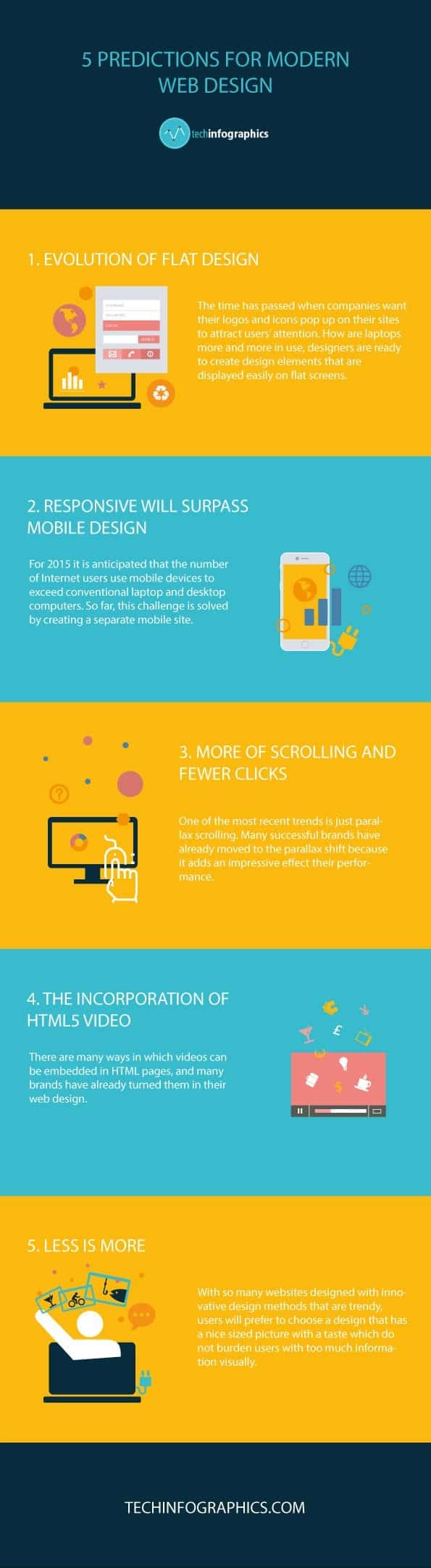
Infographic from Tech Infographics.
1. Responsive Design
One of the most critical aspects of modernizing your website is ensuring that it’s responsive. Responsive website design means that your website adapts to the screen size and device it’s being viewed on, whether it’s a desktop computer, tablet, or smartphone. This is essential because an increasing number of users are accessing websites on mobile devices.
If your website isn’t responsive, users on mobile devices will have a frustrating experience navigating it. They may need to zoom in to read text, scroll excessively to find information, or struggle to click on small links or buttons. This can lead to high bounce rates and lost opportunities.
To modernize your website, you can either redesign it using a responsive framework or employ a web developer who specializes in responsive design. There are also many content management systems (CMS) like WordPress that offer responsive themes, making it easier to update your website’s design without starting from scratch.
2. Streamlined Navigation
Navigation is another crucial element of a modern website. Users expect to find the information they’re looking for quickly and easily. If your website has a convoluted navigation menu or a cluttered layout, visitors may get frustrated and leave.
To modernize your website’s navigation, start by simplifying your menu structure. Use clear and concise labels for your navigation links, and consider organizing them into drop-down menus if you have a lot of pages. Also, make sure your website has a search function, as this can help users find specific content effortlessly.
Additionally, consider implementing a sticky navigation menu that stays at the top of the page as users scroll down. This ensures that the menu is always accessible, saving users from having to scroll back to the top to navigate.
3. High-Quality Visuals
Modern websites rely heavily on high-quality visuals to engage users. If your website is still using outdated, pixelated images or lacks visual appeal, it’s time for an upgrade. Here are a few ways to enhance the visuals of your site:
a. Professional Photography
Invest in professional photography to showcase your products, services, and team. High-quality images can convey professionalism and build trust with your audience.
b. Videos
Consider adding videos to your website. Whether it’s an introductory video on your homepage or product demos, videos can help convey information in an engaging way.
c. Modern Graphics and Icons
Update your website’s graphics and icons to modern, clean designs. These elements can enhance the overall look and feel of your site.
d. Consistent Branding
Ensure that your branding, including colors, fonts, and logos, is consistent throughout your website. Consistency helps build brand recognition and credibility.
4. Content Optimization
Content is king on the internet, and modernizing your website involves optimizing your content for both users and search engines. Here’s how to do it:
a. SEO (Search Engine Optimization)
Optimize your website for search engines to improve its visibility in search results. Conduct keyword research to identify relevant keywords for your industry, and incorporate them naturally into your content, meta titles, and descriptions.
b. Fresh Content
Regularly update your website with fresh, relevant content. This could be in the form of blog posts, news articles, or product updates. Fresh content not only keeps your audience engaged but also signals to search engines that your site is active and authoritative.
c. User-Friendly Content
Ensure that your content is easy to read and understand. Use concise paragraphs, headings, bullet points, and images to break up text. Consider the readability of your content for all audiences, including those with disabilities.
d. Multimedia Content
Incorporate multimedia elements like images, infographics, and videos into your content. Multimedia not only makes your content more engaging but also caters to different learning styles.
5. Speed and Performance
Modern internet users expect websites to load quickly and perform smoothly. If your website is slow and sluggish, it’s likely to drive visitors away. To modernize your website’s speed and performance:
a. Hosting
Consider upgrading your hosting plan to one that can handle your website’s traffic and content. Faster hosting can significantly improve loading times.
b. Compress Images and Files
Optimize your images and files by compressing them without sacrificing quality. This can reduce the load time of your web pages.
c. Use a Content Delivery Network (CDN)
Implementing a CDN can distribute your website’s content across multiple servers worldwide, reducing the physical distance between the server and the user and improving load times.
d. Minimize HTTP Requests
Reduce the number of HTTP requests by combining and minifying CSS and JavaScript files. Fewer requests mean faster loading.
e. Mobile Optimization
Ensure that your website is optimized for mobile devices. Mobile users are especially sensitive to slow-loading pages.
Conclusion
Modernizing your website is not just about aesthetics; it’s about staying competitive and meeting the expectations of today’s internet users. A responsive design, streamlined navigation, high-quality visuals, content optimization, and improved speed and performance are key elements in ensuring your website remains relevant and effective.
Remember that web design and technology continue to evolve, so it’s essential to keep your website updated regularly. By implementing these five strategies, you’ll be well on your way to a more modern and user-friendly website that leaves a positive impression on visitors and supports your online goals.

Author:
Mark Ford



