Are you wondering how to keep your website performing at its best year after year? Want to discover why regular updates are the secret to long-term online success?
You’ll find some web design basics in this infographic.
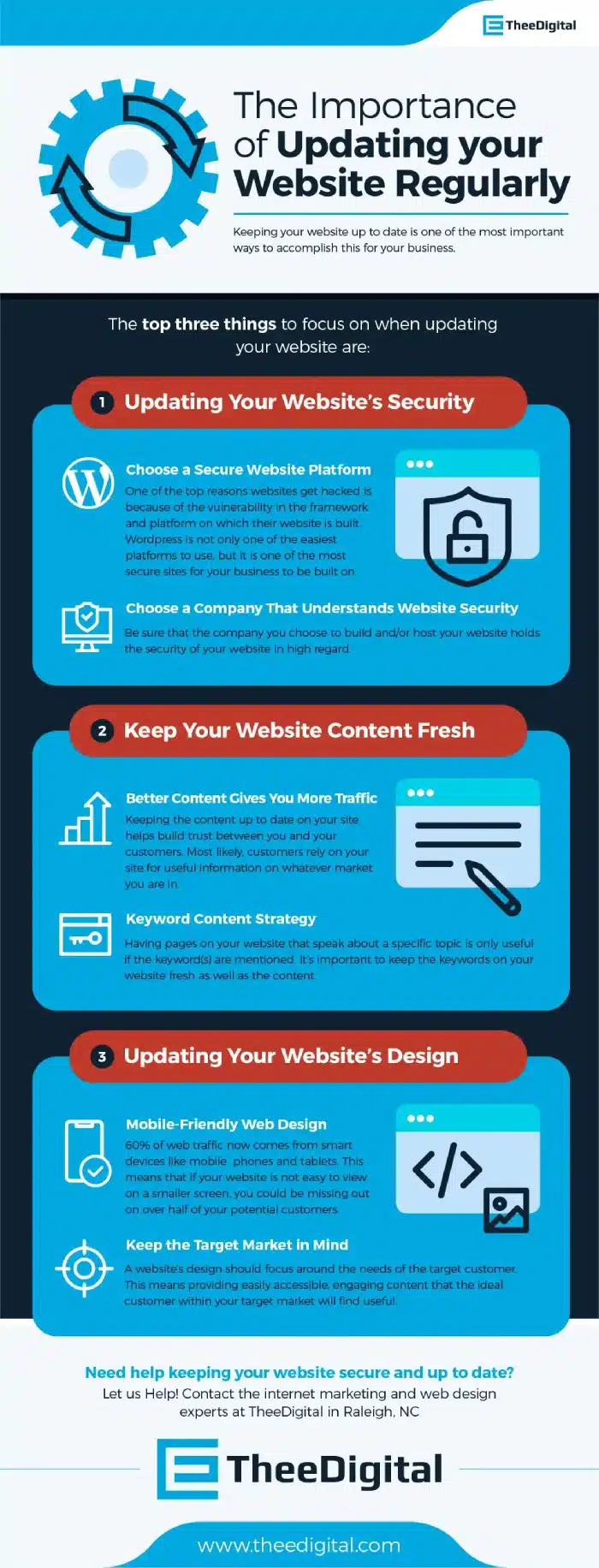
Here’s a summary of what’s covered:
- Updating Your Website’s Security
- Choose a Secure Website Platform
- Choose a Company That Understands Website Security
- Keep Your Website Content Fresh
- Better Content Gives You More Traffic
- Keyword Content Strategy
- Updating Your Website’s Design
- Mobile-Friendly Web Design
- Keep the Target Market in Mind
- Why Website Updates Drive Long-Term Success
Check out the post below for more.
A website is more than a digital business card—it’s the foundation of your online presence and a reflection of your brand’s credibility. Yet, too many businesses build their website and then forget about it. Over time, this neglect can harm visibility, security, and trust. Regular website updates aren’t optional; they are essential for keeping your business secure, competitive, and discoverable.
This guide explores why maintaining your website regularly is vital for long-term success and how focusing on security, content, and design can future-proof your online presence.
Updating Your Website’s Security
In today’s digital landscape, cybersecurity threats evolve faster than ever. If your website isn’t updated frequently, it becomes an easy target for hackers, malware, and data breaches. Regular updates help protect sensitive data, maintain user trust, and prevent costly downtime or reputation damage. A secure site is the backbone of your business’s digital integrity.
- Choose a Secure Website Platform: Opt for a platform like WordPress, which provides regular security patches and strong community support to reduce vulnerabilities.
- Keep Plugins and Themes Updated: Outdated plugins are a major cause of website breaches, so ensure all add-ons are regularly checked and updated.
- Use SSL Certificates and Encryption: Secure Sockets Layer (SSL) certificates protect customer data and improve SEO rankings.
- Partner with Security-Focused Experts: Work with a web design or hosting company that prioritises website protection, including malware scanning and backup solutions.
Choose a Secure Website Platform
The platform on which your website is built plays a huge role in its safety and performance. Platforms with strong development communities provide continuous updates, making it easier to stay protected from emerging threats. A reliable platform also ensures compatibility with new technologies and better user experiences.
- Select a Well-Supported CMS: Choose a content management system that receives frequent updates and has active developer support.
- Test Compatibility Before Updating: Always back up your website and test updates in a staging environment before applying them live.
- Monitor Platform Updates: Enable automatic updates where possible to minimise risks associated with outdated versions.
- Document Customisations: Keep track of any custom code so updates don’t unintentionally break your website’s functionality.
Choose a Company That Understands Website Security
Not every web company takes security seriously, and many businesses assume their provider handles it all. Partnering with professionals who prioritise digital safety ensures your website remains protected around the clock. They’ll stay ahead of potential vulnerabilities and safeguard your data.
- Work with Experienced Developers: Choose a team with proven expertise in security best practices and data protection protocols.
- Request Regular Security Reports: Ask your provider for scheduled reviews of website logs and security performance.
- Ensure Secure Hosting: Confirm your hosting company provides server-level firewalls, intrusion detection, and daily backups.
- Implement Multi-Layer Security: Combine strong passwords, two-factor authentication, and encryption for maximum protection.
Keep Your Website Content Fresh
Your website content is the voice of your business—and that voice should never go stale. Regularly refreshed content keeps your site relevant in search results, builds audience trust, and positions your brand as an authority in your field. Inactive websites often lose credibility, both with users and search engines.
- Update Key Pages Regularly: Refresh your homepage, service pages, and blog with up-to-date information to reflect your latest offerings.
- Add Industry Insights and News: Posting new articles about trends or updates shows visitors your business is active and knowledgeable.
- Review and Refresh SEO Elements: Optimise titles, meta descriptions, and headings to stay aligned with current search behaviours.
- Audit Outdated Information: Remove old pricing, obsolete links, or expired promotions to maintain accuracy and trust.
Better Content Gives You More Traffic
Search engines love fresh, relevant content—and so do people. Regularly updated content encourages return visits, improves engagement, and signals to search engines that your site is active. The more you publish quality updates, the more visibility and organic traffic you gain.
- Publish Consistent Blog Posts: Create a content calendar to post articles, guides, or news regularly.
- Answer Customer Questions: Use your blog to address common queries, helping your site rank for long-tail keywords.
- Incorporate Multimedia Content: Videos, infographics, and podcasts keep your audience engaged and increase dwell time.
- Encourage Sharing: Add social sharing buttons and encourage visitors to spread your latest content across platforms.
Keyword Content Strategy
Strategic keyword use is what keeps your content discoverable. Without ongoing optimisation, even well-written pages can fade from search results. Updating your keywords ensures you stay aligned with how your audience searches today, not how they searched a year ago.
- Research New Keywords: Use tools like Google Keyword Planner to identify trending search terms in your industry.
- Avoid Keyword Stuffing: Focus on naturally incorporating relevant terms within valuable, informative content.
- Update Meta Tags: Refresh meta titles and descriptions with current keyword data to improve click-through rates.
- Track Keyword Performance: Use analytics to measure keyword effectiveness and adjust your strategy accordingly.
Updating Your Website’s Design
An outdated design can make even the best content feel irrelevant. Modern users expect intuitive, mobile-friendly, and visually appealing websites. By refreshing your design regularly, you not only stay ahead of competitors but also keep users engaged and comfortable navigating your site.
- Follow Design Trends Thoughtfully: Embrace trends that enhance usability rather than distract from your content.
- Prioritise Accessibility: Ensure fonts, colours, and layouts comply with accessibility standards for all users.
- Enhance Load Speed: A modern design should be lightweight and optimised for fast loading times.
- Test User Experience (UX): Gather feedback from visitors to identify and improve friction points in navigation or design.
Mobile-Friendly Web Design
Over half of all web traffic now comes from mobile devices, meaning a mobile-friendly site is non-negotiable. Users expect seamless browsing, quick load times, and easy navigation regardless of screen size. A poor mobile experience drives users away before they even see your content.
- Use Responsive Design: Ensure your website automatically adjusts layout and visuals to fit different devices.
- Simplify Navigation: Replace cluttered menus with mobile-friendly icons or dropdowns for ease of use.
- Optimise Images for Mobile: Compress and resize images to reduce load times on slower connections.
- Test Across Devices: Regularly test your website on multiple phones and tablets to maintain consistent performance.
Keep the Target Market in Mind
Your website should always serve the people it’s built for—your customers. As your audience’s preferences evolve, so should your website’s design, tone, and content. Keeping your target market at the centre of every update ensures you continue meeting their needs and expectations.
- Analyse Visitor Behaviour: Use analytics tools to study how users interact with your site and identify improvement areas.
- Adjust Tone and Messaging: Update your copy to match how your audience communicates and what they value most.
- Tailor Visuals to Audience Preferences: Choose imagery and colour schemes that resonate with your target demographic.
- Offer Personalised Experiences: Implement features such as recommended products or location-based content for added relevance.
Why Website Updates Drive Long-Term Success
A well-maintained website performs better in every area—from visibility and security to conversions and trust. Regular updates show professionalism and demonstrate your ongoing commitment to customers. Businesses that treat their website as a living, evolving asset see greater long-term returns on their digital investment.
- Improved SEO Rankings: Search engines reward websites that remain active, relevant, and technically optimised.
- Enhanced User Trust: A secure, up-to-date site reassures visitors their data and interactions are safe.
- Better Conversion Rates: Regular improvements to design, usability, and content lead to higher engagement and sales.
- Future-Proofed Performance: Keeping up with technology ensures your site remains compatible with new browsers and devices.
Conclusion
Your website isn’t a static brochure—it’s a dynamic, evolving extension of your brand. By keeping it secure, relevant, and beautifully designed, you’re not only protecting your investment but also enhancing your long-term growth potential. Regular website updates build trust, improve performance, and signal professionalism.
Whether it’s strengthening your security, refreshing your content, or modernising your design, consistent updates keep your digital presence aligned with your business goals. The businesses that thrive online are the ones that never stop improving—and your website should be no different.

Author:
Mark Ford