

Are you in the process of purchasing a new website for your business? Want to know the difference between the most common content management systems?
FirstSiteGuide compare popular CMS platforms in this infographic.
Here are the platforms they compare:
- WordPress
- Joomla
- Drupal
Check out their infographic for more detail.
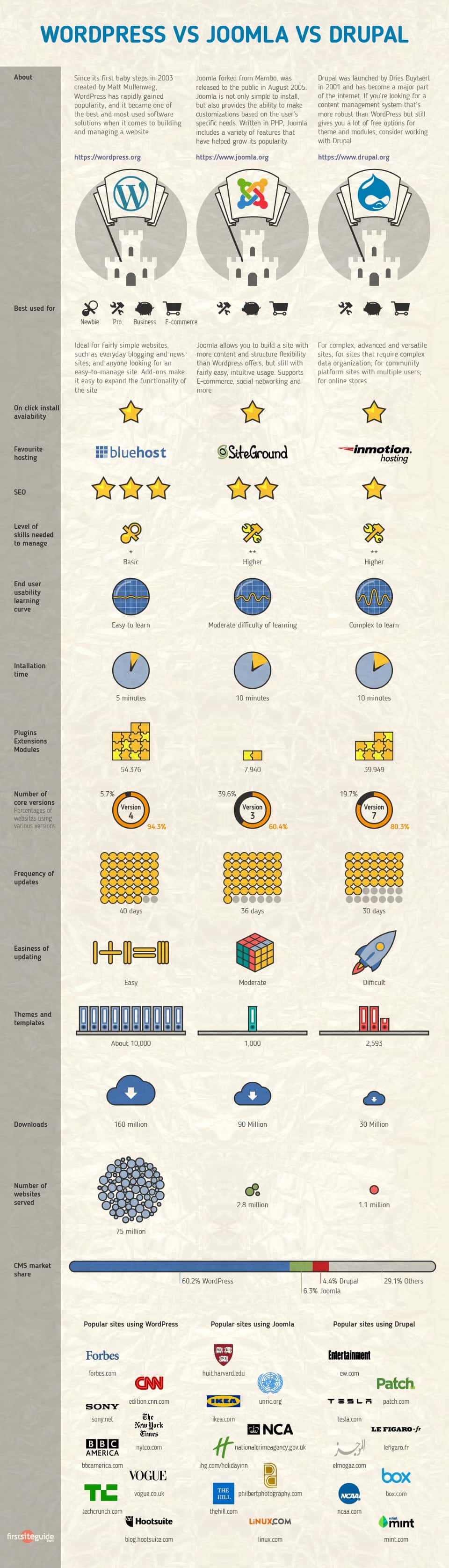
Choosing the right content management system (CMS) is crucial for the success of any website. Among the most popular and powerful CMS platforms available today are WordPress, Joomla, and Drupal. Each of these platforms has its own strengths and weaknesses, making them suitable for different types of websites and user needs. This article will compare WordPress, Joomla, and Drupal in terms of ease of use, flexibility, security, performance, and community support to help you decide which CMS might be the best fit for your project.
WordPress
Ease of Use
WordPress is widely regarded as the most user-friendly CMS. Its intuitive interface and simple setup process make it accessible even for beginners. Installing WordPress typically involves a few clicks, and many web hosting providers offer one-click installations. The dashboard is clean and easy to navigate, allowing users to manage their content without needing to write any code.
The abundance of themes and plugins available for WordPress further enhances its ease of use. Themes allow users to quickly change the design of their site, while plugins add functionality without requiring any technical knowledge. This means that even non-technical users can create and manage a professional-looking website with ease.
Flexibility
WordPress offers a high level of flexibility, making it suitable for a wide range of websites, from simple blogs to complex e-commerce sites. The platform supports various types of content, including posts, pages, and custom post types, allowing users to organize their content in different ways.
The extensive library of plugins available for WordPress adds to its flexibility. There are plugins for SEO, social media integration, e-commerce, security, and more. This means that you can customize your WordPress site to meet your specific needs, whether you’re running a blog, a business site, or an online store.
Security
While WordPress is generally secure, its popularity makes it a common target for hackers. To maintain security, it’s important to keep WordPress, themes, and plugins updated to the latest versions. The WordPress community is active in identifying and patching security vulnerabilities, but users must remain vigilant.
There are numerous security plugins available that can enhance the security of a WordPress site. These plugins offer features like firewalls, malware scanning, and login protection. However, the responsibility for security largely falls on the site owner, who must ensure that best practices are followed.
Performance
WordPress can deliver good performance if properly optimized. The use of caching plugins, content delivery networks (CDNs), and optimized themes can significantly improve the speed and performance of a WordPress site. However, due to its extensive use of plugins and themes, a poorly optimized WordPress site can become slow and cumbersome.
It’s crucial to choose a reliable hosting provider and implement performance best practices to ensure that your WordPress site runs smoothly. Regular maintenance, such as database optimization and image compression, can also help maintain good performance.
Community Support
WordPress boasts one of the largest and most active communities of any CMS. This community provides extensive resources, including documentation, forums, tutorials, and meetups. Whether you’re a beginner or an experienced developer, you can find support and guidance from the WordPress community.
The availability of professional services is another advantage. There are countless developers, designers, and agencies specializing in WordPress, making it easy to find professional help if needed.
Tips and Guidance for Small Businesses
For small businesses, WordPress offers a plethora of advantages. Here are some in-depth tips and guidance to help small businesses maximize the potential of their WordPress websites:
- Choosing the Right Hosting Provider
Selecting a reliable hosting provider is the foundation of a successful WordPress website. Consider factors such as uptime, customer support, and scalability. Managed WordPress hosting services like WP Engine, SiteGround, and Bluehost offer specialized features, including automated backups, enhanced security, and optimized performance, making them excellent choices for small businesses.
- Selecting a Suitable Theme
Your website’s design plays a crucial role in attracting and retaining customers. WordPress offers thousands of free and premium themes that cater to different industries and business needs. When choosing a theme, prioritize responsiveness, speed, and ease of customization. Themes like Astra, OceanWP, and Divi are popular for their flexibility and performance.
- Utilizing Essential Plugins
Plugins extend the functionality of your WordPress site, allowing you to add features without coding. Here are some essential plugins for small businesses:
- SEO: Yoast SEO or All in One SEO Pack can help improve your search engine rankings.
- Security: Wordfence or Sucuri Security to protect your site from threats.
- Performance: WP Rocket or W3 Total Cache to enhance site speed.
- E-commerce: WooCommerce to set up an online store.
- Analytics: MonsterInsights for integrating Google Analytics.
- Contact Forms: Contact Form 7 or WPForms for creating contact forms.
- Optimizing for Search Engines
SEO is critical for driving organic traffic to your website. Use the following strategies to optimize your WordPress site for search engines:
- Keyword Research: Use tools like Google Keyword Planner or SEMrush to find relevant keywords.
- On-Page SEO: Optimize your titles, meta descriptions, headers, and content for target keywords.
- Technical SEO: Ensure your site is mobile-friendly, has a fast loading speed, and includes an XML sitemap.
- Content Creation: Regularly publish high-quality, relevant content to attract and engage your audience.
- Ensuring Mobile Responsiveness
With the increasing use of mobile devices, having a mobile-responsive website is essential. Choose a responsive theme and test your site on various devices using tools like Google’s Mobile-Friendly Test. Additionally, consider using AMP (Accelerated Mobile Pages) plugins to improve mobile performance.
- Implementing Strong Security Measures
Security is paramount for protecting your website and customer data. Here are some tips to enhance your WordPress site’s security:
- Regular Updates: Keep WordPress, themes, and plugins updated.
- Strong Passwords: Use strong, unique passwords and enable two-factor authentication.
- Security Plugins: Install security plugins like Wordfence or Sucuri.
- Regular Backups: Use plugins like UpdraftPlus or BackupBuddy to regularly back up your site.
- Enhancing Site Performance
A fast-loading website improves user experience and SEO rankings. Follow these tips to boost your site’s performance:
- Caching: Use caching plugins like WP Rocket or W3 Total Cache.
- Image Optimization: Compress images using plugins like Smush or ShortPixel.
- Content Delivery Network (CDN): Implement a CDN, such as Cloudflare or MaxCDN, to deliver content faster.
- Database Optimization: Use plugins like WP-Optimize to clean up your database.
- Creating a User-Friendly Design
A user-friendly design enhances the overall experience of your visitors. Consider the following design principles:
- Navigation: Ensure your site has a clear, intuitive navigation structure.
- Call to Action (CTA): Use prominent CTAs to guide visitors towards desired actions (e.g., signing up for a newsletter, making a purchase).
- Readability: Use readable fonts, appropriate font sizes, and sufficient line spacing.
- Consistency: Maintain a consistent design across all pages to create a cohesive brand experience.
- Leveraging Social Media Integration
Integrating social media with your WordPress site can boost engagement and drive traffic. Use plugins like Social Snap or Monarch to add social sharing buttons and integrate your social media feeds. Additionally, consider using tools like Buffer or Hootsuite to schedule and manage your social media posts.
- Monitoring and Analyzing Performance
Regularly monitoring and analyzing your website’s performance is crucial for ongoing improvement. Use tools like Google Analytics and MonsterInsights to track key metrics such as traffic, bounce rate, and conversion rate. Analyze this data to identify areas for improvement and adjust your strategies accordingly.
- Providing Excellent Customer Support
Customer support is essential for maintaining a positive relationship with your audience. Implement live chat functionality using plugins like LiveChat or Tawk.to. Additionally, create a comprehensive FAQ section and consider using a help desk plugin like Zendesk or Help Scout to manage customer inquiries efficiently.
- Building an Email List
Email marketing is a powerful tool for nurturing leads and driving sales. Use plugins like Mailchimp for WordPress or ConvertKit to create and manage your email lists. Offer valuable content, such as e-books or exclusive discounts, to encourage visitors to subscribe to your newsletter.
Conclusion
WordPress is an excellent choice for small businesses looking to establish a professional online presence. Its user-friendly interface, extensive customization options, and vibrant community make it a versatile and powerful CMS. By following the tips and guidance provided in this article, small businesses can create a successful WordPress website that meets their needs and helps them achieve their business goals.
Joomla
Ease of Use
Joomla offers a balance between ease of use and flexibility. While it is not as beginner-friendly as WordPress, it provides a more user-friendly experience than Drupal. Joomla’s installation process is straightforward, but the dashboard and interface can be overwhelming for new users due to its many options and settings.
Joomla’s complexity can be both an advantage and a disadvantage. It offers more built-in functionality than WordPress, which can be beneficial for users who need advanced features without relying on numerous plugins. However, this also means that there is a steeper learning curve for new users.
Flexibility
Joomla is highly flexible and can be used to build a wide range of websites, from simple blogs to complex e-commerce sites and social networks. It supports multiple types of content and has a robust system for managing users and permissions. This makes Joomla particularly suitable for sites that require multiple user roles and access levels.
The platform also supports extensions, which are similar to WordPress plugins but are generally more complex. Extensions can add a wide range of functionality to a Joomla site, from SEO tools to e-commerce solutions. However, finding and installing extensions can be more challenging than with WordPress.
Security
Joomla has a good track record when it comes to security. The platform regularly releases security updates and patches to address vulnerabilities. However, as with any CMS, the security of a Joomla site depends on keeping the software and extensions up to date.
Joomla also offers several built-in security features, such as two-factor authentication and extensive access control lists (ACLs), which provide granular control over user permissions. These features make Joomla a secure choice for websites with complex user management requirements.
Performance
Joomla’s performance can vary depending on how the site is configured and optimized. Like WordPress, Joomla can benefit from caching, CDNs, and performance optimization techniques. The platform’s built-in caching and performance features are more advanced than WordPress, which can lead to better performance out of the box.
However, the complexity of Joomla can sometimes result in slower performance if not properly managed. It’s important to choose high-quality extensions and follow best practices for optimization to ensure that your Joomla site runs efficiently.
Community Support
Joomla has a smaller but dedicated community compared to WordPress. The Joomla community provides a wealth of resources, including documentation, forums, and user groups. There are also regular events and conferences where users can connect and learn from each other.
Finding professional support for Joomla can be more challenging than for WordPress, but there are still many developers and agencies that specialize in Joomla. The Joomla Extension Directory is a valuable resource for finding extensions and professional services.
Tips and Guidance for Small Businesses
For small businesses, Joomla offers a robust and flexible platform that can cater to a wide range of needs. Here are some in-depth tips and guidance to help small businesses make the most of their Joomla websites:
- Choosing the Right Hosting Provider
Selecting a reliable hosting provider is essential for the performance and security of your Joomla website. Look for hosting providers that offer specialized Joomla hosting services, which include features like automated backups, enhanced security, and optimized server environments. Providers such as SiteGround, InMotion Hosting, and A2 Hosting are well-regarded for their Joomla hosting plans.
- Selecting a Suitable Template
Joomla templates control the design and layout of your website. Choose a template that is responsive, lightweight, and easy to customize. There are numerous free and premium templates available on platforms like JoomlArt, RocketTheme, and Shape5. Ensure the template you select aligns with your brand identity and offers flexibility for future design changes.
- Utilizing Essential Extensions
Extensions extend the functionality of your Joomla site. Here are some essential extensions for small businesses:
- SEO: sh404SEF or Easy Frontend SEO (EFSEO) can help improve your search engine rankings.
- Security: Admin Tools and Akeeba Backup provide robust security and backup solutions.
- Performance: JotCache or Cache Cleaner to enhance site speed and performance.
- E-commerce: VirtueMart or HikaShop to set up an online store.
- Forms: RSForm! Pro or BreezingForms for creating contact forms and surveys.
- Analytics: CoalaWeb Traffic or Google Analytics integration for tracking site performance.
- Optimizing for Search Engines
SEO is critical for driving organic traffic to your website. Use the following strategies to optimize your Joomla site for search engines:
- Keyword Research: Utilize tools like Google Keyword Planner or Ahrefs to identify relevant keywords.
- On-Page SEO: Optimize your meta titles, descriptions, headers, and content with targeted keywords.
- Technical SEO: Ensure your site has a fast loading speed, is mobile-friendly, and includes an XML sitemap.
- Content Creation: Publish high-quality, relevant content regularly to attract and engage your audience.
- Ensuring Mobile Responsiveness
With an increasing number of users accessing websites via mobile devices, having a mobile-responsive website is essential. Choose a responsive template and test your site on various devices using tools like Google’s Mobile-Friendly Test. Additionally, ensure that your site’s navigation, buttons, and forms are easy to use on smaller screens.
- Implementing Strong Security Measures
Security is paramount for protecting your website and customer data. Here are some tips to enhance your Joomla site’s security:
- Regular Updates: Keep Joomla, templates, and extensions up to date.
- Strong Passwords: Use strong, unique passwords and enable two-factor authentication for administrative accounts.
- Security Extensions: Install security extensions like Admin Tools and RSFirewall to protect your site from threats.
- Regular Backups: Use extensions like Akeeba Backup to regularly back up your site and store backups in a secure location.
- Enhancing Site Performance
A fast-loading website improves user experience and SEO rankings. Follow these tips to boost your site’s performance:
- Caching: Enable Joomla’s built-in caching features and consider using extensions like JotCache.
- Image Optimization: Compress images using extensions like EIR (Easy Image Resizer) or use online tools like TinyPNG.
- Content Delivery Network (CDN): Implement a CDN, such as Cloudflare or MaxCDN, to deliver content faster.
- Database Optimization: Regularly clean up your database using extensions like DB Replacer or Cache Cleaner.
- Creating a User-Friendly Design
A user-friendly design enhances the overall experience of your visitors. Consider the following design principles:
- Navigation: Ensure your site has a clear, intuitive navigation structure with a logical hierarchy.
- Call to Action (CTA): Use prominent CTAs to guide visitors towards desired actions (e.g., signing up for a newsletter, making a purchase).
- Readability: Use readable fonts, appropriate font sizes, and sufficient line spacing.
- Consistency: Maintain a consistent design across all pages to create a cohesive brand experience.
- Leveraging Social Media Integration
Integrating social media with your Joomla site can boost engagement and drive traffic. Use extensions like JFBConnect or Social Media Presence to add social sharing buttons and integrate your social media feeds. Additionally, consider using tools like Buffer or Hootsuite to schedule and manage your social media posts.
- Monitoring and Analyzing Performance
Regularly monitoring and analyzing your website’s performance is crucial for ongoing improvement. Use tools like Google Analytics and Joomla extensions like CoalaWeb Traffic to track key metrics such as traffic, bounce rate, and conversion rate. Analyze this data to identify areas for improvement and adjust your strategies accordingly.
- Providing Excellent Customer Support
Customer support is essential for maintaining a positive relationship with your audience. Implement live chat functionality using extensions like LiveChat or JLive! Chat. Additionally, create a comprehensive FAQ section and consider using a help desk extension like Akeeba Ticket System or RSTickets! Pro to manage customer inquiries efficiently.
- Building an Email List
Email marketing is a powerful tool for nurturing leads and driving sales. Use extensions like Acymailing or jNews to create and manage your email lists. Offer valuable content, such as e-books or exclusive discounts, to encourage visitors to subscribe to your newsletter.
Conclusion
Joomla is a robust and flexible CMS that offers a wealth of features and customization options for small businesses. Its balance between ease of use and advanced functionality makes it a versatile platform for a wide range of websites. By following the tips and guidance provided in this article, small businesses can create a successful Joomla website that meets their needs and helps them achieve their business goals.
Whether you are setting up an e-commerce store, a corporate website, or a community portal, Joomla’s extensive capabilities and active community support provide a solid foundation for your online presence.
Drupal
Ease of Use
Drupal is known for its steep learning curve and is often considered the most challenging of the three CMS platforms to use. The installation process is more complex, and the interface is less intuitive, making it less suitable for beginners. However, Drupal’s complexity comes with a high degree of customization and flexibility, which can be a significant advantage for experienced users and developers.
Drupal’s learning curve is mitigated by its extensive documentation and the availability of professional training and support. For users willing to invest the time to learn the platform, Drupal offers unparalleled flexibility and control over their website.
Flexibility
Drupal is the most flexible and powerful of the three CMS platforms. It is designed to handle complex websites with large amounts of content and advanced functionality. Drupal’s core system supports custom content types, views, and taxonomies, allowing users to create highly customized websites.
The platform’s flexibility makes it ideal for large-scale projects, such as enterprise websites, government portals, and educational institutions. Drupal’s modular architecture allows developers to extend its functionality through custom modules, providing endless possibilities for customization.
Security
Drupal is known for its strong security features and is often the preferred choice for government and enterprise websites that require high levels of security. The platform has a dedicated security team that regularly releases updates and patches to address vulnerabilities.
Drupal’s extensive access control system allows administrators to define granular permissions for different user roles, enhancing security. Additionally, the platform’s modular architecture can be configured to meet stringent security requirements, making Drupal one of the most secure CMS options available.
Performance
Drupal is capable of delivering high performance, especially for large and complex websites. The platform includes built-in caching and performance optimization features, which can significantly improve site speed. However, due to its complexity, optimizing a Drupal site requires a higher level of expertise compared to WordPress or Joomla.
Choosing the right hosting provider and following best practices for performance optimization are crucial for ensuring that a Drupal site runs efficiently. For large-scale projects, it may be necessary to work with experienced Drupal developers to achieve optimal performance.
Community Support
Drupal has a strong and active community of developers, users, and contributors. The community provides extensive resources, including documentation, forums, and user groups. There are also numerous events and conferences where Drupal users can connect and share knowledge.
The Drupal community is known for its focus on collaboration and innovation. This has led to the development of a wide range of modules and themes that extend the platform’s functionality. However, due to the complexity of Drupal, finding professional support can be more challenging and expensive compared to WordPress or Joomla.
Tips and Guidance for Small Businesses
For small businesses, Drupal offers robust, scalable, and secure solutions that can grow with your needs. Here are some in-depth tips and guidance to help small businesses maximize the potential of their Drupal websites:
- Choosing the Right Hosting Provider
Selecting a reliable hosting provider is crucial for the performance and security of your Drupal website. Look for hosting providers that offer specialized Drupal hosting services, including automated backups, enhanced security, and optimized server environments. Providers such as Pantheon, Acquia, and SiteGround are known for their Drupal hosting capabilities.
- Selecting a Suitable Theme
Drupal themes control the look and feel of your website. Choose a theme that is responsive, lightweight, and easy to customize. Drupal’s official theme directory and platforms like ThemeForest offer a variety of free and premium themes. Ensure the theme you select aligns with your brand identity and provides flexibility for future design changes.
- Utilizing Essential Modules
Modules extend the functionality of your Drupal site. Here are some essential modules for small businesses:
- SEO: Pathauto, Metatag, and XML Sitemap can help improve your search engine rankings.
- Security: Security Kit, Login Security, and Captcha provide robust security solutions.
- Performance: Advanced CSS/JS Aggregation (AdvAgg) and Cache Expiration enhance site speed and performance.
- E-commerce: Drupal Commerce or Ubercart to set up an online store.
- Forms: Webform module for creating contact forms and surveys.
- Analytics: Google Analytics module for integrating and tracking site performance.
- Optimizing for Search Engines
SEO is critical for driving organic traffic to your website. Use the following strategies to optimize your Drupal site for search engines:
- Keyword Research: Utilize tools like Google Keyword Planner or Ahrefs to identify relevant keywords.
- On-Page SEO: Optimize your meta titles, descriptions, headers, and content with targeted keywords.
- Technical SEO: Ensure your site has a fast loading speed, is mobile-friendly, and includes an XML sitemap.
- Content Creation: Regularly publish high-quality, relevant content to attract and engage your audience.
- Ensuring Mobile Responsiveness
With an increasing number of users accessing websites via mobile devices, having a mobile-responsive website is essential. Choose a responsive theme and test your site on various devices using tools like Google’s Mobile-Friendly Test. Additionally, ensure that your site’s navigation, buttons, and forms are easy to use on smaller screens.
- Implementing Strong Security Measures
Security is paramount for protecting your website and customer data. Here are some tips to enhance your Drupal site’s security:
- Regular Updates: Keep Drupal, themes, and modules up to date.
- Strong Passwords: Use strong, unique passwords and enable two-factor authentication for administrative accounts.
- Security Modules: Install security modules like Security Kit and Login Security to protect your site from threats.
- Regular Backups: Use modules like Backup and Migrate to regularly back up your site and store backups in a secure location.
- Enhancing Site Performance
A fast-loading website improves user experience and SEO rankings. Follow these tips to boost your site’s performance:
- Caching: Enable Drupal’s built-in caching features and consider using modules like AdvAgg.
- Image Optimization: Compress images using tools like ImageAPI Optimize or online services like TinyPNG.
- Content Delivery Network (CDN): Implement a CDN, such as Cloudflare or Fastly, to deliver content faster.
- Database Optimization: Regularly clean up your database using modules like Database Cleanup.
- Creating a User-Friendly Design
A user-friendly design enhances the overall experience of your visitors. Consider the following design principles:
- Navigation: Ensure your site has a clear, intuitive navigation structure with a logical hierarchy.
- Call to Action (CTA): Use prominent CTAs to guide visitors towards desired actions (e.g., signing up for a newsletter, making a purchase).
- Readability: Use readable fonts, appropriate font sizes, and sufficient line spacing.
- Consistency: Maintain a consistent design across all pages to create a cohesive brand experience.
- Leveraging Social Media Integration
Integrating social media with your Drupal site can boost engagement and drive traffic. Use modules like AddToAny or Social Media Links Block and Field to add social sharing buttons and integrate your social media feeds. Additionally, consider using tools like Buffer or Hootsuite to schedule and manage your social media posts.
- Monitoring and Analyzing Performance
Regularly monitoring and analyzing your website’s performance is crucial for ongoing improvement. Use tools like Google Analytics and Drupal modules like Google Analytics Reports to track key metrics such as traffic, bounce rate, and conversion rate. Analyze this data to identify areas for improvement and adjust your strategies accordingly.
- Providing Excellent Customer Support
Customer support is essential for maintaining a positive relationship with your audience. Implement live chat functionality using modules like Live Helper Chat or Chatbot API. Additionally, create a comprehensive FAQ section and consider using a help desk module like RedHen Raiser or Support Ticketing System to manage customer inquiries efficiently.
- Building an Email List
Email marketing is a powerful tool for nurturing leads and driving sales. Use modules like Mailchimp or Simplenews to create and manage your email lists. Offer valuable content, such as e-books or exclusive discounts, to encourage visitors to subscribe to your newsletter.
Conclusion
Drupal is a powerful and flexible CMS that offers a wealth of features and customization options for small businesses. Its strong security features, scalability, and ability to handle complex websites make it a suitable choice for businesses looking to establish a professional online presence. By following the tips and guidance provided in this article, small businesses can create a successful Drupal website that meets their needs and helps them achieve their business goals.
Whether you are setting up an e-commerce store, a corporate website, or a community portal, Drupal’s extensive capabilities and active community support provide a solid foundation for your online presence. With its robust architecture and endless customization possibilities, Drupal is an excellent choice for businesses seeking a reliable and scalable solution for their digital needs.
Conclusion
Choosing the right CMS depends on your specific needs, technical expertise, and the type of website you want to build. WordPress is the best choice for beginners and those looking for a user-friendly platform with a wide range of themes and plugins. Its ease of use and large community make it suitable for most small to medium-sized websites.
Joomla offers a balance between ease of use and flexibility, making it a good option for users who need more built-in functionality and control over user permissions. Its complexity is manageable for those willing to invest some time in learning the platform.
Drupal is the most powerful and flexible CMS, ideal for large-scale projects that require advanced customization and security. However, its steep learning curve and complexity make it less suitable for beginners. For experienced users and developers, Drupal offers unmatched control and capabilities.
Ultimately, the best CMS for your project will depend on your specific requirements and resources. Each platform has its strengths and weaknesses, so it’s important to evaluate your needs carefully before making a decision.

Author:
Mark Ford



