Are you looking for ways to WOW potential clients? Do you want your business to stand out from the crowd?
By now you’ve probably read countless articles about how using visual content as part your marketing strategy can help you to stand out, but if you’re not the creative type you probably aren’t sure what to actually share?
Fear no more, Karen Gunton is here to help with her 116 ideas for visual content in the infographic below.
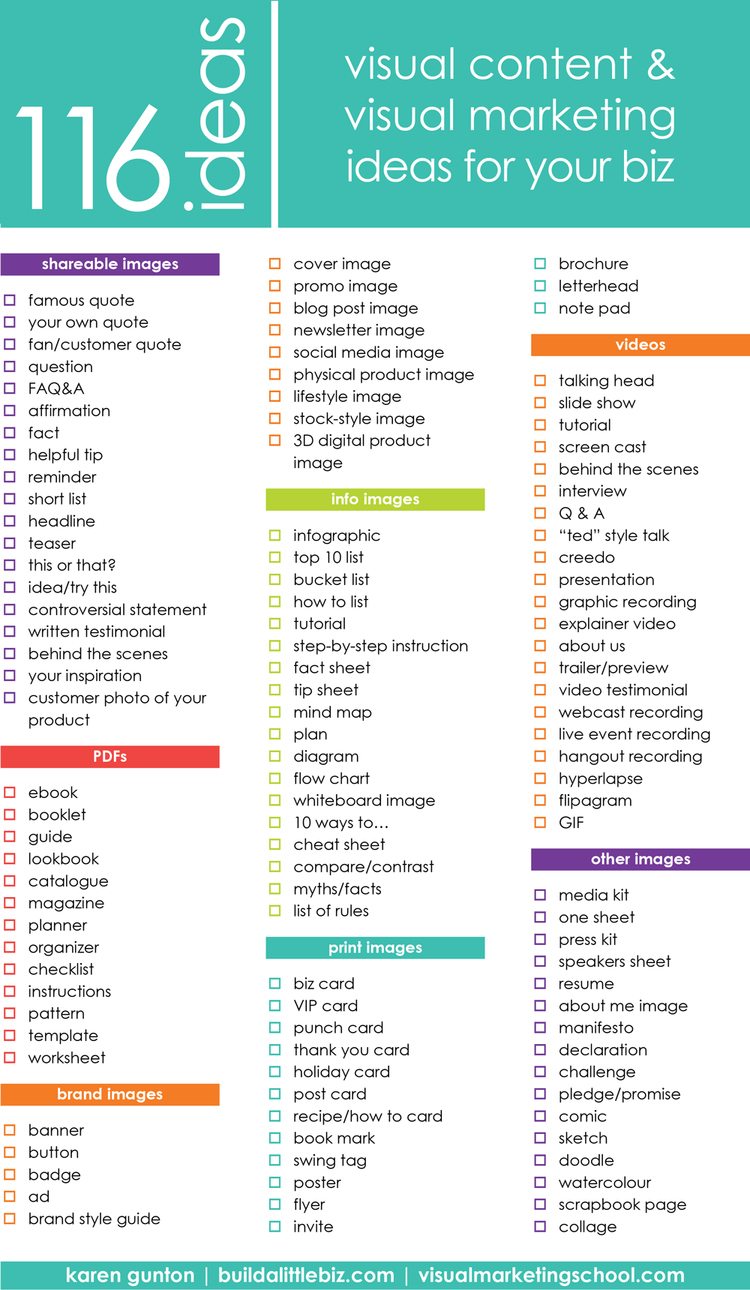
In today’s digital age, businesses are constantly competing for attention online. Whether you run a small bakery, a local plumbing service, or a software company, the challenge remains the same: how do you make your business stand out in a crowded online space? The answer often lies in creating engaging visual content that captures the imagination of your target audience.
Visual content has become increasingly important in online marketing. Studies have shown that people are more likely to remember information presented in a visual format than text alone. This means that if you want to make a lasting impression and keep your audience engaged, you need to incorporate a variety of visual content into your online strategy.
But what if your business doesn’t naturally lend itself to visually appealing content? What if you think your products or services are “boring” compared to more glamorous industries? Fear not! In this blog post, we’ll explore 116 visual content ideas that can help your “boring” business shine online.
1. Behind-the-Scenes Sneak Peeks
Take your audience behind the scenes of your business. Show them how your products are made, introduce your team, and give them a glimpse into your daily operations. People love to see the human side of a business.
2. Infographics
Create informative infographics related to your industry or niche. They’re a great way to simplify complex information and make it more shareable.
3. Customer Testimonials
Share images of satisfied customers with their testimonials. It adds a personal touch to your brand.
4. Before-and-After Photos
If your business offers transformational results, use before-and-after photos to showcase the difference your products or services make.
5. Educational How-To Videos
Create step-by-step video tutorials related to your products or services. Educational content can position you as an industry authority.
6. User-Generated Content
Encourage your customers to create content related to your products or services and share it on social media. Repost their content to build trust.
7. Product Demos
Show how your products work and highlight their key features. This can help potential customers understand their value.
8. Meet the Team
Introduce your team members with short profiles and images. Humanize your brand by putting faces to the names.
9. Infographic Slideshows
Combine multiple infographics into a slideshow for a visually engaging presentation.
10. Industry Stats and Facts
Share interesting statistics and facts about your industry to position your business as a knowledgeable resource.
11. Animated GIFs
Create eye-catching animated GIFs related to your products, services, or industry trends.
12. Product Packaging
Highlight the design and packaging of your products. A well-designed package can be a work of art.
13. Office or Workspace Tours
Take your audience on a tour of your workspace or office. Showcasing your work environment can create a connection.
14. Quote Graphics
Share inspiring or insightful quotes related to your industry. Overlay them on attractive backgrounds.
15. Infographic Videos
Turn your infographics into short video clips with animated elements.
16. Customer Spotlight
Feature loyal customers and their stories. This can create a sense of community around your brand.
17. Company Milestones
Celebrate your business’s achievements and milestones. It shows longevity and success.
18. Data Visualizations
Present data relevant to your industry in visually appealing charts and graphs.
19. Explainer Videos
Create videos that explain complex concepts or processes related to your business.
20. Product Close-Ups
Show the fine details of your products with close-up photos or videos.
21. Day-in-the-Life Content
Give your audience a glimpse into a typical day in your business. Highlight the routine and challenges.
22. Interactive Quizzes
Engage your audience with interactive quizzes related to your industry or products.
23. User Reviews
Share reviews from satisfied customers, highlighting their experiences.
24. Mini Webinars
Host short webinars on topics of interest to your audience.
25. Mood Boards
Create mood boards that reflect your brand’s aesthetic and style.
26. Infographic Timelines
Show the evolution of your business or industry through a timeline infographic.
27. Product Comparisons
Compare your products or services to competitors’ offerings to highlight your strengths.
28. Behind-the-Scenes Stories
Share anecdotes and stories from your business’s history.
29. Customer Spotlights
Highlight the success stories of your customers who have benefited from your products or services.
30. Product Unboxing Videos
Show the excitement of unboxing your products. This is particularly effective for e-commerce businesses.
31. Industry Trends
Discuss current trends and their impact on your industry.
32. Customer Feedback
Share feedback from customers, including both positive and constructive comments.
33. Case Studies
Present detailed case studies showcasing how your products or services solved specific problems for customers.
34. Video Testimonials
Capture video testimonials from satisfied customers for added authenticity.
35. Meet the Founder
Introduce the founder or CEO of your company. Share their journey and vision.
36. Visual Storytelling
Tell a visual story related to your brand or products. Use images or illustrations.
37. Infographic Templates
Provide templates for industry-related infographics that your audience can customize and share.
38. Employee Spotlight
Feature individual employees and their roles within the company.
39. Industry News Updates
Share the latest news and developments in your industry.
40. Milestone Celebrations
Celebrate company anniversaries and achievements with visuals.
41. Interactive Product Tours
Create interactive tours of your products that allow users to explore and learn.
42. Infographic Whitepapers
Turn whitepapers or in-depth reports into visually engaging infographics.
43. Product Evolution
Show how your products or services have evolved over time.
44. Polls and Surveys
Engage your audience with polls and surveys related to your industry or products.
45. Visual FAQs
Create visual representations of frequently asked questions.
46. Themed Content
Create visual content around holidays, seasons, or special occasions.
47. Product Usage Tips
Share tips and tricks for using your products effectively.
48. Infographic eBooks
Compile a series of related infographics into an eBook format.
49. Employee Takeovers
Let employees take over your social media for a day to show their perspective.
50. Visual Glossaries
Create visual glossaries of industry terms and jargon.
51. Day-of-the-Week Themes
Devote certain days of the week to specific types of visual content (e.g., “Trivia Tuesdays”).
52. Interactive Flowcharts
Create flowcharts that guide users through decision-making processes related to your products.
53. Community Engagement
Share images and stories from events or activities your business is involved in within the local community.
54. Infographic Podcasts
Summarize podcast episodes with visually engaging infographics.
55. Creative Process
Show the creative process behind your products, from concept to final design.
56. Visual FAQs
Create visual representations of frequently asked questions.
57. Employee Spotlight
Feature individual employees and their roles within the company.
58. Industry News Updates
Share the latest news and developments in your industry.
59. Milestone Celebrations
Celebrate company anniversaries and achievements with visuals.
60. Interactive Product Tours
Create interactive tours of your products that allow users to explore and learn.
61. Infographic Whitepapers
Turn whitepapers or in-depth reports into visually engaging infographics.
62. Product Evolution
Show how your products or services have evolved over time.
63. Polls and Surveys
Engage your audience with polls and surveys related to your industry or products.
64. Visual FAQs
Create visual representations of frequently asked questions.
65. Themed Content
Create visual content around holidays, seasons, or special occasions.
66. Product Usage Tips
Share tips and tricks for using your products effectively.
67. Infographic eBooks
Compile a series of related infographics into an eBook format.
68. Employee Takeovers
Let employees take over your social media for a day to show their perspective.
69. Visual Glossaries
Create visual glossaries of industry terms and jargon.
70. Day-of-the-Week Themes
Devote certain days of the week to specific types of visual content (e.g., “Trivia Tuesdays”).
71. Interactive Flowcharts
Create flowcharts that guide users through decision-making processes related to your products.
72. Community Engagement
Share images and stories from events or activities your business is involved in within the local community.
73. Infographic Podcasts
Summarize podcast episodes with visually engaging infographics.
74. Creative Process
Show the creative process behind your products, from concept to final design.
75. Behind-the-Scenes Stories
Share anecdotes and stories from your business’s history.
76. Customer Spotlights
Highlight the success stories of your customers who have benefited from your products or services.
77. Product Unboxing Videos
Show the excitement of unboxing your products. This is particularly effective for e-commerce businesses.
78. Industry Trends
Discuss current trends and their impact on your industry.
79. Customer Feedback
Share feedback from customers, including both positive and constructive comments.
80. Case Studies
Present detailed case studies showcasing how your products or services solved specific problems for customers.
81. Video Testimonials
Capture video testimonials from satisfied customers for added authenticity.
82. Meet the Founder
Introduce the founder or CEO of your company. Share their journey and vision.
83. Visual Storytelling
Tell a visual story related to your brand or products. Use images or illustrations.
84. Infographic Templates
Provide templates for industry-related infographics that your audience can customize and share.
85. Employee Spotlight
Feature individual employees and their roles within the company.
86. Industry News Updates
Share the latest news and developments in your industry.
87. Milestone Celebrations
Celebrate company anniversaries and achievements with visuals.
88. Interactive Product Tours
Create interactive tours of your products that allow users to explore and learn.
89. Infographic Whitepapers
Turn whitepapers or in-depth reports into visually engaging infographics.
90. Product Evolution
Show how your products or services have evolved over time.
91. Polls and Surveys
Engage your audience with polls and surveys related to your industry or products.
92. Visual FAQs
Create visual representations of frequently asked questions.
93. Themed Content
Create visual content around holidays, seasons, or special occasions.
94. Product Usage Tips
Share tips and tricks for using your products effectively.
95. Infographic eBooks
Compile a series of related infographics into an eBook format.
96. Employee Takeovers
Let employees take over your social media for a day to show their perspective.
97. Visual Glossaries
Create visual glossaries of industry terms and jargon.
98. Day-of-the-Week Themes
Devote certain days of the week to specific types of visual content (e.g., “Trivia Tuesdays”).
99. Interactive Flowcharts
Create flowcharts that guide users through decision-making processes related to your products.
100. Community Engagement
Share images and stories from events or activities your business is involved in within the local community.
101. Infographic Podcasts
Summarize podcast episodes with visually engaging infographics.
102. Creative Process
Show the creative process behind your products, from concept to final design.
103. Social Media Challenges
Create challenges or contests related to your products or industry and encourage user participation.
104. Explainer Infographics
Use infographics to explain complex industry concepts or processes.
105. Visual Customer Journeys
Map out the customer journey visually, from awareness to purchase and beyond.
106. Product Ingredients or Components
Highlight the key ingredients or components that make up your products.
107. Behind-the-Scenes Challenges
Document any challenges your team faces and how you overcome them.
108. User-Generated Art
Feature art or creative work made by your customers using your products.
109. Visual Industry Predictions
Make predictions about the future of your industry and create visuals to support them.
110. Product History Timeline
Show how your product has evolved over time with a timeline infographic.
111. Visual Content Calendar
Share your content calendar in a visually appealing format.
112. Customer Q&A
Answer common customer questions with visual content.
113. Iconography
Develop a unique set of icons or symbols associated with your brand.
114. Product Maintenance Guides
Create guides on how to maintain and care for your products.
115. Interactive Product Configurators
Allow users to customize your products through an interactive visual tool.
116. Visual FAQs
Create visual representations of frequently asked questions.
Conclusion
In the age of digital marketing, no business is too “boring” to stand out online. With these 116 visual content ideas, you can engage your audience, showcase your expertise, and build a strong online presence. Remember that consistency and creativity are key, so experiment with different types of visual content to find what resonates best with your target audience. Your “boring” business might just become the next online sensation!

Author:
Mark Ford

The Complete Content Mix: What Every Business Should Be Publishing
Are you struggling to decide what types of content your business should be publishing to attract more traffic and engagement? Want to learn how to build the perfect content mix that keeps your audience interested and your brand growing? […]