

Google Plus, often abbreviated as Google+, was Google’s social networking platform that was launched in 2011. While Google+ was eventually shut down in April 2019, it left a lasting impact on how businesses engage with their audiences online. During its time, it offered businesses a unique opportunity to connect with their target audience and enhance their online presence.
In this blog post, we’ll delve into the 14 steps to create a kick-ass Google Plus business page. While Google+ may no longer be operational, the principles and strategies discussed here can still be applied to other social media platforms to help you build a strong online presence for your business.
The infographic below from Twelve Skip gives you 14 steps to help create your Google Plus business page.
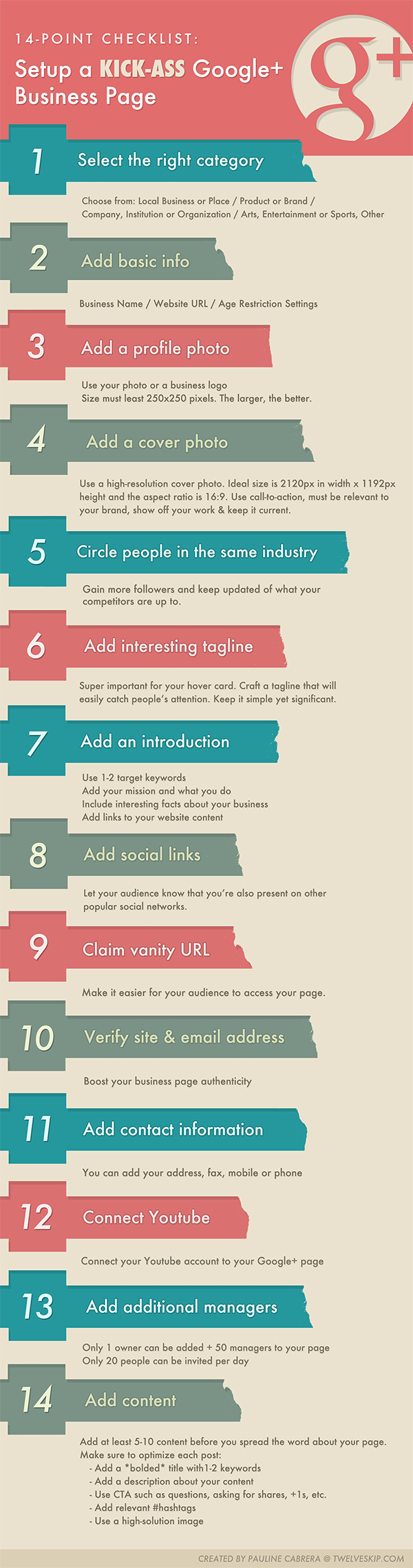
Step 1: Define Your Goals and Audience
Before you create your Google Plus business page, it’s crucial to define your goals and identify your target audience. What do you hope to achieve with your page? Who are your ideal customers? Understanding these factors will help you tailor your content and engagement strategies accordingly.
Step 2: Set Up Your Google Account
To create a Google Plus business page, you’ll need a Google account. If you don’t have one, sign up for a Google account, or use your existing one.
Step 3: Access Google My Business
Google My Business is a platform where you can manage your business information on Google. It includes your Google Plus page. Go to the Google My Business website and click on the “Start Now” button to begin setting up your page.
Step 4: Enter Your Business Information
Fill out your business details accurately, including your business name, category, address, phone number, and website. Make sure your information is consistent with what you have on your website and other online listings.
Step 5: Verify Your Business
Google will send you a verification code either by mail or phone. Follow the instructions to verify your business. Verification is crucial to establish trust with your audience.
Step 6: Customize Your Google Plus Page
Once your business is verified, you can customize your Google Plus page. Add a profile picture and cover photo that represent your brand. Use high-quality images that reflect your business’s personality.
Step 7: Optimize Your Page Description
Craft a compelling page description that provides a clear overview of your business. Include relevant keywords to improve discoverability in Google search results.
Step 8: Create Engaging Content
Now that your page is set up, start creating and sharing engaging content. Share updates, articles, images, and videos that resonate with your target audience. Consistency is key, so establish a posting schedule.
Step 9: Use Hashtags Strategically
Hashtags can increase the visibility of your content on Google Plus. Research relevant hashtags in your industry and use them in your posts. However, avoid overusing them; a few well-chosen hashtags per post are sufficient.
Step 10: Build and Engage with Your Audience
Actively engage with your followers by responding to comments, questions, and messages promptly. Encourage discussions and build a community around your brand. Share user-generated content to foster a sense of belonging.
Step 11: Collaborate and Network
Connect with other businesses and influencers in your industry. Collaborate on projects, participate in discussions, and share each other’s content. Networking can expand your reach and credibility.
Step 12: Promote Your Google Plus Page
Share your Google Plus page on your website, email signature, and other social media platforms. Encourage your customers to follow you on Google Plus by including the Google+ badge on your website.
Step 13: Measure and Analyze Performance
Use Google Plus Insights to track the performance of your posts. Pay attention to metrics like engagement, reach, and click-through rates. Analyze the data to refine your content strategy.
Step 14: Stay Informed and Adapt
Finally, stay informed about changes in the digital marketing landscape. While Google+ may no longer exist, other social media platforms are continually evolving. Adapt your strategies to the latest trends and technologies.
Conclusion
Creating a kick-ass Google Plus business page was a valuable strategy for businesses looking to establish a strong online presence. While Google+ may be a thing of the past, the principles discussed in this blog post can be applied to your current social media marketing efforts.
In summary, defining your goals, setting up your Google account, optimizing your business information, and creating engaging content are the foundational steps to success. Building a community, networking, and promoting your page are essential for expanding your reach. Additionally, measuring performance and staying informed about industry trends will help you adapt and thrive in the ever-changing digital landscape.
Remember, the key to a successful online presence is not just about the platform you use, but how effectively you engage with your audience and provide value to your customers. So, whether you’re using Facebook, Instagram, Twitter, or any other platform, apply these principles to create a kick-ass online presence for your business.

Author:
Mark Ford



