

How long does it take for your company website to load? Are you making your visitors wait and getting them all frustrated?
A slow loading website is a great way to make people leave your site and visit a competitor instead. It’s also a great way to lower your rankings and destroy your SEO as Google doesn’t want to rank sites visitors don’t like.
So what can you do to improve your website speed? The guys at Techwyse have offered some tips in the infographic below.
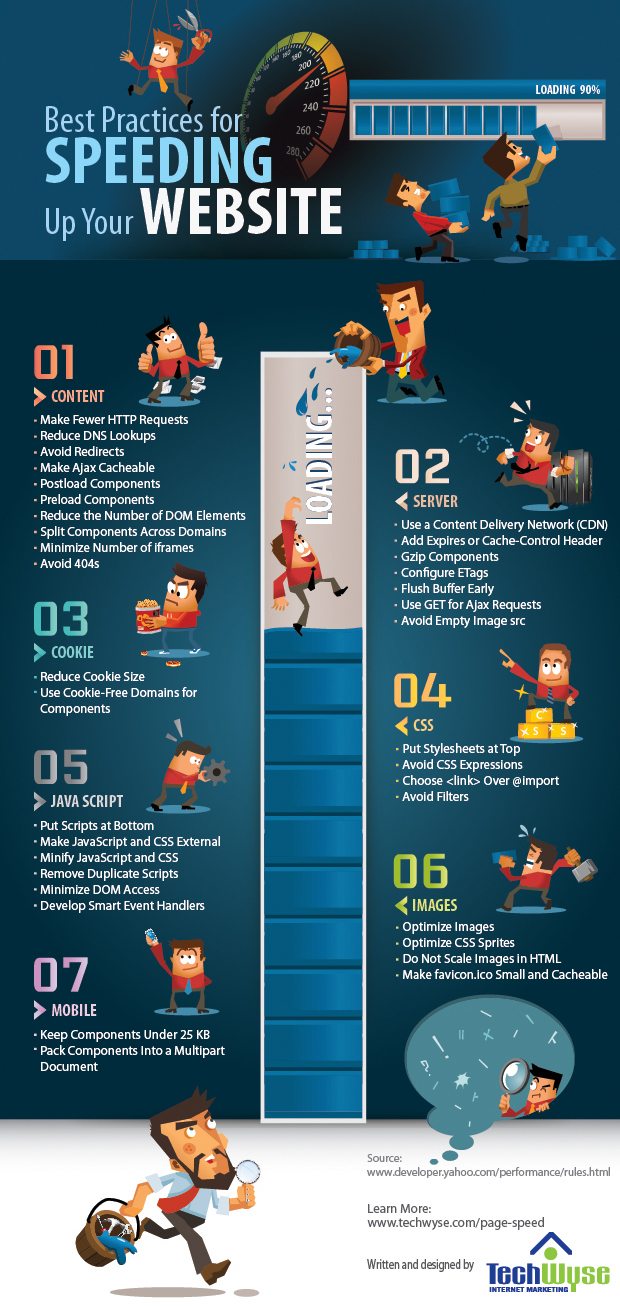
In today’s fast-paced digital world, website speed is paramount. Internet users have become increasingly impatient, expecting web pages to load in the blink of an eye. If your website is sluggish, you risk losing visitors and potential customers. Moreover, website speed is a critical factor in search engine rankings. Faster websites not only please visitors but also rank higher in search results.
So, if you want to make your website faster and impress your visitors, you’ve come to the right place. In this comprehensive guide, we’ll explore over 20 strategies and techniques to turbocharge your website’s performance.
Why Does Website Speed Matter?
Before we dive into the ways to improve website speed, let’s understand why it’s so important:
1. User Experience
A slow-loading website frustrates visitors. Studies have shown that users are more likely to abandon a webpage if it takes more than a few seconds to load. A faster website enhances the user experience, keeps visitors engaged, and encourages them to explore your content or make a purchase.
2. SEO Ranking
Search engines like Google consider page speed when ranking websites. Faster websites are more likely to appear at the top of search results, increasing their visibility and attracting more organic traffic.
3. Conversion Rates
Website speed is directly linked to conversion rates. A faster website can lead to higher conversion rates, which means more sales, sign-ups, or other desired actions.
4. Mobile Users
With the increasing use of smartphones, mobile users expect websites to load quickly on their devices. A slow mobile experience can drive away a significant portion of your audience.
Now that you understand the importance of website speed, let’s delve into the strategies to make your website lightning fast:
1. Optimize Images
Images are often the largest elements on a webpage. To speed up your website, compress images without compromising quality. Use image optimization tools and formats like WebP for better performance.
2. Use a Content Delivery Network (CDN)
CDNs distribute your website’s content across multiple servers worldwide. This reduces latency and ensures fast loading times for users, regardless of their location.
3. Minimize HTTP Requests
Each element on a webpage, such as images, scripts, and stylesheets, requires an HTTP request. Minimize the number of requests by combining and minifying CSS and JavaScript files.
4. Enable Browser Caching
Leverage browser caching to store static resources on visitors’ devices. This allows returning visitors to load your website faster since their browsers can retrieve cached content.
5. Reduce Server Response Time
A slow server response time can significantly impact website speed. Optimize server performance, use efficient hosting, and consider a content management system (CMS) that’s known for speed.
6. Implement Lazy Loading
Lazy loading loads images and other resources only when they become visible in the user’s viewport. This reduces initial page load time.
7. Optimize Code
Clean up your website’s code by removing unnecessary spaces, comments, and line breaks. This reduces file sizes and speeds up loading times.
8. Choose a Fast Hosting Provider
Select a hosting provider with a reputation for speed and reliability. Consider options like VPS (Virtual Private Server) or dedicated hosting for improved performance.
9. Use Browser Caching
Browser caching allows frequently accessed files to be stored in a visitor’s browser. This reduces the need to re-download files and speeds up page loading.
10. Minimize Redirects
Too many redirects can slow down your website. Keep them to a minimum and use 301 redirects for permanent changes.
11. Implement Content Gzip Compression
Enable Gzip compression on your server to reduce the size of web pages and assets transferred over the network.
12. Prioritize Above-the-Fold Content
Load critical content first to give users a sense that the page is loading quickly. Delay the loading of non-essential elements until later.
13. Optimize Fonts
Use web-safe fonts and limit the number of font styles and weights. Host fonts locally to reduce external requests.
14. Minimize External Scripts
Limit the use of external scripts and third-party widgets. Each additional script can slow down your website.
15. Monitor and Optimize Database Queries
If your website relies on a database, ensure that database queries are optimized for speed. Avoid overly complex queries and use caching where possible.
16. Enable HTTP/2
HTTP/2 is a more efficient protocol for loading web pages. Ensure your server and website are compatible with HTTP/2 to take advantage of its benefits.
17. Implement AMP (Accelerated Mobile Pages)
For mobile optimization, consider implementing AMP, which is designed to load web pages quickly on mobile devices.
18. Use a Lightweight Theme or Template
If you’re using a CMS like WordPress, choose a lightweight theme or template to reduce the amount of code and assets loaded.
19. Regularly Update Plugins and Themes
Outdated plugins and themes can slow down your website and pose security risks. Keep everything up to date.
20. Monitor and Test Your Website
Regularly test your website’s speed using tools like Google PageSpeed Insights or GTmetrix. Monitor performance and make adjustments as needed.
21. Enable Browser Prefetching
Use prefetching to suggest to the browser which resources it should fetch next. This can speed up the navigation experience for users.
22. Utilize a Lightweight Framework
If you’re building a website from scratch, consider using a lightweight framework that emphasizes speed and performance.
23. Optimize for Mobile
Ensure that your website is responsive and mobile-friendly. Mobile optimization is crucial for retaining mobile users and improving website speed on smartphones.
24. Reduce 404 Errors
404 errors occur when a page or resource is not found. Minimize these errors by fixing broken links and ensuring that resources are available.
25. Implement a Content Delivery Strategy
Leverage browser caching to store static resources on visitors’ devices. This allows returning visitors to load your website faster since their browsers can retrieve cached content.
26. Monitor Third-Party Services
If your website relies on third-party services, monitor their performance and ensure they are not slowing down your site.
27. Optimize for Core Web Vitals
Google’s Core Web Vitals measure aspects of web page performance that are essential for user experience. Focus on optimizing these metrics to improve your website’s speed and ranking.
Conclusion
Website speed is a critical factor in providing an exceptional user experience and achieving better search engine rankings. By implementing these 20+ strategies, you can make your website faster and truly impress your visitors. Remember that speed optimization is an ongoing process, so regularly monitor your site’s performance and make improvements as needed. With a faster website, you’ll not only keep your audience engaged but also gain a competitive edge in the digital landscape.

Author:
Mark Ford



