

In today’s digital age, owning a website is almost essential for individuals and businesses alike. Whether you’re an entrepreneur looking to start an online business or a company seeking to expand your online presence, buying a new website can be an attractive option.
However, before you dive headfirst into this endeavor, there are 26 crucial things you should know to make an informed decision and ensure your investment pays off.
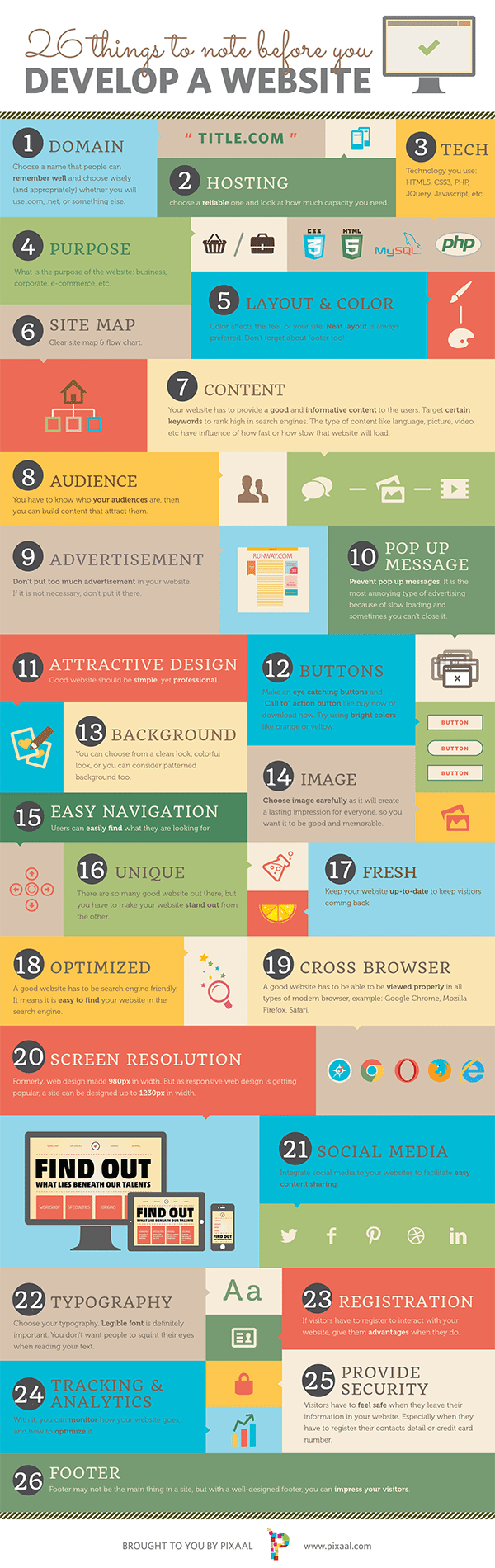
The infographic below from Pixaal gives you 26 things you should consider when buying a new site. Hopefully this will help you in your quest of finding the right web designer for you.
1. Define Your Goals
Before you start browsing websites for sale, it’s crucial to define your goals. Are you looking to start an e-commerce store, a blog, or a portfolio website? Knowing your objectives will help you choose the right website that aligns with your vision.
2. Budget Wisely
Websites come in all price ranges, from a few hundred dollars to millions. Determine your budget early on and stick to it. Remember that additional expenses like maintenance, hosting, and marketing will also come into play.
3. Understand the Types of Websites
Websites vary widely in terms of their purpose and functionality. Common types include e-commerce, content-based, social networking, and more. Make sure you understand the type of website you want to buy and its specific requirements.
4. Conduct Thorough Research
Once you’ve identified your goals, spend time researching the niche and industry your website will operate in. Understand your competition, target audience, and market trends.
5. Due Diligence is Key
Before purchasing any website, conduct due diligence to ensure it’s a legitimate and profitable venture. Examine financial records, traffic reports, and verify claims made by the seller.
6. Evaluate the Website’s Traffic
Traffic is a vital metric when assessing a website’s value. Analyze its traffic sources, trends, and the quality of visitors. Tools like Google Analytics can provide valuable insights.
7. Check SEO Performance
Review the website’s search engine optimization (SEO) performance. Check its ranking on search engines and the keywords it’s ranking for. Poor SEO can be a red flag.
8. Analyze the Monetization Strategy
Understand how the website generates revenue. Is it through ads, affiliate marketing, product sales, or subscriptions? Ensure the monetization strategy aligns with your goals.
9. Assess Content Quality
High-quality content is essential for user engagement and SEO. Evaluate the existing content on the website and assess whether it meets your standards.
10. Examine the Website’s Design
The design of a website can significantly impact user experience. Consider whether you’ll need to redesign the site to align it with your brand and goals.
11. Review the Technology Stack
Understand the technology stack used to build the website. Is it based on a reliable platform, and are there any security or performance issues that need addressing?
12. Investigate Social Media Presence
Check the website’s presence on social media platforms. Social media can be a valuable marketing tool, so assess whether it has an active and engaged following.
13. Verify Domain Ownership
Ensure that the website’s domain is registered in the seller’s name and that there are no legal disputes or issues associated with it.
14. Consider Legal Obligations
Websites can come with legal obligations like licenses, copyrights, and terms of use. Review these documents and consult legal experts if necessary.
15. Evaluate the Brand Reputation
Assess the website’s online reputation. Look for reviews and feedback from users and check if there have been any major issues in the past.
16. Understand the Transfer Process
Buying a website involves transferring ownership and assets. Familiarize yourself with the transfer process and ensure all necessary steps are taken.
17. Review Existing Contracts
If the website has partnerships, advertising agreements, or content contracts, review them carefully. Determine if you’ll need to continue these agreements.
18. Plan for Ongoing Maintenance
Websites require regular maintenance and updates. Have a plan in place for keeping the website secure and up to date.
19. Consider Future Growth
Think about the scalability of the website. Will it be able to handle increased traffic and content as your business grows?
20. Have a Marketing Strategy
Even the best website won’t succeed without effective marketing. Develop a marketing strategy to promote your website and attract visitors.
21. Check for Red Flags
Be wary of red flags like sudden traffic spikes, a history of hacking, or a seller who’s unwilling to provide necessary documentation.
22. Negotiate a Fair Price
Don’t hesitate to negotiate the price with the seller. Research comparable websites to determine a fair market value.
23. Plan for Ownership Transition
Prepare for the transition of ownership. This includes updating contact information, transferring hosting, and rebranding if necessary.
24. Secure the Website
Implement robust security measures to protect your new investment from threats and attacks.
25. Monitor Performance
Continuously monitor the website’s performance, traffic, and revenue. Make adjustments as needed to improve results.
26. Seek Professional Advice
If you’re unsure about any aspect of buying a website, seek advice from professionals, such as web developers, lawyers, and digital marketers.
In conclusion, buying a new website can be a rewarding venture if done with careful consideration and due diligence. By following these 26 essential steps, you can increase your chances of making a successful purchase and ensuring that your new website aligns with your goals and objectives. Remember that owning a website is an ongoing commitment, so be prepared to invest time and effort into its growth and success.

Author:
Mark Ford



