

So you’re a small business and you have a website, but how good is it? Are you giving your visitors the information they need easily?
When someone lands on your site it’s important to give them enough information to quickly see you can help them and then guide them through the next steps of getting in contact. Make it difficult for them and they could leave your site for a competitor.
Take a look at this infographic from Salesforce which gives you 6 easy steps to create the perfect small business website.
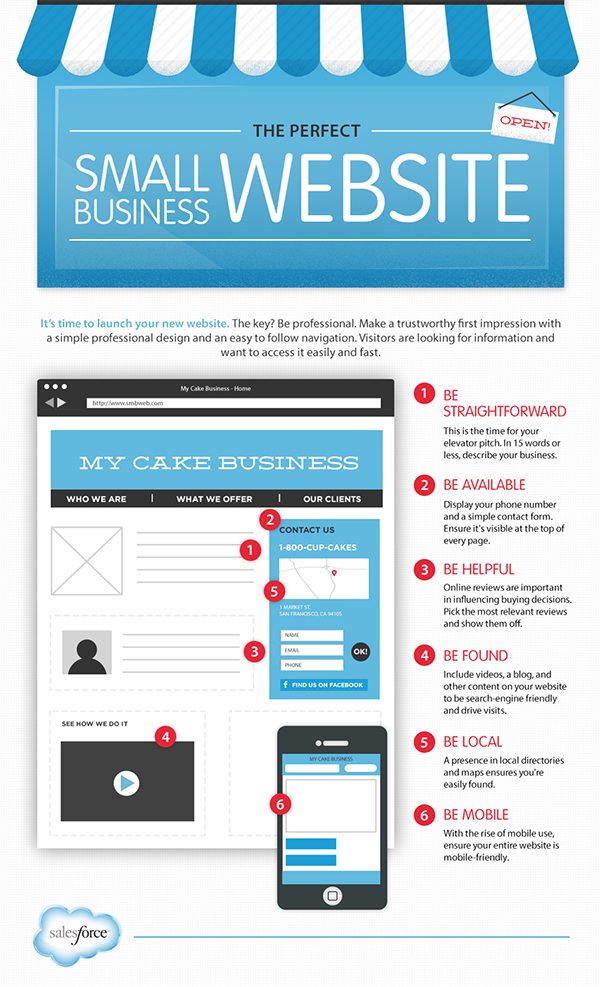
In today’s digital age, having a strong online presence is crucial for the success of any small business. And at the heart of that online presence is your business website. A well-designed website can attract customers, build trust, and ultimately boost your bottom line. But where do you start? How can you ensure that your small business website is perfect and effective? In this blog post, we’ll walk you through six easy and essential steps to create the perfect small business website.
1. Define Your Goals and Audience
Before you even think about the design and layout of your website, you need to have a clear understanding of your goals and your target audience. What do you want to achieve with your website? Are you looking to sell products online, generate leads, provide information about your services, or simply establish an online presence?
Understanding your audience is equally important. Who are your ideal customers? What are their needs, preferences, and pain points? Conduct market research and create detailed customer personas to help you tailor your website to your target audience.
2. Choose the Right Domain Name
Your domain name is your online address, and it plays a significant role in branding and SEO (Search Engine Optimization). Here are some tips for choosing the right domain name for your small business website:
- Keep it short and memorable.
- Use keywords related to your business.
- Avoid hyphens and numbers.
- Choose a domain extension (.com, .net, .org) that’s appropriate for your business.
- Ensure it’s easy to spell and type.
Once you’ve chosen a domain name, register it with a reputable domain registrar. It’s a good idea to purchase multiple variations of your domain to protect your brand.
3. Select the Right Hosting Provider
Web hosting is where your website files are stored and served to visitors. Choosing the right hosting provider is crucial for the performance and reliability of your website. Here are some factors to consider when selecting a hosting provider:
- Speed and Performance: Look for a host that offers fast loading times and reliable uptime.
- Scalability: Ensure that the hosting plan can accommodate your growing traffic.
- Security: Choose a host that provides robust security features to protect your website from cyber threats.
- Customer Support: Opt for a host with excellent customer support to assist you in case of issues.
Popular hosting providers like Bluehost, SiteGround, and HostGator offer a range of hosting plans suitable for small businesses.
4. Plan Your Website Structure and Content
Now that you have a clear understanding of your goals, audience, domain name, and hosting, it’s time to plan your website’s structure and content. Your website should be organized logically, making it easy for visitors to navigate and find information.
Here’s a basic structure to consider:
- Homepage: An introduction to your business and its offerings.
- About Us: Information about your company’s history, mission, and team.
- Products/Services: Details about what you offer, including pricing if applicable.
- Testimonials: Customer reviews and success stories.
- Contact Us: Contact information and a contact form.
- Blog/News: Regularly updated content related to your industry.
- FAQ: Answers to common questions.
In addition to planning your website structure, create high-quality, engaging content that speaks to your audience’s needs and interests. Incorporate relevant keywords to improve your SEO rankings and attract organic traffic.
5. Choose a User-Friendly Website Builder or Content Management System (CMS)
You don’t need to be a web development expert to create a professional small business website. There are plenty of user-friendly website builders and content management systems (CMS) available that make the process easier. Here are a few popular options:
- WordPress: A versatile and widely used CMS with a vast library of themes and plugins.
- Wix: A user-friendly website builder with drag-and-drop functionality.
- Squarespace: Known for its elegant and visually appealing templates.
- Shopify: Ideal for e-commerce businesses looking to sell products online.
Choose the platform that best aligns with your business goals and technical comfort level. Many of these platforms offer free and premium themes, allowing you to customize your website’s design to match your brand.
6. Optimize for Mobile and SEO
In today’s mobile-centric world, it’s essential that your website is mobile-responsive. This means that your site should adapt and display correctly on various devices, including smartphones and tablets. Google also considers mobile-friendliness as a ranking factor, so it’s crucial for SEO.
Here’s how to ensure your website is mobile-friendly:
- Use a responsive design that adjusts to different screen sizes.
- Test your website on multiple devices to ensure it looks and functions correctly.
- Optimize images and other media for faster mobile loading times.
- Prioritize user experience by providing easy navigation and a clean layout.
Speaking of SEO, optimizing your website for search engines is critical for visibility. Here are some essential SEO practices to implement:
- Perform keyword research to identify relevant keywords for your industry.
- Optimize your website’s meta titles and descriptions.
- Create high-quality, original content that answers users’ questions.
- Build high-quality backlinks to your website from reputable sources.
- Use local SEO techniques if your business serves a specific geographic area.
Regularly monitor your website’s performance using tools like Google Analytics and Google Search Console to track your progress and make necessary improvements.
Conclusion
Creating the perfect small business website may seem like a daunting task, but by following these six easy and essential steps, you can build a strong online presence that attracts customers and helps your business grow. Remember to define your goals and audience, choose the right domain name and hosting provider, plan your website structure and content, select a user-friendly platform, and optimize for mobile and SEO. With dedication and attention to detail, your small business website can become a valuable asset in today’s digital landscape.

Author:
Mark Ford



