

In the vast digital landscape of the internet, capturing and retaining the attention of your website visitors is no small feat. With countless distractions just a click away, it’s crucial to make your content not only informative but also engaging enough to keep readers glued to their screens.
Whether you’re a blogger, a business owner, or a content marketer, understanding the art of keeping people on your website is essential for success.
In this blog post, we’ll explore six powerful writing tricks that can help you achieve the coveted goal of keeping visitors on your website longer. By implementing these strategies, you’ll not only reduce bounce rates but also build a loyal and engaged audience.
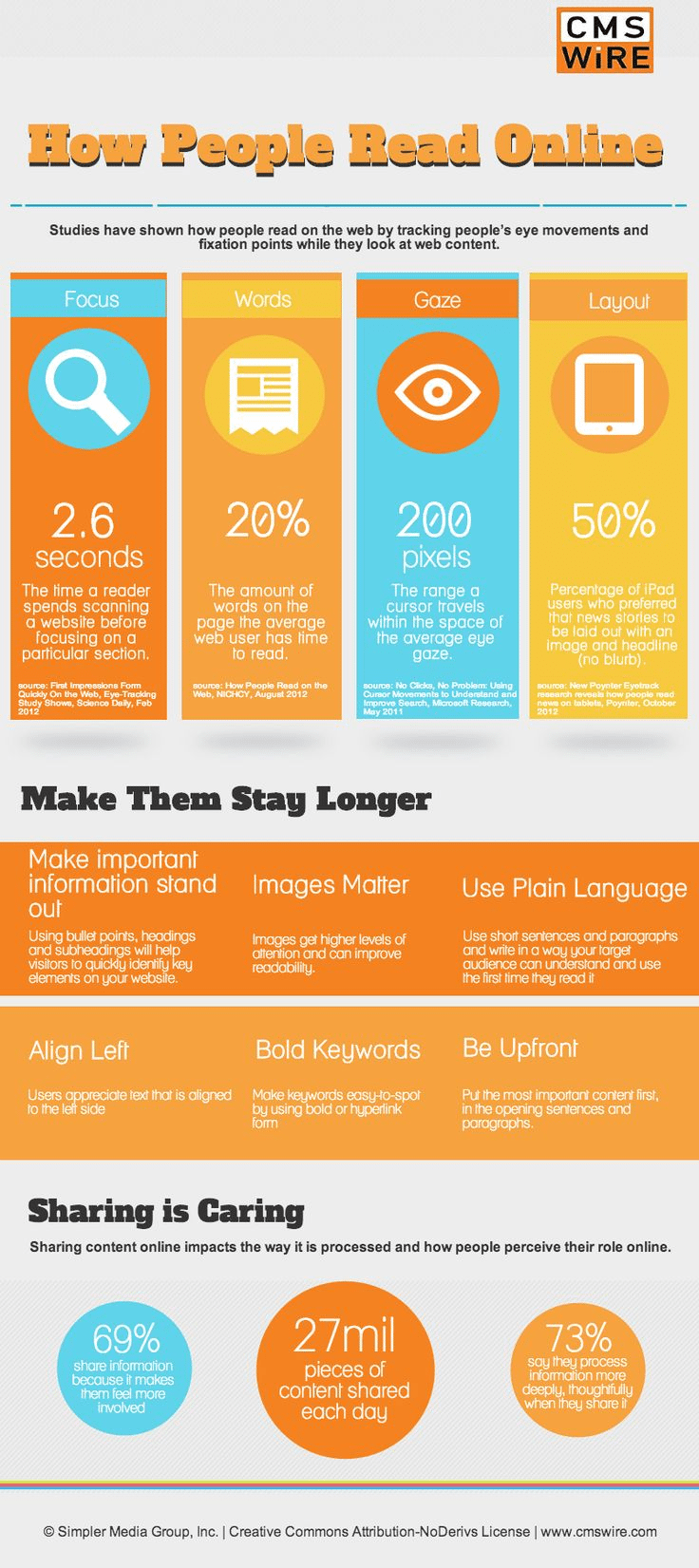
The infographic below from CMS Wire gives you 6 tips on how to structure your content to help keep your visitors on your site for longer.
1. Craft Captivating Headlines
Your headline is the first thing visitors see, and it can make or break their decision to explore your content further. A dull or uninspiring headline will often result in a lost opportunity to engage your audience. To keep visitors on your website, you need to create headlines that grab their attention and pique their curiosity.
Use Numbers and Lists
People love lists, especially when they promise valuable information. Consider headlines like “10 Proven Ways to Boost Your Productivity” or “5 Essential Tips for Healthy Living.” These headlines immediately communicate the value visitors can expect from your content.
Pose Questions
Questions stimulate curiosity and encourage readers to seek answers. For example, “Are You Making These Common Financial Mistakes?” or “What’s the Secret to a Happy Relationship?” provoke interest and invite readers to find out more by exploring your content.
Create Intrigue
Craft headlines that hint at a mystery or a surprising revelation. Phrases like “The Hidden Truth About…” or “The Shocking Connection Between…” entice readers to click and learn more.
2. Write Engaging Introductions
Once you’ve enticed visitors with a compelling headline, your introduction needs to deliver on the promise. The introduction sets the tone for the entire piece and should make readers eager to continue. Here are some techniques to create engaging introductions:
Share a Story
Humans are naturally drawn to stories. Start your content with a personal anecdote or a relatable story that connects to the topic. This not only makes your content more engaging but also helps readers relate on a personal level.
Use Surprising Statistics
Shocking or unexpected statistics can grab attention and create a sense of urgency. For instance, “Did you know that 90% of people make this common mistake in their retirement planning?” Such statistics pique curiosity and encourage readers to explore further to understand the context.
Ask a Rhetorical Question
Similar to using questions in your headlines, asking a rhetorical question in your introduction can engage readers’ curiosity. For example, “What if I told you there’s a simple trick that could change your life forever?” This question implies that valuable information is coming, encouraging readers to keep reading.
3. Break Your Content into Digestible Sections
Long walls of text can be intimidating and overwhelming for readers. To keep visitors on your website, break your content into easily digestible sections. This approach makes it easier for readers to skim and find the information they’re looking for. Here’s how to do it effectively:
Use Subheadings
Subheadings provide a roadmap for your content and make it easy for readers to navigate. They can quickly scan through your article and jump to the sections that interest them the most. Make sure your subheadings are clear and descriptive.
Incorporate Bullet Points and Lists
Lists and bullet points are visually appealing and help organize information in a concise manner. When appropriate, use them to highlight key points, tips, or takeaways in your content.
Keep Paragraphs Short
Long paragraphs can be intimidating. Aim for short, focused paragraphs to maintain reader engagement. Ideally, a paragraph should be no longer than three to four sentences.
4. Use Visuals to Enhance Understanding
Incorporating visuals into your content can significantly improve reader engagement. Visual elements such as images, infographics, videos, and charts can help explain complex concepts, break up text, and make your content more appealing. Here’s how to use visuals effectively:
Choose Relevant Images
Select images that relate to your content and reinforce your message. High-quality and visually appealing images can draw readers in and make your content more shareable.
Create Infographics
Infographics are excellent tools for presenting data, statistics, or step-by-step processes in a visually appealing way. They simplify complex information and encourage readers to stay on your page longer to absorb the content.
Embed Videos
Videos are a dynamic way to engage your audience. Consider creating short video clips or embedding relevant videos that enhance your content. Videos can provide additional context and keep visitors on your website as they watch.
5. Encourage Interaction and Discussion
Engagement isn’t limited to passive reading. Encourage your visitors to interact with your content and with each other. When readers feel like an active part of the conversation, they’re more likely to stay on your website. Here are some ways to foster interaction:
Include Social Sharing Buttons
Make it easy for readers to share your content on social media platforms. When your content gets shared, it reaches a wider audience, potentially bringing in more visitors.
Add Comment Sections
Allow readers to leave comments and engage in discussions on your website. Respond to comments promptly to create a sense of community and encourage return visits.
Pose Thought-Provoking Questions
Throughout your content, ask questions that prompt readers to reflect and respond. For example, “What’s your experience with this topic? Share your thoughts in the comments below.” This not only encourages interaction but also provides valuable insights.
6. End with a Strong Call to Action (CTA)
Finally, don’t let your visitors leave without a clear next step. A well-crafted call to action (CTA) can guide them to explore more of your content, subscribe to your newsletter, or take another desired action. Here’s how to create effective CTAs:
Be Specific
Tell your visitors exactly what you want them to do. Instead of a vague “Learn More” button, use a specific CTA like “Download the Free E-Book” or “Subscribe to Our Weekly Newsletter.”
Offer Value
Highlight the benefits of taking the desired action. Explain how it will improve the reader’s life or provide valuable information. For example, “Subscribe to Our Newsletter for Exclusive Tips and Updates.”
Create a Sense of Urgency
Encourage immediate action by adding a sense of urgency to your CTA. Phrases like “Limited-Time Offer” or “Act Now for Special Access” can motivate readers to take action.
In conclusion, keeping visitors on your website longer requires a combination of compelling writing techniques and thoughtful content presentation. Craft captivating headlines and introductions, break your content into digestible sections, use visuals to enhance understanding, encourage interaction and discussion, and end with a strong call to action. By implementing these six writing tricks, you’ll not only reduce bounce rates but also create a more engaging and valuable online experience for your audience. Remember that engaging content is the key to building a loyal and thriving online community.

Author:
Mark Ford



