

In today’s digital age, having a strong online presence is essential for businesses, individuals, and organizations alike. A well-designed website is often the first point of contact between you and your audience, making it a critical element of your online identity.
With the plethora of website builders and DIY web design tools available, it’s tempting to try your hand at designing your own website. However, this seemingly cost-effective approach can lead to some dreadful mistakes. In this blog post, we’ll explore eight common blunders that you’ve likely made if you designed your website without professional help.
Infographic by MyCase.
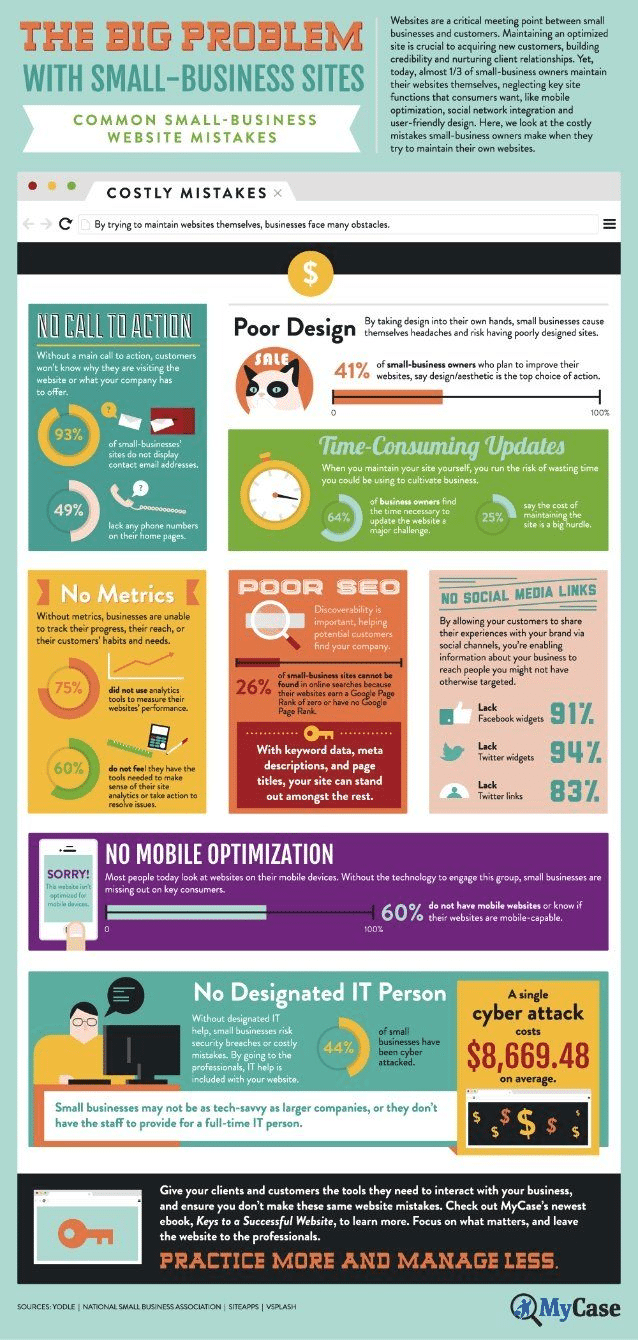
Mistake 1: Neglecting Mobile Responsiveness
One of the most significant mistakes amateur web designers make is neglecting mobile responsiveness. With the majority of internet traffic coming from mobile devices, ensuring your website looks and functions correctly on various screen sizes is non-negotiable. Failing to do so can lead to a frustrating user experience, high bounce rates, and a negative impact on your search engine rankings.
To avoid this mistake, invest time in responsive web design. Use frameworks like Bootstrap or CSS Grid to create flexible layouts that adapt seamlessly to different screens. Regularly test your website on various devices to ensure it remains user-friendly across the board.
Mistake 2: Overloading with Cluttered Design
Less is often more when it comes to web design. Many DIY designers make the mistake of overloading their websites with excessive elements, such as flashy animations, too many fonts, and a riot of colors. A cluttered design not only overwhelms visitors but also makes navigation difficult.
Instead, opt for a clean and minimalist design. Focus on a consistent color scheme, typography, and a well-thought-out layout. Prioritize content hierarchy to guide users’ attention where you want it most. Remember, a visually appealing website doesn’t mean it has to be overly complex.
Mistake 3: Ignoring Page Speed Optimization
In the age of instant gratification, slow-loading websites are a surefire way to drive users away. Unfortunately, many DIY web designers overlook the importance of optimizing page speed. Slow websites not only frustrate visitors but also suffer from lower search engine rankings.
To improve page speed, compress images, enable browser caching, minimize HTTP requests, and use content delivery networks (CDNs). Tools like Google PageSpeed Insights can help you identify and address performance issues effectively.
Mistake 4: Neglecting SEO Basics
Search Engine Optimization (SEO) is the key to attracting organic traffic to your website. Neglecting SEO basics is a mistake that can cost you visibility on search engine results pages (SERPs). Common SEO blunders include ignoring meta tags, keyword stuffing, and failing to create high-quality, relevant content.
To rectify this mistake, conduct thorough keyword research, optimize your meta tags, create valuable content that addresses user intent, and build quality backlinks. Staying up-to-date with SEO best practices is crucial for long-term success.
Mistake 5: Poor Navigation and User Experience
Effective navigation and user experience (UX) are the cornerstones of a successful website. DIY designers often overlook these critical elements, resulting in confusing navigation menus, broken links, and frustrating user journeys.
To provide a smooth user experience, create an intuitive navigation structure with clear menu items and logical categorization. Test your website’s functionality and usability regularly, seeking feedback from real users to identify and rectify any issues.
Mistake 6: Neglecting Content Quality
Content is king in the online world, and poor-quality content is a surefire way to turn visitors away. DIY designers may rush through content creation, leading to grammatical errors, spelling mistakes, and unclear messaging.
Invest time and effort in creating high-quality, engaging content that resonates with your target audience. Proofread your content meticulously, use proper formatting, and ensure that it adds value to your visitors.
Mistake 7: Forgetting About Security
Website security is not a concern to be taken lightly. DIY designers often overlook security measures, leaving their websites vulnerable to cyberattacks, data breaches, and malware infections. Neglecting security can have severe consequences for your online reputation and user trust.
To safeguard your website, regularly update plugins and themes, implement strong passwords, use SSL certificates for data encryption, and employ security plugins or services. Stay informed about the latest security threats and take proactive measures to protect your site.
Mistake 8: Skipping Regular Updates and Maintenance
Once your website is up and running, the work doesn’t end there. Many DIY designers make the mistake of neglecting regular updates and maintenance. Outdated software, broken links, and a lack of fresh content can harm your website’s credibility and performance.
Create a maintenance schedule to ensure that your website remains up-to-date, secure, and functional. Regularly check for broken links, update plugins and themes, and refresh your content to keep it relevant and engaging.
Conclusion
Designing your own website can be a rewarding endeavor, but it comes with its fair share of challenges. By avoiding these eight common mistakes, you can significantly improve your website’s performance, user experience, and overall success. Remember that while DIY web design can save you money upfront, investing in professional web design and development services can ultimately lead to a more polished and effective online presence. Whether you choose to DIY or hire a professional, prioritize the user experience, security, and quality of your website to ensure it serves its purpose effectively in the digital landscape.

Author:
Mark Ford



