
Are you looking for ways to save time as a social media manager? Want to learn how to repurpose content and make better use of scheduling tools?
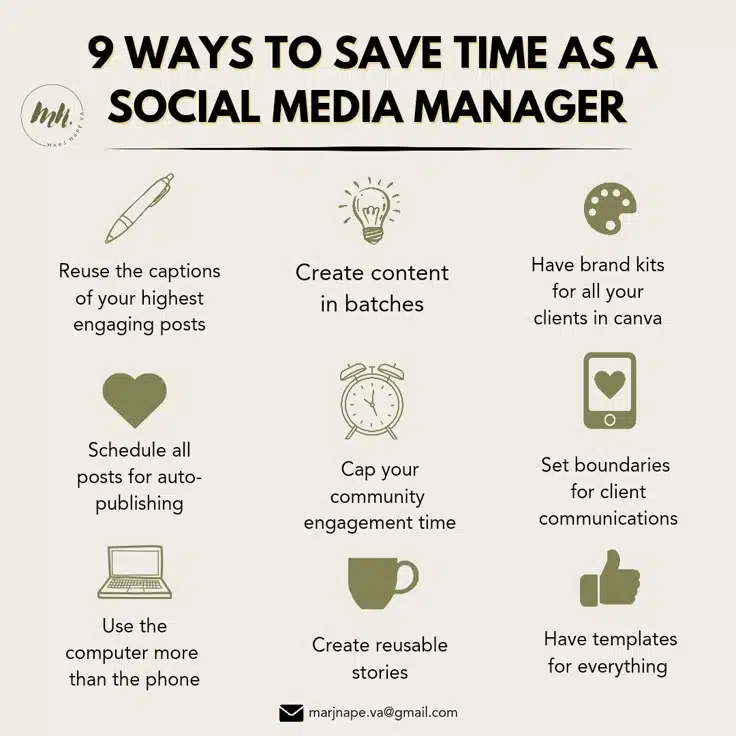
You’ll find 9 time-saving strategies in this infographic.
Here’s what it suggests:
- Reuse the captions of your highest engaging posts
- Create content in batches
- Have brand kits for all your clients in Canva
- Schedule all posts for auto-publishing
- Cap your community engagement time
- Set boundaries for client communications
- Use the computer more than the phone
- Create reusable stories
- Have templates for everything
Check out the post below for more information.
Managing social media is more than just posting content. It involves planning, research, content creation, engagement, analytics, and client communication—all of which can take up significant time. Without a structured approach, it’s easy to get lost in endless tasks, leading to burnout and inefficiency.
To stay on top of everything while maintaining high-quality work, social media managers need time-saving strategies that streamline workflows without compromising engagement or creativity. Here are nine proven methods to help you save time and boost productivity in your role.
Reuse High-Performing Captions
Not every post needs an original caption. If a specific caption has performed well in the past, repurpose it instead of writing a brand-new one. Small modifications can make it relevant for a new post while maintaining its effectiveness.
How to Implement This Strategy:
- Identify successful captions by reviewing past posts with high engagement, shares, or conversions. Use analytics tools like Meta Business Suite, Later, or Sprout Social.
- Rework key phrases while keeping the core message intact. For example, a caption that worked for a holiday sale can be tweaked for a flash sale later in the year.
- Adapt for different platforms by adjusting length and tone. A detailed Facebook post might need to be more concise for Twitter or LinkedIn.
Example:
A caption like, “Last chance! Our best-selling product is almost sold out—grab yours before it’s gone!” can be modified to “Back in stock! Due to high demand, we’ve restocked our most popular item—order now before it sells out again!”
By reusing and adapting captions, you reduce the time spent writing new ones while maintaining a high level of engagement.
Create Content in Batches
One of the biggest productivity killers is switching between different types of tasks throughout the day. Instead of creating posts one at a time, batch-produce content in advance to stay ahead of schedule.
How to Batch Create Content Efficiently:
- Dedicate a set time each week to create all posts for the upcoming period.
- Write multiple captions at once using Google Docs or Notion to organize them.
- Design several graphics in one session using Canva or Adobe Express to maintain a cohesive look.
- Film multiple videos at once if video content is part of your strategy. Editing them in bulk also saves time.
- Use scheduling tools like Buffer, Hootsuite, or Planoly to automate publishing.
Example:
Instead of creating one Instagram post daily, schedule a three-hour session on Monday to create and schedule all posts for the week. This frees up time to focus on engagement, analytics, and other high-value tasks.
Have Brand Kits Ready for Each Client
If you manage multiple brands or clients, switching between different visual styles can slow you down. Creating a brand kit for each client ensures you have everything you need in one place.
What a Brand Kit Should Include:
- Logos in various formats (PNG, JPEG, transparent background)
- Primary and secondary brand colors with hex codes
- Approved fonts for headings and body text
- Templates for social media graphics
- Brand tone and voice guidelines
How to Set This Up:
- Use Canva’s Brand Kit feature to store brand colors, fonts, and logos.
- Create pre-made templates for post types like announcements, promotions, and testimonials.
- Keep all assets in a shared Google Drive or Dropbox folder for easy access.
By having all branding elements organized, you avoid searching for logos or matching fonts every time you create a post, which significantly speeds up content production.
Schedule All Posts for Auto-Publishing
Posting manually every day is inefficient. Instead, schedule posts in advance using social media management tools.
Best Tools for Auto-Scheduling:
- Meta Business Suite (for Facebook and Instagram)
- Hootsuite (for multiple platforms)
- Later (great for Instagram and TikTok)
- Buffer (user-friendly scheduling and analytics)
How to Optimize Scheduling:
- Plan and schedule posts at least one week in advance.
- Use insights from analytics to post at the best times for engagement.
- Enable auto-responses for common queries to reduce manual workload.
By automating publishing, you free up time for engagement and strategy instead of focusing on daily uploads.
Cap Your Community Engagement Time
Engaging with followers is essential, but spending too much time replying to comments and messages can be a productivity drain. Setting time limits for engagement ensures you stay on top of interactions without letting it take over your entire day.
How to Manage Engagement Efficiently:
- Allocate specific time blocks (e.g., 30 minutes in the morning and 30 minutes in the evening) to reply to messages and comments.
- Use social media inbox tools like Sprout Social or Agorapulse to manage messages from all platforms in one place.
- Prioritize high-value interactions like responding to customer inquiries or engaging with industry influencers.
By capping engagement time, you maintain responsiveness while preventing distractions.
Set Boundaries for Client Communications
If you’re constantly answering client messages at all hours, it becomes difficult to focus on deep work. Establishing communication boundaries helps maintain work-life balance and improves productivity.
How to Set Communication Boundaries:
- Define office hours for responding to emails and messages.
- Use project management tools like Trello or Asana to track requests instead of handling everything via email.
- Set expectations with clients about response times (e.g., “Replies within 24 hours during business hours”).
Use a Computer More Than Your Phone
While mobile apps are useful for quick updates, managing social media from a computer is much more efficient.
Why a Computer is Better for Productivity:
- Faster typing speed for replying to messages and writing captions.
- Easier content creation with tools like Photoshop, Canva, or Illustrator.
- More advanced analytics dashboards compared to mobile apps.
Using desktop-based tools saves time compared to constantly switching between mobile apps.
Create Reusable Stories and Templates
Instagram and Facebook Stories require frequent updates, but you don’t need to start from scratch every time.
How to Make Stories More Efficient:
- Create a series of reusable templates in Canva.
- Use preset animations to maintain consistency.
- Save frequently used stickers, hashtags, and GIFs for quick access.
This reduces the effort needed to keep stories engaging and on-brand.
Have Templates for Everything
Templates speed up workflow by providing a ready-to-use structure for recurring tasks.
Templates You Should Have:
- Social media post templates (quotes, testimonials, announcements)
- Caption templates for different types of posts
- Reporting templates for analytics updates
- Client onboarding templates to streamline communication
By having these in place, you eliminate repetitive work and increase efficiency.
Final Thoughts
Social media management requires juggling multiple responsibilities, but with the right strategies, you can save time and work more productively. By batching content, automating scheduling, setting boundaries, and using templates, you create a structured workflow that reduces stress and improves output quality.
Implement these nine tips and watch your productivity soar while maintaining high-quality engagement and content.

Author:
Mark Ford