

Are you in the process of creating a new website for your business? Looking for the perfect font combination to complement your website design?
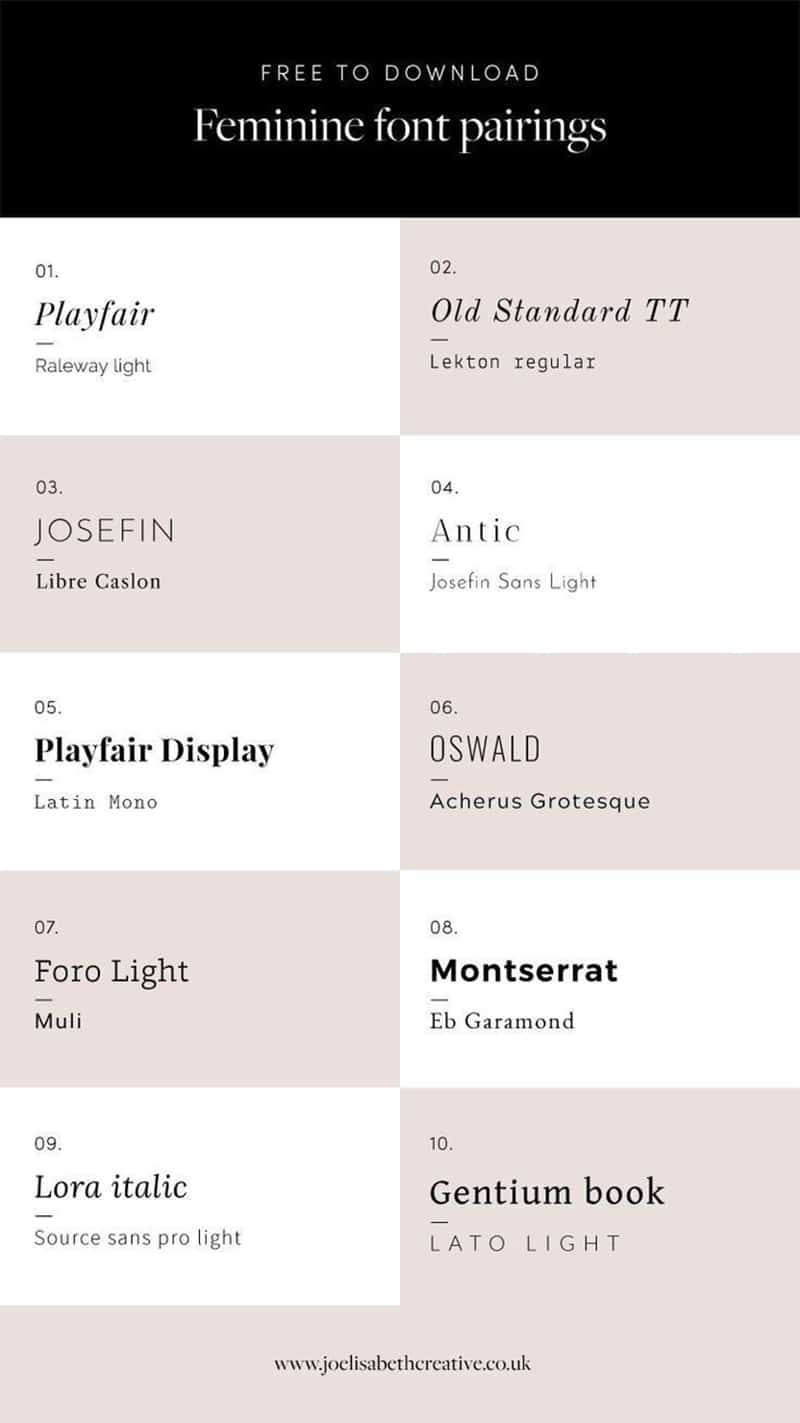
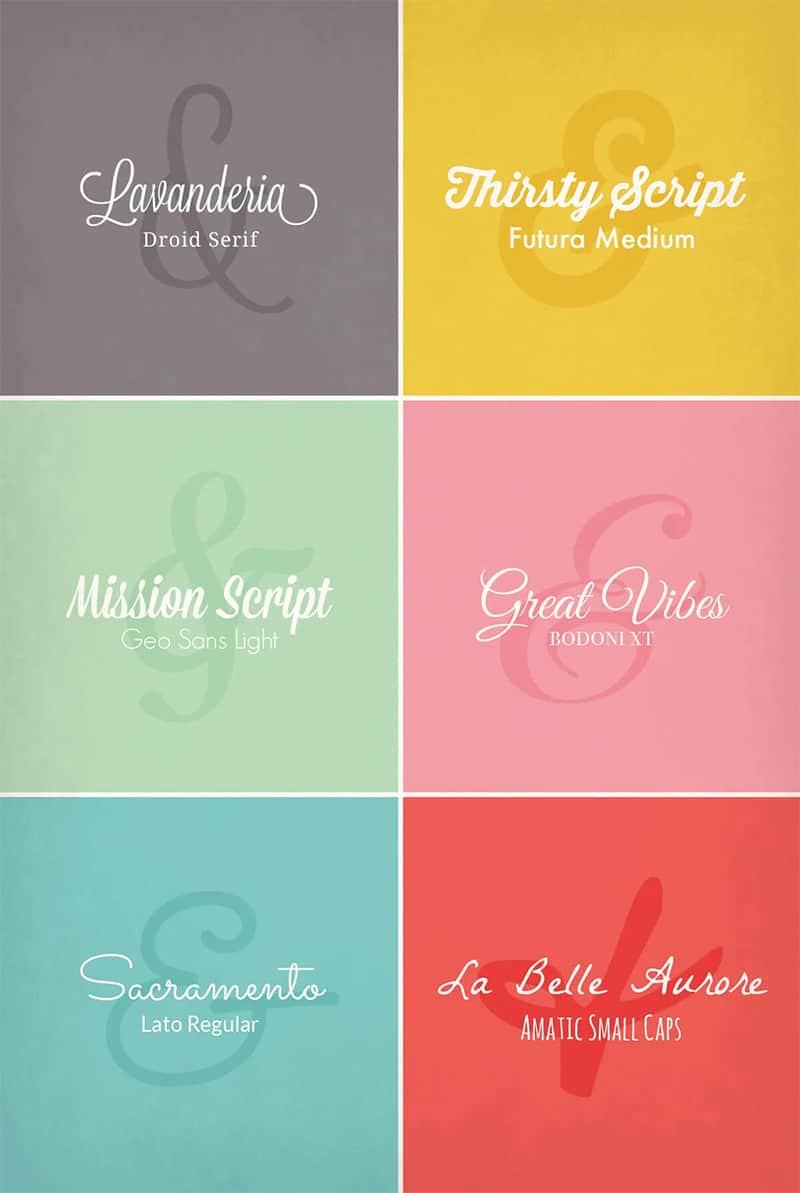
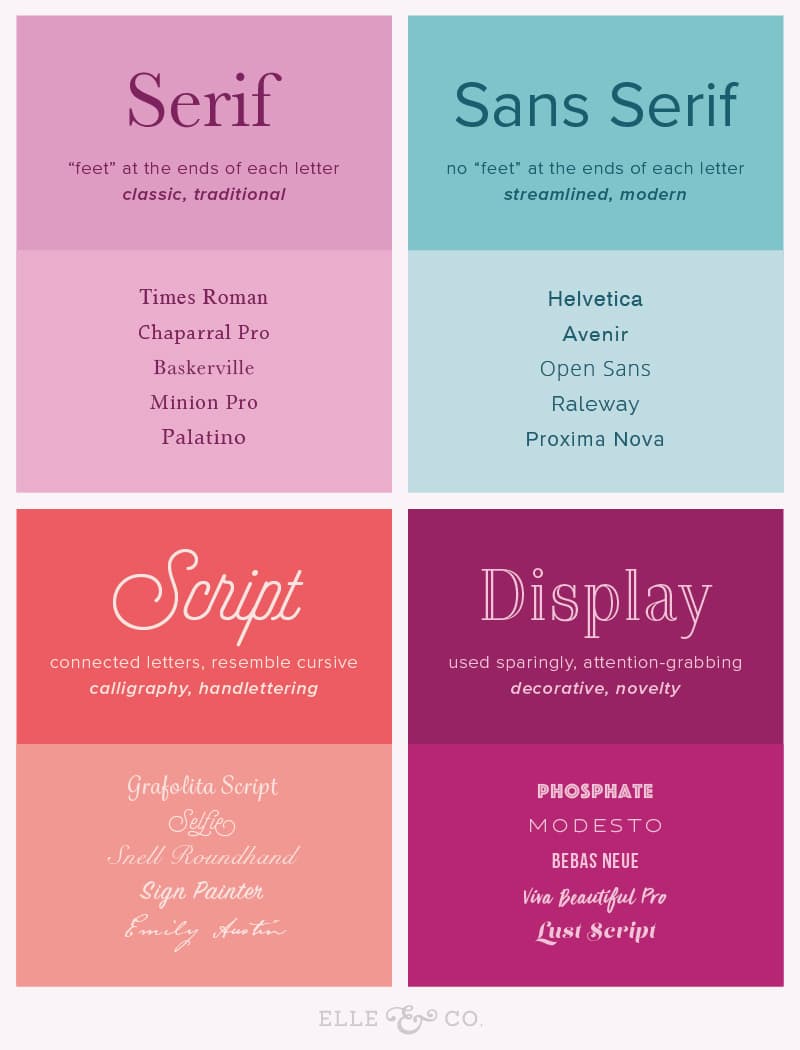
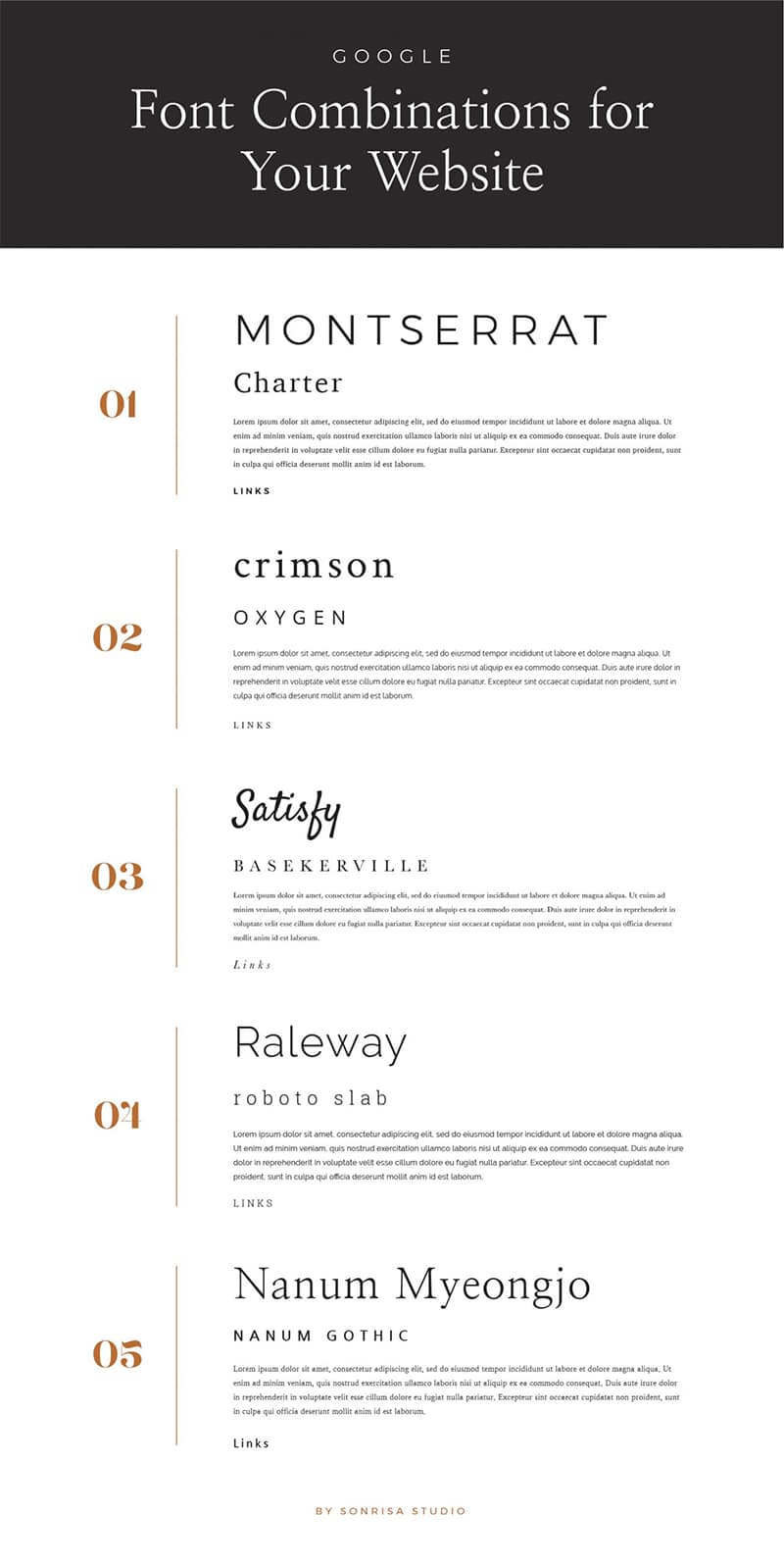
You’ll find hundreds of font combinations in the following infographics.
Here’s who makes the list:
- Google Web Font Combinations – Dotted Design
- Feminine Font Pairings – Jo Elisabeth Creative
- Font Parings – Saffron Avenue
- 12 Gorgeous Google Font Pairings – Sugar Studios Design
- Minimalist Font Pairings – Little Nook Studio
- Calligraphy Font Pairings – PicMonkey
- Font Personalities to Consider – By Rosanna
- Choosing Fonts Based on Emotion – Brand Merry
- Finding, Choosing, and Pairing Brand Fonts – Elle & Co
- 6 Fresh Google Font Combinations – Endeavor Creative
- Google Font Pairings for Your Website – Sonrisa Design Studio
- 10 Great Web Font Combinations – Stepto & Son Design
Check them out below.







How to choose your website fonts
When it comes to web design, fonts may not be the first thing that comes to mind, but they play a crucial role in shaping the overall look and feel of your website. The right fonts can enhance readability, convey your brand identity, and create a visually appealing user experience.
In this comprehensive guide, we will explore the art and science of choosing website fonts to help you make informed decisions that elevate your web design.
Why Font Selection Matters
Before we dive into the nitty-gritty of selecting fonts for your website, let’s understand why font choice is so important.
- Readability
The primary purpose of text on a website is to convey information. If your chosen fonts are difficult to read, your visitors will quickly lose interest and leave. Readability is not just about the font style but also about the size, spacing, and contrast. Proper font selection ensures that your content is easily accessible to all users.
- Brand Identity
Fonts are an integral part of your brand identity. They can evoke specific emotions and associations that align with your brand’s personality. For example, a playful and rounded font might work well for a children’s toy website, while a sleek and minimalist font might suit a high-end fashion brand.
- User Experience
Fonts can significantly impact the overall user experience. The right fonts can make your website more visually appealing, engaging, and memorable. On the other hand, poor font choices can detract from the user experience and discourage visitors from exploring your site.
- Consistency
Consistency in font usage across your website is essential for a cohesive design. Inconsistent fonts can make your site appear disjointed and unprofessional. By choosing a set of fonts that work well together, you can create a harmonious and polished look.
Key Considerations for Choosing Website Fonts
Now that we understand the importance of font selection, let’s explore the key considerations to keep in mind when choosing fonts for your website.
- Know Your Audience
Understanding your target audience is fundamental in font selection. Different fonts appeal to different demographics. For instance, a tech-savvy audience might appreciate modern and minimalist fonts, while a more traditional audience may prefer classic and timeless typography.
Consider factors like age, interests, and cultural backgrounds when determining your target audience’s font preferences.
- Define Your Brand Personality
Your brand personality should guide your font choices. Are you a playful and creative brand, or do you want to convey professionalism and authority? Take the time to define your brand’s personality traits, and then choose fonts that align with these traits.
For instance:
- Playful brands might opt for fun and whimsical fonts.
- Professional brands may choose elegant and serif fonts.
- Modern and minimalist brands can go for clean and sans-serif fonts.
- Consider Readability
Never compromise on readability. The primary purpose of text on your website is to convey information, and if visitors can’t read it comfortably, they’ll leave.
Here are some readability factors to consider:
- Font Size: Choose a font size that is neither too small nor too large. Aim for a comfortable reading experience on both desktop and mobile devices.
- Line Spacing: Proper line spacing (leading) enhances readability. Avoid cramming text together; leave enough space between lines.
- Contrast: Ensure sufficient contrast between text and the background to make reading effortless.
- Pairing Fonts
Pairing fonts is an art in itself. Using a combination of fonts can create visual interest and hierarchy in your design. Typically, you’ll want to pair two fonts: one for headlines (display font) and another for body text (body font).
Here are some tips for font pairing:
- Contrast: Choose fonts that contrast each other. For example, pair a serif font with a sans-serif font.
- Consistency: Maintain consistency in font pairings across your website to create a cohesive look.
- Hierarchy: Ensure that your display font and body font have distinct characteristics to establish a visual hierarchy. The display font should stand out but remain complementary.
- Web-Safe Fonts vs. Custom Fonts
When it comes to using fonts on the web, you have two primary options: web-safe fonts and custom fonts.
- Web-Safe Fonts: These are fonts that are pre-installed on most devices and are safe to use across different platforms. Common web-safe fonts include Arial, Helvetica, Times New Roman, and Georgia. They ensure that your text appears consistently to all visitors.
- Custom Fonts: If you want a unique and branded look, custom fonts are the way to go. You can purchase or license custom fonts and host them on your server or use font delivery services like Google Fonts or Adobe Fonts. Custom fonts can help your website stand out, but they may impact page load times.
Consider your project’s requirements, budget, and the user experience when deciding between web-safe and custom fonts.
- Test on Multiple Devices
Fonts can render differently on various devices and browsers. It’s crucial to test your chosen fonts on multiple devices to ensure they display correctly and maintain readability.
Responsive design is essential to adapt fonts seamlessly to different screen sizes.
- Check Licensing and Permissions
If you opt for custom fonts, be mindful of licensing and permissions. Ensure that you have the right to use the fonts on your website and that you comply with the font license terms.
Violating font licenses can lead to legal issues.
Practical Steps for Choosing Website Fonts
Now that we’ve covered the key considerations, let’s go through the practical steps for choosing fonts for your website.
- Research Font Trends
Stay up-to-date with current font trends and design practices. Trends evolve, and what was popular a few years ago may not be in vogue today. Websites like Behance, Dribbble, and Awwwards showcase cutting-edge web design projects that can inspire your font choices.
- Create a Mood Board
Compile a mood board that represents your brand’s identity and desired aesthetics. Include color palettes, images, and font examples that resonate with your vision. This visual reference will help you narrow down your font choices later.
- Limit Your Font Selection
Resist the temptation to use too many fonts. Limiting your selection to a few well-paired fonts will maintain consistency and enhance the overall user experience. As mentioned earlier, a common pairing includes a display font for headlines and a body font for content.
- Use Font Resources
Take advantage of online font resources such as Google Fonts, Adobe Fonts, and Font Squirrel. These platforms offer a wide range of fonts, and many of them are free to use. They also provide easy integration into your website through code snippets.
- Test Font Combinations
Before finalizing your font choices, test different combinations to ensure they work well together. You can use online tools and design software like Adobe XD or Figma to create mockups and experiment with fonts. Get feedback from colleagues or peers to make an informed decision.
- Consider Accessibility
Accessibility is a crucial aspect of web design. Ensure that the fonts you choose meet accessibility standards. This includes having adequate contrast between text and background, using fonts that are easy to read, and providing options for users with visual impairments, such as larger font sizes and text-to-speech capabilities.
- Optimize for Page Speed
If you decide to use custom fonts, optimize them for page speed. Large font files can slow down your website’s loading times, which can negatively impact user experience and SEO. Use tools like Font Squirrel’s Webfont Generator to create optimized font files.
- Get Feedback
Don’t make font decisions in isolation. Gather feedback from your team, peers, or target audience. Their perspectives can provide valuable insights and help you refine your font choices.
- Test Responsiveness
Test how your chosen fonts behave on various devices and screen sizes. Make adjustments as needed to ensure a consistent and pleasant reading experience for all users.
- Implement and Monitor
Once you’ve made your font selections, implement them on your website. Pay attention to any issues that arise and be prepared to make adjustments based on user feedback and analytics data.
Popular Font Categories for Websites
Now that you have a better understanding of how to choose fonts for your website, let’s explore some popular font categories that can serve as a starting point for your font selection:
- Serif Fonts
Serif fonts are characterized by small lines or decorative features at the ends of their characters. They convey a sense of tradition, professionalism, and elegance. Serif fonts are commonly used for body text in print media and on websites where a classic and timeless appearance is desired.
Popular Serif Fonts:
- Times New Roman
- Georgia
- Baskerville
- Palatino
- Sans-Serif Fonts
Sans-serif fonts lack the decorative lines or serifs seen in serif fonts. They have a clean, modern, and minimalist appearance, making them suitable for various web design styles. Sans-serif fonts are often used for headlines and body text, particularly on websites that aim for a contemporary and approachable look.
Popular Sans-Serif Fonts:
- Arial
- Helvetica
- Roboto
- Open Sans
- Display Fonts
Display fonts are attention-grabbing and often used for headlines, logos, and other prominent text elements. They come in a wide range of styles, from elegant and decorative to bold and playful. When using display fonts, ensure they maintain readability, especially at larger sizes.
Popular Display Fonts:
- Lobster
- Playfair Display
- Pacifico
- Cinzel
- Handwritten Fonts
Handwritten fonts mimic the look of handwritten script. They can add a personal and creative touch to your website, making them suitable for informal or artistic brands. However, readability can be a concern with some handwritten fonts, so use them sparingly and for specific design elements.
Popular Handwritten Fonts:
- Comic Sans MS (informal)
- Dancing Script (casual)
- Brush Script (artistic)
- Monospaced Fonts
Monospaced fonts are unique in that each character occupies the same amount of horizontal space. They are often used for code snippets and text that requires precise alignment. Monospaced fonts have a technical and utilitarian feel.
Popular Monospaced Fonts:
- Courier New
- Consolas
- Inconsolata
Conclusion
Choosing the right fonts for your website is a crucial aspect of web design that directly impacts readability, brand identity, user experience, and overall aesthetics. By considering your audience, defining your brand personality, and carefully selecting and testing fonts, you can create a website that not only looks great but also effectively communicates your message.
Remember that font selection is not a one-time decision. It’s an ongoing process that may require adjustments based on user feedback and changing design trends. Stay informed about emerging font trends and be open to refining your font choices to keep your website fresh and engaging.
In the world of web design, fonts are more than just letters on a screen; they are powerful tools for conveying meaning and creating memorable online experiences. So, take the time to choose your website fonts thoughtfully, and watch your design come to life with character and style.

Author:
Mark Ford



