Are you trying to boost conversions on your ecommerce product pages? Want to know exactly what elements make a product page seamless and effective?
You’ll find some ecommerce basics in this infographic.
Here’s a summary of what’s covered:
- Logo
- Navigation
- High-Quality Product Images
- Highlighted “Add to Cart” Button
- Short Product Description
- Product Video Explaining “How to Use” & Benefits
- Detailed Product Description
- FAQs
- Suggested Products
Check out the post below for more.
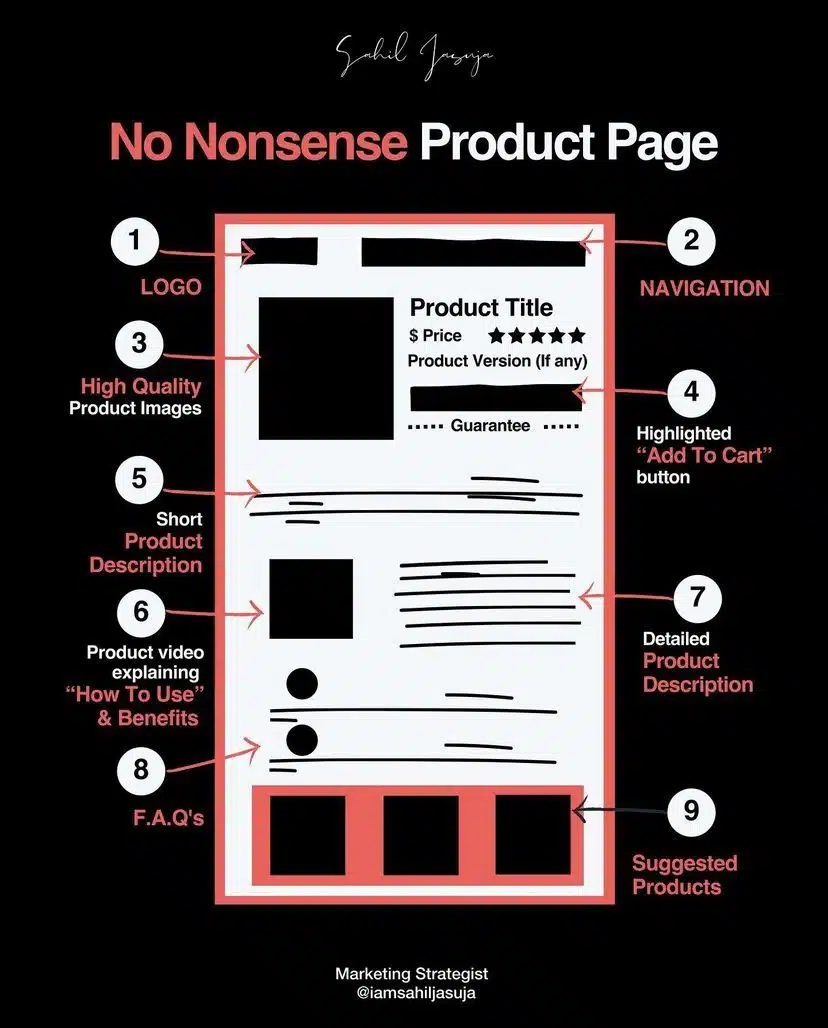
In the fast-paced world of ecommerce, your product page is often the first and only chance you have to convert a casual browser into a paying customer. Every element—from visuals to copy to functionality—plays a critical role in shaping the customer experience.
A cluttered or poorly structured product page can cause hesitation, while a clean and intuitive layout encourages trust and action. This post breaks down each component of a high-performing product page so you can optimise every click on the path to purchase.
Logo
The logo may seem like a small detail, but it holds significant weight in the psychology of trust. A visible, well-designed logo reminds visitors of your brand identity and signals professionalism. It helps customers feel reassured they’re shopping from a reputable source. Ensure your logo is placed prominently, especially on product pages that attract new users.
- Place the logo in the top-left corner for instant brand recognition.
- Use a high-resolution version to avoid pixelation or distortion.
- Link the logo back to the homepage for easy navigation.
- Keep it consistent across all pages to reinforce your brand identity.
Navigation
A seamless ecommerce experience starts with intuitive navigation. Customers need to move effortlessly between products, categories, and information without feeling lost or overwhelmed. Clear menus, breadcrumb trails, and logical page structure can make all the difference. If users can’t find what they need quickly, they’re more likely to leave.
- Use a sticky or top bar menu to keep navigation accessible at all times.
- Include category filters and sorting options for better browsing.
- Highlight key links like “Home,” “Shop,” “About,” and “Contact.”
- Ensure mobile responsiveness with collapsible menus and touch-friendly design.
High-Quality Product Images
Images are the most influential element of a product page. Since customers can’t touch or try the product, your images must do the heavy lifting. Crisp, clear, and multi-angle images can convey texture, scale, and use-case—boosting confidence and conversions. The right visuals reduce returns and increase time-on-page.
- Include high-resolution images with zoom functionality.
- Show the product from multiple angles, including close-ups.
- Use lifestyle images to demonstrate the product in real-life settings.
- Optimise image file sizes for fast loading without losing quality.
Highlighted “Add to Cart” Button
The “Add to Cart” button is where browsing turns into buying. This call-to-action (CTA) must be easy to find, visually distinct, and functionally flawless. When this button blends into the background or is hard to locate, you risk losing a sale at the final hurdle. Make it obvious, clickable, and mobile-friendly.
- Use a bold colour that stands out against your page background.
- Place the button above the fold so it’s visible without scrolling.
- Make the button large enough to tap easily on mobile devices.
- Use clear, actionable text like “Add to Cart” or “Buy Now.”
Short Product Description
A concise product description gives customers a quick overview of what they’re buying. This copy should hook attention while conveying the most important benefits and uses. Think of it as the elevator pitch for your product. If it sparks curiosity, users are more likely to scroll down for more.
- Highlight key benefits in 2–3 sentences.
- Focus on what problem the product solves or how it adds value.
- Use simple, direct language—avoid jargon or fluff.
- Place it near the price and title for immediate context.
Product Video Explaining “How to Use” & Benefits
Video adds movement and depth that photos and text alone can’t deliver. A short, engaging video can demonstrate product use, address objections, and create emotional connection. Done well, it boosts conversions by helping customers visualise ownership. It also enhances trust by showing the product in action.
- Keep videos short (under 2 minutes) and focused on benefits.
- Use captions so the video is effective without sound.
- Feature real usage footage, not just animated explainer graphics.
- Include customer testimonials or voiceovers for added credibility.
Detailed Product Description
Once the short version has captured attention, the detailed description should answer every remaining question. This is where you get into the specifications, materials, dimensions, compatibility, and more. Done right, it eliminates confusion and minimises the likelihood of returns or support requests.
- Break long content into sections with bold headings or bullet points.
- Cover materials, sizes, instructions, and any unique selling points.
- Address possible objections (e.g., fit, durability, compatibility).
- Optimise for SEO using natural keywords throughout the copy.
FAQs
A well-placed FAQ section clears up doubts without needing customer support. It reduces barriers to purchase and shows that you understand your audience’s concerns. If users are hesitating because they’re unsure about shipping, returns, or product use, FAQs can remove that friction instantly.
- Group common questions under clear headings like “Shipping” or “Sizing.”
- Keep answers concise and to the point.
- Update your FAQs regularly based on actual customer queries.
- Link to relevant support or policy pages where needed.
Suggested Products
Cross-selling and upselling work best when they feel natural, not pushy. Suggested products help customers discover complementary items or alternatives, increasing average order value. These sections also improve site stickiness by encouraging continued browsing and reducing bounce rates.
- Display 3–4 related items with thumbnails and prices.
- Use titles like “You Might Also Like” or “Complete the Look.”
- Ensure relevance—don’t show random or unrelated products.
- Test placement (bottom of page, side panel, or below cart button) for best performance.
Conclusion
Building a seamless ecommerce product page is about more than good design—it’s about guiding the customer from curiosity to conversion without friction. Every element has a role to play, from the visual reassurance of a logo to the clarity of product descriptions and the persuasive power of video.
When thoughtfully combined, these components create a user experience that’s not just functional but delightful. By refining your product pages with this no-nonsense approach, you increase trust, reduce drop-offs, and ultimately drive more sales with less resistance.

Author:
Mark Ford