

In the world of social media marketing, engagement is king. The more interactions your Facebook posts receive, the more visibility your brand gains, and the stronger your online community becomes.
One of the most valuable forms of engagement is comments on your posts. Comments not only show that your content is resonating with your audience but also provide an opportunity for meaningful conversations and interactions.
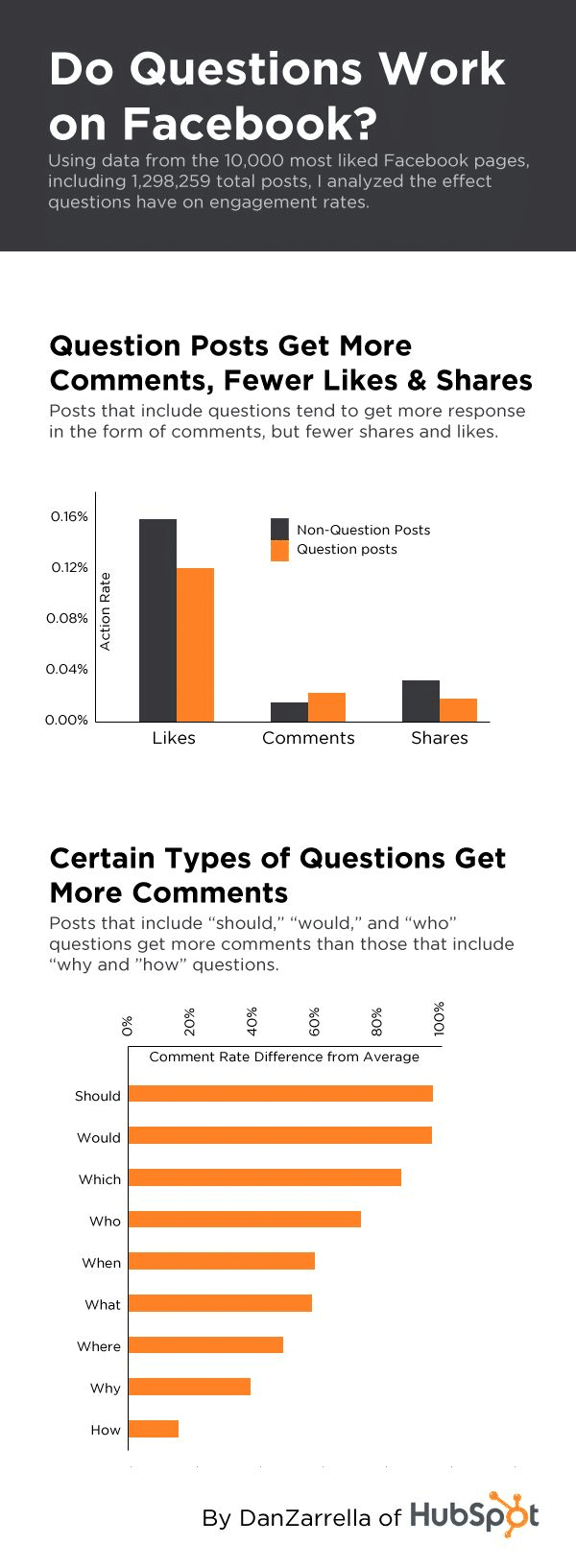
But how can you boost the number of comments on your Facebook page? In this blog post, we’ll reveal a quick trick that can help you generate 95% more Facebook page comments and supercharge your social media strategy.
Infographic by HubSpot.
Understanding the Importance of Facebook Page Comments
Before diving into our quick trick, it’s essential to understand why Facebook page comments are so valuable. Comments serve several critical purposes in your social media marketing strategy:
- 1. Boosting Visibility: Facebook’s algorithm prioritizes posts with high engagement. When your posts receive more comments, they are more likely to appear in your followers’ news feeds and reach a broader audience.
- 2. Building Trust: Comments can act as social proof. When potential customers see that others are engaging with your content, they are more likely to trust your brand and consider your products or services.
- 3. Encouraging Dialogue: Comments provide a platform for meaningful conversations. They allow you to connect with your audience, answer questions, and gain valuable insights into their needs and preferences.
Now that we’ve established the significance of comments let’s explore the quick trick that can help you generate more of them.
The Quick Trick: Ask Engaging Questions
The secret to generating more Facebook page comments is surprisingly simple: ask engaging questions in your posts. By framing your content in a way that encourages responses, you can significantly increase the likelihood of your audience commenting on your posts. Here’s how to do it effectively:
1. Understand Your Audience
Before you start asking questions, it’s crucial to know your audience inside and out. What are their interests, pain points, and preferences? The more you understand your audience, the better you can tailor your questions to their needs and interests.
2. Choose the Right Topics
Select topics that resonate with your audience and are relevant to your brand. Consider the current trends in your industry and any recent news or events that might be of interest to your followers.
3. Craft Thoughtful Questions
The key to generating comments is to ask questions that require more than a simple “yes” or “no” answer. Instead, aim for questions that encourage storytelling, sharing opinions, or providing advice. For example:
- “What’s your favorite memory from your last vacation?”
- “How do you stay motivated on a Monday morning?”
- “What’s the most creative way you’ve used our product?”
These types of questions invite your audience to share personal experiences and insights, making them more likely to engage.
4. Use Visuals to Enhance Your Questions
Accompany your questions with eye-catching visuals, such as images or videos, to capture your audience’s attention. Visuals can help set the context and make your posts more appealing.
5. Pin Your Posts
Once you’ve posted a question, consider pinning it to the top of your Facebook page. Pinned posts stay at the top of your page’s timeline, making them more visible to visitors and increasing the chances of getting responses.
6. Engage With Responses
When your audience starts responding to your questions, don’t leave them hanging. Take the time to engage with their comments, thank them for their input, and continue the conversation. This not only boosts the comment count but also strengthens your community.
Real-World Examples of Engaging Questions
To illustrate the effectiveness of this quick trick, let’s look at some real-world examples from brands and businesses that have successfully generated high levels of Facebook page comments through engaging questions:
1. National Geographic
National Geographic, known for its stunning photography and educational content, often poses thought-provoking questions to its audience. For example, they once asked, “If you could go on a trip anywhere in the world right now, where would you choose?” This question taps into the wanderlust of their followers and encourages them to dream and share their travel aspirations.
2. Airbnb
Airbnb frequently asks questions that not only promote their services but also encourage user-generated content. One of their posts asked, “What’s the most unique Airbnb listing you’ve ever stayed in?” This question not only generates comments but also showcases the diversity of Airbnb accommodations.
3. Starbucks
Starbucks, the global coffee giant, often asks questions related to seasonal products and experiences. For instance, they once asked, “What’s your favorite fall drink?” This question not only drives engagement but also helps Starbucks gauge which seasonal offerings are most popular among their customers.
4. Neil Patel
Neil Patel, a well-known digital marketing expert, uses engaging questions to spark discussions related to his industry. For example, he asked, “What’s the most significant SEO challenge you’re currently facing?” This question encourages fellow marketers to share their experiences and seek advice, fostering a sense of community.
Measuring the Impact
To determine the success of your efforts in generating more Facebook page comments, it’s essential to track your metrics. Facebook Insights provides valuable data on post engagement, including the number of comments. Monitor your comments over time and compare the performance of posts with engaging questions to those without. You should see a noticeable increase in comments when you consistently apply this quick trick.
Other Tips for Maximizing Facebook Page Comments
While asking engaging questions is a powerful method for boosting comments, there are additional strategies you can implement to further enhance your Facebook page’s engagement:
- 1. Consistent Posting Schedule: Maintain a regular posting schedule to keep your audience engaged. Consistency helps followers anticipate your content and encourages them to interact more frequently.
- 2. Leverage User-Generated Content: Encourage your audience to create and share content related to your brand. User-generated content can lead to more comments as followers discuss and react to each other’s posts.
- 3. Host Contests and Giveaways: Contests and giveaways are excellent tools for sparking excitement and generating comments. Encourage users to participate by commenting, liking, and sharing your posts for a chance to win prizes.
- 4. Collaborate With Influencers: Partner with influencers in your niche to create engaging content. Influencers can help drive traffic and comments to your posts through their dedicated fan base.
- 5. Respond Promptly: When followers comment on your posts, respond promptly and engage in meaningful conversations. This demonstrates that you value their input and encourages further interaction.
Final Thoughts
In the world of social media marketing, Facebook page comments are a precious commodity. They not only increase the visibility of your posts but also foster trust, encourage dialogue, and build a loyal community around your brand. By asking engaging questions in your posts, you can unlock the potential to generate 95% more comments and supercharge your social media strategy. Remember to understand your audience, choose relevant topics, craft thoughtful questions, use visuals, and engage with responses to maximize your results. With consistency and creativity, you’ll watch your Facebook page comments soar, bringing your brand closer to its social media goals.

Author:
Mark Ford

How to Create Engaging Instagram Reels Without Ever Showing Your Face
Are you looking for creative ways to make engaging Instagram Reels without stepping in front of the camera? Want to discover proven content ideas that help your brand stand out on social media while keeping your privacy intact? […]


