Are you looking for ways to boost your online presence? Have you considered how using Google posts could help your online strategy?
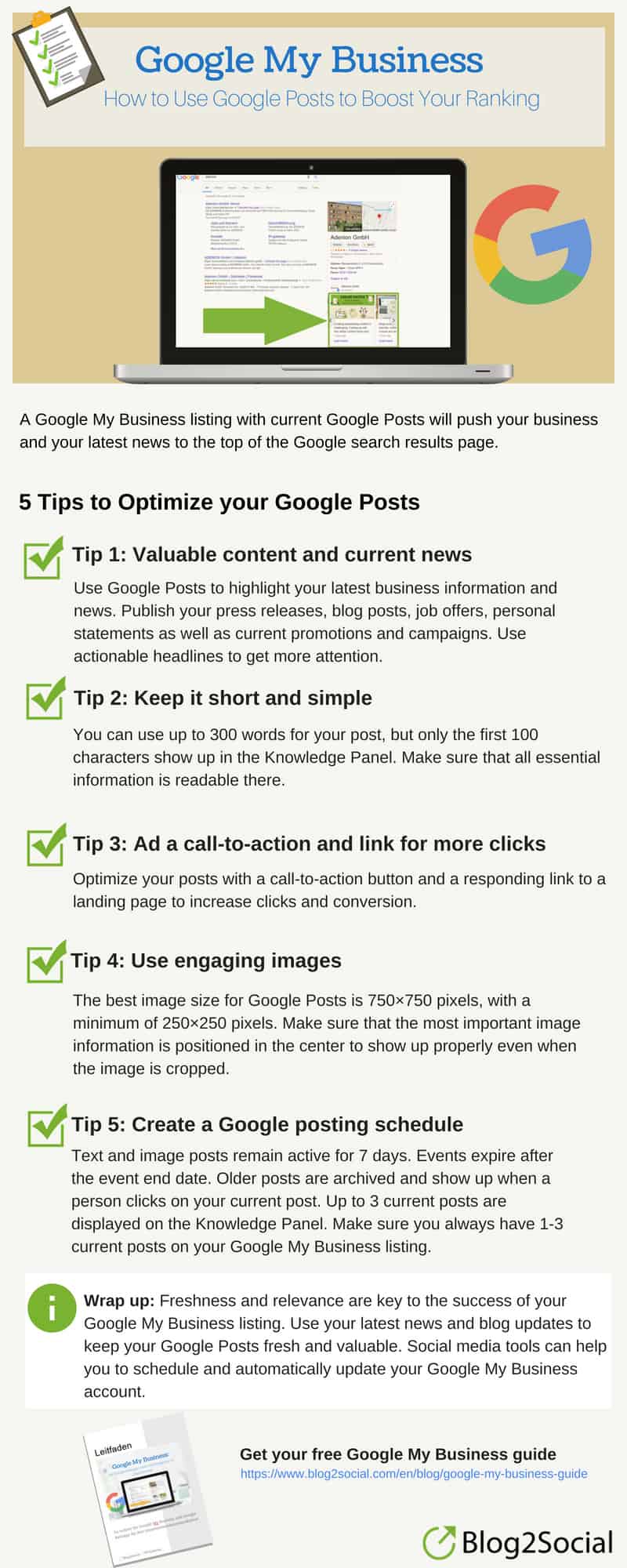
Blog2Social share their Google posts tips for success in this infographic.
Here’s a quick summary:
- Share valuable content and current news
- Keep it short and simple
- Add a call to action
- Use engaging images
- Create a posting schedule
Check out the infographic for more detail.
In today’s digital age, having a strong online presence is crucial for businesses of all sizes. Whether you run a small local shop or a large corporation, reaching your audience effectively and consistently is key to maintaining and growing your customer base. One of the most powerful tools at your disposal is Google My Business (GMB), specifically the Google Posts feature. By leveraging Google Posts, you can communicate directly with your audience, share valuable information, and drive more traffic to your business. This blog post will guide you through five key strategies to maximize the effectiveness of Google Posts in boosting your online presence.
Share Valuable Content and Current News
For small businesses, the ability to share valuable content and current news effectively is a critical component of any successful online marketing strategy. Google Posts provide a unique and direct way to reach potential customers who are already searching for your business or similar services. By leveraging this platform to share insightful and timely information, small businesses can not only attract more attention but also build trust and establish themselves as thought leaders in their industry. Below are some in-depth tips and guidance on how to share valuable content and current news through Google Posts.
Understand Your Audience’s Needs and Interests
Before creating content, it’s essential to understand who your audience is and what they are looking for. This involves researching your target demographic, including their interests, pain points, and the type of content they consume. For instance, if you run a local fitness center, your audience might be interested in tips for staying fit, healthy recipes, or updates on local fitness events.
To better understand your audience, consider the following steps:
- Analyze Customer Feedback: Review comments, reviews, and direct feedback from your customers. This can give you insights into what topics they care about and what questions they frequently ask.
- Use Analytics Tools: Tools like Google Analytics, social media insights, and your own website’s analytics can reveal which content is performing well and what your audience is engaging with most.
- Conduct Surveys: Directly ask your customers or followers what type of content they’d like to see. You can do this through email surveys, social media polls, or even in-person at your business location.
Once you have a clear understanding of your audience, you can tailor your Google Posts to provide content that is not only valuable but also highly relevant.
Provide Educational and Informative Content
One of the most effective ways to engage your audience is by offering educational and informative content. This type of content positions your business as an authority in your industry and helps solve problems that your potential customers may have. Educational content can come in various forms, such as tips, how-tos, or industry insights.
Here are some examples of educational content you can share:
- How-to Guides: Create posts that offer step-by-step instructions on how to do something related to your industry. For example, a gardening store might share a guide on how to plant a vegetable garden in the spring.
- Tips and Tricks: Offer quick tips that are easy to implement. A bakery might post tips on how to store bread to keep it fresh longer or how to bake the perfect chocolate chip cookie.
- Industry News: Keep your audience informed about the latest trends and developments in your industry. For instance, a local gym could share updates on new fitness trends or the latest research on health and wellness.
- Answer Common Questions: Use your Google Posts to address frequently asked questions that your customers have. For example, a plumbing service could post about how to prevent frozen pipes in the winter.
- Case Studies and Success Stories: Share real-life examples of how your products or services have helped customers achieve their goals. This not only educates potential customers but also serves as powerful social proof.
By consistently providing educational and informative content, you build credibility and keep your audience coming back for more.
Share Time-Sensitive Updates and Current News
Google Posts are an excellent way to share time-sensitive information and updates with your audience. Since these posts appear directly in your Google My Business listing and are visible for up to seven days, they are perfect for announcing current news or timely offers.
Here’s how small businesses can effectively use Google Posts to share current news:
- Promotions and Special Offers: Announce limited-time discounts, sales, or special offers. For example, a clothing store might post about a weekend sale or a buy-one-get-one-free promotion. Be sure to include any relevant details, such as dates and conditions, so customers can take advantage of the offer immediately.
- Event Announcements: If your business is hosting or participating in an event, use Google Posts to share the details. This could include information about local workshops, webinars, in-store events, or community activities. For instance, a bookstore might post about an upcoming author signing event.
- Seasonal Updates: Tailor your content to reflect the current season or holidays. For example, a florist could share posts about their Christmas arrangements or a summer sale on outdoor plants. Seasonal content resonates well with audiences and can drive increased engagement during specific times of the year.
- Company News: Keep your customers informed about important changes within your business. This could include announcing a new product launch, a change in business hours, or the opening of a new location. For example, a restaurant might use a Google Post to announce the introduction of a new menu item or a change in their operating hours.
- Crisis Communication: In times of crisis or significant change, such as during a natural disaster or a global event like the COVID-19 pandemic, businesses can use Google Posts to communicate important updates. This could include changes in business operations, safety measures being implemented, or ways your business is supporting the community.
Optimize Content for Local Audience Engagement
Small businesses often rely on local customers, making it essential to tailor your content to resonate with a local audience. Google Posts can be a powerful tool for connecting with your community and driving local engagement.
Consider these strategies:
- Highlight Local Partnerships: If you’re collaborating with other local businesses or organizations, share this news through Google Posts. For example, a coffee shop might post about a new collaboration with a local bakery to offer combined products.
- Feature Local Events: Promote events that are happening in your area, even if they are not directly related to your business. This shows that you’re an active part of the community. For example, a local gym could post about a charity run happening in the neighborhood.
- Support Local Causes: If your business supports local charities or causes, share this with your audience. For instance, a retail store could post about their participation in a local food drive or charity auction.
- Use Localized Keywords: When creating content for your Google Posts, incorporate keywords that reflect your local area. This could include the name of your city, neighborhood, or any local landmarks. This helps improve your visibility in local searches.
By focusing on local engagement, you strengthen your connection with the community and increase the likelihood of attracting local customers to your business.
Utilize Visual Content Alongside Your Posts
Visual content significantly enhances the appeal of your Google Posts. Including high-quality images or short videos can make your posts more engaging and increase the chances that users will interact with them.
Here’s how to effectively incorporate visual content:
- Product Images: When sharing a post about a new product or promotion, include a clear, high-quality image of the product. For example, if you’re a bakery announcing a new cake flavor, a beautifully shot image of the cake can entice viewers to visit your store.
- Event Photos: If you’re promoting an event, use images from previous events or relevant graphics to draw attention. For instance, a yoga studio might use a serene image of a yoga class to promote an upcoming workshop.
- Infographics: If your post is educational, consider using a simple infographic to convey the information visually. This is especially effective for tips or step-by-step guides, as visuals can make complex information easier to digest.
- Behind-the-Scenes Content: Share photos or videos that give your audience a behind-the-scenes look at your business. This could be a sneak peek into how your products are made or a day in the life of your team. Such content adds a personal touch and helps humanize your brand.
Visual content not only makes your posts more attractive but also helps communicate your message more effectively, especially for users who are quickly scanning through search results.
Encourage Interaction and Feedback
Engaging with your audience doesn’t end once you’ve posted content. Encouraging interaction and gathering feedback is a critical part of the process. Google Posts can be a two-way communication tool, allowing you to interact directly with your customers.
Here’s how to foster engagement:
- Ask Questions: Use your Google Posts to pose questions to your audience. For example, a restaurant might ask, “What’s your favorite dish on our menu?” This can prompt users to leave comments or visit your location to try the dish.
- Encourage Reviews: If you’ve recently launched a new product or service, ask your customers to share their experiences. For example, “Tried our new latte flavor? Let us know what you think in the reviews!”
- Respond to Comments: If your Google Posts generate comments or feedback, make sure to respond promptly. This shows that you value customer input and are engaged with your community.
- Run Contests or Giveaways: Use Google Posts to announce contests or giveaways that require customer participation. For instance, “Share a photo of your favorite spot in our store and tag us to win a free gift!” Such activities can significantly increase interaction and engagement.
- Share User-Generated Content: If your customers are sharing photos or reviews of your products on social media, ask for permission to feature this content in your Google Posts. This not only gives your customers recognition but also adds authenticity to your posts.
By encouraging interaction and feedback, you can create a more dynamic and engaged community around your business, fostering stronger relationships with your customers.
Monitor and Adapt Your Strategy
Finally, it’s important to regularly monitor the performance of your Google Posts and adapt your strategy based on the results. This will help you understand what content resonates most with your audience and optimize future posts accordingly.
Here’s how to monitor and adjust your content strategy:
- Track Engagement Metrics: Use Google My Business insights to track how many views, clicks, and actions your posts are generating. Pay attention to which types of content perform best.
- Experiment with Different Content: Don’t be afraid to try different types of content to see what works best. Test different formats, such as text-based posts, videos, or promotions, and analyze the results.
- Update or Repurpose Content: If you notice that certain posts are performing particularly well, consider updating or repurposing that content for future posts. For example, you could expand on a popular tip or create a follow-up post.
- Stay Informed About Industry Trends: Keep up with trends in your industry and adjust your content strategy accordingly. For instance, if there’s a new trend or technology that’s gaining traction, share your insights or opinions on it.
- Gather Feedback: Regularly ask your audience for feedback on the content you’re sharing. This can provide valuable insights into what your customers find most useful or interesting.
By continuously monitoring and refining your content strategy, you can ensure that your Google Posts remain relevant, engaging, and effective in boosting your online presence.
In conclusion, sharing valuable content and current news through Google Posts is a powerful way for small businesses to enhance their online visibility, engage with their audience, and build lasting relationships. By understanding your audience, providing educational content, sharing timely updates, incorporating visuals, encouraging interaction, and regularly monitoring your performance, you can maximize the impact of your Google Posts and drive meaningful results for your business.
Keep It Short and Simple
In the fast-paced digital world, attention spans are shorter than ever, making it crucial for small businesses to communicate their messages quickly and effectively. The “Keep it short and simple” principle is especially important when crafting Google Posts. These posts are designed to capture the interest of potential customers who are searching for your business or similar services, and you often have only a few seconds to make an impact. Below, I’ll provide in-depth tips and guidance on how small businesses can master the art of brevity and simplicity in their Google Posts.
Why Simplicity and Brevity Matter
The primary goal of Google Posts is to engage your audience with relevant and timely content. However, given that users are often skimming through information, lengthy or overly complex posts can deter them from engaging with your content. A concise, clear message is more likely to grab attention, convey the necessary information, and encourage action.
Here are some reasons why keeping your posts short and simple is crucial:
- Attention Span: People are inundated with information online, and they typically decide within seconds whether to engage with content. A clear and concise message is more likely to hold their attention.
- Mobile Usability: Many users will view your Google Posts on mobile devices. Long posts may be harder to read on smaller screens, leading to lower engagement rates.
- Message Retention: Short, simple messages are easier to remember. When your audience can quickly grasp and retain your key points, they’re more likely to act on them.
- Improved Engagement: Posts that are easy to read and understand are more likely to encourage engagement, such as clicks, visits to your website, or in-store visits.
Focus on One Core Message
One of the most effective ways to keep your Google Posts concise is to focus on a single core message or call to action. Trying to convey multiple ideas in one post can dilute your message and confuse your audience.
Tips for Focusing on One Message:
- Identify the Main Purpose: Before writing your post, determine what you want to achieve with it. Are you promoting a sale, announcing a new product, or encouraging sign-ups for an event? Once you’ve identified the primary goal, tailor your message to that specific objective.
- Eliminate Unnecessary Details: Strip away any information that doesn’t directly support your core message. For instance, if you’re promoting a discount, focus solely on the offer, its benefits, and how to redeem it, without delving into unrelated details.
- Use the Inverted Pyramid Model: This journalistic technique involves placing the most important information at the beginning of the post, followed by supporting details. This ensures that even if someone only reads the first sentence, they’ll still get the main point.
- Avoid Overloading with Information: If you have multiple messages to convey, consider creating separate posts for each. This way, each post can remain focused and effective.
Example of Focused Messaging:
Instead of: “We’re excited to announce that we’ve expanded our menu with new vegan options, and don’t forget our weekend sale is coming up where you can get 20% off on all items! Also, check out our new store hours starting next week.”
Try: “Enjoy our new vegan menu options! Visit us this weekend and get 20% off all items.”
The second example is more direct, focusing on one core message (the promotion) while still mentioning the new vegan menu briefly.
Use Clear and Direct Language
To communicate effectively in a short space, it’s important to use language that is clear, direct, and easy to understand. Avoid jargon or overly complicated terms that might confuse your audience or require additional explanation.
Tips for Clear and Direct Language:
- Choose Simple Words: Use everyday language that your audience will easily understand. For instance, instead of saying “utilize,” say “use.”
- Be Specific: Clearly state what you’re offering or what action you want the audience to take. Ambiguity can lead to misunderstandings or missed opportunities. For example, instead of “Check out our new offers,” say “Get 20% off all orders this weekend.”
- Avoid Redundancies: Be mindful of repetitive phrases or unnecessary words that can be trimmed without losing meaning. For example, “free gift” is redundant because a gift is inherently free.
- Use Active Voice: Active voice is more direct and engaging than passive voice. For example, “Claim your discount today” is stronger than “Discounts can be claimed today.”
- Break Up Text: Use short sentences and paragraphs to make your post more readable. Large blocks of text can be overwhelming, especially on mobile devices.
Example of Clear Language:
Instead of: “We are offering a promotional discount where you can obtain a 20% reduction on all of our available products this coming weekend, so make sure to stop by!”
Try: “Get 20% off all products this weekend. Visit us now!”
The second example uses simple, direct language that clearly communicates the promotion without any unnecessary complexity.
Highlight Key Information
Even within a short post, it’s important to draw attention to the most crucial details. This can help ensure that your audience doesn’t miss the key points of your message.
Tips for Highlighting Key Information:
- Use Bullet Points or Lists: If your post includes several pieces of important information, consider using bullet points to make it easier to scan. For example, list the main benefits of a product or the steps to claim an offer.
- Bold Important Words or Phrases: While Google Posts have limited formatting options, you can still emphasize key information within your content. For example, you might bold the discount percentage or the deadline for an offer (though note that Google Posts don’t support HTML, so ensure your emphasis is within the text constraints).
- Place Important Info First: As mentioned earlier, use the inverted pyramid model to ensure that the most critical information is at the beginning of your post. This increases the likelihood that your audience will see and remember it.
- Keep Calls to Action Prominent: Your call to action (CTA) should stand out. Make sure it’s placed prominently, typically at the end of your post, and that it’s clear and actionable.
Example of Highlighting Key Information:
Instead of: “Our summer sale is happening this weekend, and you can get discounts on many items in the store. The sale ends on Sunday, so make sure to visit us soon to take advantage of these great deals!”
Try: “Summer Sale: 20% Off All Items! Visit us this weekend and save big. Sale ends Sunday.”
This approach makes the key information—the sale and its terms—immediately clear to the reader.
Limit the Length of Your Post
While Google Posts allow up to 1,500 characters, it’s often more effective to use far fewer. Aim for a post length that is concise yet informative, typically between 150-300 characters. This ensures your message is easy to read quickly and remains impactful.
Tips for Limiting Post Length:
- Use Short Sentences: Keep your sentences short and to the point. Aim for a length of around 10-15 words per sentence. This makes your post more readable and digestible.
- Trim Excess Words: After writing your post, review it for any words or phrases that can be removed without changing the meaning. For example, replace “in order to” with “to.”
- Avoid Fluff: Every word in your post should serve a purpose. Eliminate any “fluff” or filler words that don’t add value to your message.
- Get Straight to the Point: Begin your post with the most important information, and avoid long introductions or background details. For example, instead of starting with, “We are pleased to announce that,” simply state the announcement.
Example of a Short and Impactful Post:
Instead of: “We are excited to let you know that we have just added a new line of organic skincare products to our store! These products are made from all-natural ingredients and are now available for purchase at a special introductory price.”
Try: “New organic skincare line available now! Shop today and enjoy special introductory prices.”
This version delivers the same information in fewer words, making it more concise and effective.
Incorporate Relevant Keywords
Even in a short post, it’s important to incorporate keywords that are relevant to your business and that align with what your audience is searching for. This not only improves the visibility of your post in search results but also ensures that your content resonates with your target audience.
Tips for Using Keywords in Short Posts:
- Identify Primary Keywords: Focus on one or two primary keywords that are most relevant to the content of your post. For example, if you’re promoting a sale on running shoes, “running shoes sale” could be your primary keyword.
- Naturally Integrate Keywords: Ensure that your keywords are seamlessly integrated into your content. They should fit naturally into the sentence structure without feeling forced. For example, “Save big on our running shoes sale this weekend!”
- Use Local Keywords: If you’re targeting a local audience, include location-based keywords. For example, a coffee shop might use “best coffee in [city name]” as a keyword.
- Avoid Keyword Stuffing: While it’s important to include keywords, overloading your post with them can make it sound unnatural and spammy. Stick to a natural, conversational tone.
Example of Effective Keyword Integration:
Instead of: “We are having a sale on all our products, including running shoes, this weekend.”
Try: “This weekend only—big savings on running shoes! Visit our store in [city name].”
This version uses relevant keywords naturally and effectively within a short post.
Create a Strong Call to Action
Your Google Post should always include a clear and compelling call to action (CTA) that tells your audience what to do next. Whether you want them to visit your website, make a purchase, or contact your business, your CTA should be direct and easy to follow.
Tips for Crafting a Strong CTA:
- Use Action-Oriented Language: Start your CTA with a strong action verb, such as “Shop,” “Visit,” “Call,” or “Sign up.” This makes it clear what you want the audience to do.
- Create Urgency: Encourage immediate action by adding a sense of urgency to your CTA. Phrases like “limited time offer,” “shop now,” or “don’t miss out” can motivate quicker responses.
- Keep It Short: Your CTA should be concise, typically no more than a few words. It should be easy to understand and act upon immediately.
- Align with Your Message: Ensure that your CTA directly relates to the content of your post. If you’re promoting a sale, for example, the CTA should encourage shopping or visiting your store.
Example of a Strong CTA:
Instead of: “If you are interested in learning more about our products, please visit our website or contact us for further details.”
Try: “Shop now and save! Limited time offer.”
This CTA is direct, action-oriented, and encourages immediate engagement.
Test and Refine Your Approach
Even when keeping your posts short and simple, it’s important to continually test and refine your approach to see what resonates best with your audience. Different messages, formats, and lengths may perform better depending on your target market and industry.
Tips for Testing and Refining:
- A/B Testing: Create two versions of a post with slight variations, such as different CTAs or keywords, and see which one performs better. This can provide valuable insights into what works best for your audience.
- Monitor Engagement Metrics: Use Google My Business insights to track how your posts are performing. Pay attention to metrics like clicks, views, and actions taken as a result of the post.
- Experiment with Post Length: While shorter posts are generally more effective, there’s no one-size-fits-all rule. Experiment with different lengths to see what works best for your audience. For instance, some audiences may respond well to slightly longer posts with more detailed information.
- Gather Feedback: Ask your customers for feedback on your posts. This could be done informally, through social media, or even via direct communication with regular customers.
- Adjust Based on Performance: Based on the results of your testing and feedback, adjust your content strategy accordingly. If certain types of posts consistently perform better, consider making those a regular part of your content rotation.
By following these in-depth tips and focusing on simplicity, clarity, and conciseness, small businesses can create more effective Google Posts that resonate with their audience, drive engagement, and ultimately boost their online presence.
Add a Call to Action
A Call to Action (CTA) is a critical component of any marketing message, especially in digital marketing. For small businesses, incorporating a strong CTA in Google Posts can make the difference between a passive viewer and an engaged customer. A well-crafted CTA guides your audience toward taking the next step, whether it’s visiting your website, making a purchase, signing up for a newsletter, or contacting your business directly. This section will provide in-depth tips and guidance on how small businesses can effectively use CTAs in their Google Posts to drive action and achieve their business goals.
Understanding the Importance of a CTA
A CTA is not just a simple suggestion—it’s a direct instruction that tells your audience exactly what to do next. Without a CTA, even the most engaging content can fall flat, as your audience might not know what action to take. A strong CTA not only encourages engagement but also helps track the effectiveness of your Google Posts by providing measurable outcomes.
Key Reasons to Include a CTA:
- Encourages Immediate Action: A CTA prompts users to take immediate steps, whether it’s making a purchase or signing up for an event, helping to convert interest into tangible results.
- Provides Direction: A clear CTA eliminates any ambiguity about what the user should do next, ensuring they are guided toward a specific outcome that benefits your business.
- Increases Engagement: By encouraging users to interact with your content, CTAs can help boost engagement rates, whether through website visits, phone calls, or other forms of interaction.
- Enhances Measurability: With a defined CTA, you can more easily measure the effectiveness of your Google Posts, as actions taken by users (clicks, calls, sign-ups) can be tracked and analyzed.
Crafting a Strong and Effective CTA
Creating an effective CTA involves more than just telling your audience what to do. It requires careful consideration of language, placement, and alignment with your overall marketing goals. Below are key tips for crafting a CTA that drives results.
- Use Action-Oriented Language
The language you use in your CTA should inspire action. Strong, action-oriented verbs make it clear what you want your audience to do and can motivate them to take that step.
Tips for Action-Oriented CTAs:
- Start with a Verb: Begin your CTA with a direct command, such as “Buy,” “Sign up,” “Call,” “Visit,” or “Learn.”
- Be Clear and Direct: Avoid vague language. Instead of saying “Consider our services,” say “Book a free consultation today.”
- Keep It Short: Your CTA should be concise and to the point, typically no more than a few words. For example, “Shop Now” or “Get Started” is clear and effective.
Examples:
- “Book Your Appointment Today”
- “Claim Your Free Trial”
- “Download the Guide Now”
- Create a Sense of Urgency
A CTA is more effective when it creates a sense of urgency. By implying that there’s a limited time to act, you can encourage users to take immediate steps rather than postponing their decision.
Tips for Creating Urgency:
- Use Time-Sensitive Language: Phrases like “Limited time offer,” “Offer ends soon,” or “Act now” encourage users to act quickly.
- Highlight Scarcity: If an offer is limited, emphasize this. For example, “Only a few spots left” or “While supplies last” can create a fear of missing out (FOMO), prompting quicker decisions.
- Combine Urgency with Value: Pairing urgency with the benefits of acting now can be particularly compelling. For instance, “Save 20% today only” combines both elements.
Examples:
- “Don’t Miss Out—Register Now!”
- “Last Chance to Save 30%”
- “Hurry, Sale Ends Midnight!”
- Align with Your Business Goals
Your CTA should align with the specific goals of your business. Whether you want to drive sales, increase website traffic, or build your email list, your CTA needs to reflect that objective.
Tips for Goal-Oriented CTAs:
- Identify the Desired Action: Determine the specific action you want users to take and tailor your CTA accordingly. If the goal is to increase online sales, a CTA like “Shop Our Bestsellers” would be appropriate.
- Match the CTA to the Content: Ensure that your CTA is relevant to the content of your Google Post. For instance, if you’re promoting a blog post, “Read More” or “Explore the Full Article” would be fitting.
- Consider the User’s Journey: Think about where the user is in their journey. For example, a user who is just discovering your brand might be more receptive to a CTA like “Learn More” rather than “Buy Now.”
Examples:
- “Explore Our Services”
- “Get a Free Quote”
- “Start Your Free Trial”
- Make It Easy to Follow
Even the best CTAs will fall flat if the action required is too complicated or unclear. Your CTA should be easy to follow, with minimal steps involved.
Tips for Simplicity:
- Provide Clear Instructions: If there are steps to follow, make sure they are simple and clearly outlined. For example, “Click here to sign up in just two steps.”
- Ensure Accessibility: Make sure that the link or button associated with your CTA is prominent and easy to access, especially on mobile devices.
- Minimize Barriers: Reduce any potential friction in the user journey. For instance, if you want users to sign up for a newsletter, don’t ask for too much information upfront—name and email might be enough.
Examples:
- “Sign Up in Seconds”
- “Browse Our Collection”
- “Call Us Today”
- Tailor Your CTA to Your Audience
Understanding your audience’s needs and motivations is crucial for crafting an effective CTA. The more you know about what drives your audience, the better you can tailor your CTA to resonate with them.
Tips for Audience-Centered CTAs:
- Segment Your Audience: If possible, tailor your CTAs to different segments of your audience. For instance, a CTA for returning customers might be different from one aimed at first-time visitors.
- Speak to Their Needs: Address your audience’s specific needs or pain points. For example, “Find the perfect gift” might resonate with shoppers during the holiday season.
- Use Language They Relate To: The tone and style of your CTA should match the language your audience uses and understands. For instance, a youthful brand might use a more casual and playful CTA, while a professional service might opt for a formal approach.
Examples:
- “Upgrade Your Wardrobe Now”
- “Join the Movement—Sign Up Today”
- “Solve Your Tax Problems—Get Help Now”
- Position Your CTA Strategically
Where you place your CTA in your Google Post can significantly impact its effectiveness. The CTA should be easy to find and should naturally follow the flow of the content.
Tips for Strategic Placement:
- Place at the End: Typically, the CTA is placed at the end of the post, after you’ve presented your key information. This gives the user a clear direction after they’ve absorbed the content.
- Use Visual Cues: If possible, use visual elements like arrows or bold text to draw attention to your CTA. While Google Posts don’t support rich text formatting, you can still use spacing and placement to make the CTA stand out.
- Repeat if Necessary: In longer posts, consider repeating the CTA at the beginning and end of the post to ensure it’s seen, especially by users who might skim the content.
Examples:
- “Explore More [placed after a summary of the content]”
- “Sign Up Now [placed at the end of the post]”
- “Get Started [placed alongside relevant images or graphics]”
- Measure and Optimize Your CTAs
Finally, it’s essential to regularly measure the effectiveness of your CTAs and optimize them based on performance data. What works well for one audience or campaign might not be as effective for another, so continuous testing and refinement are key.
Tips for Measuring and Optimizing:
- Track Click-Through Rates (CTR): Monitor how often users are clicking on your CTA links. High CTR indicates a strong CTA, while a low CTR suggests it may need tweaking.
- A/B Test Different CTAs: Experiment with different versions of your CTAs to see which performs better. For example, you might test “Shop Now” against “Explore Our Collection” to see which drives more engagement.
- Analyze Conversion Rates: Beyond clicks, track how many users complete the desired action after clicking the CTA. This could be purchasing a product, signing up for a newsletter, or filling out a contact form.
- Gather User Feedback: Sometimes, the best way to understand what works is by asking your customers. Use surveys or direct feedback to gather insights into why they responded to a particular CTA.
Examples of Optimization:
- If “Learn More” has a low CTR, try changing it to “Discover More Benefits.”
- If “Call Us Today” isn’t driving phone calls, test “Get a Free Consultation” instead.
Examples of Effective CTAs for Small Businesses
To illustrate how these principles come together, here are some examples of effective CTAs tailored for different types of small businesses:
- Retail Store:
- Post Content: “Our summer collection is here! Featuring the latest styles in beachwear and accessories.”
- CTA: “Shop the Summer Collection Now”
- Restaurant:
- Post Content: “Try our new seasonal menu featuring locally sourced ingredients and refreshing summer cocktails.”
- CTA: “Reserve Your Table Today”
- Fitness Studio:
- Post Content: “Get in shape this summer with our 6-week bootcamp. Perfect for all fitness levels.”
- CTA: “Sign Up for Bootcamp”
- Professional Service (e.g., Accountant):
- Post Content: “Tax season is just around the corner. Ensure your finances are in order with our expert tax preparation services.”
- CTA: “Get a Free Tax Consultation”
- E-commerce Business:
- Post Content: “Exclusive online deal: Save 25% on all orders this weekend only!”
- CTA: “Shop Now”
- Local Event:
- Post Content: “Join us for our annual community festival featuring live music, food trucks, and family-friendly activities.”
- CTA: “Get Your Tickets”
Conclusion
A well-crafted CTA is a powerful tool for driving engagement and achieving your business objectives. By focusing on action-oriented language, creating urgency, aligning your CTA with your business goals, making it easy to follow, tailoring it to your audience, positioning it strategically, and continuously measuring and optimizing, you can maximize the impact of your Google Posts. For small businesses, mastering the art of the CTA can lead to higher engagement rates, increased conversions, and ultimately, greater success in your online marketing efforts.
Use Engaging Images
In the digital age, visual content is not just a complement to text; it’s a critical component of effective online communication. For small businesses, using engaging images in Google Posts can significantly enhance the impact of your messaging, making your posts more eye-catching, memorable, and likely to prompt action. Images can convey emotions, highlight products, and communicate key messages faster than words alone. This section provides in-depth tips and guidance on how small businesses can effectively use engaging images in their Google Posts to attract attention, engage their audience, and drive conversions.
The Power of Visual Content
Before diving into specific tips, it’s essential to understand why visual content, particularly images, is so powerful:
- Instant Impact: Images can grab attention instantly, making them ideal for capturing the interest of users who are quickly scrolling through content.
- Emotional Connection: Visuals can evoke emotions more effectively than text, helping to create a connection with your audience.
- Better Retention: People are more likely to remember information paired with images. This means that a post with a strong visual element is more likely to stick in the minds of your audience.
- Improved Engagement: Posts with images typically see higher engagement rates, including more clicks, shares, and comments, as people are naturally drawn to visual content.
- Enhanced Communication: A well-chosen image can convey complex ideas quickly and clearly, supporting or even replacing the need for lengthy text descriptions.
Given these benefits, it’s clear that images should be a cornerstone of your Google Posts strategy. Below are detailed tips on how to select, create, and use engaging images that enhance your online presence.
Choosing the Right Images
The effectiveness of your visual content starts with choosing the right images. Not all images will have the desired impact, so it’s crucial to select visuals that align with your message, brand, and audience.
- Ensure Relevance
The images you choose should be directly relevant to the content of your post. Irrelevant images can confuse your audience and dilute the message you’re trying to convey.
Tips for Relevance:
- Product Photos: If your post is about a specific product or service, include a clear image of that product or a visual representation of the service. For example, if you’re promoting a new line of coffee, use a high-quality image of a freshly brewed cup.
- Event Promotion: When promoting an event, use images from past events or related visuals that give potential attendees a clear idea of what to expect. For example, a restaurant hosting a wine-tasting event might use an image of people enjoying a previous wine-tasting session.
- Thematic Consistency: Make sure the images are thematically consistent with the message. For instance, a post about health tips could feature a clean, vibrant image of fresh fruits and vegetables.
Examples:
- Right Image for a Promotion: If you’re offering a discount on gym memberships, use an image of a happy customer working out at your gym.
- Wrong Image: Using a generic stock photo of a landscape for the same promotion would be irrelevant and ineffective.
- Use High-Quality Images
The quality of your images reflects the professionalism of your brand. High-quality images convey credibility, while low-quality, pixelated, or poorly composed images can harm your brand’s reputation.
Tips for High-Quality Images:
- Resolution: Use high-resolution images that look sharp and clear, even on large screens. Google recommends an image size of 1200 x 900 pixels for optimal display in Google Posts.
- Lighting and Composition: Ensure that your images are well-lit and properly composed. Good lighting can make your products look more appealing, while thoughtful composition can draw attention to key elements of the image.
- Avoid Clutter: Keep the image focused on the subject. A cluttered image with too many elements can be distracting. For example, if you’re showcasing a new dish at your restaurant, the dish should be the star of the image without too much background noise.
- Professional Photography: If possible, invest in professional photography for your products and services. While smartphones can take decent photos, a professional photographer can ensure that your images truly stand out.
Examples:
- Right Quality: A sharp, well-lit image of your storefront with clear signage will attract more attention than a dim, poorly composed photo.
- Wrong Quality: A blurry, dark image of the same storefront can make your business seem uninviting.
- Consistent Branding
Consistency in your visual branding helps build recognition and trust. The images you use should reflect your brand’s identity and values.
Tips for Consistent Branding:
- Color Scheme: Use images that incorporate your brand’s colors. For instance, if your brand colors are blue and white, try to include these colors in your images where possible.
- Style and Tone: Maintain a consistent style and tone across all your images. If your brand is known for a minimalist, clean look, your images should reflect that aesthetic.
- Incorporate Logos: Where appropriate, include your logo in images to reinforce brand identity. However, make sure it’s subtle and doesn’t overwhelm the image.
- Use Filters or Effects Sparingly: If you use filters or effects, make sure they are consistent across your images. Avoid over-editing or using filters that clash with your brand’s style.
Examples:
- Right Consistency: A wellness brand might consistently use images with a calming, natural color palette, reflecting their focus on health and relaxation.
- Wrong Consistency: Switching between bright, flashy images and muted, natural tones can confuse your audience and weaken your brand identity.
Creating Original Visual Content
While stock photos can be convenient, original content often has a stronger impact. Creating your own visual content allows you to tailor images specifically to your brand and messaging.
- Showcase Your Products and Services
Original images of your products or services in use can be very persuasive. These images not only demonstrate what you offer but also show potential customers how they might benefit.
Tips for Product and Service Imagery:
- Real-Life Context: Show your products in real-life settings. For example, if you sell furniture, show your pieces in a beautifully arranged living room, not just isolated against a white background.
- Feature Happy Customers: Images of satisfied customers using your products or services can serve as powerful testimonials. For example, a gym could show a photo of members enjoying a group workout class.
- Behind-the-Scenes Content: Share images that offer a behind-the-scenes look at your business. This could include how your products are made, your team at work, or the preparation that goes into your services. This type of content can humanize your brand and build trust.
Examples:
- Right Original Content: A bakery posting an image of the team preparing fresh pastries early in the morning can attract customers by showcasing the freshness of the products.
- Wrong Original Content: An unfocused, poorly lit image of the baking process can fail to convey the quality and care that goes into your products.
- Leverage User-Generated Content
User-generated content (UGC) is a great way to create original, authentic imagery for your brand. Encouraging customers to share their experiences with your products or services can provide you with valuable content to use in your Google Posts.
Tips for Using UGC:
- Encourage Sharing: Ask your customers to share photos of themselves using your products on social media, and encourage them to tag your business. Offer incentives like discounts or features on your social media channels to motivate participation.
- Request Permission: Always ask for permission before using customer photos in your marketing. Most customers will be happy to share, especially if they receive recognition from your brand.
- Showcase Diversity: Highlight a variety of customers using your products or services to appeal to a broader audience. For example, a clothing store could feature different body types, ages, and styles in their customer photos.
Examples:
- Right UGC: A restaurant sharing a customer’s beautifully composed Instagram photo of their meal, with credit to the customer, adds authenticity and engagement.
- Wrong UGC: Reposting low-quality or irrelevant customer images without proper credit can damage your credibility.
Optimizing Images for Google Posts
Even the most engaging image won’t have the desired effect if it isn’t optimized correctly for Google Posts. Proper optimization ensures that your images look great and load quickly, providing a better user experience.
- Correct Sizing and Format
Google recommends that images for Google Posts be at least 1200 x 900 pixels in size and in a 4:3 aspect ratio. This ensures that your images display properly across different devices and don’t get cropped in awkward ways.
Tips for Sizing and Format:
- Maintain Aspect Ratio: Stick to the recommended aspect ratio to avoid parts of your image being cut off. If you need to crop your image, ensure the key elements remain within the visible area.
- Use JPEG or PNG: These formats are most commonly supported and maintain good quality without large file sizes. PNG is particularly useful for images with text or logos due to its lossless compression.
- Avoid Overly Large Files: While high resolution is important, be mindful of file size. Large files can slow down load times, which might frustrate users on slower connections.
Examples:
- Right Sizing: A high-quality PNG image at 1200 x 900 pixels ensures that the image displays crisply on all devices.
- Wrong Sizing: An image that is too small (e.g., 600 x 400 pixels) might appear blurry or pixelated, which can detract from the professionalism of your post.
- Mobile Optimization
With many users accessing content via mobile devices, it’s crucial that your images look good on smaller screens as well.
Tips for Mobile Optimization:
- Test on Different Devices: Before publishing, test your images on different screen sizes to ensure they display well on both desktop and mobile devices.
- Simplify the Composition: Keep the composition of your images simple, with a clear focal point. Busy images can look cluttered on small screens.
- Consider Text Size: If your image includes text, make sure it’s large enough to be legible on a mobile device. Avoid placing text too close to the edges, as it may get cut off.
Examples:
- Right Mobile Optimization: A simple, clear image of a product against a neutral background ensures that the product stands out on any screen size.
- Wrong Mobile Optimization: An image with small text or too many details might be difficult to see on a mobile device, reducing its effectiveness.
- Alt Text for SEO
While Google Posts don’t support alt text in the traditional sense used on websites, the concept of SEO optimization still applies. The text in your post should complement the image and include relevant keywords.
Tips for SEO-Optimized Text:
- Use Keywords in Descriptions: When describing the image or adding text to your post, incorporate relevant keywords that align with your SEO strategy.
- Keep Text Relevant to the Image: The text should describe or relate directly to the image, making it clear to both users and search engines what the image represents.
- Leverage Captions: If appropriate, use captions or accompanying text to provide context for the image. This can also help with SEO by adding more keyword-rich content.
Examples:
- Right SEO Practice: A post with an image of a seasonal dish at your restaurant might include keywords like “summer menu,” “fresh ingredients,” and “local cuisine” in the accompanying text.
- Wrong SEO Practice: Failing to include relevant keywords or using text that doesn’t clearly relate to the image can result in missed opportunities for search visibility.
Incorporating Visuals into a Broader Marketing Strategy
While using engaging images in Google Posts is powerful on its own, integrating these visuals into your broader marketing strategy can amplify their impact.
- Cross-Promote on Social Media
Share your Google Post images on your social media channels to increase visibility and engagement. This not only broadens the reach of your content but also maintains consistency across platforms.
Tips for Cross-Promotion:
- Adapt Content for Each Platform: While you can share the same image, customize the accompanying text for each platform’s audience and format.
- Encourage Interaction: On platforms like Instagram and Facebook, encourage users to share their thoughts or experiences related to the image. This can increase engagement and drive more traffic back to your Google Post.
Examples:
- Right Cross-Promotion: Sharing an image from a Google Post about a new product on Instagram with a prompt like, “Tag a friend who needs this in their life!” can boost engagement.
- Wrong Cross-Promotion: Simply reposting the image without any context or call to action might not generate the same level of interest or interaction.
- Include in Email Marketing
Use your Google Post images in email marketing campaigns to provide a consistent visual experience for your subscribers. This can make your emails more visually appealing and align them with your current marketing initiatives.
Tips for Email Marketing Integration:
- Feature Images in Newsletters: Highlight images from your Google Posts in your newsletters with a link back to your Google My Business page or website for more information.
- Use Visuals as Teasers: Use a compelling image as a teaser in your email, encouraging recipients to click through to your Google Post for the full offer or announcement.
Examples:
- Right Email Integration: Including an image of a new product launch in your email, along with a “See More” button that links to your Google Post, can drive traffic and sales.
- Wrong Email Integration: Using a mismatched or low-quality image in your email campaign can create a disconnect between your email content and your Google Post.
- Monitor Performance and Adjust
As with any marketing effort, it’s important to track the performance of your images in Google Posts and adjust your strategy based on what works best.
Tips for Monitoring Performance:
- Use Google My Business Insights: Regularly review the analytics available in your Google My Business dashboard to see how your posts and images are performing.
- A/B Test Different Images: Experiment with different types of images to see which ones generate the most engagement. For example, test lifestyle images versus product-only images.
- Solicit Feedback: Ask your customers what type of content they find most engaging. You can do this through surveys, social media polls, or direct customer interactions.
Examples:
- Right Performance Monitoring: Noticing that posts with customer testimonial images perform better, you decide to feature more UGC in future posts.
- Wrong Performance Monitoring: Ignoring the performance data and continuing to use images that aren’t resonating with your audience can lead to wasted resources and missed opportunities.
Conclusion
Using engaging images in your Google Posts is a powerful way to enhance your online presence, capture the attention of your audience, and drive meaningful engagement. By choosing relevant, high-quality images, maintaining consistent branding, creating original content, and optimizing for mobile and SEO, you can maximize the impact of your visual content. Integrating these visuals into a broader marketing strategy, such as cross-promotion on social media and email marketing, further amplifies their effectiveness. Regularly monitoring performance and making adjustments based on insights ensures that your visual content continues to resonate with your audience and support your business goals. For small businesses, mastering the use of engaging images can be a game-changer in the quest to stand out in a crowded digital landscape.
Create a Posting Schedule
Creating a consistent posting schedule for your Google Posts is essential for maximizing the effectiveness of your online presence. A well-thought-out posting schedule ensures that your content remains fresh, relevant, and regularly updated, which can lead to higher engagement, improved customer trust, and better search engine visibility. For small businesses, having a structured plan for when and what to post can save time, reduce stress, and ensure that your marketing efforts are aligned with your overall business goals. This section provides in-depth tips and guidance on how to create an effective posting schedule for your Google Posts.
The Importance of Consistency
Consistency is key in digital marketing, particularly when it comes to Google Posts. Regularly updating your content signals to both your audience and search engines that your business is active and engaged. Inconsistent posting, on the other hand, can lead to a drop in engagement and potentially harm your online visibility.
Key Reasons to Maintain Consistency:
- Increased Engagement: Regular posts keep your audience engaged with your brand, reminding them of your presence and encouraging repeat interactions.
- Enhanced Credibility: Consistent updates can build trust with your audience, as they’ll see your business as reliable and attentive to customer communication.
- SEO Benefits: Google favors active and regularly updated profiles. By posting consistently, you may improve your chances of ranking higher in local search results.
- Better Planning and Resource Allocation: A posting schedule helps you allocate resources more effectively, ensuring that content creation and marketing efforts are organized and efficient.
How to Determine Your Posting Frequency
The frequency of your posts should be determined by several factors, including your business goals, the nature of your industry, and the resources available to you. There’s no one-size-fits-all approach, but here are some guidelines to help you find the right balance:
- Understand Your Audience’s Preferences
Knowing how often your audience wants to hear from you is crucial. Posting too frequently can overwhelm your followers, while posting too infrequently might cause them to lose interest.
Tips for Understanding Audience Preferences:
- Survey Your Customers: Ask your audience how often they would like to receive updates from you. This can be done through email surveys, social media polls, or direct feedback.
- Analyze Engagement Metrics: Review engagement metrics from past posts to see if there’s a pattern. For instance, if you notice higher engagement on posts that are spaced out by a few days, this might indicate that a daily posting schedule could be too much.
- Consider Industry Norms: Look at what your competitors are doing. If businesses in your industry typically post weekly and see good engagement, this could be a good starting point for your schedule.
- Align with Your Business Goals
Your posting frequency should align with your specific business goals. For example, if you’re in a highly competitive industry, posting more frequently might be necessary to maintain visibility. Conversely, if your goal is to build a deeper connection with your audience through more thoughtful, high-quality content, you might opt for a less frequent posting schedule.
Tips for Goal Alignment:
- Product Launches: If you’re launching a new product, consider increasing your posting frequency leading up to the launch to build anticipation.
- Seasonal Campaigns: During peak seasons or special events (e.g., holiday sales, back-to-school promotions), you may want to post more frequently to maximize visibility.
- Customer Engagement: If your goal is to foster community engagement, consider a steady, moderate posting schedule that encourages ongoing interaction without overwhelming your audience.
- Balance Quality with Quantity
While it’s important to post regularly, the quality of your posts should never be compromised for the sake of quantity. A few well-crafted posts will always be more effective than a high volume of low-quality content.
Tips for Balancing Quality and Quantity:
- Plan Ahead: Use a content calendar to plan your posts in advance. This allows you to focus on creating high-quality content rather than scrambling to come up with something at the last minute.
- Batch Content Creation: Consider creating multiple posts at once during a dedicated content creation session. This can help maintain quality while ensuring that you have a steady stream of content ready to go.
- Review and Edit: Always take the time to review and edit your posts before they go live. This ensures that each post is polished and aligns with your brand’s voice and standards.
- Start with a Baseline and Adjust
If you’re unsure where to start, establish a baseline posting frequency and adjust based on the results. For many small businesses, posting once or twice a week is a good starting point. You can then monitor engagement and make adjustments as needed.
Tips for Establishing a Baseline:
- Choose a Starting Point: Begin with a manageable frequency, such as one post per week, and observe how your audience responds.
- Monitor and Adjust: Use the insights from your Google My Business dashboard to track how your posts are performing. If you notice increased engagement or demand for more content, gradually increase your posting frequency.
- Be Flexible: Your posting schedule should be flexible enough to accommodate changes in your business, industry trends, or customer behavior.
Creating a Content Calendar
A content calendar is an invaluable tool for maintaining a consistent posting schedule. It helps you plan and organize your posts, ensuring that your content is timely, relevant, and aligned with your marketing goals.
- Map Out Key Dates and Events
Start by mapping out important dates, holidays, and events that are relevant to your business. These might include:
- Seasonal Events: Holidays, seasonal changes, or industry-specific events (e.g., Black Friday, Valentine’s Day, summer sales).
- Business Milestones: Anniversaries, product launches, or significant achievements.
- Local Events: Community events, local festivals, or charity drives that your business might be involved in.
Tips for Mapping Key Dates:
- Use a Calendar Tool: Utilize digital tools like Google Calendar, Trello, or Asana to keep track of important dates and schedule your posts accordingly.
- Plan Around Peak Times: Schedule your most important posts around peak times when your audience is most active. For example, a retail business might plan a series of posts leading up to the holiday shopping season.
- Plan Your Content Themes
To maintain variety and keep your audience engaged, plan your content around different themes or topics. This also helps in avoiding repetition and ensures that your posts cover a broad range of interests.
Tips for Planning Content Themes:
- Rotate Themes: Consider rotating themes weekly or monthly. For example, one week could focus on product highlights, the next on customer testimonials, and another on industry news.
- Align with Business Goals: Ensure that your content themes align with your overall business goals. If you’re trying to increase sales of a particular product, make sure to plan posts that highlight that product.
- Incorporate User-Generated Content: Include customer reviews, photos, or testimonials in your content calendar to add authenticity and build trust.
- Schedule Regular Recurring Posts
In addition to themed content, consider scheduling regular recurring posts that your audience can look forward to. This could be a weekly tip, a monthly roundup, or a recurring promotion.
Tips for Recurring Posts:
- Weekly Tips: Share helpful tips related to your industry every week. For example, a fitness studio could share workout tips every Monday.
- Monthly Roundups: At the end of each month, post a roundup of your best-selling products, top customer reviews, or highlights from your business.
- Recurring Promotions: If you have a regular sale or discount (e.g., “First Friday Discounts”), make it a recurring post on your calendar.
- Prepare for Flexibility
While it’s important to stick to a schedule, you should also leave room for flexibility. Sometimes, unexpected opportunities or challenges arise, and being able to adjust your schedule accordingly is crucial.
Tips for Building in Flexibility:
- Leave Buffer Days: Don’t pack your calendar too tightly. Leave a few buffer days each month where no posts are scheduled, allowing you to fill in with timely content as needed.
- Respond to Real-Time Events: Be prepared to adjust your content if something significant happens in your industry or community. For example, if a new trend emerges, you might want to create a post that addresses it immediately.
- Adjust Based on Performance: If a particular type of post is performing exceptionally well, consider increasing the frequency of that content type.
Automating and Scheduling Tools
To make managing your posting schedule easier, consider using automation and scheduling tools. These tools allow you to plan and schedule your posts in advance, saving time and ensuring consistency.
- Use Google My Business Dashboard
Google My Business offers a simple way to schedule posts directly from its dashboard. You can create and schedule posts ahead of time, ensuring they go live at the right moment.
Tips for Using Google My Business Dashboard:
- Schedule in Advance: Plan your posts at least a week or two in advance to ensure that your content is always fresh and timely.
- Monitor Scheduled Posts: Keep an eye on your scheduled posts to ensure that everything is running smoothly and that there are no technical issues.
- Review Analytics: Use the dashboard’s analytics to review how your scheduled posts are performing, and adjust your strategy as needed.
- Leverage Social Media Management Tools
If you’re managing multiple platforms in addition to Google My Business, social media management tools like Hootsuite, Buffer, or Sprout Social can be invaluable. These tools allow you to schedule posts across different platforms from one central location.
Tips for Using Social Media Management Tools:
- Centralize Your Content: Manage all your social media and Google My Business posts in one place to streamline your workflow.
- Schedule in Bulk: Batch schedule multiple posts at once to save time and ensure consistency across platforms.
- Set Reminders: Use these tools to set reminders for when it’s time to create and schedule new content, helping you stay on track with your posting schedule.
- Track and Adjust
No posting schedule is perfect from the start. It’s important to track the performance of your posts and adjust your schedule based on what works best for your audience.
Tips for Tracking and Adjusting:
- Monitor Engagement: Regularly check how your posts are performing in terms of views, clicks, and engagement. If certain days or times perform better, adjust your schedule accordingly.
- Be Ready to Pivot: If you notice that a particular type of content isn’t resonating with your audience, don’t be afraid to switch things up. Your posting schedule should be a living document that evolves with your business.
- Gather Feedback: Don’t hesitate to ask your customers for feedback on your content. Their input can provide valuable insights into what they find most useful and engaging.
Conclusion
Creating a posting schedule for your Google Posts is a vital component of a successful digital marketing strategy. By understanding your audience’s preferences, aligning your schedule with your business goals, and maintaining a balance between quality and quantity, you can ensure that your content is both consistent and impactful. A well-organized content calendar helps you stay on top of important dates and plan a variety of engaging posts that keep your audience interested. Leveraging tools to automate and schedule your posts can save time and increase efficiency, while regular monitoring and adjustment ensure that your strategy remains effective over time. For small businesses, mastering the art of consistent and strategic posting can lead to increased engagement, stronger customer relationships, and greater success in the competitive online landscape.
Conclusion
Google Posts are a powerful tool for boosting your online presence, driving engagement, and connecting with your audience. By sharing valuable content, keeping your messages short and simple, adding clear calls to action, using engaging images, and maintaining a consistent posting schedule, you can maximize the impact of your Google My Business profile.
As you implement these strategies, remember that the key to success is to stay focused on your audience’s needs and preferences. By delivering the right content at the right time, you can build stronger relationships with your customers and enhance your business’s visibility online.

Author:
Mark Ford

From Confusion to Clarity: How to Steer Your Marketing Away from These Frequent Errors
Are you struggling to make sense of your marketing strategy and wondering why your results aren’t matching your effort? Want to learn how to avoid the most common marketing mistakes and create a clear, focused plan that actually delivers results? […]

85 Game-Changing Tools for Creators, Marketers, and Entrepreneurs
Are you searching for powerful yet free tools to help you grow your brand, streamline your workflow, and boost your online presence? Want to discover game-changing platforms that every creator, marketer, and entrepreneur should be using right now? […]