Do you want to create a LinkedIn profile that stands out and attracts the right opportunities? Looking for expert tips to optimize your profile and rank in the top 1% on LinkedIn?
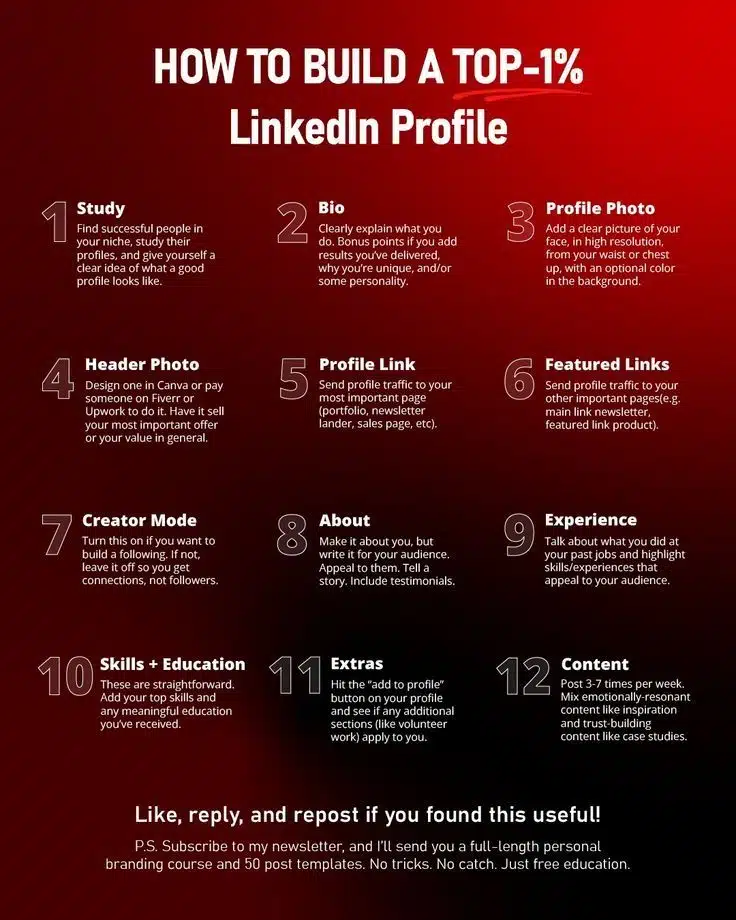
You’ll find some top tier LinkedIn tips in this infographic.
Here’s what it covers:
- Study
- Bio
- Profile Photo
- Header Photo
- Profile Link
- Featured Links
- Creator Mode
- About
- Experience
- Skills + Education
- Extras
- Content
Check out the post below for more.
LinkedIn has evolved into the go-to platform for professionals looking to build their brand, network with industry leaders, and unlock career opportunities. With over 900 million users worldwide, standing out is more important than ever.
Whether you’re a job seeker, entrepreneur, or business professional, having a top-tier LinkedIn profile can help you attract the right connections, establish credibility, and increase your visibility.
If you want to build a LinkedIn profile that ranks in the top 1%, follow these 12 steps to success.
Study the Best Profiles in Your Industry
Before making any changes to your profile, take time to research successful professionals in your industry. Look at influencers, top executives, or people with impressive engagement on their content.
What to Look For:
- How they write their headlines and bios
- The structure of their ‘About’ section
- Their profile and banner photos
- The type of content they post
- How they engage with their audience
By analyzing what works for others, you can gain inspiration and apply similar strategies to your own profile while maintaining authenticity.
Craft a Powerful Bio That Highlights Your Unique Value
Your bio is one of the most important elements of your profile. It should clearly explain what you do, the value you provide, and what makes you different.
How to Write a Strong Bio:
- Start with a powerful opening line that grabs attention
- Highlight key achievements or measurable results
- Show some personality to make it engaging
- Use simple, clear language that anyone can understand
For example, instead of saying, “Marketing Manager at XYZ Company,” you could say:
“Helping businesses generate 10x more leads through data-driven digital marketing strategies.”
This makes your bio more compelling and results-oriented.
Use a Professional Profile Photo
Your profile photo is the first impression people get when they visit your LinkedIn page. It needs to be high-quality, professional, and aligned with your industry.
Tips for the Perfect Profile Photo:
- High resolution (at least 400×400 pixels)
- Well-lit and clear image
- Face should take up around 60% of the frame
- Neutral or blurred background
- Wear professional attire suitable for your industry
A high-quality photo increases your credibility and helps you stand out.
Design a Strong Header Photo
Your header photo is prime real estate to showcase your expertise, brand, or value proposition. Many users leave this section blank, missing a great opportunity to reinforce their professional image.
Ideas for Your Header Photo:
- A personal branding statement
- A call-to-action (e.g., “Helping businesses scale with AI-powered marketing”)
- Your company logo and tagline
- A professional image of you speaking at an event
Use tools like Canva or hire a designer on Fiverr or Upwork to create a visually appealing banner that aligns with your brand.
Optimize Your Profile Link
LinkedIn allows you to customize your profile URL, making it cleaner and more professional. Instead of a generic URL like:
linkedin.com/in/john-doe-9a8b7c6
You can customize it to:
linkedin.com/in/johndoe
This looks more polished on business cards, email signatures, and resumes. To change it:
- Click on “Me” in the top menu
- Select “View Profile”
- Click “Edit Public Profile & URL” on the right
- Customize your URL and save
Add Featured Links to Showcase Your Work
The ‘Featured’ section allows you to showcase key links, documents, or media. This is a great way to direct visitors to important pages such as:
- Your personal website or portfolio
- A lead magnet (e.g., free eBook, webinar signup)
- A case study or media mention
- Your best-performing LinkedIn post
Having featured links helps build credibility and allows people to engage with your work directly.
Turn on Creator Mode (If Building a Following)
LinkedIn’s Creator Mode is an excellent tool if you want to build a personal brand and grow your audience. When enabled, it prioritizes your content, adds a “Follow” button instead of “Connect,” and gives access to LinkedIn Live and newsletters.
When to Turn It On:
- If you’re posting valuable content regularly
- If you want to grow your following instead of just connections
- If you’re an industry expert or influencer
However, if you prefer to keep a tight network of personal connections, leave it off.
Write an Engaging ‘About’ Section
Your ‘About’ section is your opportunity to tell your story and connect with your audience on a deeper level. Instead of listing job titles, make it engaging, personal, and value-driven.
How to Structure Your About Section:
- Hook – Start with a strong opening line that captures attention.
- Your Expertise – Explain what you do and who you help.
- Results & Achievements – Showcase measurable success stories.
- Personal Touch – Add personality or a unique story.
- Call to Action – Tell visitors what to do next (e.g., “Let’s connect!”).
Example:
“After generating £10M in sales for B2B tech startups, I now help businesses scale with growth-driven digital marketing strategies. Let’s connect if you’re looking to increase your revenue through data-backed campaigns!”
Highlight Experience in a Results-Oriented Way
Your experience section should do more than list past job titles—it should highlight your skills, impact, and results.
How to Write a Strong Experience Section:
- Use bullet points for clarity
- Focus on achievements, not just responsibilities
- Include data and metrics where possible
Instead of:
“Managed social media accounts for a tech company.
Write:
“Increased LinkedIn engagement by 300% and generated £500K in new revenue through content marketing campaigns.
Quantifiable achievements make your profile more compelling to recruiters and potential clients.
List Your Top Skills & Education
LinkedIn allows you to add up to 50 skills, but prioritize your top 10 that are most relevant to your industry.
How to Optimize This Section:
- Add both hard and soft skills (e.g., SEO, Leadership, Copywriting)
- Get endorsements from colleagues or clients
- List certifications or additional training you’ve completed
This helps improve searchability and credibility in your industry.
Add Extra Sections (Volunteering, Projects, Publications, etc.)
The ‘Add to Profile’ button lets you include additional sections like:
- Volunteer Experience
- Certifications
- Publications (e.g., blog articles, research papers)
- Projects
If you’ve written for major publications, contributed to industry projects, or been featured in media, highlight these to boost credibility.
Post Content Consistently to Build Authority
Having a great profile is only half the battle—you also need to engage with your audience through content.
Best Practices for Posting on LinkedIn:
- Post three to seven times per week for consistent visibility
- Mix content types:
- Thought leadership (e.g., industry trends, opinions)
- Case studies (e.g., real-world success stories)
- Personal stories (e.g., lessons learned in your career)
- Encourage engagement by asking questions or seeking opinions
By posting valuable content, you stay top-of-mind, attract opportunities, and grow your network organically.
Final Thoughts
Building a top 1% LinkedIn profile takes time, but with the right strategies, you can stand out, attract opportunities, and grow your professional brand.
Recap of Key Steps:
- Study successful profiles
- Write a compelling bio and About section
- Use professional photos and banner images
- Optimize your profile link and featured links
- Showcase skills, experience, and achievements
- Post high-quality content consistently
Start optimizing your LinkedIn profile today, and watch your connections, engagement, and opportunities grow.

Author:
Mark Ford