

Halloween is a time of year when creativity and fun collide, and what better way to celebrate this spooky season than by hosting a Halloween-themed photo contest on Facebook?
Not only does it engage your audience and foster a sense of community, but it also offers a fantastic opportunity to boost your brand’s visibility and create buzz around your products or services.
In this comprehensive guide, we will walk you through the step-by-step process of running a successful Halloween photo contest on Facebook.
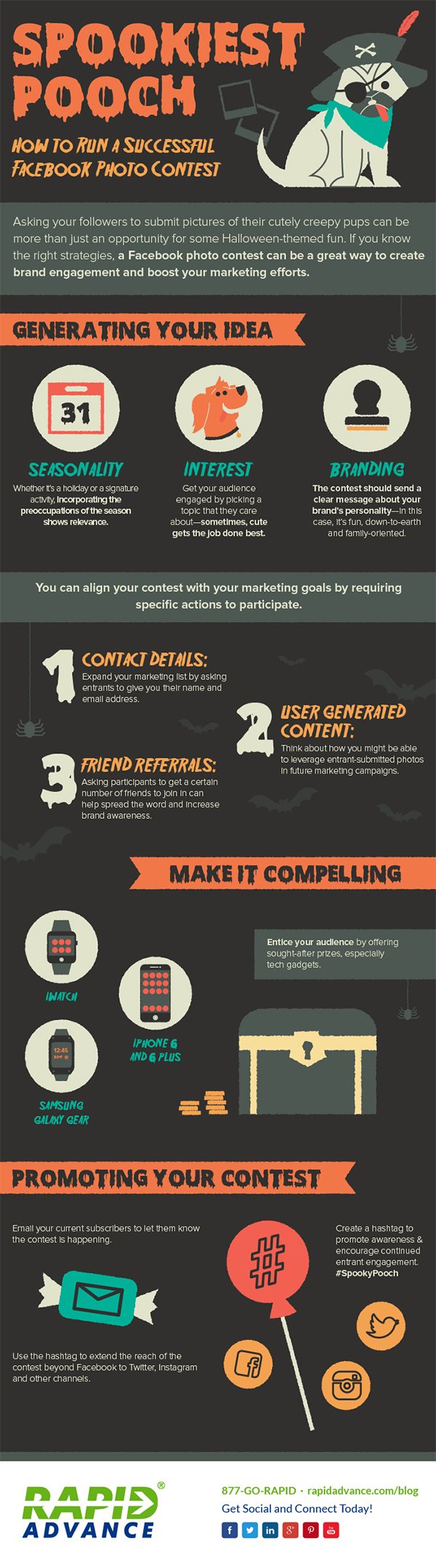
Infographic by Rapid Advance.
- Set Clear Objectives
Before diving into the details of your Halloween photo contest, it’s essential to establish clear objectives. What do you hope to achieve with this contest? Whether it’s increasing brand awareness, growing your Facebook audience, or promoting a specific product, defining your goals will shape your contest’s structure and success metrics.
- Know Your Audience
Understanding your target audience is pivotal in designing a Halloween photo contest that resonates with them. Consider their preferences, interests, and the type of content that would excite them. Tailor your contest theme and rules accordingly to maximize participation.
- Define the Contest Theme
A well-defined theme sets the tone for your Halloween photo contest. It should be closely related to the Halloween season and align with your brand’s identity. Some popular Halloween themes include:
- Spooky Costumes
- Pumpkin Carving
- Haunted House Decorations
- Creepy Makeup Looks
- Halloween Pet Costumes
- Set Clear Rules and Guidelines
To ensure a smooth and fair contest, establish clear rules and guidelines. These rules should cover:
- Eligibility criteria (age, location, etc.)
- Submission deadlines
- Photo format and quality requirements
- Ownership and copyright issues
- How winners will be selected
- Prizes and their distribution
- Choose the Right Hashtag
A unique and catchy hashtag is essential for organizing and tracking entries. Make sure it’s easy to remember and relevant to your contest theme. Encourage participants to use the hashtag when sharing their photos.
- Create Eye-Catching Graphics
First impressions matter. Design visually appealing graphics for your contest announcement and promotional materials. Include the contest’s name, theme, rules, and prizes. These graphics should be consistent with your brand’s style and color palette.
- Promote Your Contest
Now that you’ve set the stage, it’s time to promote your Halloween photo contest. Use various channels to reach your audience:
- Facebook posts and stories
- Email newsletters
- Website banners
- Social media platforms (besides Facebook)
- Influencer partnerships (if applicable)
Leverage the power of social media advertising to boost your contest’s visibility among a broader audience.
- Engage Your Audience
Engagement is the key to a successful Facebook photo contest. Keep participants excited and active by:
- Sharing user-submitted entries regularly
- Asking questions related to Halloween
- Encouraging participants to tag friends
- Responding promptly to comments and messages
- Utilize User-Generated Content
User-generated content (UGC) can be a valuable asset for your brand. Encourage participants to grant you permission to repost their photos, giving proper credit. Share these UGC posts on your Facebook page and other social media platforms to showcase the community’s creativity.
- Judging and Winner Selection
Depending on the scale of your contest, you can choose one of the following judging methods:
- Public voting: Allow Facebook users to vote for their favorite entries by likes, comments, or reactions.
- Expert panel: Assemble a panel of judges to evaluate the submissions based on predetermined criteria.
- Combination: Combine public voting with expert judging for a balanced approach.
Ensure transparency in the judging process and communicate it clearly to participants. Announce the winners and share their winning entries on your Facebook page.
- Prizes and Rewards
Attract participants with enticing prizes that align with the Halloween spirit. Prizes can include:
- Cash rewards
- Gift cards
- Exclusive merchandise
- Discounts on your products or services
- Feature in your brand’s marketing materials
- Express Gratitude
Show appreciation to all participants, whether they won or not. Thank them for their creativity and participation, reinforcing a positive connection with your brand. Consider offering exclusive discounts or promotions as a gesture of gratitude.
- Follow Up and Collect Feedback
After the contest ends, don’t forget to follow up with winners and distribute prizes promptly. Additionally, collect feedback from participants to gain insights into what worked well and what can be improved for future contests.
- Measure Your Success
To determine the effectiveness of your Halloween photo contest, analyze the following key performance indicators (KPIs):
- Engagement metrics (likes, comments, shares)
- Follower growth on Facebook
- Reach and impressions
- Conversion rates (if applicable)
- User-generated content generated
- Learn and Improve
Based on the KPIs and participant feedback, identify areas for improvement. Use these insights to refine your future contests and marketing strategies.
Conclusion
Hosting a Halloween photo contest on Facebook can be a fun and rewarding way to engage your audience, boost brand visibility, and foster a sense of community. By following the steps outlined in this guide, you can create and execute a successful contest that resonates with your audience, enhances your brand’s image, and leaves a lasting impression in the minds of participants. So, gear up for Halloween, unleash your creativity, and start planning your spooktacular Facebook photo contest today!

Author:
Mark Ford



